

Conducting Project Viability Study To Ensure Profitability Powerpoint Presentation Slides




Try Before you Buy Download Free Sample Product
 Impress Your
 Audience
 100%
100% Editable
 Save Hours
 of Time


A project manager can assess a projects value using its viability. Grab our cleverly crafted Conducting Project Viability Study to Ensure Profitability template. Evaluating the tasks present performance and the factors affecting its analysis is beneficial. Our Economic Viability deck discusses the different viability studies and the associated dangers. It also incorporates the methods to mitigate the risks and details the components involved in the assessment. Additionally, Our Project Feasibility PPT displays data on the project overview, its current performance, different kinds of feasibility studies for conduction, etc. It further showcases the methodology for project assessment and its analysis in depth. Our Project Assessment module covers project budget variance, risks during project implementation, their judgment, and potential solutions. Lastly, it exhibits the benefits of undertaking a feasibility study and offers a project management interface with top priorities and a section with a budget and approaching due dates. Get access right away.
People who downloaded this PowerPoint presentation also viewed the following :
Content of this Powerpoint Presentation
Slide 1: This slide introduces Conducting Project Viability Study to Ensure Profitability. Commence by stating Your Company Name.
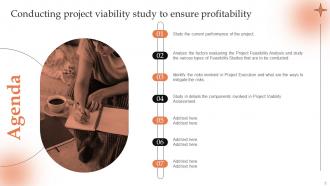
Slide 2: This slide depicts the Agenda of the presentation.
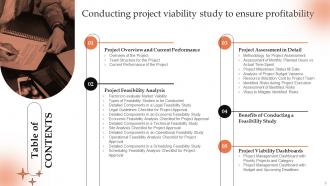
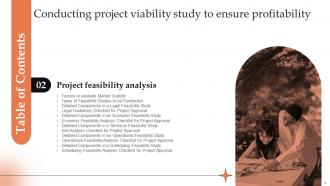
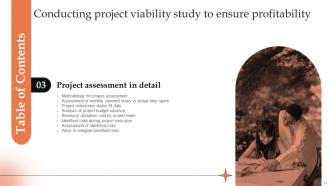
Slide 3: This slide incorporates the Table of Contents.
Slide 4: This slide highlights the Title for the Topics to be covered further.
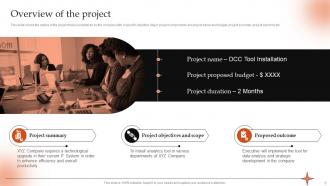
Slide 5: This slide shows the outline of the project that is undertaken by the company with a specific objective.
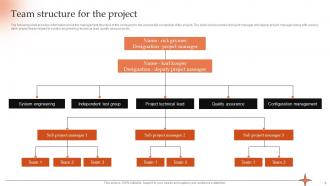
Slide 6: This slide presents the Team structure for the project.
Slide 7: This slide displays the Current performance of the project.
Slide 8: This slide elucidates the Heading for the Contents to be discussed further.
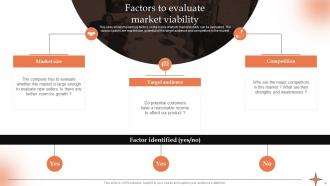
Slide 9: This slide exhibits the Factors to evaluate market viability.
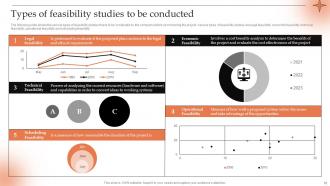
Slide 10: This slide states the Types of feasibility studies to be conducted.
Slide 11: This slide portrays Detailed components in a legal feasibility study.
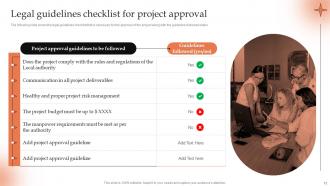
Slide 12: This slide highlights the Legal guidelines checklist for project approval.
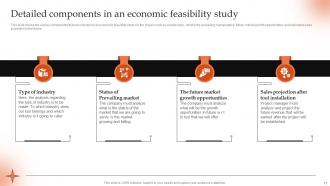
Slide 13: This slide showcases the Detailed components in an economic feasibility study.
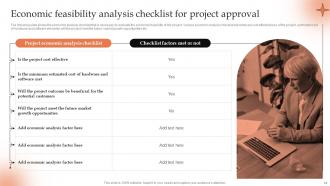
Slide 14: This slide reveals the Economic feasibility analysis checklist for project approval.
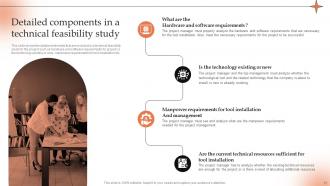
Slide 15: This slide lists the Detailed components in a technical feasibility study.
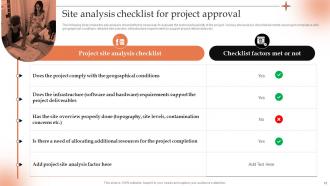
Slide 16: This slide talks about the Site analysis checklist for project approval.
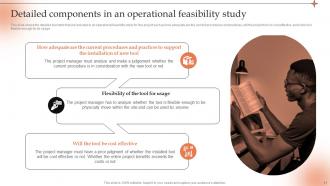
Slide 17: This slide represents the Detailed components in an operational feasibility study.
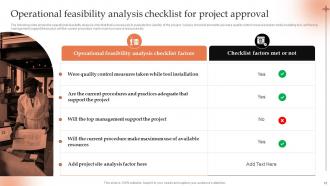
Slide 18: This slide exhibits the Operational feasibility analysis checklist for project approval.
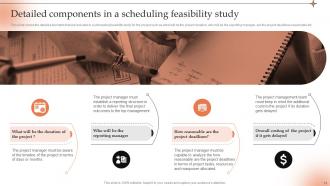
Slide 19: This slide shows the detailed elements that are included in a scheduling feasibility study for the project.
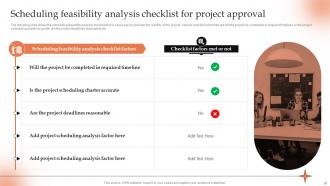
Slide 20: This slide deals with Scheduling feasibility analysis checklist for project approval.
Slide 21: This slide mentions the Title for the Ideas to be further discussed.
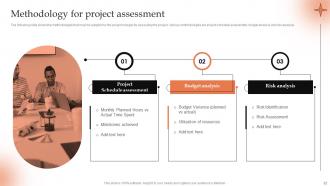
Slide 22: This slide showcases the Methodology for project assessment.
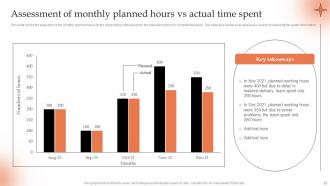
Slide 23: This slide rveeals the Assessment of monthly planned hours vs actual time spent.
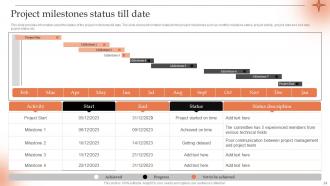
Slide 24: This slide depicts the Project milestones status till date.
Slide 25: This slide displays the Analysis of project budget variance.
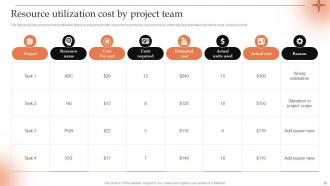
Slide 26: This slide focuses on Resource utilization cost by project team.
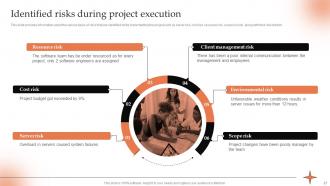
Slide 27: This slide emphasizes on Identified risks during project execution.
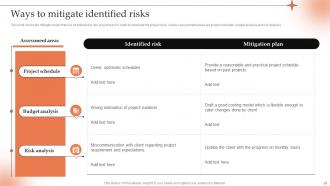
Slide 28: This slide portrays the Ways to mitigate identified risks.
Slide 29: This slide shows the Assessment of identified risks.
Slide 30: This slide indicates the Heading for the Ideas to be covered in the following template.
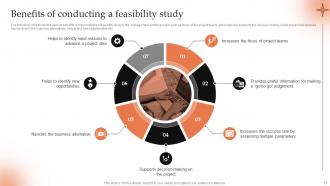
Slide 31: This slide highlights the Benefits of conducting a feasibility study.
Slide 32: This slide incorporates the Title for the Components to be discussed next.
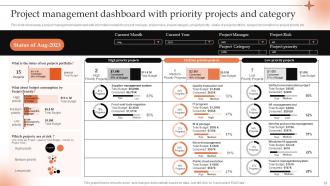
Slide 33: This slide presents the Project management dashboard with priority projects and category.
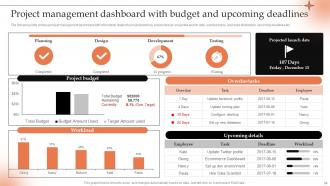
Slide 34: This slide displays the Project management dashboard with budget and upcoming deadlines.
Slide 35: This is the Icons Slide containing all the Icons used in the plan.
Slide 36: This slide is used for showcasing some Additional information.
Slide 37: This is the Puzzle slide with related imagery.
Slide 38: This slide portrays the company Roadmap.
Slide 39: This is the Venn diagram slide.
Slide 40: This slide contains the Post it notes for reminders and deadlines.
Slide 41: This is Our goal slide. State your company goals here.
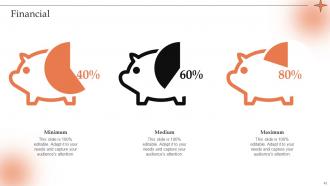
Slide 42: This slide elucidates information related to the Financial topic.
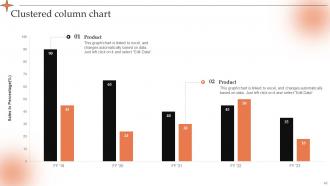
Slide 43: This slide represents the Clustered column chart.
Slide 44: This is the Thank You slide for acknowledgement.
Conducting Project Viability Study To Ensure Profitability Powerpoint Presentation Slides with all 49 slides:
Use our Conducting Project Viability Study To Ensure Profitability Powerpoint Presentation Slides to effectively help you save your valuable time. They are readymade to fit into any presentation structure.









FAQs for Conducting Project Viability Study To Ensure Profitability
So basically you need to hit four key things for your viability study. Money stuff first - will this thing actually turn a profit or give you the ROI you're after? Technical side is next - do you have the skills and tech to make it happen? Market research is critical (seriously, I can't tell you how many projects I've watched crash because no one actually wanted the product). Oh and don't forget operational - can your team handle the workload and timeline? Honestly just start with whatever feels like the biggest risk factor.
Definitely run NPV and IRR first - those will tell you if you're actually gonna make money once you factor in time value. Payback period is worth checking too, even though it's pretty basic stuff. Here's the thing though: your initial numbers are probably way too rosy, so do some sensitivity analysis to see what happens when things go sideways. Oh, and don't forget those sneaky hidden costs that always pop up. If your NPV comes back positive and IRR beats your cost of capital, you're golden.
Honestly, start with the free stuff first - government databases and Census data are goldmines. SurveyMonkey or Google Forms work great for getting actual customer feedback. IBISWorld has solid industry reports but they're pricey. Google Trends is weirdly helpful for tracking market momentum (I use it way more than I thought I would). Throw in some competitor analysis with SEMrush if you've got budget left. Focus groups are useful too but don't go crazy - stick to 3-4 tools max or you'll drown in data and never actually finish your analysis.
Look, risk assessment is basically your reality check before diving into a project. You map out everything that could go sideways - tech problems, blown budgets, market shifts, whatever. Then figure out how likely each thing is and how badly it'd hurt if it happened. I know it feels like being a downer, but trust me on this one. The whole point is deciding whether the potential payoff is worth the headaches you might face. Oh, and when you're talking to higher-ups about it? Don't downplay the scary stuff. Better they know now than freak out later.
You definitely want to figure out who can kill your project before you're too deep in. Map out everyone who'll be impacted - users, executives, regulators, whoever. Understanding their influence and what they actually want is key. It's like scoping out the room before a big meeting, except way more critical. Miss someone important or totally misjudge where they stand? They can wreck everything later when fixes cost a fortune. I always start with the obvious people, then ask each of them who else needs to be looped in. You'll be surprised how many stakeholders fly under the radar initially.
Honestly, your team makes or breaks the whole thing. Experienced people will catch problems that rookies completely miss - like unrealistic deadlines or solutions that sound good on paper but won't actually work. I've seen so many projects go sideways because someone thought they could wing it without the right expertise. Get people who've done similar stuff before. They'll give you honest timelines instead of those "oh we can totally do this in 3 weeks" estimates that always backfire. Worth investing in good people upfront rather than dealing with expensive surprises later.
Ugh the worst thing is getting caught up in wishful thinking - teams convince themselves terrible ideas will work just because they're excited. Also don't rush through market research or use ancient data (learned that one the hard way). Get the right people involved from day one or you'll miss obvious problems. Risk assessment sucks but do it anyway. Actually talk to real customers instead of just guessing what they want. Oh and definitely pad your timeline and budget because something will go wrong. Trust me on that last part.
Dude, environmental stuff will absolutely wreck your project if you don't handle it upfront. Check local regulations first - seriously, I've watched teams get completely blindsided by wetland rules they didn't know existed. Get a site assessment done early too. Your location makes a huge difference here. Air quality regs, impact studies, potential cleanup costs - all that adds up fast and can drag out your timeline forever. Plus you don't want surprise liabilities popping up later. It's honestly one of those things that seems boring until it destroys your budget.
Look, technology adoption can totally make or break your project. I've watched so many "genius" solutions flop because nobody wanted to actually use them - kind of frustrating to see all that work go nowhere. You've got to figure out if your users are ready for new tech and whether they even have the setup to handle it. Their digital skills matter too. Build in proper training and change management from day one. Don't just assume people will jump on board. Really assess this stuff early in your viability study, otherwise you might end up with something that just collects dust.
So you need to figure out who's actually getting impacted by this thing. Local people, your workers, customers - basically anyone whose day-to-day changes because of what you're doing. Job creation's huge, but don't forget about environmental stuff and how you're messing with (or improving) local infrastructure. Surveys work well, though honestly they're kind of a pain to organize. I'd also check out similar projects to see what went wrong or right. The biggest thing? Don't just focus on the wins. Being upfront about the downsides saves you headaches later when people start complaining.
ROI, NPV, and payback period are your bread and butter - start there for the financial stuff. But don't ignore market demand and competitive positioning because I've watched so many "profitable" projects crash when they hit real-world conditions. Resource availability matters too, obviously. For complex projects, timeline feasibility becomes huge since delays just murder your margins. Oh, and definitely run risk assessment scores upfront. Here's what I'd do: calculate your break-even point first, then see if your timeline actually makes sense with what you've got to work with.
Oh man, compliance stuff can totally kill a project if you're not careful. I learned this the hard way on a job last year - everything looked perfect until we hit the regulatory wall. You've got to map out all that permit and inspection nonsense right from the start, not halfway through when you're already bleeding money. Honestly, some of these requirements are just bonkers, but they'll add months to your timeline regardless. Don't make my mistake of treating compliance as an afterthought. Bake those costs into your budget immediately or you'll hate yourself later.
So SWOT analysis is basically your project reality check - maps out Strengths, Weaknesses, Opportunities, and Threats. Super useful because it makes you think past "will this work?" to consider what might blow up in your face. I've watched way too many teams crash because they only looked at the good stuff. The whole point? Gives everyone a real picture of risks vs rewards. Run it early when you're figuring out if something's even worth doing - you'll spot the deal-breakers and know where you need backup plans. Honestly saves so much headache later.
Think of scenario planning as basically testing how screwed you'd be if things go sideways. You model out best case, worst case, and what'll probably actually happen - because let's be real, nothing ever goes according to plan. When market conditions shift or costs blow up, you'll already know if your project can survive it. Run three different scenarios minimum. Figure out which assumptions are make-or-break so you know what to watch like a hawk once things get rolling. Way better than just crossing your fingers and hoping for the best.
Look, I'd hit three main things for risk mitigation. Build contingency plans for your biggest risks - like actual "what if" scenarios with clear steps. Don't put all your eggs in one basket either - diversify funding, suppliers, whatever you can. Phase everything out so you can test stuff early before you're in too deep (learned this the hard way). Oh, and definitely keep a risk register with owners assigned to each thing. Trust me, when everything goes crazy later, you'll be glad someone's actually responsible for each piece. Being proactive beats scrambling around trying to fix things after they blow up.
-
Keep doing the good work guys. Surpass the needs and expectations always!!
-
I am extremely pleased with these PPT slides that we used for our event. They were easy to modify and came out great in all aspects!