


Content Delivery Network IT Powerpoint Presentation Slides





Try Before you Buy Download Free Sample Product
 Impress Your
 Audience
 100%
100% Editable
 Save Hours
 of Time


A content delivery network CDN is an extensive, distributed system of computers on the Internet stretched across numerous data centers. This PowerPoint presentation is of significant assistance to learn about Content Delivery Network, its benefits, and its implementation to eliminate business problems such as latency. In this Content Delivery Network PowerPoint presentation, we have covered the need, benefits, and importance of Content Delivery to the business and market share of CDN. Furthermore, it includes working, its architecture, Cloud CDN, and CDN edge server. Moreover, this Distribution Network presentation represents features of the Content Delivery Network, issues that CDN handles, and the need for CDN providers to the business. Further, the Cloud CDN template caters to the implementation of CDN in the company, a checklist to implement CDN in business, a timeline, and a roadmap to monitor the implementation process. Lastly, the Delivery Network deck comprises a 30-60-90-day plan to implement CDN in business and a dashboard to measure the performance and impact of the CDN implementation in the organization. Download our 100 percent editable and customizable template, which is also compatible with Google Slides.
People who downloaded this PowerPoint presentation also viewed the following :
Content of this Powerpoint Presentation
Slide 1: This slide introduces Content Delivery Network (IT). State Your Company Name and begin.
Slide 2: This is an Agenda slide. State your agendas here.
Slide 3: This slide presents Table of Content for the presentation.
Slide 4: This is another slide continuing Table of Content for the presentation.
Slide 5: This is another slide continuing Table of Content for the presentation.
Slide 6: This slide highlights title for topics that are to be covered next in the template.
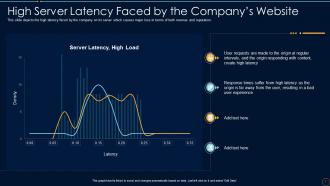
Slide 7: This slide shows High Server Latency Faced by the Company’s Website.
Slide 8: This slide presents Reputational Damage Faced by the Company.
Slide 9: This slide highlights title for topics that are to be covered next in the template.
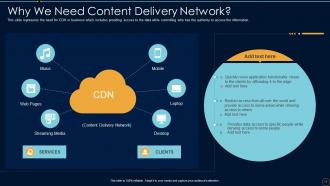
Slide 10: This slide displays Why We Need Content Delivery Network.
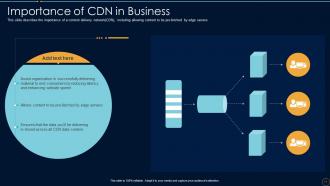
Slide 11: This slide describes the importance of a content delivery network(CDN).
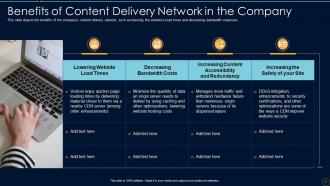
Slide 12: This slide represents Benefits of Content Delivery Network in the Company.
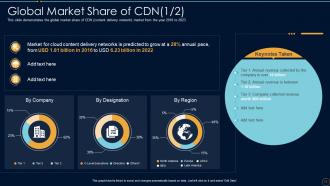
Slide 13: This slide demonstrates the global market share of CDN (content delivery network) market.
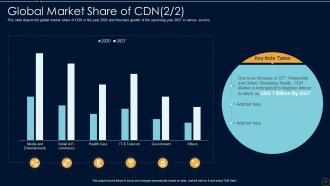
Slide 14: This slide depicts the global market share of CDN in the year 2020 and forecasts growth of the upcoming year.
Slide 15: This slide highlights title for topics that are to be covered next in the template.
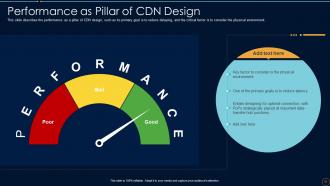
Slide 16: This slide describes the performance as a pillar of CDN design, such as its primary goal is to reduce delaying.
Slide 17: This slide shows Scalability as Pillar of Content Delivery Network.
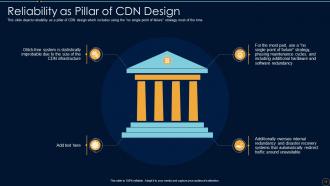
Slide 18: This slide depicts reliability as a pillar of CDN design which includes using the “no single point of failure”.
Slide 19: This slide presents Responsiveness as Pillar of Content Delivery Network.
Slide 20: This slide highlights title for topics that are to be covered next in the template.
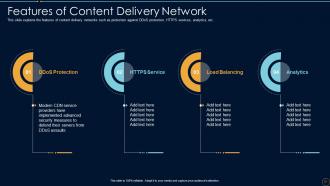
Slide 21: This slide displays Features of Content Delivery Network.
Slide 22: This slide highlights title for topics that are to be covered next in the template.
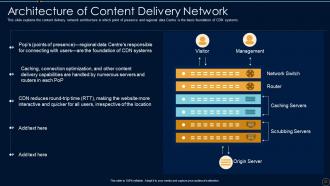
Slide 23: This slide represents Architecture of Content Delivery Network.
Slide 24: This slide demonstrates the working of content delivery network.
Slide 25: This slide highlights title for topics that are to be covered next in the template.
Slide 26: This slide describes the scattered as a content delivery network topology.
Slide 27: This slide represents the consolidated as a CDN topology, and the rise of internet connectivity.
Slide 28: This slide highlights title for topics that are to be covered next in the template.
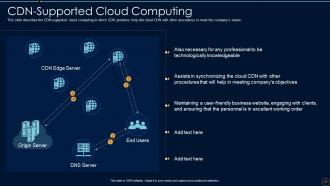
Slide 29: This slide describes the CDN-supported cloud computing in which CDN providers help link cloud CDN with other procedures.
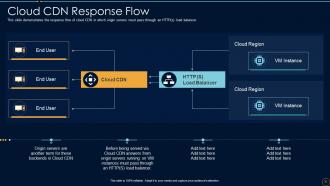
Slide 30: This slide demonstrates the response flow of cloud CDN.
Slide 31: This slide highlights title for topics that are to be covered next in the template.
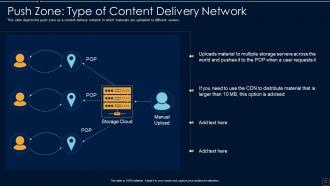
Slide 32: This slide depicts the push zone as a content delivery network in which materials are uploaded to different servers.
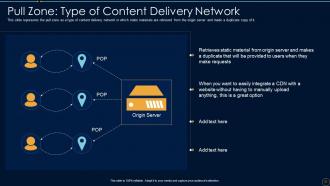
Slide 33: This slide represents the pull zone as a type of content delivery network in which static materials are retrieved.
Slide 34: This slide highlights title for topics that are to be covered next in the template.
Slide 35: This slide demonstrates introduction to CDN edge server, such as it is commonly used to connect two networks.
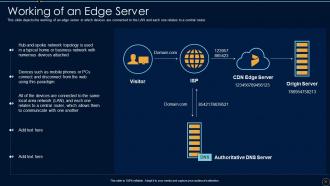
Slide 36: This slide depicts the working of an edge server in which devices are connected to the LAN.
Slide 37: This slide highlights title for topics that are to be covered next in the template.
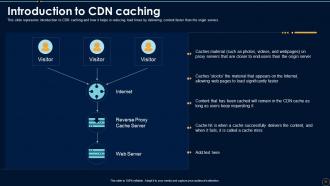
Slide 38: This slide represents introduction to CDN caching and how it helps in reducing load times.
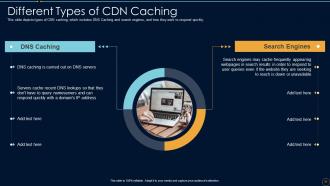
Slide 39: This slide depicts types of CDN caching, which includes DNS Caching and search engines.
Slide 40: This slide highlights title for topics that are to be covered next in the template.
Slide 41: This slide depicts the attributes of a great CDN provider that includes being quicker, reducing geological distance.
Slide 42: This slide presents how CDN providers help the business by reducing the server load.
Slide 43: This slide represents the key CDN metrics to watch while looking for a CDN provider.
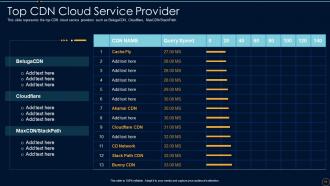
Slide 44: This slide showcases the top CDN cloud service providers such as BelugaCDN, Cloudflare, MaxCDN/StackPath.
Slide 45: This slide highlights title for topics that are to be covered next in the template.
Slide 46: This slide shows Latency Handled by Content Delivery Network.
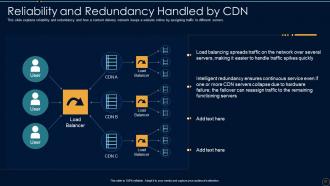
Slide 47: This slide explains reliability and redundancy and how a content delivery network keeps a website online.
Slide 48: This slide demonstrates how CDN protects data by issuing TLS/SSL certificates.
Slide 49: This slide highlights title for topics that are to be covered next in the template.
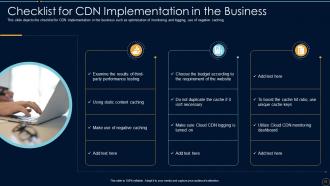
Slide 50: This slide presents Checklist for CDN Implementation in the Business.
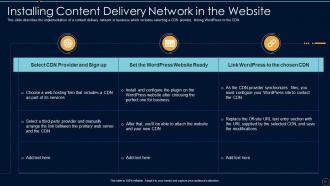
Slide 51: This slide displays Installing Content Delivery Network in the Website.
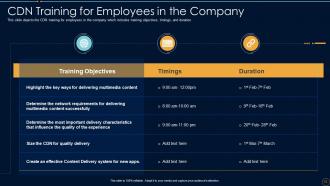
Slide 52: This slide represents CDN Training for Employees in the Company.
Slide 53: This slide showcases Budget for Content Delivery Network Implementation.
Slide 54: This slide highlights title for topics that are to be covered next in the template.
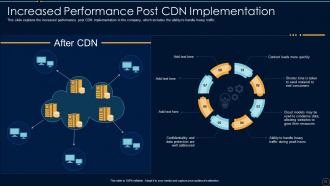
Slide 55: This slide shows Increased Performance Post CDN Implementation.
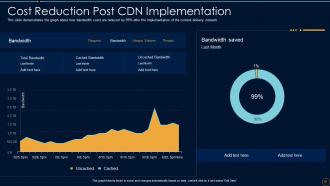
Slide 56: This slide demonstrates the graph about how bandwidth costs are reduced by 99%.
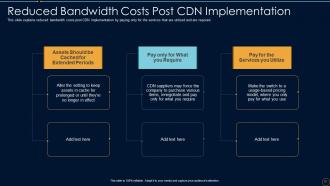
Slide 57: This slide showcases Reduced Bandwidth Costs Post CDN Implementation.
Slide 58: This slide highlights title for topics that are to be covered next in the template.
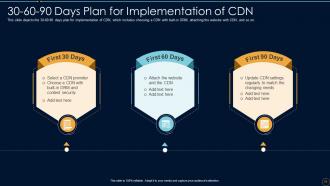
Slide 59: This slide shows 30-60-90 Days Plan for Implementation of CDN.
Slide 60: This slide highlights title for topics that are to be covered next in the template.
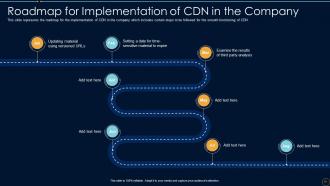
Slide 61: This slide presents Roadmap for Implementation of CDN in the Company.
Slide 62: This slide highlights title for topics that are to be covered next in the template.
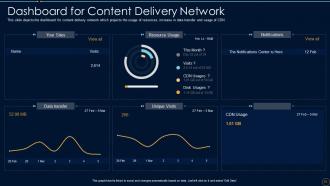
Slide 63: This slide displays Dashboard for Content Delivery Network.
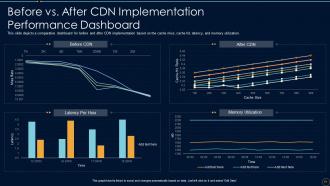
Slide 64: This slide represents Before vs. After CDN Implementation Performance Dashboard.
Slide 65: This slide displays Icons for Content Delivery Network(IT).
Slide 66: This slide is titled as Additional Slides for moving forward.
Slide 67: This slide highlights title for topics that are to be covered next in the template.
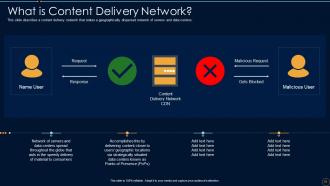
Slide 68: This slide describes a content delivery network that states a geographically dispersed network.
Slide 69: This slide highlights title for topics that are to be covered next in the template.
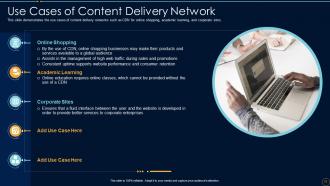
Slide 70: This slide showcases Use Cases of Content Delivery Network.
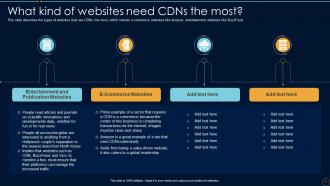
Slide 71: This slide describes the types of websites that use CDNs the most.
Slide 72: This is Our Target slide. State your targets here.
Slide 73: This is a Financial slide. Show your finance related stuff here.
Slide 74: This is Our Mission slide with related imagery and text.
Slide 75: This slide shows Post It Notes. Post your important notes here.
Slide 76: This slide contains Puzzle with related icons and text.
Slide 77: This slide depicts Venn diagram with text boxes.
Slide 78: This is a Timeline slide. Show data related to time intervals here.
Slide 79: This slide displays Mind Map with related imagery.
Slide 80: This slide showcases Magnifying Glass to highlight information, specifications etc
Slide 81: This is an Idea Generation slide to state a new idea or highlight information, specifications etc.
Slide 82: This is a Thank You slide with address, contact numbers and email address.
Content Delivery Network IT Powerpoint Presentation Slides with all 87 slides:
Use our Content Delivery Network IT Powerpoint Presentation Slides to effectively help you save your valuable time. They are readymade to fit into any presentation structure.


















































FAQs for Content Delivery Network IT
So basically a CDN stores copies of your site on servers everywhere, so users get content from whatever's closest to them instead of your main server. Way faster loading times that way. It's like having warehouses all over instead of shipping from one spot - makes total sense when you think about it. Really helps when you're getting hammered with traffic too, prevents the whole thing from crashing. Honestly, if your site feels sluggish or you're worried about handling more users, you should probably look into it. Game changer for most sites.
So CDNs work by copying your site's files to servers worldwide. When someone visits, they pull from whatever's closest to them instead of your main server. Load times drop big time - sometimes by seconds, which honestly makes a huge difference. Your origin server doesn't get hammered during traffic spikes either. Images and videos load way smoother since CDNs handle that heavy stuff better than regular hosting. If international visitors are complaining about slow speeds, you'll want to set one up ASAP. It's probably the easiest performance fix you can make.
Yeah, CDNs are actually great for security! They basically sit between your server and visitors, filtering out all the sketchy traffic. DDoS protection is huge - trust me, you don't want to deal with those attacks hitting you directly. Most decent CDNs throw in web application firewalls too, which block SQL injections and cross-site scripting attacks. SSL encryption usually comes standard now. Oh, and bot protection is pretty nice to have. Just make sure you actually compare what each provider includes though - some are way more generous with their security features than others.
Okay so your regular hosting puts everything on one server somewhere. Users far away? Yeah, they're gonna wait forever. CDN hosting copies your stuff to servers all over the place - like having little backup sites everywhere. People automatically get served from whatever's closest to them instead of traveling across the internet to your main server. Honestly, I don't know why more people don't use this. If you've got visitors complaining about speed or people hitting your site from different countries, you should really add a CDN. It's kinda crazy how much faster everything loads.
So basically your CDN auto-scales when traffic goes nuts. It spins up extra server capacity and spreads requests across all those edge locations worldwide - kinda like opening emergency highway lanes when there's a jam. Your content's already cached on servers everywhere, so people hit the closest one instead of crushing your main server. Pretty clever system honestly. You'll want to watch those real-time analytics during busy periods to see how it's handling the load distribution. Way better than the old days when sites just crashed.
Oh nice question! So CDNs work best with static stuff - images, CSS, JavaScript files, videos, downloads. Basically anything that doesn't change much. Netflix and YouTube are huge on them for streaming, which makes sense. Dynamic content's harder since it's personalized, but newer CDNs can actually cache some of that with smart algorithms. Honestly, you'll see the biggest difference with heavy files like videos or high-res images since they really benefit from being served close to users. I'd start by throwing your biggest static assets on there first and see how it goes.
So basically, CDNs cut down latency by putting servers closer to your users. Instead of someone in Tokyo hitting your server in Virginia (like 200ms), they'll connect to one in Asia and get it down to maybe 20ms. It's kinda like having corner stores everywhere instead of making everyone drive across town to Walmart. Less distance = fewer network hops = faster loading. Oh, and if you're getting complaints from certain regions, definitely check if your CDN actually has decent coverage there. Some are better in Europe, others crush it in Asia.
CDNs are all about caching - that's literally what makes them work. So when someone hits your site, the CDN grabs a copy and sticks it on servers closer to your users. Next time someone needs that same stuff? Boom, it's right there instead of traveling back to your main server. Picture having corner stores everywhere vs one massive warehouse across town - way more convenient, right? Better caching means faster load times and your origin server isn't getting hammered. Just make sure you set up your cache headers and TTL rules properly or you're missing out on the whole point.
Honestly, measuring CDN ROI isn't too complicated once you break it down. First, grab your baseline numbers - page load times, bounce rates, conversions, server costs - before you deploy anything. Then track how those improve after implementation. Load speed bumps usually drive conversions up 2-7%, which is huge if you're doing decent volume. Plus you'll cut infrastructure costs from reduced server strain. The SEO boost from faster speeds is nice too, though harder to quantify. Just add up your revenue gains and cost savings, subtract your CDN fees, and boom - there's your ROI percentage.
So for CDN providers, start with where their edge servers are - gotta make sure they cover your user regions well. Performance stuff like latency and uptime obviously matter a ton. Pricing can get weird with bandwidth costs, so definitely dig into that. Security's pretty key too, especially DDoS protection and SSL. Their API integration shouldn't be a nightmare either. Honestly, I'd test a few with your real traffic first - the performance differences might surprise you. Way better than just going off their marketing materials, you know?
Yeah CDNs are solid for SEO! Page speed is huge for Google rankings, and that's exactly what CDNs fix. Users get your content from closer servers so everything loads way faster. Better speed = better user experience = higher rankings. One gotcha though - don't let it mess up your URLs or create duplicate content problems. I've seen people screw this up and tank their rankings lol. Configure it right from day one and you're golden. Definitely run speed tests before/after so you can actually see the difference. The improvement is usually pretty obvious.
Yeah, CDNs work great for streaming! Your content gets cached on servers worldwide, so people get way faster load times and less buffering issues. Cost is the biggest pain though - bandwidth adds up fast with HD video. You'll also need solid origin servers for when tons of people jump on during big events. Live streams will always have some delay no matter what, CDNs just make it less awful. Honestly I'd go with a provider that has media-focused features and decent analytics. That way you can actually see what's happening with performance and costs.
So CDNs are like having mini copies of your site scattered everywhere instead of one main server getting hammered. Most requests get handled by these edge locations, which means way less traffic hitting your origin server - and that's where the savings kick in. You're looking at maybe 60-90% less bandwidth usage from your main host. Honestly, the math on this is pretty straightforward once you crunch your current bandwidth bills against CDN pricing. It's basically like having local stores instead of everyone road-tripping to one warehouse. Should save you real money.
First thing - update all your asset URLs to hit the CDN instead. Get compression turned on and cache headers sorted before you flip the switch (learned this the hard way lol). Test everything on staging, especially any dynamic stuff or user features that might break. Your CDN needs proper SSL config if you're running HTTPS. Also update CSP headers if you've got them set up. Keep your origin server ready as backup and watch those performance metrics like a hawk for the first week or so. You don't want any surprises.
So edge computing is basically taking CDNs and shoving them way closer to users - like right at cell towers and IoT devices instead of those massive data centers. Your apps can run with insanely low latency because the processing power is literally next door. CDNs aren't just file servers anymore, they're becoming full computing platforms. Gaming and AR/VR stuff especially benefits from this. Honestly, anything real-time will see huge improvements. You should probably start figuring out which of your services could work at the edge - IoT applications that need instant responses are obvious candidates.
-
Use of icon with content is very relateable, informative and appealing.
-
Great product with effective design. Helped a lot in our corporate presentations. Easy to edit and stunning visuals.