


Corporate Data Security Awareness Powerpoint Presentation Slides




Try Before you Buy Download Free Sample Product
 Impress Your
 Audience
 100%
100% Editable
 Save Hours
 of Time


Introducing our corporate data security awareness PowerPoint presentation slides. Make your employees aware of cyber threats with the help of this network security PowerPoint deck. This IT data security PPT theme consists of a slide that discusses the cyber attacks experienced by the company in the previous financial year. Assimilating this security recognition assignment PPT layout will help you in discussing the gaps in the security programs. This ready-to-use web security PowerPoint design contains a slide that showcases different training formats for different organization levels. Incorporating this particular organization network security PPT theme allows you to have a discussion on the security training programs. This data safety coaching PowerPoint creative set contains a slide that discusses the organization impact metrics. Selection of this internet security awareness PowerPoint template lets you represent the ROI (Return on Investment) of security awareness training. Choose this company information safety guide PowerPoint design to showcase organization and assurance. Download this PPT slide to explore true perfection.
People who downloaded this PowerPoint presentation also viewed the following :
Content of this Powerpoint Presentation
Slide 1: This slide introduces Corporate Data Security Awareness. State Your Company Name and begin.
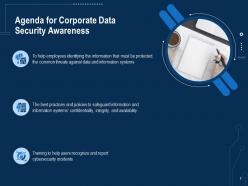
Slide 2: This slide shows Agenda for Corporate Data Security Awareness.
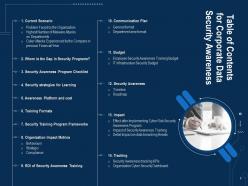
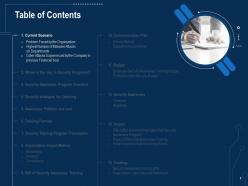
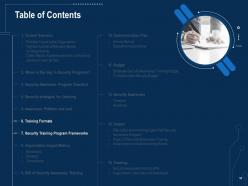
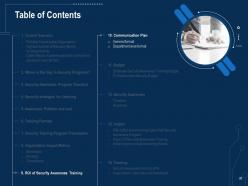
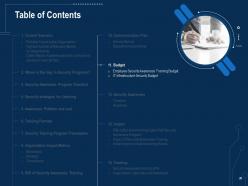
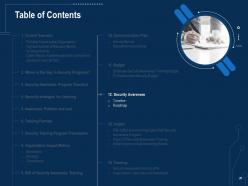
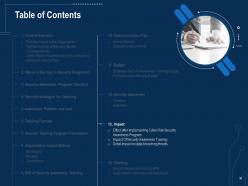
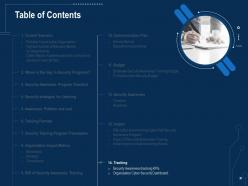
Slide 3: This slide presents Table of Contents for Corporate Data Security Awareness.
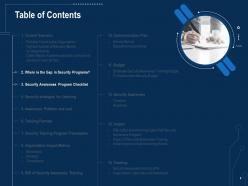
Slide 4: This slide displays Table of Content for the presentation.
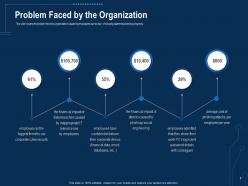
Slide 5: This slide represents problem faced by organization caused by employees due to lack of security awareness training programs.
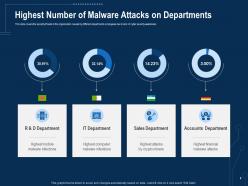
Slide 6: This slide shows security threats to the organization caused by different departments employees due to lack of cyber security awareness
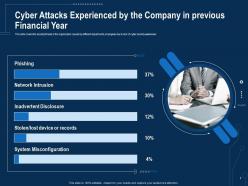
Slide 7: This slide presents Cyber Attacks Experienced by the Company in previous Financial Year.
Slide 8: This slide shows Table of Content for the presentation.
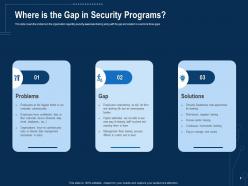
Slide 9: This slide displays problems in the organization regarding security awareness training along with the gap and solution to overcome those gaps
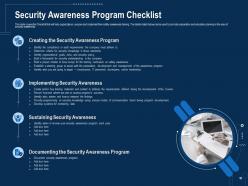
Slide 10: This slide represents Checklist that will help organizations prepare and implement their safety awareness training.
Slide 11: This slide shows Table of Content for the presentation.
Slide 12: This slide shows effective ways to build cybersafe across an organization including key programs and approaches for the learning programs
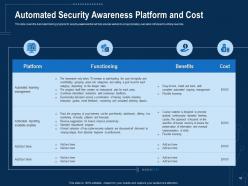
Slide 13: This slide presents Automated training programs for security awareness that will help educate workers to act appropriately.
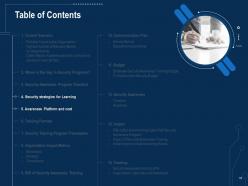
Slide 14: This slide displays Table of Content for the presentation.
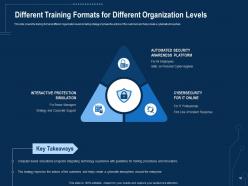
Slide 15: This slide represents Different Training Formats for Different Organization Levels.
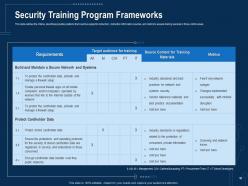
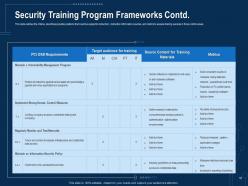
Slide 16: This slide outlines the criteria, describes possible positions that could be subject to instruction, instruction information sources, and metrics to assess training success in those control areas.
Slide 17: This slide presents the criteria, describes possible positions that could be subject to instruction.
Slide 18: This slide shows Table of Content for the presentation.
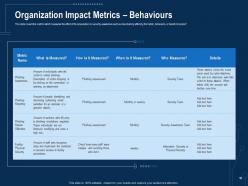
Slide 19: This slide displays metrics which measures the effect of the preparation on security awareness such as does training affecting the habits, behaviors, or beliefs of people.
Slide 20: This slide shows how your security awareness plan serves the overall security system of your company.
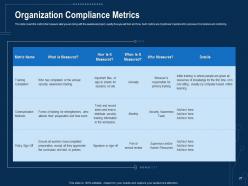
Slide 21: This slide represents Organization Compliance Metrics.
Slide 22: This slide shows Table of Content for the presentation.
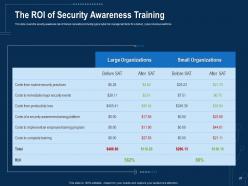
Slide 23: This slide presents security awareness rate of interest calculations including typical cyber risk management factor for a trained, cyber-conscious workforce.
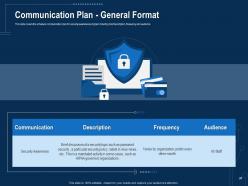
Slide 24: This slide displays schedule communication plan for security awareness program including brief description, frequency and audience
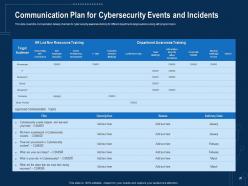
Slide 25: This slide represents Communication Plan for Cybersecurity Events and Incidents.
Slide 26: This slide shows Table of Content for the presentation.
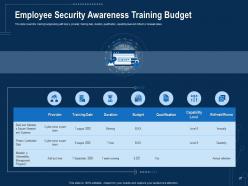
Slide 27: This slide presents training budget along with topics, provider, training date, etc.
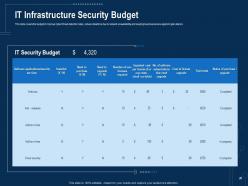
Slide 28: This slide shows budget to improve Cyber threat detection rates.
Slide 29: This slide displays Table of Content for the presentation.
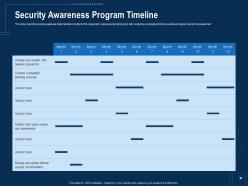
Slide 30: This slide represents security awareness implementation timeline for the organization.
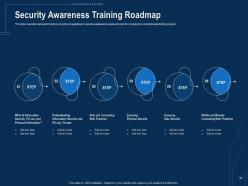
Slide 31: This slide shows roadmap for training concepts and guidelines on security awareness.
Slide 32: This slide presents Table of Content for the presentation.
Slide 33: This slide covers the security threats to the organization caused by different departments employees.
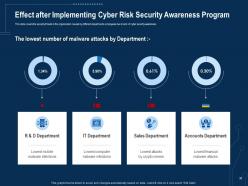
Slide 34: This slide displays the good impact of security awareness program.
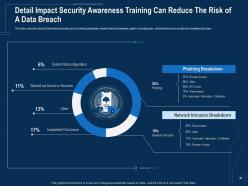
Slide 35: This slide represents Detail Impact Security Awareness Training Can Reduce The Risk of A Data Breach.
Slide 36: This slide shows Table of Content for the presentation.
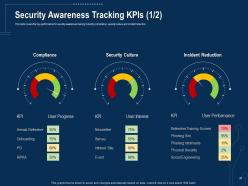
Slide 37: This slide presents key performance for security awareness training including compliance, security culture and incident reduction
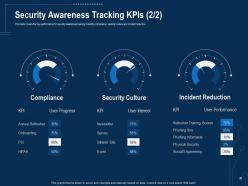
Slide 38: This slide shows key performance for security awareness training.
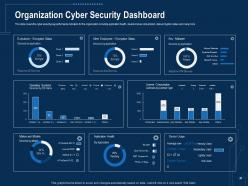
Slide 39: This slide displays cyber security key performance indicators for the organization.
Slide 40: This slide represents Corporate Data Security Awareness Icons.
Slide 41: This slide is titled as Additional Slides for moving forward.
Slide 42: This is Our Mission slide with related imagery and text.
Slide 43: This is Our Team slide with names and designation.
Slide 44: This is About Us slide to show company specifications etc.
Slide 45: This slide shows Post It Notes. Post your important notes here.
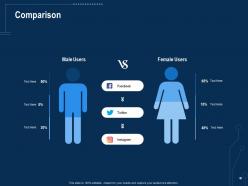
Slide 46: This is a Comparison slide to state comparison between commodities, entities etc.
Slide 47: This slide displays Clustered Column-Line with three products comparison.
Slide 48: This slide shows Puzzle with related icons and text.
Slide 49: This is a Timeline slide. Show data related to time intervals here.
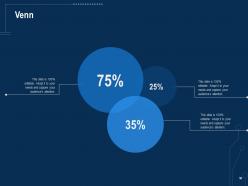
Slide 50: This slide shows Venn diagram with text boxes.
Slide 51: This is a Thank You slide with address, contact numbers and email address.
Corporate Data Security Awareness Powerpoint Presentation Slides with all 51 slides:
Use our Corporate Data Security Awareness Powerpoint Presentation Slides to effectively help you save your valuable time. They are readymade to fit into any presentation structure.






FAQs for Corporate Data Security Awareness
Honestly, phishing is the scariest one right now - AI makes those fake emails crazy realistic. Ransomware's still brutal too. Your own employees are another risk, whether they're being sketchy or just accidentally clicking random links (happens more than you'd think). Cloud configs get messed up all the time and bite people. Plus there's vendor breaches - your data's probably sitting in like 5 different companies' systems you don't even think about. My advice? Train everyone constantly but accept that someone's gonna screw up eventually. Have your response plan actually ready to go when it happens.
Watch out for that "act now!" panic stuff - I swear it gets me every time even when I know better. Generic greetings like "Dear Customer" are sketchy too. Check if the sender's email actually matches who they claim to be from. Real companies won't ask for passwords or SSNs over email, period. Before clicking anything, hover over links to see where they go. Honestly? Just call the company directly if you're unsure. Or bug IT about it. Your gut's usually right when something feels weird.
So encryption is basically like having a bodyguard for your data - it scrambles everything so hackers can't read it even if they steal it. Your laptop's hard drive should definitely be encrypted (learned that one the hard way when my coworker's got stolen). You'll want it protecting both stored files and anything you're sending around like emails or transfers. Customer info, financial stuff, proprietary data - all that needs to be locked down. It's honestly not that complicated once you get started. Just check what tools your IT team recommends first.
Honestly, quarterly training hits the sweet spot - most security folks I know swear by it. Do it monthly and people just zone out completely. Less than that? Your team forgets everything between sessions. Cyber threats change so fast these days, you really need those regular check-ins to catch everyone up on the latest phishing schemes. I'd toss in quick updates whenever there's a big breach making headlines too. Oh, and definitely do a full refresher once a year. Check your current setup first and see where you can squeeze in those quarterly sessions.
Okay so basic rule: 12+ characters mixing uppercase, lowercase, numbers and symbols. I'm a huge fan of the passphrase thing though - like "Coffee47!Mountain$Blue" - way easier to remember than random gibberish. Don't be that person using "Password123" or your birthday, obviously. Here's the thing that'll save your sanity: make every password different for each account. Seriously, just bite the bullet and get a password manager. It generates strong ones automatically and remembers everything so you don't have to. Trust me, you'll thank yourself later when you're not sitting there going "wait, what was my Netflix password again?"
Dude, data breaches are absolutely brutal for companies. Stock prices tank immediately, customers bail for competitors, and honestly? Some businesses never recover from the damage. Your customers start questioning everything - like, can this company even protect my credit card info anymore. The PR mess alone costs a fortune to clean up. I read somewhere that the average breach costs way more than just fixing the technical stuff too - there's legal fees, compliance issues, all that headache. Prevention is so much cheaper than dealing with the aftermath. Trust takes forever to rebuild once it's broken.
Okay so first things first - get a strong password or use your fingerprint/face unlock. Keep everything updated too, that stuff actually matters. Remote wipe is clutch, seriously saved my ass when I lost my phone downtown last year. Don't connect to random wifi networks and obviously skip the sketchy app downloads. If it's a work phone, your IT people should handle the management software that locks everything down automatically. Oh and try not to mix work and personal stuff on the same device - makes things messy.
So basically insider threats come from people already inside your company - employees, contractors, whoever has legit access. External breaches? That's hackers trying to break in from outside. Honestly, insiders scare me more because they don't need to hack anything - they're already in! Meanwhile external attackers have to actually find vulnerabilities and get past your defenses first. You need totally different approaches too. For insiders, watch user behavior and audit access regularly. External threats? Focus on hardening your perimeter. Both are serious but the strategies are pretty different.
Dude, it gets messy fast. GDPR fines can hit 4% of your annual revenue - that's insane money. Customers will sue you, obviously. Executives might even face criminal charges if it's health or financial data. The legal costs pile up quick, plus you'll have compliance investigations dragging on for months. Oh, and don't forget the mandatory reporting headaches. My advice? Keep your security training up to date and document everything you do. Shows you weren't being reckless if things go south. Trust me, you don't want to be scrambling after the fact.
Start with mapping out your data flows and access points - basically audit everything you've got right now. Run some vulnerability scans and pen testing if you can swing the budget. Honestly, most breaches happen because of people though, not tech issues. So survey your team about their security habits and maybe run phishing tests to see who clicks what they shouldn't. Check your incident response plans too. Oh, and don't just focus on the technical stuff - you need to see how aware your people actually are. It's really about getting the full picture of where you're vulnerable.
Start with the basics - endpoint protection and firewalls. Encryption for your sensitive stuff is a must, both stored and when it's moving around. MFA isn't optional anymore, honestly it's crazy how many places still skip it. Get some data loss prevention tools so you know what's going out of your network. Oh, and vulnerability scanning catches problems before hackers do. But seriously, train your people first - doesn't matter how good your tech is if Dave from accounting clicks every sketchy email. I'd actually run a security audit to find your weak spots, then tackle the worst ones first.
Okay so first thing - cut off those compromised systems immediately and get your incident response people moving. Document everything you can right now because you'll definitely need that trail later. This is honestly why having a plan beforehand saves your butt instead of running around panicking. Figure out what data got hit and loop in legal, HR, plus customers if it's bad enough. Oh and don't forget about regulatory stuff - that reporting timeline can sneak up on you. Jump on the investigation fast but stay organized so you actually understand what happened and can stop it from spreading.
Think of a data security policy like having house rules - everyone knows what's cool and what's not with your company's sensitive info. People just wing it otherwise, which gets messy fast. You get consistent standards across the board, compliance boxes get checked, and new employees have actual guidelines instead of guessing. When things go sideways (and they will), you've got a playbook ready instead of panicking. Just don't make it some 50-page monster that nobody reads. Keep it simple and actually useful.
Dude, skip the boring PowerPoint training - nobody pays attention to that crap anyway. Use real horror stories from actual breaches instead. People need to see how this stuff affects them personally, not just the company's bottom line. Make reporting mistakes super easy so folks aren't scared to fess up when they click something sketchy. Actually celebrate when someone spots a phishing email! Here's the thing though - if your CEO doesn't follow the security rules, forget it. Everyone else will ignore them too. Oh, and make it feel like everyone's job, not just IT's headache to deal with.
Here's the thing - most data breaches actually come from third-party vendors, not direct attacks on your company. When you give vendors access to your systems, you're handing over the keys. They become part of your network whether you like it or not. Make sure you vet them hard before signing anything. Require security certs and audit them regularly - don't just take their word for it. Only give them access to data they actually need for the job. I learned this the hard way at my last company when our payment processor got hacked.
-
Unique and attractive product design.
-
Colors used are bright and distinctive.
-
Best Representation of topics, really appreciable.
-
Design layout is very impressive.
-
Use of different colors is good. It's simple and attractive.
-
Out of the box and creative design.
-
Nice and innovative design.
-
Best way of representation of the topic.
-
Great designs, really helpful.
-
Use of different colors is good. It's simple and attractive.