


Cyber Phishing Dashboard With Improvement Curve




Try Before you Buy Download Free Sample Product
 Impress Your
 Audience
 100%
100% Editable
 Save Hours
 of Time


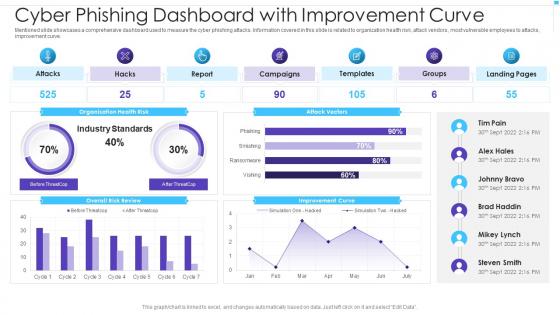
Mentioned slide showcases a comprehensive dashboard used to measure the cyber phishing attacks. Information covered in this slide is related to organization health risk, attack vendors, most vulnerable employees to attacks, improvement curve.
People who downloaded this PowerPoint presentation also viewed the following :
Cyber Phishing Dashboard With Improvement Curve with all 2 slides:
FAQs for Cyber Phishing Dashboard
Phishing emails are probably your biggest worry - some look scary realistic these days. Your staff clicks a bad link thinking it's legit, and boom, you're screwed. Ransomware's another nightmare since they'll encrypt everything until you pay. Password attacks hit hard too, especially when people use "password123" for everything (we've all been there). Small businesses get targeted more because hackers know you don't have enterprise-level security. Train your team to spot sketchy emails and get a password manager. Trust me, it's way cheaper than dealing with a breach later.
Honestly, skip the boring annual slideshow thing - nobody learns from clicking through that stuff. Do quick 10-minute sessions monthly instead. Way more effective. Make it hands-on with fake phishing emails so people actually practice spotting sketchy stuff. Different teams need different training too - your IT folks vs sales people, you know? Oh, and this is huge - create an environment where someone won't get yelled at for reporting a suspicious email. Half the battle is getting people to actually speak up when something seems off. Maybe start with a quick assessment to see where everyone's at first.
Dude, AI in cybersecurity is honestly a game changer. Machine learning algorithms are constantly scanning network traffic and catching sketchy patterns that would take humans forever to spot. The crazy part? These systems can actually predict attacks before they happen now. Your security team gets freed up from all the boring, repetitive stuff since AI handles automatic responses to common threats. Just make sure you're feeding it quality data for training - my buddy's company learned that the hard way when they got swamped with false alarms that made everyone want to throw their laptops out the window.
Honestly, you need to figure out what you're working with first - get someone to do a proper security audit. I'd hire an outside firm because your own IT team probably can't see their own mistakes. Once you know where the weak spots are, tackle the scary stuff right away: update everything, get multi-factor auth set up, and for the love of god train people not to click sketchy links. Oh, and make an incident response plan because something will go wrong eventually. Don't treat this like a one-and-done thing though. Check back every few months since new threats pop up constantly.
Data breaches are honestly such a legal headache. Customers can sue you, regulators like the FTC will hit you with massive fines, and if you're in healthcare or finance? Even worse compliance issues. You'll have strict deadlines to notify everyone - mess those up and the penalties get bigger. Class action lawsuits are probably the worst part since they drag on forever and cost a fortune. Seriously though, get an incident response plan now. Trust me, you don't want to be googling "what do I legally have to do" while your servers are on fire.
Okay so first thing - get different passwords for everything and turn on two-factor auth. I'm terrible at remembering mine but password managers help. Lock down your social media settings too, that stuff's way too public by default. Don't click weird links (I know, obvious but people still do it). Software updates are actually important since they patch security holes. Oh and be smart about what you post - even random stuff can give away more than you'd think. Honestly? Just spend like 20 minutes this week checking your main accounts and tightening things up.
Honestly, just get a password manager - I use Bitwarden but 1Password works too. Makes life so much easier since you only need to remember one master password. Let it generate those crazy 12+ character passwords with all the symbols and stuff. Turn on two-factor auth everywhere, especially banking and email. That's like the bare minimum now. Don't use obvious things like your birthday or dog's name (seriously, people can find that on your Instagram in 2 seconds). I'd start with your most important accounts first - email, bank, whatever you'd cry about losing. Then just work through the rest when you have time.
Ugh, IoT devices are such a pain for security. They basically turn your network into Swiss cheese since most manufacturers don't give a damn about protecting them properly. You'll have hundreds of sketchy connected gadgets that could be backdoors waiting to happen. My advice? Ditch the old perimeter security thinking and go zero-trust instead. Segment everything aggressively and assume every IoT device is already hacked. Seriously, that's not even paranoid anymore. Start by making a list of what's actually connected to your network - you'd be surprised how many random smart things are lurking around. Then isolate all that stuff from anything mission-critical.
Dude, just do your updates. Seriously. Those security holes are exactly what hackers look for - they literally have lists of outdated software to target. Yeah, the notifications are super annoying and always pop up when you're trying to get work done. But skipping them is like leaving your front door unlocked. Auto-updates are your friend for browsers and your main OS. If it's work stuff, maybe test things first, but don't sit on patches forever. Trust me, getting hacked is way worse than dealing with a few minutes of updates.
Look, nobody wants security that makes them rage-quit their own job. Risk-based stuff works best - lock down the sensitive things but keep daily tasks easy. Single sign-on is honestly a lifesaver because users don't hate you but you still have control. MFA used to suck but now with push notifications and fingerprints, it's not terrible. Here's the thing though - actually talk to your users about why you're doing this. When they get it, they won't spend all day trying to hack around your systems. Oh, and test with real people first. Can't stress that enough.
So you need six main things: preparation (get your tools/training/contacts ready), spotting incidents fast, containing the damage, wiping out the threat completely, getting everything back online, and reviewing what went wrong afterward. That last step? Yeah, barely anyone does it but you really should. Also map out who does what when things hit the fan - trust me, chaos isn't fun. Document your systems now and keep contact info handy. Nothing worse than googling your security vendor's emergency line at 2am during a breach.
Ugh, data compliance is such a pain but here's what actually works. First, figure out what data you're collecting and who can see it - like actually map it out. Train your team so they don't accidentally mess up with personal info. The rules change constantly (seriously, who has time for this?) so maybe get a compliance person or consultant. You'll need solid processes for breaches, getting consent, and when people want their data deleted. Oh, and do quarterly check-ins instead of waiting for someone to audit you and find problems.
So you're basically letting your company's network stretch into places they can't control. Home WiFi might be sketchy, your family could stumble onto work stuff, and most people use personal devices that IT has never touched. Coffee shops are the worst though - public WiFi is basically handing hackers an invitation. Oh, and don't get me started on leaving laptops places or having documents scattered around. Use a VPN if you can, turn on two-factor auth for everything, and try keeping work separate from your personal stuff when possible.
Threat intel is like getting a sneak peek at what hackers are planning before they hit you. Feed it into your security tools and you'll automatically block malicious IPs, sketchy domains, and attack patterns targeting companies in your space. It's honestly pretty cool how it works as an early warning system. The trick is finding decent threat feeds that actually match your industry - too many people just hoard threat data that never gets used. Make sure you're integrating it properly into whatever security setup you've got running. Short version: know what's coming so you can stop it.
So proactive cybersecurity is basically hunting down threats before they hit you - doing regular security checks, patching vulnerabilities, that kind of stuff. Reactive is scrambling after you've already been breached. Like going to the doctor for checkups vs waiting until you're dying (ok maybe dramatic but whatever). Most places do both, but honestly? The more you can stay ahead of problems, the less you'll hate your life when shit hits the fan. Reactive focuses on damage control and figuring out what went wrong after it's too late.
-
I have just started downloading templates for my presentations and I must say this is a great design. It helped accelerate my presentation design process and made it more visually appealing.
-
“Detailed and great to save your time.”