Organization cyber security dashboard cyber security phishing awareness training ppt pictures

Rating:
87%
Organization cyber security dashboard cyber security phishing awareness training ppt pictures
Slide 1 of 2
Favourites Favourites

Try Before you Buy Download Free Sample Product

Audience Impress Your
Audience
Editable 100%
Editable
Time Save Hours
of Time
The Biggest Sale is ending soon in
0
0
:
0
0
:
0
0
Rating:
87%
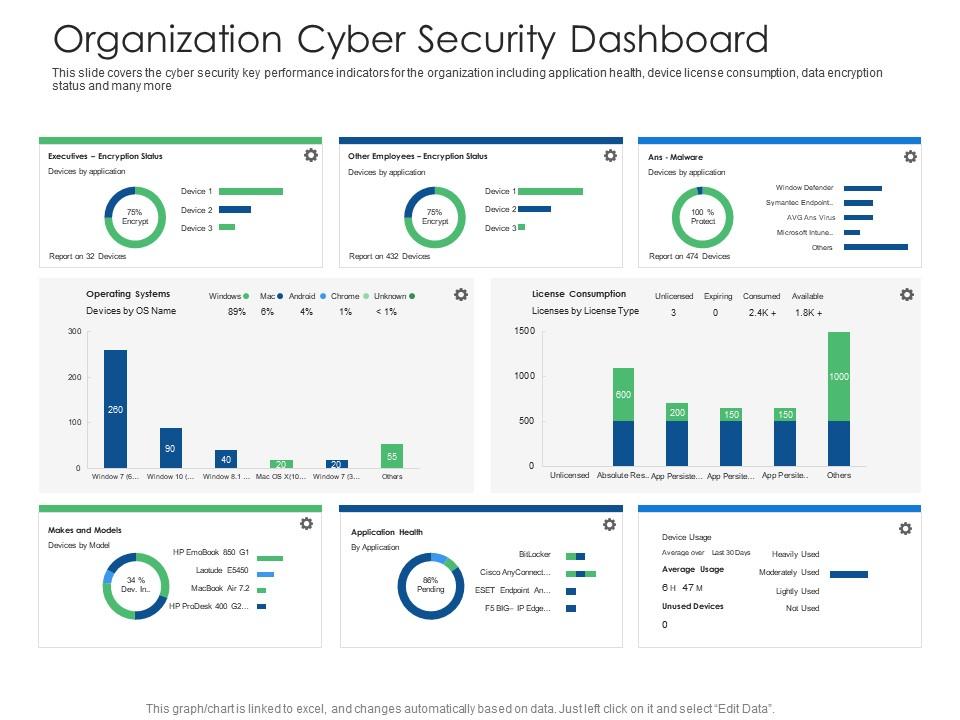
This slide covers the cyber security key performance indicators for the organization including application health, device license consumption, data encryption status and many more. Deliver an outstanding presentation on the topic using this Organization Cyber Security Dashboard Cyber Security Phishing Awareness Training Ppt Pictures. Dispense information and present a thorough explanation of Organization Cyber Security Dashboard using the slides given. This template can be altered and personalized to fit your needs. It is also available for immediate download. So grab it now.

FAQs for Organization cyber security dashboard cyber security phishing awareness

Dude, the phishing emails are getting insane - attackers are using ChatGPT to write them now and I honestly can't tell the difference sometimes. Ransomware-as-a-service keeps evolving too, which is terrifying. They're also hitting companies through their vendors more often, so you might get breached through some random third-party you forgot about. Oh, and people are still screwing up cloud permissions left and right. You should probably check who has access to what in your cloud setup. Also audit your vendor relationships if you haven't recently - that's becoming a real attack vector.

Start with mapping your assets and users - that's your foundation. Then roll out strict identity verification everywhere, basically "never trust, always verify." The old trust-but-verify approach is pretty much toast at this point. Multi-factor authentication needs to go on everything, and you'll want micro-segmentation to isolate network areas from each other. Monitor all your traffic for weird stuff too. But honestly? Don't bite off more than you can chew. Pick one thing first - maybe user access or network segmentation - and get really good at that before moving on.

So AI in cybersecurity is pretty wild - it can spot threats crazy fast by crunching through tons of data while your team is still having their morning coffee. Picture having that one overly cautious friend who's always watching for sketchy stuff, except this one never needs sleep. It catches malware and weird network behavior that humans might miss for hours. Plus it learns from old attacks to predict new ones, which is honestly kind of scary but useful. You can automate responses to basic threats too. Just don't ditch your human team completely - you'll still need actual people keeping an eye on things.

Honestly, start running fake phishing tests on your own team - you'll be shocked how many people fall for them. I'd do it monthly at first. Set up some training with real examples of sketchy emails and fake login pages. The boring slideshow approach doesn't work, so make it hands-on. Biggest thing? Teach everyone to verify requests through different channels, especially when someone wants passwords or money stuff. Most people get caught when they're rushing around. Track who clicks on your test emails - that shows you exactly who needs extra help. Oh, and emphasize that "urgent" requests are usually the biggest red flags.

First thing - get everyone's contact info in one place because trust me, you don't want to be hunting for phone numbers when everything's on fire. Map out who does what during detection, containment, investigation, and recovery. Oh, and define what counts as an "incident" for your company since that's weirdly different everywhere. Run tabletop exercises regularly to test everything actually works. Draft templates now for talking to stakeholders and customers later. Don't forget compliance stuff if you're in a regulated industry. Honestly, the biggest mistake is not assigning someone to update this thing quarterly - plans get stale fast.

GDPR's all about building privacy protections right into your systems from the start. Can't just slap security on afterward and call it good. The fines are insane - up to 4% of your entire global revenue, which honestly seems excessive but here we are. You've got 72 hours to report any data breaches too, so your response plan needs to actually work. Start by figuring out what personal data you're collecting and where it lives. Then design your security around protecting that stuff at every step. It's way more work upfront but beats getting hammered with penalties later.

Dude, the main stuff that'll get you is misconfigured access controls and unsecured APIs. Most breaches? Someone literally left an S3 bucket open to the world - I've seen it happen so many times it's not even funny. Set up least-privilege access and turn on MFA everywhere you can. Also encrypt everything, both moving and sitting still. Run a security audit first though. AWS Config and Azure Security Center will catch the dumb mistakes before they become expensive problems. Oh, and that whole "shared responsibility" thing with cloud providers confuses people constantly - make sure you know what's actually your job vs theirs.

Dude, you really don't need to spend a fortune on this stuff. Turn on two-factor authentication everywhere first - that alone stops most attacks. Bitwarden costs like $3/month and handles all your passwords. Auto-updates are clutch too since half these breaches happen from old, unpatched software anyway. Cloud security tools scale with you without the crazy upfront costs. Oh, and cybersecurity insurance is way cheaper than I thought it'd be. If you want the fancy enterprise stuff later, managed services let you basically rent it. Start with the basics though - I swear most companies get hacked over dumb password issues.

Ugh, remote work is such a double-edged sword security-wise. Every home network and personal device becomes a potential attack vector now. Your traditional office security perimeter? Gone. We learned this the hard way at my last job tbh. You'll need solid endpoint protection first, then VPNs and multi-factor auth for everything. Clear policies about data storage are crucial too. Start by figuring out which devices are actually accessing your systems - might surprise you. Then go full zero-trust mode. Assume every connection is sketchy until it proves otherwise.

Security audits are basically health checkups for your systems - they catch vulnerabilities before hackers do. You'd be surprised how many weak passwords and forgotten servers these things uncover. Outdated software, wonky configurations, policy gaps you never noticed - it's all there waiting to bite you. I learned this the hard way at my last job when we found a test server still running default credentials (yikes). They also keep you compliant with regulations and give your boss actual numbers to justify security spending. Do internal audits quarterly, then bring in outside experts once a year. Fresh perspective catches stuff your team misses every time.

Honestly, it comes down to three things: money, control, and skills. Going in-house means you get total control and quick responses when shit hits the fan. But good security people? Their salaries are absolutely insane right now. Outsourcing usually saves you cash and gets you experts you probably can't afford full-time. You'll lose some visibility though. Budget matters obviously, plus your company size and whether you need instant responses. Oh, and regulatory stuff if that applies. Most mid-size places I know do both - keep the core stuff internal, farm out the fancy specialized work.

HIPAA and PCI DSS aren't just paperwork - they actually change how you work every day. You'll be encrypting data, setting up role-based access, patching systems constantly. The authentication stuff gets annoying fast, honestly. Plus there's approval processes for everything. But here's the thing - if you bake these rules into your workflows right from the start, it's way less painful than trying to add them later. Trust me on that one. Yeah, it feels like overkill sometimes, but after a few weeks it just becomes muscle memory. Documentation is huge too, so get used to writing everything down.

So quantum computers are gonna demolish our current encryption - RSA, ECC, pretty much everything we use now. Timeline's murky but probably 10-20 years out. When that happens though? Your encrypted stuff could be cracked basically overnight, which is terrifying if you think about it. That's why there's this whole push for "post-quantum cryptography" already happening. New standards that can actually survive quantum attacks. Honestly, if you're dealing with sensitive data that needs protection long-term, you should start thinking about migration plans now. Way better to be paranoid early than scrambling later.

Dude, you gotta assume you'll get hacked eventually - that mindset shift is everything. First priority: offline backups that actually work (test them monthly because finding out they're broken during an attack is the worst). Train your people on phishing since that's how 90% of this stuff starts. My old boss used to send fake phishing emails to test us and it was annoying but honestly helped. Keep everything patched, have a solid incident response plan, and maybe look into cyber insurance. Oh and do one of those tabletop exercises where you pretend you're getting attacked - sounds nerdy but it's super useful for finding gaps in your plan.

Honestly, you gotta bake cybersecurity training right into your vendor contracts from day one. Don't just write it in there and forget about it though - actually follow up with regular security assessments. Joint training sessions work really well where you walk through protocols together. Create shared incident response plans too, so when shit hits the fan, everyone knows their role. I learned this the hard way at my last job. Quarterly check-ins keep everyone honest. The whole thing works better when you treat vendors like they're part of your team instead of some outside group you can't trust.

Ratings and Reviews

87% of 100
Review Form
Write a review
Most Relevant Reviews
  1. 100%

    by Christopher Wood

    Editable templates with innovative design and color combination.
  2. 80%

    by David Wright

    Awesomely designed templates, Easy to understand.
  3. 80%

    by Brown Baker

    Excellent template with unique design.
  4. 80%

    by Earl Contreras

    Awesome use of colors and designs in product templates.
  5. 80%

    by Dalton Aguilar

    Excellent products for quick understanding.
  6. 100%

    by Clyde Sullivan

    Perfect template with attractive color combination.

6 Item(s)

per page: