category-banner

Dashboard of talent acquisition showing employee turnover rate

Rating:
90%
Dashboard of talent acquisition showing employee turnover rate
Slide 1 of 2
Favourites Favourites

Try Before you Buy Download Free Sample Product

Audience Impress Your
Audience
Editable 100%
Editable
Time Save Hours
of Time
The Biggest Sale is ending soon in
0
0
:
0
0
:
0
0
Rating:
90%
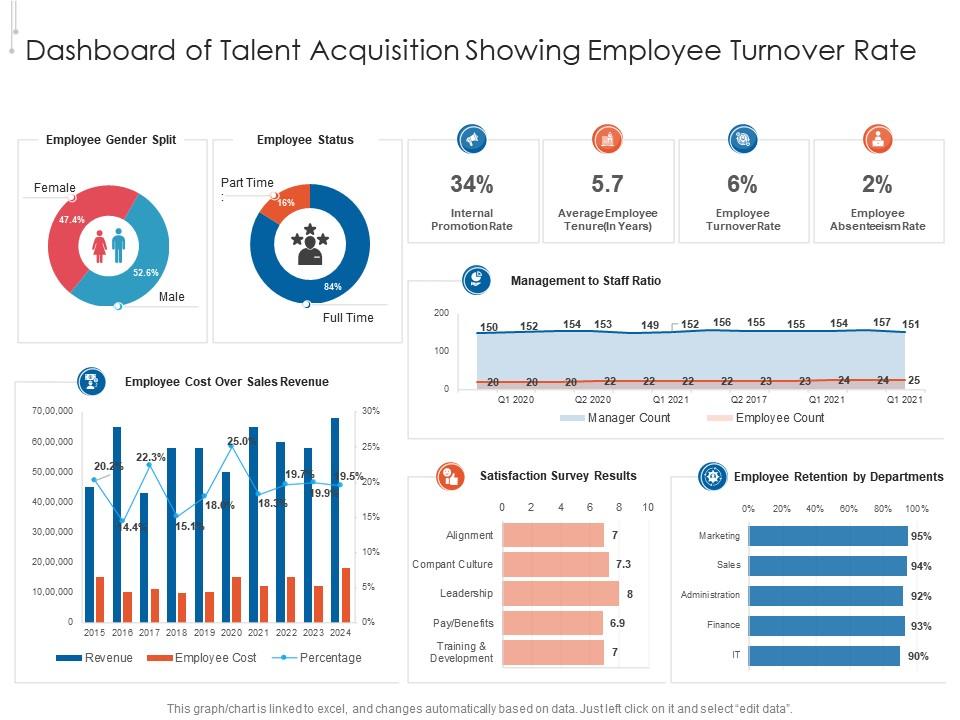
Presenting our well structured Dashboard Of Talent Acquisition Showing Employee Turnover Rate. The topics discussed in this slide are Sales, Revenue, Survey. This is an instantly available PowerPoint presentation that can be edited conveniently. Download it right away and captivate your audience.

People who downloaded this PowerPoint presentation also viewed the following :

FAQs for Dashboard of talent acquisition showing

Honestly, start with the basics: time-to-fill, cost-per-hire, and offer acceptance rates. Quality of hire matters way more than people think - check 90-day retention and how new hires actually perform. Track which sourcing channels work (hint: probably not those pricey job boards your CEO loves). Pipeline stuff like candidates per opening helps too. Don't forget diversity metrics - that's non-negotiable now. Keep it under 8 metrics total or you'll drown in data. Oh, and whatever your leadership obsesses over? Add that in or they won't pay attention to the rest.

Honestly, having a talent acquisition dashboard is like finally getting glasses after squinting for years. Instead of guessing what's working, you'll see exactly which job boards are worth your money and where candidates keep dropping off. Time-to-hire becomes super obvious across different roles too. I'd say start small though - pick maybe 3 key metrics first because tracking everything right away gets messy fast. The forecasting part is clutch for budget meetings with leadership. Once you get into the habit of checking the data regularly, you won't go back to making hiring decisions blind.

Look, data visualization just turns your hiring metrics into something you can actually read without wanting to cry. Charts and graphs beat staring at endless spreadsheet rows any day. You'll spot patterns way faster - like which job boards suck or where candidates are getting stuck in your pipeline. Time-to-hire, source performance, all that stuff becomes obvious at a glance. Honestly, I spent way too much time last month trying to make sense of raw numbers before switching to visuals. Keep it simple though - fancy doesn't always mean better when you're just trying to figure out your hiring bottlenecks.

Honestly, most people just copy generic dashboard templates and wonder why they're useless. Figure out what's actually broken first - are candidates dropping off early? Track completion rates. Taking forever to hire? Focus on where the bottlenecks are happening. Your executives don't need the same data your recruiters do, so build different views. I'd start with your biggest 3 problems and pick metrics that actually tell you why they're happening. Volume hiring needs totally different tracking than executive searches anyway. Work backwards from what's keeping you up at night.

Start by figuring out your key metrics - time-to-fill, where your best hires come from, conversion rates, the usual suspects. Set up automated data pulls from your ATS instead of doing manual exports every time (seriously, save yourself the headache). Your ATS data is probably a mess, so clean up job titles and departments first. Real-time updates are clutch - nobody wants to look at last week's numbers. Here's the thing though: get your recruiting team involved in building this. They know what metrics actually move the needle vs what looks impressive in exec meetings. Oh, and don't go crazy - start with maybe 5-6 core KPIs.

Set up dashboard widgets to track candidate demographics through each hiring stage - applications to final offers. Spot where diverse candidates drop off. Compare your current ratios against goals and past data to see if you're actually improving or just pretending you are (honestly, most companies fool themselves here). Automated alerts work great when diversity dips below targets. Also filter by job postings and recruitment channels - you'll quickly see which ones bring in diverse talent. The real-time aspect is clutch because you can course-correct mid-hiring cycle instead of waiting until it's too late.

Honestly, I'd stick with 30, 90, and 365-day windows as your starting point. 30 days gives you that real-time pulse on what's happening right now. For actual trends, 90 days is way better since it smooths out all those weird weekly spikes. The yearly view is where you'll catch seasonal stuff - like campus recruiting totally messing with your Q4 numbers, which always throws people off. Some metrics (quality of hire especially) are basically useless if you're only looking at a month. Performance takes time to show up. Start with these three and add custom ranges later if your leadership team wants something specific.

So basically you'd add widgets that predict stuff like time-to-hire and which candidates will actually accept your offers. The system crunches your old hiring data to forecast candidate quality scores and source effectiveness. Honestly, I think the seasonal hiring volume predictions are super helpful - saves you from scrambling last minute. You can also build models for salary benchmarking and spotting flight risk in new hires. Start with whatever's driving you crazy in recruiting right now, then get your data people to create predictive models around those specific headaches. It's like having a recruiting crystal ball, which sounds cheesy but actually works.

Don't cram everything onto one screen - it'll just overwhelm people and they won't use it. Skip the vanity stuff like total applications. Focus on metrics that actually move the needle: time-to-hire, quality of hire, that kind of thing. Teams always get caught up making dashboards look gorgeous but forget if they're even usable. Your data needs to be fresh and accurate too. Stale numbers are honestly worse than having nothing at all. Oh, and definitely test with your recruiters first - they'll catch the annoying stuff you totally missed. Trust me on that one.

Honestly, real-time data is a game changer for hiring. You can spot problems immediately instead of waiting weeks for some useless report. Applications dropping for certain roles? Your sourcing channels aren't working? Candidates bailing at the second interview? You'll know right away. It's basically like GPS but for recruiting - super helpful when you need to switch things up fast. Adjust your job posts, move budget around, fix whatever's broken before it screws up your hiring numbers. I check mine every morning with coffee. Just don't overthink it.

Tableau and Power BI are your best bets for serious analytics - both can pull from your ATS and make those charts that don't look terrible. Google Data Studio works too if budget's tight. Excel dashboards can get you pretty far honestly, though things get chaotic once you're juggling tons of requisitions. Before you go crazy though, check if Greenhouse or Workday (whatever your company uses) has decent reporting built in. Why build something from scratch if it's already there? I'd start with whatever tools you can access now. Figure out which metrics actually matter, then upgrade later.

Just talk to your hiring managers directly - send them quick surveys or grab them for 15-minute chats after they make hires. They'll tell you straight up which metrics actually help them decide and which ones are total garbage. Most dashboards are honestly just cluttered messes anyway. Focus on stuff that matters for their decisions, like how long it takes to fill urgent roles or whether candidates are actually any good. Ask what's missing too - they might want insights you haven't thought of. I'd do this monthly so you can actually fix things based on what they say.

Your hiring process is probably bleeding candidates and you don't even know it. Track stuff like how many people actually finish applications, interview satisfaction scores, time between steps. Most companies suck at this - they think they're being efficient but candidates are getting ghosted left and right. Set up alerts when your scores tank so you can jump on problems fast. Maybe your application form is way too long or your team takes forever to get back to people. This data will show you exactly where things go sideways before your reputation gets trashed.

Honestly, start simple - pick 3-4 metrics max or you'll go crazy. Cost-per-hire and time-to-fill are obvious ones. Quality of hire is trickier but worth tracking. The real trick is matching your hiring spend to actual business results, like did sales go up after you hired those new reps? Retention's huge too. If people bail after six months, your ROI is toast no matter how cheap they were to hire. I'd set up quarterly reports comparing hiring costs to stuff like project completions or revenue growth. Yeah, the math gets messy sometimes, but focus on trends rather than perfect precision. Much easier than overthinking every single data point.

Look, without benchmarks you're just guessing at everything. Your 45-day time-to-fill might feel awful, but if everyone else takes 50 days, you're crushing it! Industry standards help you figure out what's actually broken versus what's just normal growing pains. When your boss starts whining about unrealistic timelines, boom - you've got real data to shut that down. It's also perfect ammunition for budget conversations (trust me on this one). Start with the basics: time-to-fill, cost-per-hire, source effectiveness. Make sure you're comparing apples to apples though - same industry, similar company size. Otherwise the numbers won't mean much.

Ratings and Reviews

90% of 100
Write a review
Most Relevant Reviews
  1. 80%

    by Dorian Armstrong

    Design layout is very impressive.
  2. 100%

    by Donte Duncan

    Really like the color and design of the presentation.

2 Item(s)

per page: