

Detailed business plan for company powerpoint presentation slides





Try Before you Buy Download Free Sample Product
 Impress Your
 Audience
 100%
100% Editable
 Save Hours
 of Time


Leave behind your competitors and convince the investors to invest in your business idea using professionally designed content-ready Detailed Business Plan For Company PowerPoint Presentation Slides. Turn your business idea into a business model with the help of pitch deck PPT slides. Incorporate these relevant templates of investor pitch deck PowerPoint presentation to add story to your idea. Impress the business angels to raise funds for you and your start up. This ready-to-use business plan PowerPoint presentation comprises of templates such as the problem, the solution, financial projections, use of funds, competitive landscape, and more. Use this detailed business plan PPT presentation for various other topics such as seed funding, investor pitch deck, venture capital, etc. This pitch deck PowerPoint presentation is completely customizable. Customize the presentation as per your need. Change the color, text, icon, and font size as per your requirement. Download this professionally designed ready-made pitch deck PPT presentation to have your own start up by getting funds from the investors. Impress all your clients by using our Detailed Business Plan for Company PowerPoint Presentation Slides. Use this professionally designed detailed business plan for your company to let everyone have an overview about your esteemed company. If you express the detailed business plan for company via our given PPT you will be able to represent it better since we provide for various slides in this presentation including the contents, growth strategies, financial projections, details of shareholders. The slides include bar graphs, pie charts, graphs and charts. If you download this full business strategy deck you can fully represent every bit detail of your company to viewers. If you want clients to invest in your company it is highly recommended that you use this template as it consists of 77 slides, which widely cover every aspect of your company. This deck is extremely well suited with Google slides and can be saved in PDF or JPG format. Our Detailed Business Plan For Company Powerpoint Presentation Slides are like the morning dew. They add to the freshness of your thoughts.
People who downloaded this PowerPoint presentation also viewed the following :
Content of this Powerpoint Presentation
Slide 1: This slide introduces Detailed Business Plan For Company. State Your Company Name and get started.
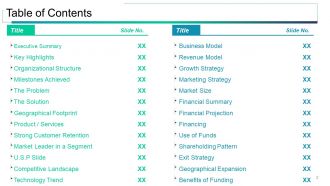
Slide 2: This slide presents Table of Contents showcasing- Executive Summary, Key Highlights, Organizational Structure, Milestones Achieved, The Problem, The Solution, Geographical Footprint, Product / Services, Strong Customer Retention, Market Leader in a Segment, U.S.P Slide, Competitive Landscape, Technology Trend, Business Model, Revenue Model, Growth Strategy, Marketing Strategy, Market Size, Financial Summary, Financial Projection, Financing, Use of Funds, Shareholding Pattern, Exit Strategy, Geographical Expansion, Benefits of Funding.
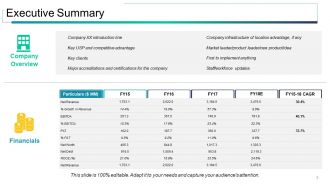
Slide 3: This slide presents Executive Summary Particulars ($ MM), Company XX introduction line, Key USP and competitive advantage, Key clients, Major accreditations and certifications for the company, Company infrastructure of location advantage, if any with Market leader/product leader/new product/idea, First to implement anything, Staff/workforce updates, Company Overview.
Slide 4: This is a Key Highlights slide to represent company highlights etc.
Slide 5: This is The Problem slide to present the current challenges faced. To better illustrate your problem, as well as convey the problem statement to someone who’s less immersed in it than you, consider adding some components like 1. What do you need? 2. Reason behind the need. This will provide a better understanding to the investor for your funding requirement.
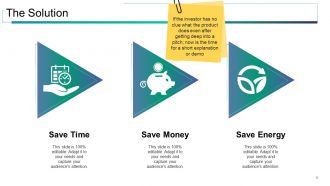
Slide 6: This slide displays The Solution such as- Save Time, Save Money, Save Energy. If the investor has no clue what the product does even after getting deep into a pitch; now is the time for a short explanation or demo.
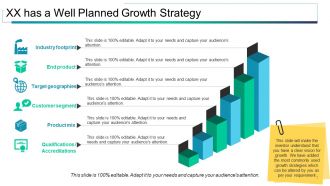
Slide 7: This slide shows XX has a Well Planned Growth Strategy displaying- Industry footprint, End product, Target geographies, Customer segment, Product mix, Qualifications /Accreditations. This slide will make the investor understand that you have a clear vision for growth. We have added the most commonly used growth strategies which can be altered by you as per your requirement.
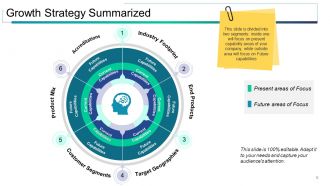
Slide 8: This slide shows Growth Strategy Summarized displaying- Present areas of Focus, Future areas of Focus, Accreditations, Product Mix, Customer Segments, Target Geographies, End Products, Industry Footprint, Future Capabilities, Current Capabilities. This slide is divided into two segments: inside one will focus on present capability areas of your company; while outside area will focus on Future capabilities.
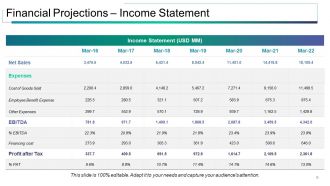
Slide 9: This is a slide on Financial Projections – Income Statement in tabular form.
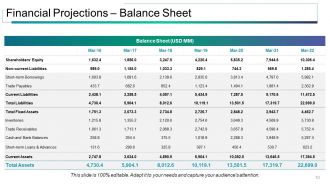
Slide 10: This is a Financial Projections – Balance Sheet slide in tabular form.
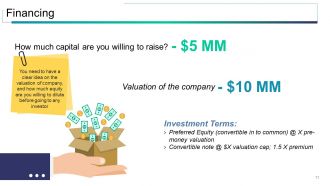
Slide 11: This slide shows Financing displaying- Investment Terms, Valuation of the company as examples. You need to have a clear idea on the valuation of company, and how much equity are you willing to dilute before going to any investor.
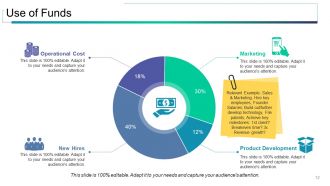
Slide 12: This slide presents Use of Funds showcasing- New Hires, Operational Cost, Marketing, Product Development.
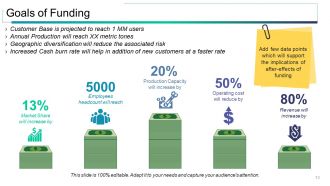
Slide 13: This slide displays Goals of Funding. State your funding goals etc. here.
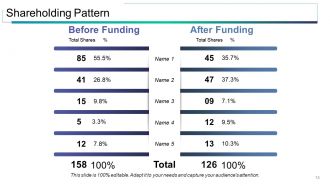
Slide 14: This slide showcases Shareholding Pattern in tabular form.
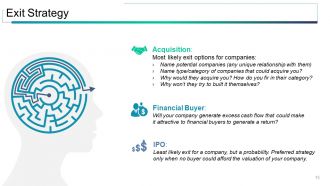
Slide 15: This slide presents the Exit Strategy categorized into- Financial Buyer, Acquisition, IPO.
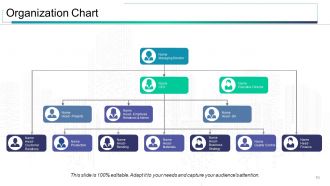
Slide 16: This slide displays an Organization Chart to present structure of the proposed organization.
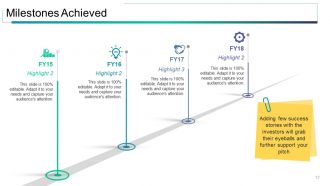
Slide 17: This slide presents Milestones Achieved so far. Adding few success stories with the investors will grab their eyeballs and further support your pitch.
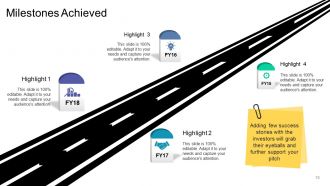
Slide 18: This slide also presents Milestones Achieved so far. Adding few success stories with the investors will grab their eyeballs and further support your pitch.
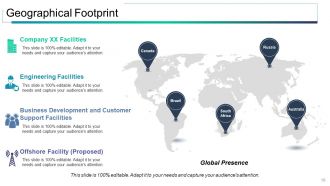
Slide 19: This slide showcases Geographical Footprint in world map image form. State- Global Presence, Company XX Facilities, Engineering Facilities, Business Development and Customer Support Facilities, Offshore Facility (Proposed) etc. here.
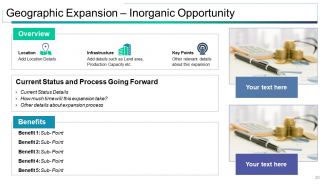
Slide 20: This slide presents Geographic Expansion – Inorganic Opportunity displaying- Location, Infrastructure, Key Points, Overview, Benefits, Current Status and Process Going Forward.
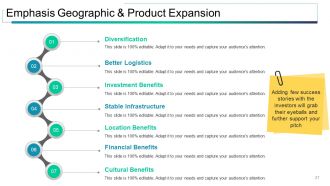
Slide 21: This slide shows Emphasis Geographic & Product Expansion displaying- Diversification, Investment Benefits, Location Benefits, Cultural Benefits, Financial Benefits, Stable Infrastructure, Better Logistics. Adding few success stories with the investors will grab their eyeballs and further support your pitch.
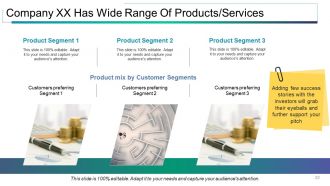
Slide 22: This slide shows Company XX Has Wide Range Of Products/Services diasplaying- Product Segment, Customers preferring Segment, Product mix by Customer Segments. Adding few success stories with the investors will grab their eyeballs and further support your pitch.
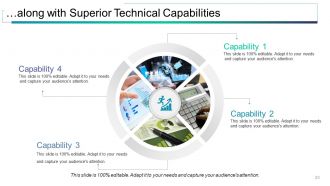
Slide 23: This is …along with Superior Technical Capabilities slide displaying Capabilities.
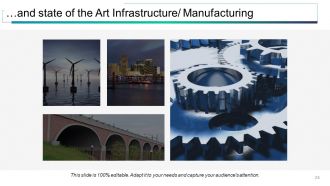
Slide 24: This is …and state of the Art Infrastructure/ Manufacturing slide showcasing relative imagery to display.
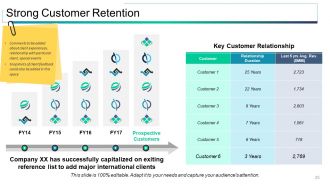
Slide 25: This slide shows Strong Customer Retention displaying- Prospective Customers, Customer, Relationship Duration, Last 5 yrs Avg. Rev. ($MM), Key Customer Relationship. Comments to be added about client experiences, relationship with particular client, special events Snapshots of client feedback could also be added in this space
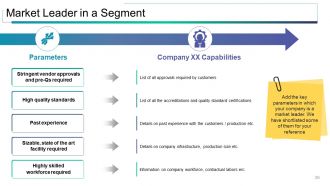
Slide 26: This slide showcases Market Leader in a Segment displaying- Parameters: High quality standards, Past experience, Sizable, state of the art facility required, Highly skilled workforce required, Stringent vendor approvals and pre-Qs required AND. Capabilities: List of all the accreditations and quality standard certifications, Details on past experience with the customers / production etc. Details on company infrastructure, production size etc. Information on company workforce, contractual labors erc. List of all approvals required by customers. Add the key parameters in which your company is a market leader. We have shortlisted some of them for your reference.
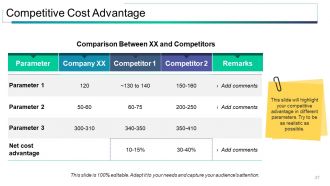
Slide 27: This slide shows Competitive Cost Advantage in tabular form displaying- Parameter, Remarks, Comparison Between XX and Competitors. This slide will highlight your competitive advantage in different parameters. Try to be as realistic as possible.
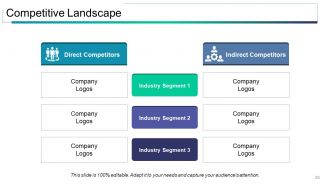
Slide 28: This slide showcases Competitive Landscape showing- Direct Competitors and Indirect Competitors.
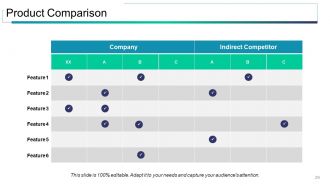
Slide 29: This slide showcases Product Comparison in tabular form showing- Indirect Competitor, Company and Features.
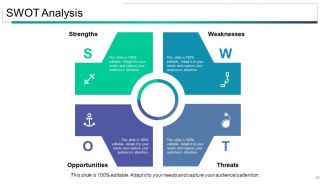
Slide 30: This is a SWOT Analysis slide.
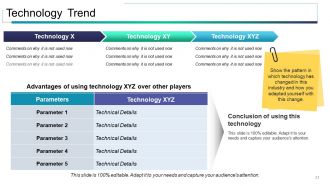
Slide 31: This slide presents Technology Trend showcasing- Advantages of using technology XYZ over other players, Parameters. Show the pattern in which technology has changed in this industry and how you adapted yourself with this change. Conclusion of using this technology can also be stated here.
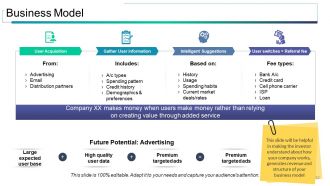
Slide 32: This is a Business Model slide displaying- User Acquisition Gather User information Intelligent Suggestions User switches = Referral fee with Future Potential: Advertising aspects to state.
Slide 33: This is a Revenue Model slide showing- Pricing, Recurring Revenue Frequency, Expected ARPU, Life-time value of a customer, Cost to Acquire a customer. We have considered 6 most important and commonly considered factors which are expected by the investors to be a part of their revenue model.
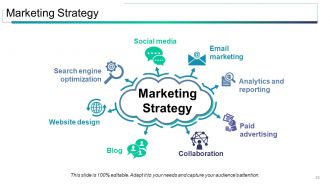
Slide 34: This slide presents Marketing Plan consisting of- Website design, Analytics and reporting, Email marketing, Social media, Paid advertising, Collaboration, Blog, Search engine optimization.
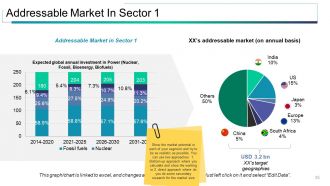
Slide 35: This slide presents Addressable Market In Sector 1 in chart and graph forms. Show the market potential in each of your segment and try to be as realistic as possible. You can use two approaches: 1. Bottom-up approach where you calculate and show the working or 2. direct approach where do you do some secondary research for the market size.
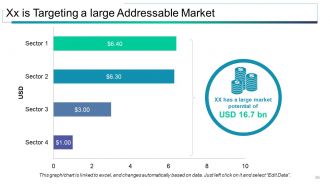
Slide 36: This slide presents Xx is Targeting a large Addressable Market in bar graph form.
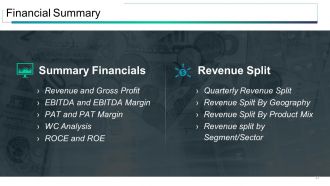
Slide 37: This slide shows Financial Summary divided into- Summary Financials: Revenue and Gross Profit, EBITDA and EBITDA Margin, PAT and PAT Margin, WC Analysis, ROCE and ROE. Revenue Split: Quarterly Revenue Split, Revenue Spilt By Geography, Revenue Split By Product Mix, Revenue split by Segment/Sector.
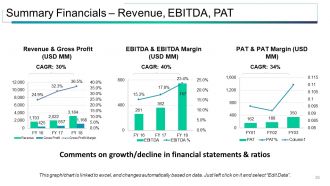
Slide 38: This slide showcases Summary Financials – Revenue, EBITDA, PAT in graph form.
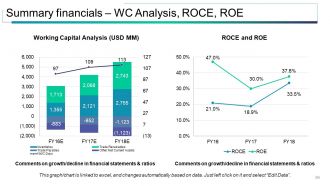
Slide 39: This slide showcases Summary financials – WC Analysis, ROCE, ROE in graph form.
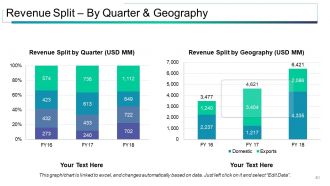
Slide 40: This slide showcases Revenue Split – By Quarter & Geography in two graph forms stating- Revenue Split by Quarter, Revenue Split by Geography.
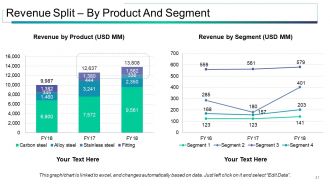
Slide 41: This slide showcases Revenue Split – By Product And Segment in graph form.
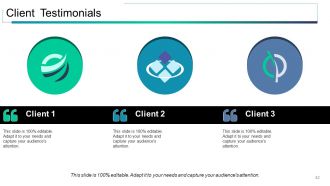
Slide 42: This is a Client Testimonials slide with name, designation and text boxes to state information.
Slide 43: This is a Contact Us slide with name, designation and text boxes to state information.
Slide 44: This is a Coffee Break slide to halt. You may change the slide content as per need.
Slide 45: This slide is titled Charts and Graphs to proceed forward. You may change the slide content as per need.
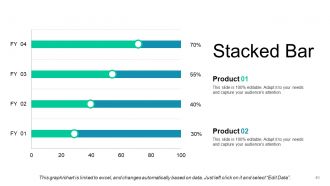
Slide 46: This slide presents a Stacked Bar graph for two product/entity comparison, information, specifications etc.
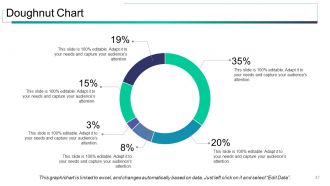
Slide 47: This slide presents a Doughnut Chart for two product/entity comparison, information, specifications etc.
Slide 48: This slide presents a Clustered Column Chart for two product/entity comparison, information, specifications etc.
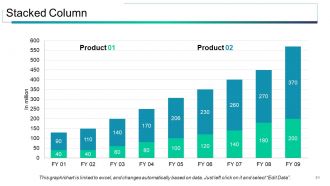
Slide 49: This slide presents a Stacked Chart for two product/entity comparison, information, specifications etc.
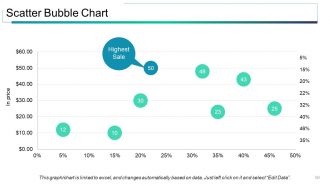
Slide 50: This slide presents a Scatter Bubble Chart for two product/entity comparison, information, specifications etc.
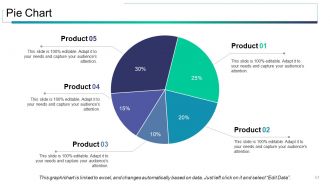
Slide 51: This slide presents a Pie Chart for two product/entity comparison, information, specifications etc.
Slide 52: This slide presents a Clustered Column Line Graph for two product/entity comparison, information, specifications etc.
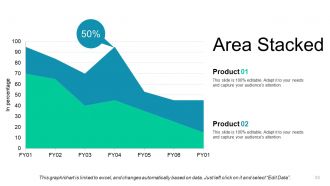
Slide 53: This slide presents an Area Chart for two product/entity comparison, information, specifications etc.
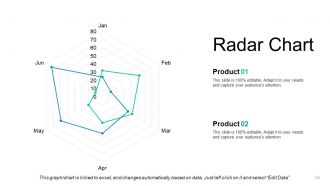
Slide 54: This slide presents a Radar Chart for two product/entity comparison, information, specifications etc.
Slide 55: This slide is titled Additional slides to proceed forward. You may change the slide content as per need.
Slide 56: This slide contains Our Mission with imagery. State it here.
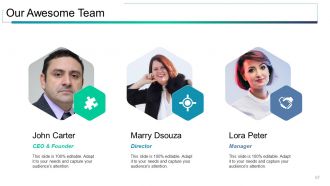
Slide 57: This slide presents Our Team with designation, image text holder and text boxes to fill information.
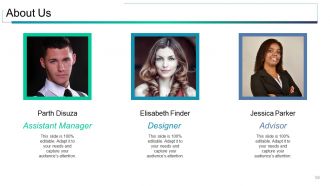
Slide 58: This is an About Us slide. State your position, facts, team/company specifications or anything business here.
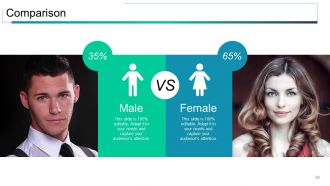
Slide 59: This slide shows Comparison in a creative manner displaying male and female imagery. State comparing aspects here.
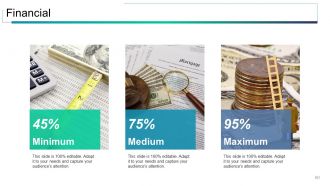
Slide 60: This slide shows Financial Score. State financial aspects here.
Slide 61: This is a Quotes slide. State business message, beliefs etc. here.
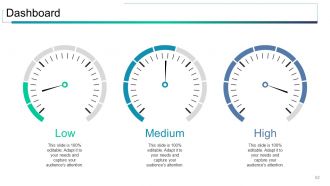
Slide 62: This is a Dashboard slide to display metrics, kpis, etc.
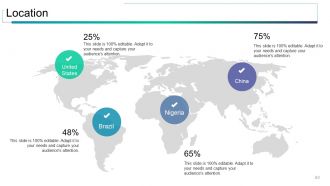
Slide 63: This is a Location slide of a world map image to show global growth, presence etc.
Slide 64: This is a Post It slide to flash company event, news or anything to highlight.
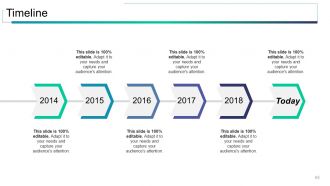
Slide 65: This is a Timeline slide to show growth, evolution etc.
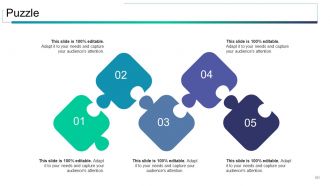
Slide 66: This slide showcases a Puzzle image to show information, specifications etc.
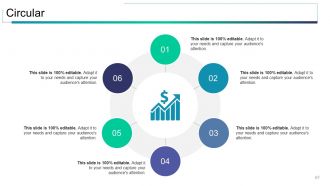
Slide 67: This slide shows a Circular image with text boxes. State information etc. here.
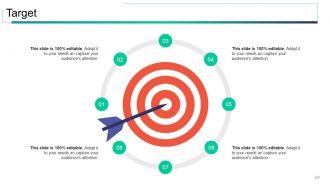
Slide 68: This slide shows Target Board With Dart. State your targets here.
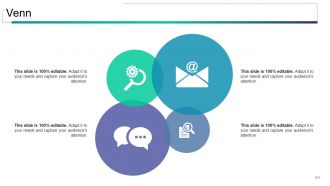
Slide 69: This slide shows a Venn diagram image with text boxes. State information etc. here.
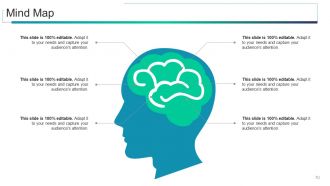
Slide 70: This is a Mind Map Chart to show information, segregations, specifications etc.
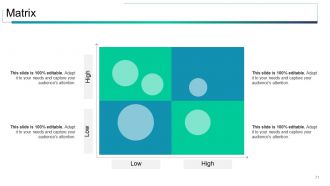
Slide 71: This is a Matrix slide to show information, specifications etc.
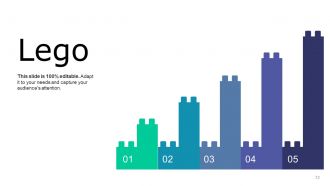
Slide 72: This is a Lego Blocks Diagram slide to show information, specifications etc.
Slide 73: This slide shows Silhouettes image with text boxes. State people related information etc. here.
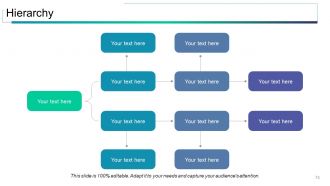
Slide 74: This is a Hierarchy slide to state team specifications, organizational structure etc.
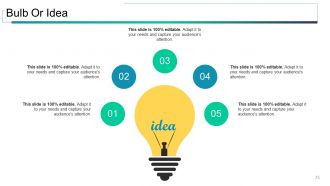
Slide 75: This slide shows a Bulb or Idea image with text boxes. State information, innovative aspects etc. here.
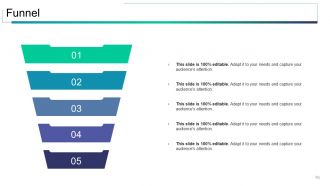
Slide 76: This slide displays a Funnel image. State information, funneling aspects etc. here.
Slide 77: This is a Thank You slide with Address# street number, city, state, Contact Numbers, Email Address.
Detailed business plan for company powerpoint presentation slides with all 77 slides:
Generate a huge amount of energy with our Detailed Business Plan For Company Powerpoint Presentation Slides. Bring about fusion of ideas.












FAQs for Detailed business plan for company
Okay so definitely hit the basics: executive summary, problem/solution, market analysis, business model, financials, and what you're actually asking for. Lead with the problem because honestly, investors check out super fast if you don't grab them right away. Financial slides matter but don't dump a messy spreadsheet on them - keep those numbers clean. Practice your timing like crazy since running over just kills your whole vibe. Most pitches bomb because people try shoving everything in instead of actually telling a story. Make sure each section flows into the next, and always wrap up with what you want them to do next.
Dude, visual storytelling is a game changer for business plans. Don't just dump numbers on investors - walk them through your customer's actual journey. Show the problem, your fix, then the happy ending. Makes it way more memorable than some boring spreadsheet they'll forget in 5 minutes. Charts help too since nobody wants to decode tiny cells forever. Think of it like making a movie where each slide moves the story forward. You're building up to that big moment where they're like "yeah, I need to invest in this." Oh and infographics make financial stuff way less painful to look at.
Look, templates are just scaffolding for breaking down big ideas into bite-sized pieces. You'll structure everything logically - problem, solution, market size, money stuff - instead of dumping it all at once. People won't get lost in random details (happens constantly with business pitches, trust me). The visual consistency is clutch because your audience focuses on actual ideas rather than decoding messy slides. Honestly, pick whatever template matches your story and stick with it. Your investors will appreciate not having to work so hard to follow along.
Dude, it's all about knowing your audience. Investors? Hit them with market size and revenue projections right away - they just want to see dollar signs. But stakeholders like your team or partners? They're thinking "how does this mess with my day-to-day?" Totally different vibe. I swear, sometimes I feel like I need a translator between these groups. Your slides should literally get reordered depending on who's in the room. Do your homework on what they actually care about beforehand. Trust me, leading with growth charts works for VCs, but your operations team wants to know their role first.
Dude, the worst thing you can do is be super vague about money stuff - like how you'll actually make revenue or what your projections look like. Investors hate that. Also don't try shoving everything into one presentation, you'll lose people fast. Oh and here's something that drives me crazy - founders spend like 10 slides on the problem then rush through their actual solution in 30 seconds. Makes no sense! You gotta know your competition too. Don't pretend you're the only company doing this because that's just not realistic. Tell a clear story, nail your timing, and always end with what you specifically need from them.
Skip the number dump - nobody wants to wade through raw survey data. Charts work way better for showing market size, who your customers are, competitor stuff. Each data point needs to tell a story about why your business makes sense or what gaps you can fill. I learned this the hard way after watching too many eyes glaze over during pitches! Bullet points help break down the main insights. Then connect it back to how the research backs up your model. Visuals first, then the "so what does this actually mean" explanation.
You definitely need those financial charts - investors eat up revenue projections and break-even timelines. Product screenshots or prototypes are gold if you've got them. Market size stuff works too (yeah, even pie charts, boring as they are). Customer testimonials hit different though - nothing beats real people saying your product actually works. Keep everything clean so people focus on you talking, not squinting at tiny text. Oh, and practice those transitions beforehand because awkward pauses between slides kill momentum. You'll nail it!
Dude, that first slide is EVERYTHING. You literally have 30 seconds before people zone out and start scrolling Instagram. I've watched amazing startups completely bomb because they opened with some snooze-fest company timeline instead of the actual problem they're solving. Don't do that to yourself. Hit them with something that makes investors go "oh shit, really?" - could be a crazy stat, something everyone relates to, whatever. Just make them lean forward instead of back. Those opening words either hook them or you're done.
Honestly, ditch the spreadsheet nightmare and go big picture. Charts are your friend here - bar graphs and trend lines beat tiny number tables every time. Round everything up (like $2.5M instead of $2,547,832 because who has time for that?). Pick maybe 3-4 key things: revenue growth, when you'll break even, cash flow. More than that and people zone out completely. The story matters too - explain why you think growth will happen or if there's seasonal stuff. Make a one-pager with your main projections so you're not scrambling during questions.
Actually use that feedback instead of just saying "thanks, noted." Time yourself religiously - going over kills your credibility instantly. If multiple people say the same thing (like your financials slide being confusing), they're right. Record yourself after making changes because you'll catch stuff you'd otherwise miss. Most people honestly just ignore this whole step and wonder why they bomb. Oh, and work on whatever specific issues came up - talking too fast, unclear value prop, whatever. You want to walk in there knowing you've fixed the obvious problems already.
Honestly, just repeat their questions back to them - gives you a sec to think and makes sure everyone caught it. Don't know something? Just say you don't know instead of making stuff up (learned that one the hard way). Try to connect your answers back to what makes your business awesome whenever you can. Keep things short and sweet - nobody wants to hear you ramble on forever. Oh, and definitely prep for the obvious stuff beforehand: how much money you need, who you're competing with, revenue numbers. Stay confident but don't be cocky about it. Have your financial projections ready because that question's coming 100%.
Sprinkle customer testimonials on your market validation slides, but don't go overboard with quote walls - looks super try-hard. Show client logos and drop specific numbers like retention rates or NPS scores. Case studies work great for proving real results. Got any big-name customers? Definitely name-drop those. I'd put testimonials right after making claims about product-market fit so they feel like natural backup, not random bragging. Oh, and mix up where you place them throughout the deck instead of dumping everything on one slide.
PowerPoint and Keynote are solid, but have you tried Prezi? Way more dynamic since you can zoom around instead of just clicking through slides. Canva's actually pretty decent too if you suck at design stuff. For remote stuff, just use Zoom's screen share or maybe record something with Loom beforehand. Oh, and Mentimeter's cool for polls if you want people to actually participate. But honestly? I've watched so many presentations completely bomb because someone got too fancy with animations. Always keep a basic PDF ready just in case. Your delivery matters way more than flashy transitions anyway.
Look at the room during your pitch - are people leaning in? Asking smart questions? That's your first clue. But honestly, the real indicator comes after. Within a week or two, you'll know if they're actually interested based on follow-up meetings, partnership talks, or funding discussions. Pay attention to question quality too. Surface-level stuff usually means they didn't get it, while detailed implementation questions? That's gold. I'd wait about two weeks max, then circle back to see where they stand and get some real feedback on what clicked.
Don't cram too much text on each slide - nobody wants to read a novel up there. Stick to one font (maybe two if you're feeling fancy) and use colors that actually make sense together. White space isn't empty space, it's breathing room. Your font needs to be big enough so the person in the back row isn't squinting. High contrast between text and background is clutch. Oh, and line everything up properly because crooked slides just look amateur. Use bullet points but keep them short. Visuals should actually help tell your story, not just fill space. Random tip: print a couple slides in black and white to see if they still work without color.
No Reviews