


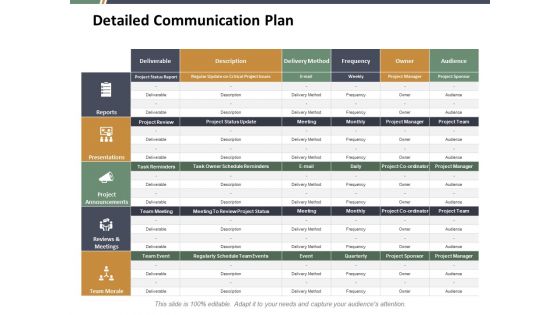
Detailed communication plan ppt summary visual aids





Try Before you Buy Download Free Sample Product
 Impress Your
 Audience
 100%
100% Editable
 Save Hours
 of Time


Take their breath away with our Detailed Communication Plan Ppt Summary Visual Aids. They will gulp in the oxygen of your thoughts.
People who downloaded this PowerPoint presentation also viewed the following :
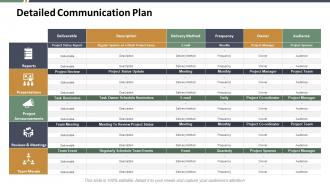
Detailed communication plan ppt summary visual aids with all 5 slides:
Be an entertaining joker with our Detailed Communication Plan Ppt Summary Visual Aids. Allow folks to have fun at your expense.

FAQs for Detailed communication plan ppt
Focus on four main things for your communication plan: who needs to hear what, timing, how you'll reach them, and tracking if it actually worked. I'd segment your audiences first - different groups need different messages. Then pick the right channels. Email works fine for routine stuff, but big news deserves a call or meeting. Too many people just blast the same message everywhere and wonder why nobody cares. Build in ways for people to respond back to you - that's how you know if anyone's actually listening. Oh, and don't forget to measure results somehow.
So audience segmentation is honestly what separates communication plans that actually work from the ones that just sit there looking pretty. You've got to figure out who needs what - your executives want the 30,000-foot view while project teams need all the nitty-gritty details. Makes total sense when you think about it. Without breaking people into segments, you end up sending generic messages that nobody really connects with. I learned this the hard way on a project last year, ugh. Start by mapping out your key audiences first. Then figure out what info each group actually cares about and build your messaging around that.
Honestly, it's all about matching the channel to what you're saying. Quick updates? Slack or email work great for getting info out fast. But anything complex where people need to ask questions - definitely do a meeting or video call. I made the mistake once of giving tough feedback over text and it went horribly. Face-to-face is non-negotiable for sensitive stuff. Policy changes and formal announcements are fine through official emails though. The key is knowing your audience too - some teams love Slack, others barely check it. You'll save yourself so much headache if you just think about urgency and complexity first.
Honestly, remote teams are just harder to coordinate - you can't walk over and bug someone when you need an answer. I'd start by figuring out everyone's timezones first (learned this the hard way). Set up regular check-ins and use Slack for ongoing stuff, but be really clear about when people need to respond. With in-person teams you can wing it more since everyone picks up on visual cues. The big thing with remote is having backup communication - like if someone misses a message, they'll hear about it in your weekly meeting too. Oh, and actually spell out what each meeting is for.
Honestly, feedback is what saves your communication plan from being a total disaster. Without it, you're just guessing if anything's actually landing. Get feedback during planning to spot what you missed, while rolling out so you can pivot fast, and afterward to see if it really worked. I've watched too many teams bomb because they figured they'd "deal with feedback later" - huge mistake. Short feedback loops show you who's confused, what messages aren't clear, and which channels are basically useless. Don't just say you'll collect feedback somehow. Set actual checkpoints with real people responsible for gathering it.
Honestly, visuals are a game changer for communication plans. People's brains just process images way faster than text - there's actually research on that but whatever. Charts and infographics turn boring data into something people will actually look at. Nobody wants to read paragraph after paragraph of dense info. Different people learn differently too, so you're covering more bases. I'd grab your 2-3 most important points and think about what kind of visual would make them stick. Even simple diagrams work better than walls of text most of the time.
Honestly, the worst thing you can do is be super vague about who needs what info and when. Don't fall into that "tell everyone everything" trap either - it just becomes white noise. Map out your key people first and figure out what they actually give a shit about. Then work backwards from there. Also, think two-way communication, not just you blasting updates at people. Be realistic about timing too. Not everything needs a whole meeting when a quick Slack works fine. I learned this the hard way - over-promising on update frequency will bite you later.
Look, treat your crisis communication plan like it's constantly evolving - don't set it and forget it. Ramp up your updates way more than usual and be transparent about what's happening. Most teams freak out and over-communicate, but honestly? That beats going silent any day. Watch how people are reacting and switch up your approach - different tone, channels, timing, whatever works. Daily check-ins with your team are crucial here. You need to see what's actually landing and what's falling flat based on real feedback. If something's not working, ditch it fast and try something else.
So you'll need to track both reach and engagement - stuff like email open rates, meeting attendance, survey responses, and actual content engagement. Views are pretty much useless though, total vanity metric. The real gold is behavioral changes: are people actually following new processes? Have those "wait, how do I do this again?" support tickets dropped off? I'd honestly set specific targets for each metric upfront. Then review monthly so you can pivot if things aren't working. Oh, and don't forget to look at whether there's less general confusion floating around - that's usually a good sign your communication is landing.
Honestly, just wrap your key messages in actual stories people can relate to. Like instead of dumping stats, tell them how that new policy helped Sarah in accounting or whatever. I'm always a sucker for good before-and-after stuff too. Mix up your formats - case studies work great in reports, but save the personal stories for presentations. Customer journey stuff is perfect for marketing materials. Oh, and start collecting these stories now while you're thinking about it. You'll need examples that actually back up what you're trying to say. Trust me, it makes everything way more engaging.
Start with your brand voice and main messages - that's your foundation. Write a simple style guide covering hashtags, emojis, the whole deal. I swear, companies always skip this part then scramble later trying to figure out their "voice." Different platforms need different approaches though - your LinkedIn posts can't sound like your TikToks, obviously. But the core message stays consistent. Set up who approves what and who runs each platform. Honestly, just make a one-page cheat sheet everyone can actually use instead of some massive document nobody reads.
Honestly, timing can totally make or break your whole plan. Map out when your audience actually pays attention - don't launch something big right before holidays when everyone's checked out mentally. Bad timing kills even great messages. But here's the thing - good timing actually makes your message hit harder. Try syncing with product launches or industry events. I learned this the hard way once, but whatever. Start with your key dates first, then build everything else around those. Short answer: timing isn't just important, it's everything.
Dude, culture affects literally everything in your comm plan. Your messaging style needs to match whether they're direct communicators or more roundabout. Some audiences want formal tone, others are super casual. Visual vs text-heavy depends on the culture too. Don't just think time zones - cultural holidays and work patterns are huge (learned that the hard way once). Different cultures handle feedback and hierarchy totally differently. Honestly, just map out all their cultural preferences first, then build your timeline and messaging around that. Way easier than trying to fix it later.
Honestly, start with Asana or Monday.com to track your timeline and deliverables - they're lifesavers. Slack's probably your best bet for team chat unless you're already stuck with Teams. For social media stuff, Hootsuite and Buffer are solid for scheduling posts. Canva's great for making visuals that don't look terrible (way easier than trying to figure out Photoshop). Oh, and if you need surveys, Typeform's pretty slick - way better user experience than SurveyMonkey in my opinion. Just don't go crazy with too many tools or your team will hate you. Pick like 2-3 max that everyone will actually use.
Start by mapping who your stakeholders actually are and what keeps them up at night - not what you assume matters to them. Create different communication channels for each group instead of those soul-crushing mass emails we all send (guilty as charged). Build in real feedback loops at decision points, not just status updates. Regular check-ins are clutch, but only if you're actually listening to what people tell you. The whole thing needs to feel like a conversation from day one. Be upfront about how you'll use their input too - people hate feeling like they're shouting into the void.
No Reviews