


Devsecops Best Practices For Secure Applications Powerpoint Presentation Slides





Try Before you Buy Download Free Sample Product
 Impress Your
 Audience
 100%
100% Editable
 Save Hours
 of Time


This PowerPoint presentation gives a brief idea about DevSecOps, including its overview, core principle, workflow, and elements for successful implementation of DevSecOps. In this Role of DevSecOps in Modern Software Development PowerPoint Presentation, we have covered the difference between DevSecOps and devops, the importance and benefits in an organization, and the pipeline security stages of DevSecOps. In addition, this DevSecOps Automation for Continuous Security PPT contains the governance model with success criteria, pillars of transformation, and cultural aspects of DevSecOps. Also, the DevSecOps Tools and Techniques for Robust Security PPT presentation includes the transformation phases of DevSecOps, security applications, and associated security tools. Furthermore, this DevSecOps Strategies for Security Vulnerability Management template outlines the various tools associated with DevSecOps and the activities performed by the tools. It also highlights the future trend driving the digital transformation of DevSecOps. Moreover, this deck comprises market growth dynamics, a checklist, best practices, training, and a budget for DevSecOps. Lastly, this PowerPoint Presentation highlights the various challenges and possible solutions, a roadmap, a timeline, and a dashboard for evaluating DevSecOps. Download our 100 Percentage editable and customizable template, which is also compatible with Google Slides.
People who downloaded this PowerPoint presentation also viewed the following :
Content of this Powerpoint Presentation
Slide 1: This slide introduces DevSecOps- Best Practices For Secure Applications. State Your Company Name and begin.
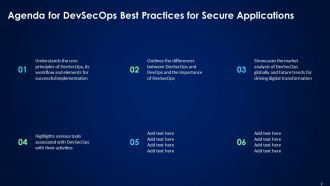
Slide 2: This slide is an Agenda slide. State your agendas here.
Slide 3: This slide shows a Table of Contents for the presentation.
Slide 4: This slide is in continuation with the previous slide.
Slide 5: This slide is an introductory slide.
Slide 6: This slide gives an overview of DevSecOps and its process.
Slide 7: This slide discusses the working process of development, security & operations in DevSecOps.
Slide 8: This slide entails the core principle used in the DevSecOps model.
Slide 9: This slide presents an overview of the working procedure of DevSecOps.
Slide 10: This slide represents the various processes followed in DevSecOps.
Slide 11: This slide showcases the various processes followed in DevSecOps.
Slide 12: This slide highlights the level of the DevSecOps maturity model.
Slide 13: This slide is an introductory slide.
Slide 14: This slide illustrates the comparison between DevOps and DevSecOps models.
Slide 15: This slide elucidates the working procedure of the DevOps model.
Slide 16: This slide mentions the workflow procedure of DevSecOps model.
Slide 17: This slide is an introductory slide.
Slide 18: This slide contains the benefits of DevSecOps in an organization.
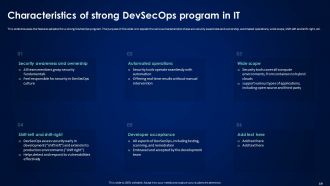
Slide 19: This slide highlights the features adopted for a strong DevSecOps program.
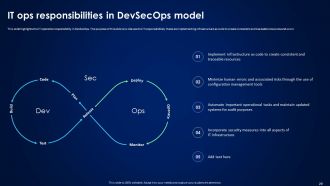
Slide 20: This slide consists the IT operation responsibility in DevSecOps.
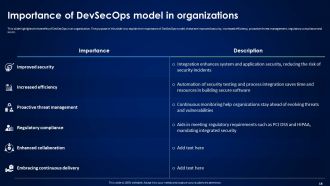
Slide 21: This slide explains the importance of the DevSecOps model in an organization.
Slide 22: This slide shows a Table of Contents for the presentation.
Slide 23: This slide depicts the global market size of DevSecOps.
Slide 24: This slide denotes the global market analysis of DevSecOps.
Slide 25: This slide demonstrates the trends driving adoption and digital transformation in DevSecOps.
Slide 26: This slide is an introductory slide.
Slide 27: This slide highlights the DevSecOps phases and continuous feedback loop cycle.
Slide 28: This slide is an introductory slide.
Slide 29: This slide puts the success criteria followed for the DevSecOps process.
Slide 30: This slide is an introductory slide.
Slide 31: This slide discusses the things to be considered when adopting DevSecOps.
Slide 32: This slide entails the integration of security in the CI pipeline for DevSecOps.
Slide 33: This slide is an introductory slide.
Slide 34: This slide discusses the pipeline security of DevSecOps.
Slide 35: This slide presents the development pre-commit stage of the DevSecOps pipeline.
Slide 36: This slide represents the continuous integration commit stage of the DevSecOps pipeline.
Slide 37: This slide elucidates the continuous deployment acceptance stage of the DevSecOps pipeline.
Slide 38: This slide mentions the production post-deployment stage of the DevSecOps pipeline.
Slide 39: This slide is an introductory slide.
Slide 40: This slide discusses the DevSecOps program requirement for continuous improvement.
Slide 41: This slide is an introductory slide.
Slide 42: This slide portrays the way to develop a DevSecOps culture in an organization.
Slide 43: This slide gives an overview of the associated DevSecOps culture.
Slide 44: This slide is an introductory slide.
Slide 45: This slide pertains to the importance and driver of software development security.
Slide 46: This slide showcases the various challenges associated with DevOps for neglecting security.
Slide 47: This slide shows the environment and data security for DevSecOps.
Slide 48: This slide describes the continuous integration and continuous delivery process security for DevSecOps.
Slide 49: This slide elucidates the various application security testing tools used in DevSecOps.
Slide 50: This slide is an introductory slide.
Slide 51: This slide highlights the four pillars of transformation for DevSecOps.
Slide 52: This slide marks the first phase of DevSecOps transformation.
Slide 53: This slide demarcates the second phase of DevSecOps transformation.
Slide 54: This slide delienates the third phase of DevSecOps transformation.
Slide 55: This slide puts the fourth phase of DevSecOps transformation.
Slide 56: This slide discusses the fifth phase of DevSecOps transformation.
Slide 57: This slide mentions the sixth phase of DevSecOps transformation.
Slide 58: The slide contains the critical elements for the successful implementation of DevSecOps.
Slide 59: The slide consists the critical elements for the successful implementation of DevSecOps.
Slide 60: This slide caters to the approach to developing a sustainable governance model for DevSecOps.
Slide 61: This slide is an introductory slide.
Slide 62: This slide explains the various limitations with DevSecOps and its solution.
Slide 63: This slide discusses the various obstacles faced when transforming from DevOps to DevSecOps.
Slide 64: This slide is an introductory slide.
Slide 65: This slide represents the checklist to implement the DevSecOps in an organization.
Slide 66: This slide showcases the best practices for the DevSecOps in an organization.
Slide 67: This slide is an introductory slide.
Slide 68: This slide shows the training schedule for strategy implementation for customers to manage, monitor, and troubleshoot DevSecOps implementation procedures.
Slide 69: This slide elucidates the estimated and actual cost of implementing a DevSecOps system in an organization.
Slide 70: This slide presents the breakdown cost for the DevSecOps installation and management training for the customers.
Slide 71: This slide is an introductory slide.
Slide 72: This slide represents the 30-60-90-day plan for DevSecOps implementation.
Slide 73: This slide is an introductory slide.
Slide 74: This slide highlights the project roadmap to implement the DevSecOps plan in an organization.
Slide 75: This slide is an introductory slide.
Slide 76: This slide shows the timeline for implementing the DevSecOps process.
Slide 77: This slide is an introductory slide.
Slide 78: This slide showcases the dashboard to track the DevSecOps performance.
Slide 79: This slide is in continuation with the previous slide.
Slide 80: This slide shows a Table of Contents for the presentation.
Slide 81: This slide presents the comparative analysis of the before versus after DevSecOps implementation.
Slide 82: This slide depicts the various impacts of the DevSecOps process in an organization.
Slide 83: This slide shows a Table of Contents for the presentation.
Slide 84: This slide mentions the case study related to DevSecOps.
Slide 85: This slide shows all the icons included in the presentation.
Slide 86: This slide is titled Additional Slides for moving forward.
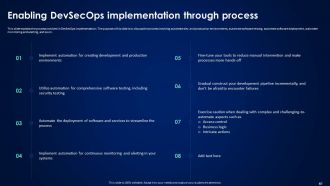
Slide 87: This slide explains the process involved in DevSecOps implementation.
Slide 88: This slide discusses the various application security testing tools used in DevSecOps.
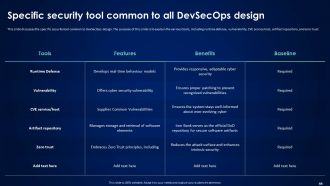
Slide 89: This slide depicts the specific security tool common to DevSecOps design.
Slide 90: This slide demonstrates the trends driving adoption and digital transformation in DevSecOps.
Slide 91: This slide is an About Us slide to show company specifications etc.
Slide 92: This slide shows SWOT describing- Strength, Weakness, Opportunity, and Threat.
Slide 93: This slide contains a Puzzle with related icons and text.
Slide 94: This slide shows Post-It Notes. Post your important notes here.
Slide 95: This slide depicts a Venn diagram with text boxes.
Slide 96: This slide is a thank-you slide with address, contact numbers, and email address.
Devsecops Best Practices For Secure Applications Powerpoint Presentation Slides with all 102 slides:
Use our Devsecops Best Practices For Secure Applications Powerpoint Presentation Slides to effectively help you save your valuable time. They are readymade to fit into any presentation structure.
-
DevSecOps Best Practices For Secure Applications
-
Agenda for DevSecOps Best Practices for Secure Applications
-
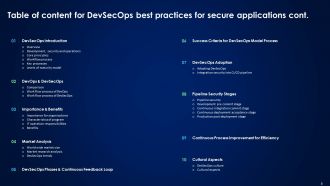
Table of content for DevSecOps best practices for secure applications cont
-
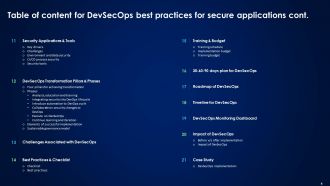
Table of content for DevSecOps best practices for secure applications cont
-
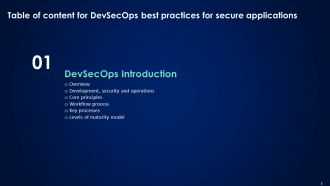
DevSecOps best practices for secure applications
-
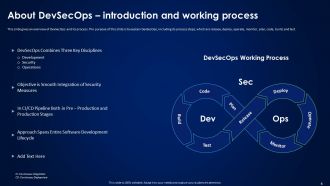
About DevSecOps introduction and working process
-
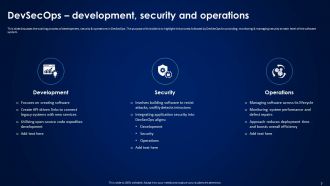
DevSecOps development security and operations
-
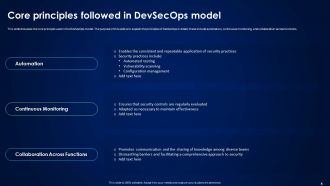
Core principles followed in DevSecOps model
-
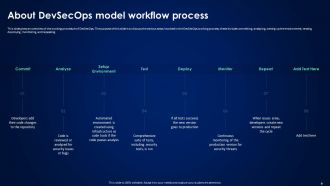
About DevSecOps model workflow process
-
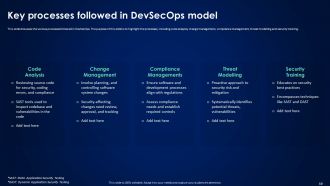
Key processes followed in DevSecOps model
-
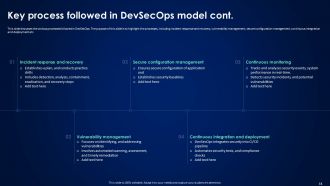
Key process followed in DevSecOps model cont
-
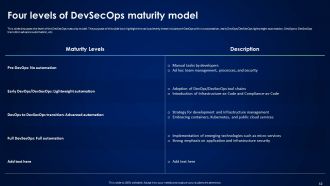
Four levels of DevSecOps maturity model
-
DevOps and DevSecOps
-
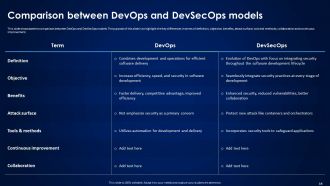
Comparison between DevOps and DevSecOps models
-
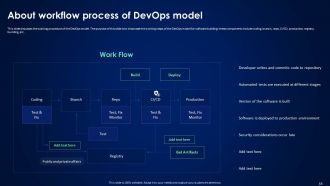
About workflow process of DevOps model
-
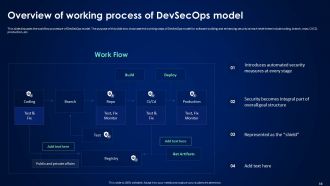
Overview of working process of DevSecOps model
-
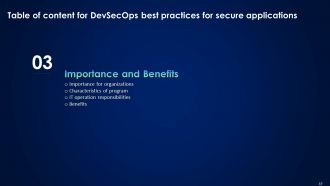
Table of content for DevSecOps best practices for secure applications
-
Importance of DevSecOps model in organizations
-
Characteristics of strong DevSecOps program in IT
-
IT ops responsibilities in DevSecOps model
-
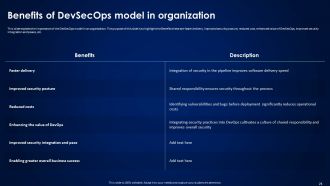
Benefits of DevSecOps model in organization
-
Table of content for DevSecOps best practices for secure applications
-
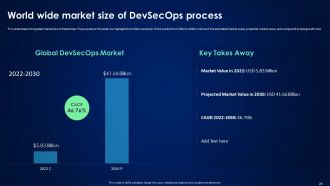
World wide market size of DevSecOps process
-
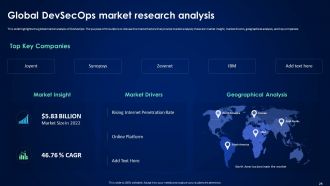
Global DevSecOps market research analysis
-
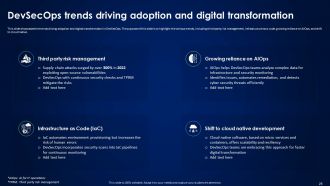
DevSecOps trends driving adoption and digital transformation
-
DevSecOps best practices for secure applications
-
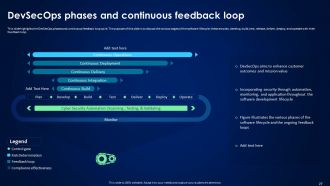
DevSecOps phases and continuous feedback loop
-
Table of content for DevSecOps best practices for secure applications
-
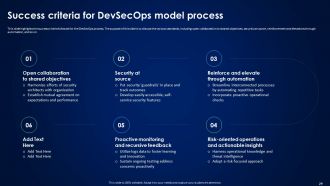
Success criteria for DevSecOps model process
-
DevSecOps best practices for secure applications
-
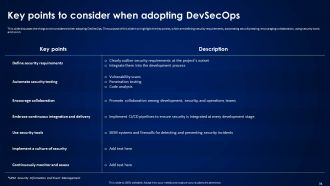
Key points to consider when adopting DevSecOps
-
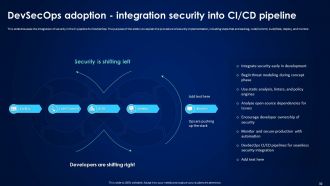
DevSecOps adoption integration security into CI CD pipeline
-
Pipeline Security Stages
-
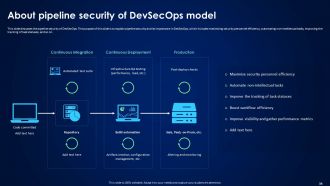
About pipeline security of DevSecOps model
-
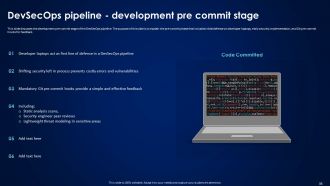
DevSecOps pipeline development pre commit stage
-
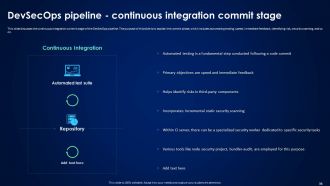
DevSecOps pipeline continuous integration commit stage
-
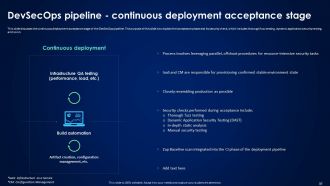
DevSecOps pipeline continuous deployment acceptance stage
-
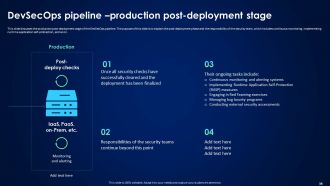
DevSecOps pipeline production post deployment stage
-
Table of content for DevSecOps best practices for secure applications
-
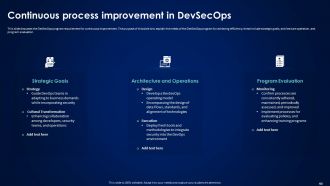
Continuous process improvement in DevSecOps
-
Table of content for DevSecOps best practices for secure applications
-
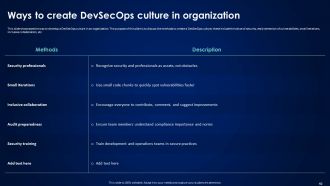
Ways to create DevSecOps culture in organization
-
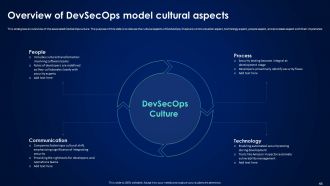
Overview of DevSecOps model cultural aspects
-
Table of content for DevSecOps best practices for secure applications
-
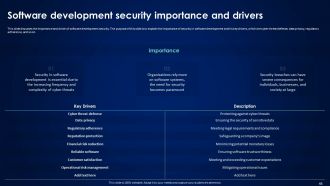
Software development security importance and drivers
-
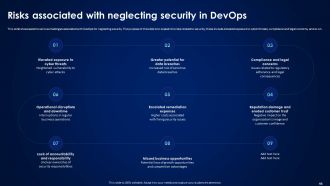
Risks associated with neglecting security in DevOps
-
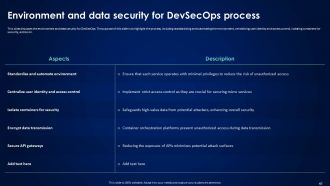
Environment and data security for DevSecOps process
-
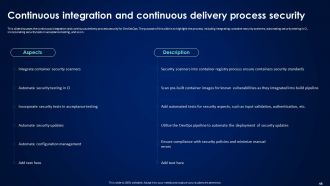
Continuous integration and continuous delivery process security
-
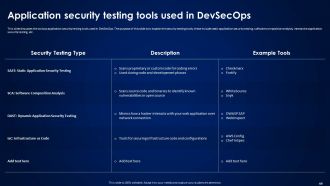
Application security testing tools used in DevSecOps
-
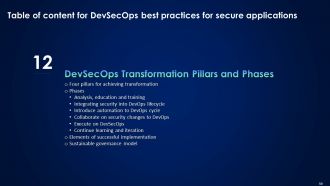
DevSecOps Transformation Pillars and Phases
-
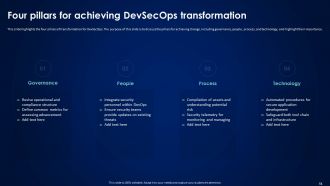
Four pillars for achieving DevSecOps transformation
-
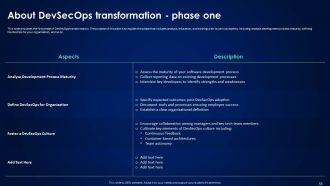
About DevSecOps transformation phase one
-
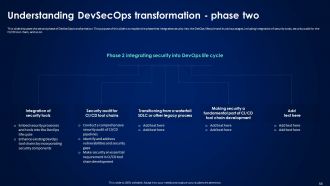
Understanding DevSecOps transformation phase two
-
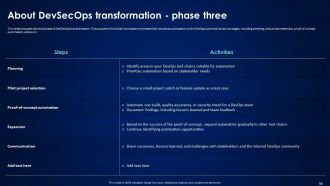
About DevSecOps transformation phase three
-
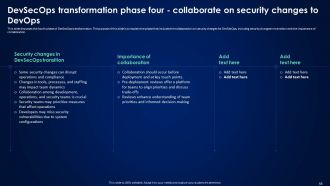
DevSecOps transformation phase four collaborate on security changes to DevOps
-
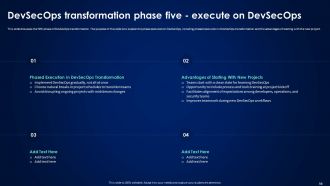
DevSecOps transformation phase five execute on DevSecOps
-
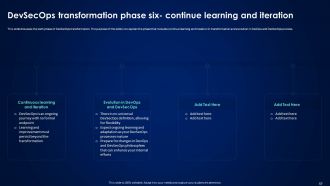
DevSecOps transformation phase six continue learning and iteration
-
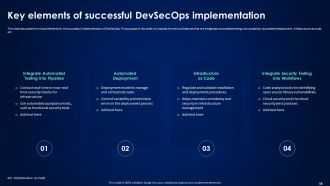
Key elements of successful DevSecOps implementation
-
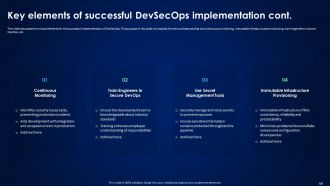
Key elements of successful DevSecOps implementation cont
-
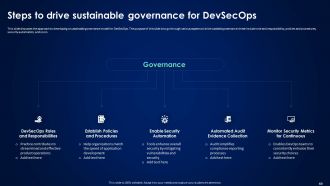
Steps to drive sustainable governance for DevSecOps
-
Challenges Associated with DevSecOps
-
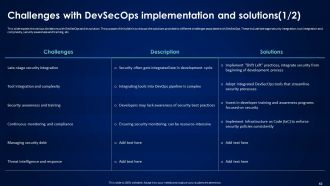
Challenges with DevSecOps implementation and solutions 1 2
-
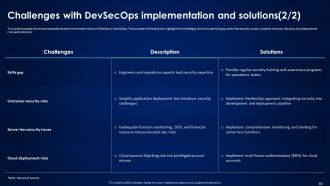
Challenges with DevSecOps implementation and solutions 2 2
-
Table of content for DevSecOps best practices for secure applications
-
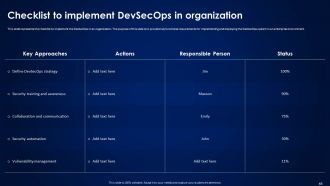
Checklist to implement DevSecOps in organization
-
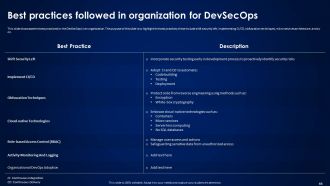
Best practices followed in organization for DevSecOps
-
Table of content for DevSecOps best practices for secure applications
-
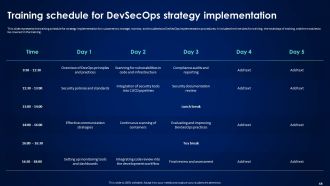
Training schedule for DevSecOps strategy implementation
-
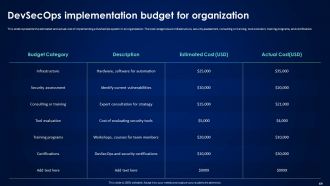
DevSecOps implementation budget for organization
-
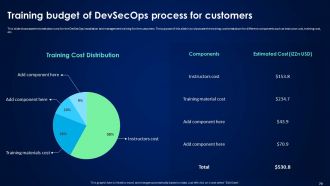
Training budget of DevSecOps process for customers
-
Table of content for DevSecOps best practices for secure applications
-
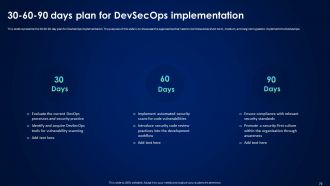
30 60 90 days plan for DevSecOps implementation
-
Table of content for DevSecOps best practices for secure applications
-
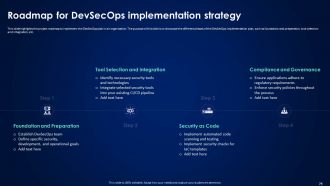
Roadmap for DevSecOps implementation strategy
-
Table of content for DevSecOps best practices for secure applications
-
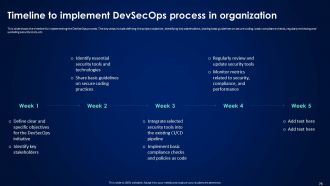
Timeline to implement DevSecOps process in organization
-
DevSecOps best practices for secure applications
-
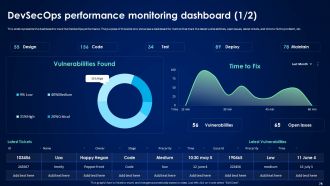
DevSecOps performance monitoring dashboard 1 2
-
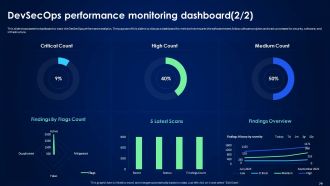
DevSecOps performance monitoring dashboard 2 2
-
Impact of DevSecOps
-
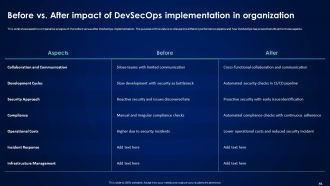
Before vs After impact of DevSecOps implementation in organization
-
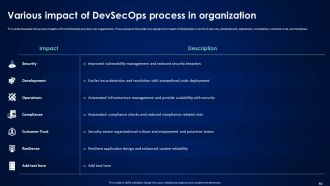
Various impact of DevSecOps process in organization
-
Table of content for DevSecOps best practices for secure applications
-
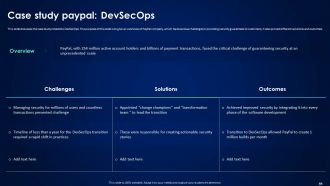
Case study PayPal DevSecOps
-
Icons slide for DevSecOps best practices for secure applications
-

Additional Slides
-
Enabling DevSecOps implementation through process
-
Specific security tool common to all DevSecOps design
-
About us
-
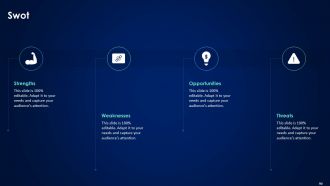
SWOT Analysis
-

Puzzle
-
Post it notes
-
Venn diagram
-

Thank you for watching
-

-

-

-

-

-

-

-

FAQs for Devsecops Best Practices For Secure Applications
So DevSecOps is basically regular DevOps but you're not waiting until the end to think about security - you build it right into your pipeline from day one. The whole "shift left" thing means catching bugs early instead of scrambling later. You automate security testing, get everyone on the same page (dev, ops, security), and monitor stuff continuously. Regular DevOps is all about moving fast, which works great until you accidentally push something sketchy to production. Trust me, that's never fun. DevSecOps keeps that speed but without the security headaches. Start small - throw some automated scans into your CI/CD and loop your security folks into sprint planning.
Honestly? Just bake security right into your development process instead of bolting it on later. SAST tools in your commits will catch bugs when they're actually fixable. Add container scanning, dependency checks, that whole deal. The funny thing is - getting the tools working together is way easier than making devs actually look at the alerts! Set up build gates that fail on critical stuff, otherwise people ignore it. Oh, and give clear fix instructions or you'll just get frustrated tickets. Make it feel natural, not like you're the security police slowing everyone down.
Okay so for continuous monitoring, I'd start with a SIEM like Splunk or ELK Stack - they're great for log analysis and catching threats. Runtime security is huge too, so look at Falco or Aqua Security for real-time container monitoring. Vulnerability scanning is obvious but necessary - Snyk and Twistlock both plug into CI/CD pretty seamlessly. The thing is, you'll end up with like 5+ tools talking to each other (been there), so orchestration platforms like Phantom help wrangle everything. My advice? Start small with 2-3 solid tools, actually get them working right, then add more. Tool sprawl is real and it'll drive you crazy if you go too fast.
Honestly? Cultural pushback is your biggest headache. Dev teams hate when security slows their roll, and security people freak out about losing control. Tool integration is also a nightmare - getting everything to play nice in your CI/CD pipeline makes you want to scream sometimes. Plus good luck finding people who actually get both security AND DevOps. Those unicorns are rare. Start with just one team though, pick one security thing to implement. Once you prove it doesn't suck, other teams will come around. Way easier than trying to boil the ocean from day one.
Honestly, automation is like having a security guard that never sleeps. Set it up in your CI/CD pipeline and it'll catch vulnerabilities automatically with every commit. No more hoping someone remembers to run manual checks when you're all stressed about deadlines. Developers get instant feedback too, which is way better than finding out about issues weeks later when nobody remembers what they were thinking. I'd start with just one security tool though - don't try to automate everything at once or you'll drive yourself crazy. Pick something simple and build from there.
You're gonna want to track security stuff AND delivery speed - both matter. Start with mean time to detect vulnerabilities, how many security tests are automated, and critical bugs reaching production. For delivery: deployment frequency, lead time, change failure rate. Don't forget developer happiness with your security tools though - angry devs will just work around everything you build. Honestly, a slight slowdown for better security is fine, but track it so you know the trade-off. Pick 3-4 metrics max to start. You'll go crazy trying to measure everything at once.
Honestly, you've gotta stop making security feel like the IT team's headache. Do those lunch-and-learn sessions where you actually show real vulnerabilities in your code - nothing wakes people up like "hey, this could totally break our stuff." Build it into onboarding but keep it going, don't just check the box once. Try gamifying it with internal bug bounties or challenges. The big thing though? Celebrate when people catch issues early instead of making them feel bad about it. Also give your devs actual time to fix problems when they find them. Most places are terrible at that last part.
Hey! So first thing - get a proper secret manager like Vault or AWS Secrets Manager. Don't hardcode that stuff anymore. I learned this the hard way when I accidentally pushed an API key to GitHub once (whoops). Set up least-privilege access too, so apps only see what they need. Rotate secrets regularly if you can automate it. GitLeaks is solid for scanning repos - it'll catch things you missed. Honestly, just audit what you have first. You'll probably find random keys in weird places. Trust me on that one.
Get those vulnerability scanners baked right into your CI/CD pipeline - like Snyk or OWASP ZAP scanning every single commit. Yeah, blocking deployments for critical vulns will annoy your devs at first, but trust me, it builds better habits. I'd suggest setting thresholds by severity. Block the high/critical stuff but let medium/low slide with tracking. Speed matters here - if scans take forever, everyone's gonna hate it. Oh, and maybe start small? Pick one scanner, throw it in your build pipeline this week. See how painful it actually is before going all-in.
Think of threat modeling as your security game plan. Map out attack vectors during design phase - way easier than patching holes later. I always push teams to do this in sprint planning or architecture reviews. Get everyone involved: devs, security, product folks. They'll spot different risks you'd miss alone. Honestly, I've watched so many projects blow up because they skipped this step entirely. Just use STRIDE framework or ask "what would hackers go after first?" Build it into your definition of done for new features. Short sessions work better than marathon planning meetings anyway.
Honestly, you can't just bolt compliance on at the end - it'll bite you later. Build those checks right into your CI/CD pipeline from the start. Get some policy-as-code tools running that'll catch SOX, GDPR, whatever regulatory stuff you're dealing with. Make sure everything gets documented automatically because auditors are weirdly obsessed with having records of everything. Here's the crucial part: set up gates that actually stop deployments when something fails compliance. That way your devs can't accidentally ship sketchy code. I'd start with your biggest 3 regulatory headaches and automate those first.
Containers definitely make your DevSecOps pipeline more consistent, but they bring their own headaches too. Better isolation is great for catching vulnerabilities early - can't argue with that. The downside? Now you're juggling container image security, registry issues, and runtime protection on top of everything else. Honestly feels like whack-a-mole sometimes. I'd start with securing your base images first, then shift security scanning left to catch problems before deployment. Tools like Twistlock or Aqua help with runtime monitoring, and don't forget proper secrets management. It's overwhelming initially but worth it.
So with DevSecOps, you're basically baking incident response right into your dev pipeline instead of having security teams panic when stuff hits the fan. Your CI/CD can automatically roll back bad deployments, quarantine sketchy services, whatever. It's like - instead of one bouncer at the club entrance, you've got eyes everywhere. Teams don't sit around waiting for approvals anymore. The whole point is flipping from "oh shit" mode to having your infrastructure just handle problems on its own. Honestly, half the incidents you deal with now could probably be automated away if you mapped them out first.
Definitely get dependency scanning set up - Snyk or OWASP Dependency-Check work great in your CI/CD. Those update PRs are annoying but honestly you can't ignore them. Pin your versions instead of using wildcards (learned this the hard way). Software composition analysis helps you see what's actually getting pulled in transitively, which is usually way more than you think. Set up CVE alerts for your stack so you know when stuff breaks. Oh and consider private repos for anything critical - public mirrors can be sketchy sometimes.
Skip the boring slide presentations and get people actually breaking stuff in workshops. Way more fun and they'll remember it. Rotate your devs through security roles so they get why ops does what they do. Those capture-the-flag competitions work surprisingly well - people get weirdly competitive about it. Focus on threat modeling and secure coding for your actual stack, not generic examples. Incident response drills are crucial too. Regular lunch sessions with your security folks help a ton. Conferences are great if you've got budget. Oh, and make sure everyone knows security isn't just the security team's headache anymore.
-
The website is jam-packed with fantastic and creative templates for a variety of business concepts. They are easy to use and customize.
-
Happy to found you SlideTeam. You guys are value for money. Amazing slides.