

Ecommerce Accounting Management Powerpoint Presentation Slides





Try Before you Buy Download Free Sample Product
 Impress Your
 Audience
 100%
100% Editable
 Save Hours
 of Time


E-commerce Accounting Management refers to collecting, evaluating, organizing, and reporting finances of an e-commerce business with respect to multiple transactions and assets. The main purpose of this procedure is to obtain foundations for future e-commerce business decisions. Check out our professionally designed E-commerce Accounting Management PowerPoint presentation. It provides information about the importance and impact of financial management on e-commerce business, covering aspects such as progress measurement, cash flow, financial goals, merchant fees, etc. This deck offers slides that can help e-commerce organizations in remodeling their key financial processes, such as e-commerce website finances, financial model, operational expenses, website revenues, etc. Also, it represents strategies, namely self-service, auditing, customer acquisition, business valuation, payment gateway, etc., which can help boost these financial processes. Furthermore, the PPT includes an organizational structure with roles and responsibilities of the finance team along with a budget management plan and software selection. These slides also contain KPIs and dashboards along with statements, namely P and L, cash flow, income, and balance sheet, to determine the impact of the improved process of e-commerce financial management. Get access to this powerful template now.
People who downloaded this PowerPoint presentation also viewed the following :
Content of this Powerpoint Presentation
Slide 1: This slide introduces Ecommerce Accounting Management. State your company name and begin.
Slide 2: This slide states Agenda of the presentation.
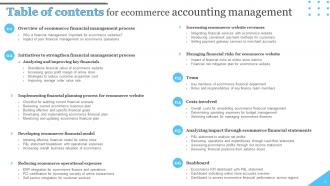
Slide 3: This slide shows Table of Content for the presentation.
Slide 4: This slide highlights title for topics that are to be covered next in the template.
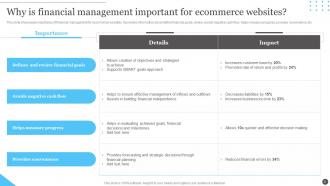
Slide 5: This slide showcases importance of financial management for ecommerce websites.
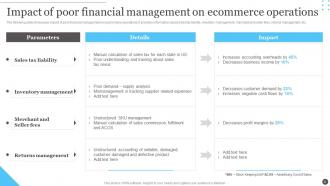
Slide 6: The following slide showcases impact of poor financial management on ecommerce operations.
Slide 7: This slide highlights title for topics that are to be covered next in the template.
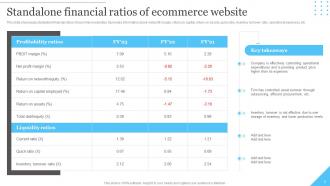
Slide 8: This slide showcases standalone financial ratios of ecommerce websites.
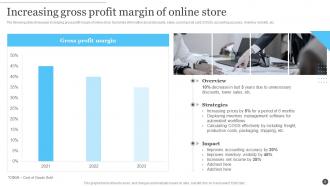
Slide 9: The following slide showcases increasing gross profit margin of online store.
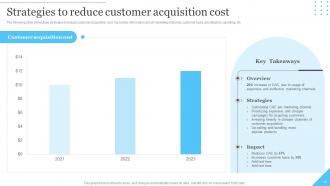
Slide 10: The following slide showcases strategies to reduce customer acquisition cost.
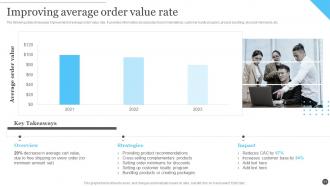
Slide 11: The following slide showcases improvement of average order value rate.
Slide 12: This slide highlights title for topics that are to be covered next in the template.
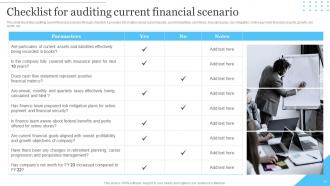
Slide 13: This slide illustrates auditing current financial scenario through checklist.
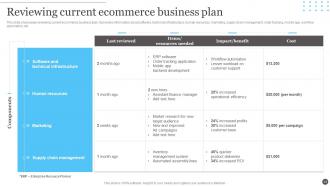
Slide 14: This slide showcases reviewing current ecommerce business plan.
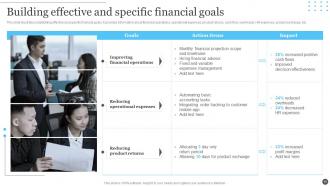
Slide 15: This slide illustrates establishing effective and specific financial goals.
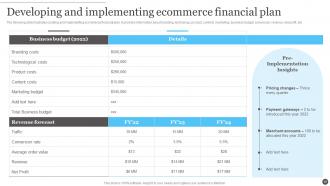
Slide 16: The following slide illustrates creating and implementing ecommerce financial plan.
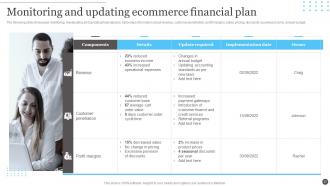
Slide 17: The following slide showcases monitoring, reevaluating and updating financial plan.
Slide 18: This slide highlights title for topics that are to be covered next in the template.
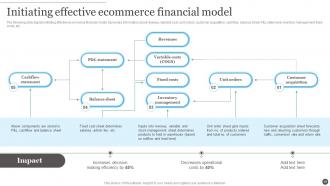
Slide 19: The following slide depicts initiating effective ecommerce financial model.
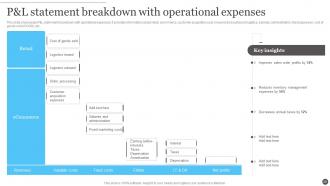
Slide 20: This slide showcases P&L statement breakdown with operational expenses.
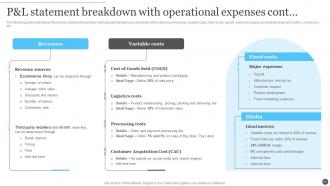
Slide 21: The following slide illustrates profit and loss statement breakdown with operational expenses.
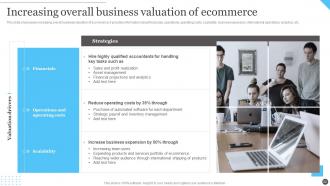
Slide 22: This slide showcases increasing overall business valuation of ecommerce.
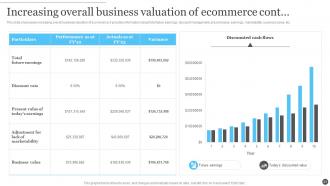
Slide 23: This slide showcases increasing overall business valuation of ecommerce.
Slide 24: This slide highlights title for topics that are to be covered next in the template.
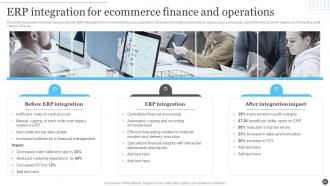
Slide 25: This slide showcases enterprise resource planner (ERP) integration for ecommerce finance and operations.
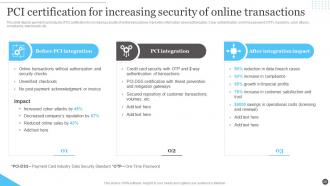
Slide 26: This slide depicts payment card industry (PCI) certification for increasing security of online transactions.
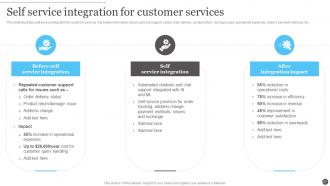
Slide 27: This slide illustrates self service integration for customer services.
Slide 28: This slide highlights title for topics that are to be covered next in the template.
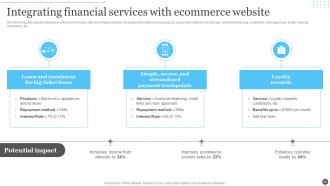
Slide 29: The following slide depicts integration of financial services with ecommerce website.
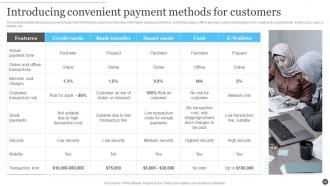
Slide 30: This slide illustrates introducing convenient payment methods for customers.
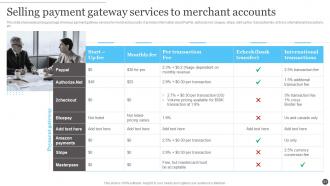
Slide 31: This slide showcases pricing package of various payment gateway services for merchant accounts.
Slide 32: This slide highlights title for topics that are to be covered next in the template.
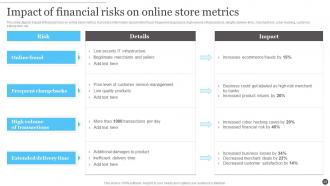
Slide 33: This slide depicts impact of financial risks on online store metrics.
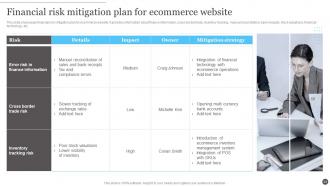
Slide 34: This slide showcases financial risk mitigation plan for ecommerce website.
Slide 35: This slide highlights title for topics that are to be covered next in the template.
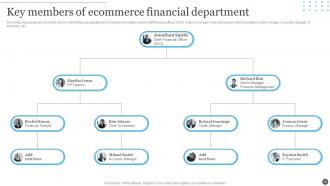
Slide 36: This slide showcases key members of ecommerce financial department.
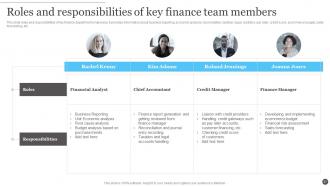
Slide 37: This slide roles and responsibilities of key finance department employees.
Slide 38: This slide highlights title for topics that are to be covered next in the template.
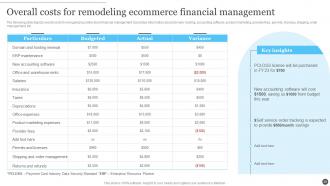
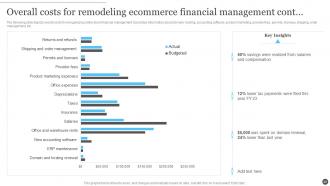
Slide 39: The following slide depicts overall costs for reorganizing online store financial management.
Slide 40: The following slide depicts overall costs for reorganizing online store financial management.
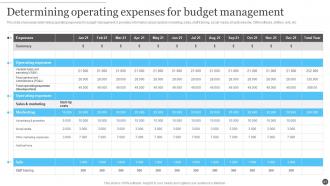
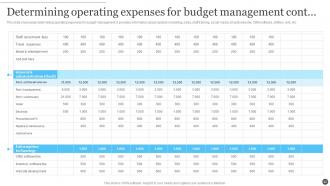
Slide 41: This slide showcases determining operating expenses for budget management.
Slide 42: This slide showcases determining operating expenses for budget management.
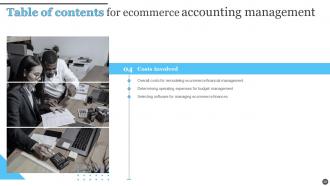
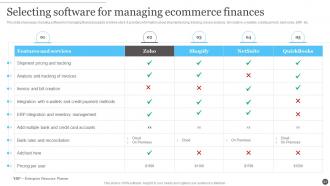
Slide 43: This slide showcases choosing software for managing financial aspects of online store.
Slide 44: This slide highlights title for topics that are to be covered next in the template.
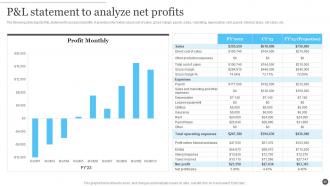
Slide 45: The following slide depicts P&L statement to assess net profits.
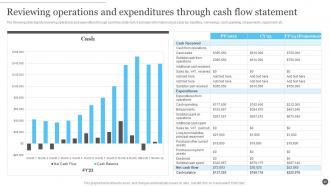
Slide 46: The following slide depicts reviewing operations and expenditure through cash flow statement.
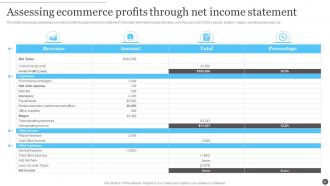
Slide 47: This slide showcases assessing ecommerce profits through net income statement.
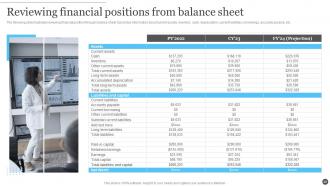
Slide 48: The following slide illustrates reviewing financial position through balance sheet.
Slide 49: This slide highlights title for topics that are to be covered next in the template.
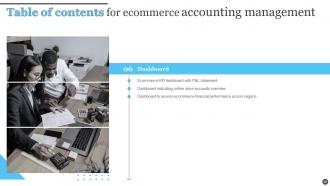
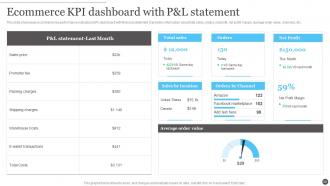
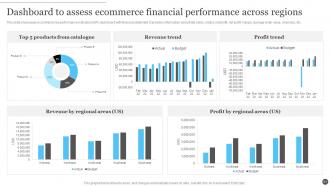
Slide 50: This slide showcases ecommerce key performance indicators (KPI) dashboard with financial statement.
Slide 51: This slide showcases ecommerce key performance indicators (KPI) dashboard with financial statement.
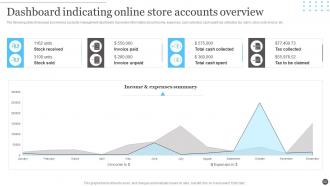
Slide 52: The following slide showcases ecommerce accounts management dashboard.
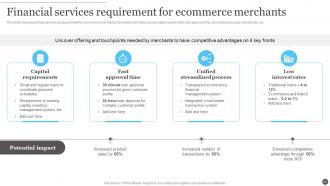
Slide 53: This slide presents Financial services requirement for ecommerce merchants.
Slide 54: This slide contains all the icons used in this presentation.
Slide 55: This slide is titled as Additional Slides for moving forward.
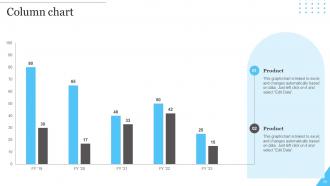
Slide 56: This slide displays Column chart with two products comparison.
Slide 57: This slide provides 30 60 90 Days Plan with text boxes.
Slide 58: This is a Timeline slide. Show data related to time intervals here.
Slide 59: This is Our Mission slide with related imagery and text.
Slide 60: This slide shows Post It Notes. Post your important notes here.
Slide 61: This is a Thank You slide with address, contact numbers and email address.
Ecommerce Accounting Management Powerpoint Presentation Slides with all 66 slides:
Use our Ecommerce Accounting Management Powerpoint Presentation Slides to effectively help you save your valuable time. They are readymade to fit into any presentation structure.










FAQs for Ecommerce Accounting Management
Honestly, the payment side gets crazy complicated - you're juggling Shopify fees, PayPal cuts, Amazon's marketplace fees, all that stuff. Traditional retail? Pretty much just cash and cards, easy peasy. Inventory tracking across channels is a headache, and don't even get me started on sales tax across different states (seriously, it's the worst). The sheer volume of tiny transactions will make your head spin compared to regular retail. Oh, and digital products need completely different handling than physical ones. My take? Automation tools are your best friend here. Also maybe find an accountant who won't look confused when you mention dropshipping.
So basically this stuff syncs all your sales data automatically - no more manual entry hell. QuickBooks Commerce or Xero are solid picks, they connect to Shopify, Amazon, PayPal, whatever you're using. Your inventory costs get tracked, transactions categorized, the whole deal. I spent way too much time reconciling payments before switching over. Now you actually get real-time cash flow instead of playing the guessing game for weeks. Honestly changed everything for me. The reports it spits out show your actual profit margins too, which is clutch.
Honestly, sales tax is gonna be your biggest headache - every state has different rules for when you need to start collecting based on revenue or how many sales you make. Income tax on profits is pretty straightforward, but nexus rules get weird if you're selling across state lines. Different places have different tax rates and what you can deduct depends on where you registered vs where you're actually selling. I'd set up a simple spreadsheet tracking sales by location and check it monthly so you don't get blindsided when you hit those thresholds.
So for returns, you gotta reverse your original entries - debit sales revenue and credit cash/AR depending how you refunded. Put returned inventory back by debiting inventory and crediting COGS (assuming it's sellable condition). Returns are honestly the worst part of ecommerce but whatever. I'd set up a standard process in your accounting software so you're not doing mental gymnastics every time. Also track why people are returning stuff - that data's actually useful for planning later. Short sentences mixed with longer ones. Nothing too fancy, just keep it consistent and you'll be fine.
Focus on gross profit margin, customer acquisition cost, and lifetime value first - those are your bread and butter. Average order value matters too, plus return on ad spend if you're running ads. Monthly recurring revenue is key for any subscription stuff you've got going. Honestly, inventory turnover is probably the most underrated metric. Dead stock will murder your cash flow faster than anything else. Your LTV to CAC should hit at least 3:1, but don't forget about contribution margin per order - shipping and processing fees add up quick. Just throw together a basic dashboard and check it weekly so you're not flying blind.
Pick FIFO for your inventory method - works best for most online stores since you're actually selling older stuff first anyway. Track everything from day one: product costs, shipping to your warehouse, customs, storage fees, all of it. Physical counts are a pain but catch them early before things get weird. Get inventory software that talks to your accounting system or you'll hate your life later. Whatever method you pick, stick with it. Switching mid-year is a nightmare I wouldn't wish on anyone. The organized stuff pays off big time when tax season rolls around, trust me.
Dude, cash flow will make or break your ecommerce business - I'm not even exaggerating. You're paying for inventory, shipping, platform fees, ads, all that stuff way before customers actually pay you. Payment processors are slow too, which is annoying. Seasonal swings can totally mess with your timing. Honestly, I've watched profitable companies go under just because they ran out of cash during a rough patch. You gotta forecast those cycles and keep some reserves tucked away. Maybe look into financing for when you're scaling up. Oh, and track your cash conversion cycle - sounds boring but it'll save your butt later.
Digital goods work just like physical products, but timing's the key difference. When customers get access or control, that's when you recognize revenue - so downloadable software hits immediately. Subscriptions? Spread that over the service period. Gaming companies probably hate me for saying this, but in-app purchases and virtual currencies are honestly a nightmare to track. No physical shipment means you've got to document delivery differently. Oh, and get accounting software that handles automated revenue recognition for subscriptions. Trust me, you don't want to do that manually every month.
Honestly, reconcile this stuff daily or you'll hate yourself later. Match your processor reports against your platform sales - I'm talking PayPal, Stripe, whatever you use. Don't just look at what hits your bank because that's where it gets weird. Track everything separately: gross sales, fees, refunds, chargebacks. Set up clearing accounts for each processor so you can see exactly what they're skimming off the top. Download those reports every single day (yeah, it's annoying but trust me). When numbers don't match, cross-reference the transaction IDs. Learned this one the hard way when our books were off by like $3K!
Oh man, multi-state sales tax is such a pain. Your accounting gets way more complicated since you're tracking nexus thresholds for different states and collecting all these varying rates. The chart of accounts becomes a nightmare - you're segregating everything by state now. Monthly remittances, quarterly filings, audit records... it adds up quick. Honestly the worst part is doing it manually - I made that mistake once and wanted to throw my laptop out the window. Get decent tax software that plays nice with whatever accounting system you're using. Trust me, automate this stuff from day one or you'll hate your life.
Honestly, start with the big three metrics - monthly recurring revenue, customer acquisition cost, and lifetime value. Track those like your life depends on it. Rolling forecasts work way better than annual ones since ecommerce changes so damn fast. I swear, some weeks feel like months in this space. Break your revenue down by channel and product so you'll catch trends before they hit you. Seasonality will destroy your cash flow if you're not ready for it. Start with 13-week rolling forecasts, then expand once your data's actually clean.
Get separate bank accounts for each currency you're dealing with - trust me on this one. Manual conversions are a nightmare when you're doing any real volume. QuickBooks or Xero handle multi-currency pretty well and update exchange rates automatically. Always record stuff in the original currency first, then let the software convert to your base currency. Pick whether you're using spot rates or daily averages and stick with it. Oh, and reconcile those foreign accounts monthly or you'll get burned by weird rate swings later.
Don't mix your personal stuff with business expenses - that's like the
-
SlideTeam was so customer-centric and quick service-provider that I doubted the amount I was paying and literally re-checked the transaction.
-
Fantastic collection. Loved how we can personalize these templates as per the requirements.