

Email Marketing Campaign KPIs Tracking Dashboard Email Marketing For Customer Acquisition




Try Before you Buy Download Free Sample Product
 Impress Your
 Audience
 100%
100% Editable
 Save Hours
 of Time


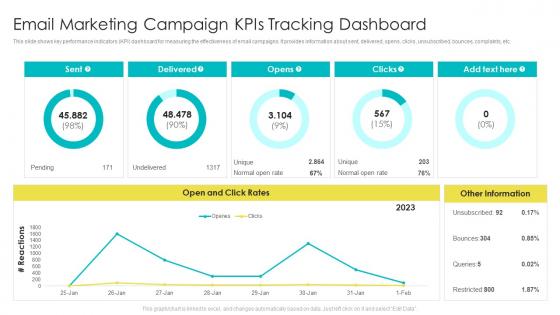
This slide shows key performance indicators KPI dashboard for measuring the effectiveness of email campaigns. It provides information about sent, delivered, opens, clicks, unsubscribed, bounces, complaints, etc.
People who downloaded this PowerPoint presentation also viewed the following :
Email Marketing Campaign KPIs Tracking Dashboard Email Marketing For Customer Acquisition with all 7 slides:
Use our Email Marketing Campaign KPIs Tracking Dashboard Email Marketing For Customer Acquisition to effectively help you save your valuable time. They are readymade to fit into any presentation structure.





FAQs for Email Marketing Campaign KPIs Tracking Dashboard Email Marketing
Honestly, just track these five things and you'll be golden. Open rates tell you if your subject lines suck or not. Click-through rates show whether people actually care about what you're saying. Then there's conversion rate - that's the money metric right there. Also watch your unsubscribe rate like a hawk because nobody wants to be that annoying brand. Oh, and delivery rate too since your brilliant emails mean nothing sitting in spam folders. Compare your numbers to industry benchmarks first, then just track month-to-month improvements. That's really all you need to figure out what's working.
Honestly, subject lines are like 80% of it - keep them short and kinda intriguing without being those annoying clickbait ones. Your sender name actually matters way more than most people realize, so ditch the "noreply@company" thing and use a real person's name instead. Personalization is good but don't just slap someone's first name in there and think you're done. Test your send times too since your audience probably checks email at weird hours. Oh and A/B test one thing at a time - I know it's tempting to test everything but you'll never figure out what's actually working. Start there and see what happens with your list specifically.
A high CTR is basically proof you're doing everything right - your subject line hooked people, your content was actually interesting, and you're hitting the right audience. People clicked because they genuinely wanted to see more, not because you tricked them (which never works long-term anyway). It shows your targeting isn't random and your messaging actually resonates. The best part? You can dig into those high-performing emails and figure out what made them click. Then just repeat that magic in your next campaigns.
Dude, segmentation is a total game changer for email stuff. Instead of sending the same boring message to everyone, you're actually giving people content they care about. Your open rates will go up, more people click through - basically all your numbers get better. I started with just splitting new subscribers from returning customers and wow, what a difference. The data you get back is so much cleaner too since you can see what works for different groups. Honestly wish I'd figured this out earlier instead of just... blasting everyone with everything lol. Try 2-3 basic segments first.
So bounce rate is basically telling you when your emails aren't actually making it to people's inboxes. Hard bounces mean the email address is dead/invalid, soft bounces are temporary stuff like full mailboxes. Here's the thing though - if your bounce rate gets high, it murders your sender reputation with email providers. Then they start blocking even MORE of your emails. It's honestly such an annoying spiral. You want to stay under 2% and immediately remove any addresses that bounce back. I learned this the hard way when our company newsletter got completely blacklisted last year.
So conversion rate is like your email's batting average - shows what percentage of people actually did the thing you wanted after opening it. Just take your conversions (purchases, signups, whatever) and divide by emails delivered, then times 100. Way better metric than open rates tbh since it shows real business impact. I'd definitely start A/B testing your subject lines and CTAs across different send times. Segment your audience too - you'll catch patterns fast. Honestly opens don't mean much if nobody's buying, you know?
Oof, definitely pause those emails first. Something's clearly off if people are bailing left and right. Check your recent campaigns - did you ramp up frequency? Your content might not match what they expected when they signed up. I've seen this happen when subject lines get too salesy or pushy. Go through which emails caused the biggest exodus. Then look at your signup flow - are you promising one thing but delivering something totally different? Try A/B testing how often you send stuff. Maybe dial back the frequency for a bit? Some audiences just can't handle daily emails, honestly. Test different content styles too until you find what actually works.
So basically take your email revenue minus what you spent, divide by costs, then multiply by 100. Like if you made $5,000 but spent $500, that's ($5,000 - $500) ÷ $500 × 100 = 900% ROI. Not bad at all! Don't forget to count everything though - platform fees, design work, writing time, all that stuff. The revenue part's honestly the tricky bit since you gotta track which sales actually came from your emails. UTM codes are your friend here, plus decent conversion tracking. Otherwise you're basically shooting in the dark with your numbers, which defeats the whole point.
Look, you really just need three main ones: open rates, click-through rates, and conversions. Open rates tell you if your subject lines don't suck. CTR shows whether people actually care about what you're saying. Conversions are obviously the big one - that's actual money or sign-ups or whatever you want them to do. Oh, and time spent reading is pretty useful too if you can track it. Don't stress about list size though - I see people obsessing over that all the time. Better to have 500 people who actually engage than 5000 who ignore you. These metrics will show you what's actually working vs what's just... not.
Honestly, A/B testing is your best friend for figuring out what actually works in your emails. Subject lines are where I'd start - they're super easy to test and can make a huge difference in open rates. You can also test send times, button copy, design layouts, whatever. Just change one thing at a time though, or you won't know what caused the results. Make sure you've got enough people in your test groups to actually mean something statistically. I learned this the hard way once with a tiny sample size that told me nothing useful! Don't go with your gut on this stuff - let the numbers do the talking. Pick whatever metric is bugging you most and start there.
Honestly, you gotta start cleaning that email list regularly or your numbers will tank. Ditch subscribers who haven't opened anything in 3-6 months - I know it hurts seeing that subscriber count drop, but dead weight is killing your deliverability. Use double opt-in for new signups so you're not getting junk emails from the start. Before you axe people completely though, try a "we miss you" campaign. Those actually work better than you'd think! Segment based on who's actually engaging vs. who's ghosting you. A smaller list of people who give a damn beats having thousands of dead emails any day. Do this quarterly and watch your open rates finally start climbing.
Honestly? Most people do fine with 1-2 emails weekly, but it really comes down to your audience. E-commerce can push daily during big sales (I've seen it work), while B2B folks usually want weekly or every other week max. Start small and work your way up - your unsubscribe rate will scream at you way before engagement drops, trust me on that one. Just split-test different frequencies with chunks of your list. The data doesn't lie, even when you want it to.
Most email platforms already track the basics like open rates and clicks - honestly saves you a ton of work. For campaigns, set up UTM parameters in Google Analytics. Your current platform (Mailchimp, Constant Contact) probably has decent built-in analytics to start with. If you want deeper insights later, Klaviyo and Campaign Monitor are solid for segmentation and automated reports. HubSpot's great too but might be overkill depending on your needs. The real magic happens when you connect everything to your CRM - then you can actually see the full customer journey instead of just email stats.
Yeah, benchmarks are all over the place depending on your industry. E-commerce usually hits 15-18% open rates with 2-3% clicks. Nonprofits crush it at 20-25% opens since people actually care about the cause. B2B sits around 17-20%. Finance and healthcare? Way lower because of all the compliance stuff, but when people do convert it's worth more. Travel emails are weird - summer vacation promos do amazing while January ones... not so much. Honestly, I'd find benchmarks for your specific industry and company size, but beating your own past performance matters way more than hitting some industry average.
Dude, personalization totally works. Open rates go up like 26% and click-throughs jump 14% just from customizing subject lines and content. Revenue's where it gets crazy though - you'll see 6x higher transaction rates compared to those boring mass emails everyone sends. Even throwing someone's name in there helps, but behavioral stuff is honestly where you see the real results. People stop unsubscribing as much since they're actually getting content they care about. I'd start with names first - it's super easy - then maybe segment by what people bought before or what they looked at on your site.
-
Easily Editable.
-
Perfect template with attractive color combination.