


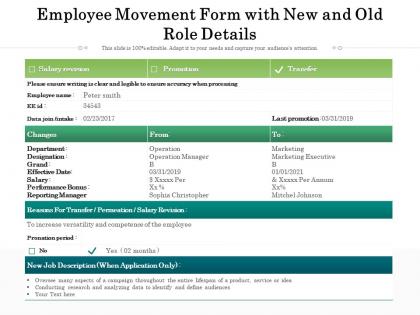
Employee movement form with new and old role details




Try Before you Buy Download Free Sample Product
 Impress Your
 Audience
 100%
100% Editable
 Save Hours
 of Time


Our Employee Movement Form With New And Old Role Details are topically designed to provide an attractive backdrop to any subject. Use them to look like a presentation pro.
People who downloaded this PowerPoint presentation also viewed the following :
Employee movement form with new and old role details with all 2 slides:
Use our Employee Movement Form With New And Old Role Details to effectively help you save your valuable time. They are readymade to fit into any presentation structure.
FAQs for Employee movement form with new and
Oh that thing? It's basically paperwork for when someone's job changes - promotions, transfers, department switches, location moves, whatever. HR needs it to update payroll and system access stuff. Without it, people end up with the wrong salary or can't log into things (been there, it's annoying). Fill one out whenever your team changes. Honestly, it seems like extra work but it prevents way bigger headaches down the road. The form creates a record so nothing gets missed during transitions.
Honestly, these forms are lifesavers. You get all the transfer details - salary bumps, new department, who they'll report to - documented in one spot instead of hunting down approvals from like six different people. Creates a solid paper trail too, which auditors eat up. The best part? Everyone has to actually think through the move beforehand rather than winging it later. Trust me, without one you'll be stuck in endless email chains every time someone wants to switch teams. If your company doesn't use them yet, definitely bring it up - even our most disorganized managers love having everything spelled out clearly.
Ok so you'll want the basic stuff first - employee name, ID number, current department. Then add where they're going (new dept, position, who their manager will be) plus when it starts. HR will definitely bug you if there's no business reason listed, so throw that in too. Also mention if it's permanent or just temporary, any pay changes, and who's signing off. Both managers need to approve it obviously. Oh and submit it like two weeks early - payroll gets cranky when they don't have time to update everything properly.
So basically, it tracks every single job move someone makes at the company - promotions, transfers, lateral moves, all of it. Like if Sarah went from Marketing Coordinator to Senior Coordinator to Manager, you'd see all those steps with dates and reasons. Pretty smart actually. HR uses it during performance reviews and when they're figuring out who to promote next. It also shows what skills people picked up along the way, which helps identify who's ready to move up. Think of it as everyone's career timeline in one place - makes succession planning way easier than digging through random files.
So that Employee Movement Form is basically your paper trail for HR stuff - tracks every job change, transfer, promotion, whatever. You'll need it for audits and legal protection to prove you followed proper procedures when people move around. Honestly sounds boring but trust me, you'll be glad you have it if there's ever an investigation. Without these forms you're screwed if someone questions whether a transfer was legit or authorized properly. Oh and make sure they're filled out completely before anyone moves - half-done forms are worse than nothing.
Honestly, automated forms are a game-changer for cutting out all that annoying back-and-forth. No more hunting people down for signatures or watching your request sit in someone's inbox forever. The system just sends everything to the right person automatically, in order. You'll actually know what's happening with real-time updates instead of wondering if your stuff got lost somewhere. Way fewer mistakes too since everything gets captured the same way each time. I'd start by sketching out how your current process works - then you can spot where automation will help most. Trust me, it's worth the setup time!
Honestly, the worst part is dealing with managers who think it's just more busy work. Employee privacy concerns come up a lot too. Your IT setup will probably give you grief - connecting everything to payroll and HR systems is such a pain. Different departments always enter data their own way, which totally screws up the whole point. Oh, and there's always that one team that'll skip the process for "emergency" moves. Trust me on this - start small with a pilot group first. Get them actually using it before you unleash it on everyone.
So here's what I'd do - get feedback from both HR and your actual employees. HR will catch the compliance stuff and bottlenecks you might miss. But honestly? Employees are gonna tell you exactly what sucks about the current process. Run some quick surveys or just ask managers what questions keep coming up. You'll probably find HR spots the legal requirements you're forgetting, while employees point out confusing fields or steps that feel pointless. The trick is don't just collect feedback and ignore it. Test changes with a few people first, then roll out the fixes.
Just focus on the basics - employee info, old/new position, start date, why they're moving, and who needs to approve it. Seriously, I've watched managers ignore forms that are like novels. Make the approval chain crystal clear so people know whose signature they need. Set up auto-notifications too, otherwise stuff just sits there forever. Don't forget space for HR to note any pay or benefit changes. The whole thing should feel quick to fill out but still capture everything you actually need. It's way better to have something people will consistently use than a perfect form that collects dust.
Honestly, that form is actually pretty genius for keeping people happy. Your employees get a real way to move around internally instead of just rotting in the same role forever. People feel way less trapped when they can actually request transfers or try new positions - gives them control over where they're headed career-wise. Plus managers can spot which departments are bleeding talent or making people miserable. I'd definitely make sure everyone knows it exists though, because what's the point if nobody uses it? Might even push people to be more proactive about it.
Honestly? Employee Movement Forms are like a mirror for your company culture. Handle them well and people see you actually care about career growth. Mess it up though - let forms sit around forever or keep everything hush-hush - and you're basically telling everyone internal mobility is BS. I've watched places where these things disappear into some black hole for months. Kills morale instantly. People aren't dumb, they notice when your "we support development" talk doesn't match what actually happens. The process itself becomes the message, you know?
Employee Movement Forms are honestly such a treasure trove - you can track where everyone's jumping ship and which departments are bleeding talent. Pull quarterly reports first, then map out the common patterns. Timing matters too since some teams lose people during specific seasons or big projects. What's cool is you'll spot which positions are basically stepping stones to better roles. That info's perfect for planning who moves up next. Quick tip though - don't just look at who's leaving, check where they're going internally. Gives you a way better picture for staffing decisions down the road.
Quarterly reviews are probably your best bet, but honestly? Just update it whenever something big changes at work. Major restructuring, new departments, bunch of people switching roles - that's when you need to jump on it. The form has to match your actual reporting structure or everything gets messy and slow. Performance review season is another good time since that's usually when people move around anyway. Oh, and set a reminder or you'll totally forget until someone complains the whole thing's outdated. Way easier than playing catch-up later.
Honestly, those employee movement forms are actually pretty useful for connecting departments. When someone transfers, both teams have to work together on the handover - transition plans, training stuff, who's taking what responsibilities. It's like forced collaboration but it works! Managers end up talking directly about skills gaps and project details they never discussed before. Half the time they realize their work overlaps way more than they thought. I've seen it lead to actual partnerships down the road. If you're trying to build cross-department relationships, this is your opening.
Honestly, going digital with those employee movement forms will save you so much headache. Start simple - just digitize what you're already doing on paper. Once people aren't grumbling about the change, add automated routing so forms hit the right approvers automatically. Mobile apps are clutch for remote teams submitting stuff on the fly. The real magic happens when you connect it to your HRIS - no more entering the same info twice (I cannot stress how much time this saves). Real-time tracking means fewer "where's my request?" emails too. Trust me on this one.
-
Great quality product.