

Expense Powerpoint Presentation Slides





Try Before you Buy Download Free Sample Product
 Impress Your
 Audience
 100%
100% Editable
 Save Hours
 of Time


Managing the budget is the most important aspect of business development. Keeping this in mind, we have come up with expense PowerPoint deck. This 45 slides presentation layout has been crafted for the businesses to make them understand how they can manage the expenses in the organized way. The PPT slides are created with professional approach as these are designed by the team of designers who have hands on experience in crafting masterpiece for business industry. Some of the key information shared in the PowerPoint deck are investment objectives, mutual funds, systematic investment plans, exchange traded funds, bonds, stocks etc. Whether you are managing expense for your personal or professional goal, the important thing is to ensure that you are giving complete attention towards each penny. Using our presentation deck, you can understand the concept of money management and also where to spend money and can share the information with others. Download the expense PPT 45 slides deck to manage your expense in the right way for development purpose. If you have to create many presentations with that revolve around the same theme our custom created Expense Powerpoint Presentation Slides can be a perfect fit. This will ensure you don't have to create a new presentation each time you need to make an update.
People who downloaded this PowerPoint presentation also viewed the following :
Content of this Powerpoint Presentation
Slide 1: This slide introduces Expense.State Your Company Name and begin.
Slide 2: This slide showcases Investment Objectives with these of the five Increase Income, Finance Expenses, Increase Savings, Fight Inflation, Reduce Tax Liability.
Slide 3: This slide showcases Investment Instruments with these of the following- Stocks, Bonds, Cash, Annuities, Real Estate, ETF’s, Mutual Funds, Emerging Markets, Domestic, Foreign, Options, Hedge Funds.
Slide 4: This slide showcases Mutual Funds with imagery background.
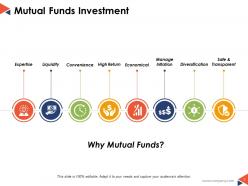
Slide 5: This slide presents Mutual Funds Investment Expertise, Liquidity, Manage Inflation, High Return, Economical, Safe & Transparent, Diversification, Convenience.
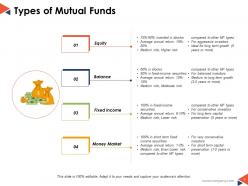
Slide 6: This slide presents Types of Mutual Funds with these of the four main types- Equity, Balanced, Money Market, Fixed Income.
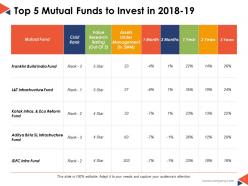
Slide 7: This slide shows Top 5 Mutual Funds to Invest in 2018-19.
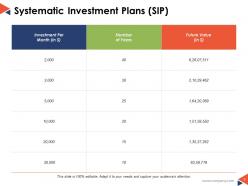
Slide 8: This slide presents Systematic Investment Plans (SIP).
Slide 9: This slide shows Exchange Traded Funds which further showcases imagery also.
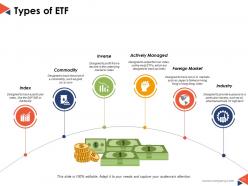
Slide 10: This slide showcases Types of ETF and thes are some of them we have listed- Index, Commodity, Inverse, Actively Managed, Industry, Foreign Market, Kong’s Hang Seng index.
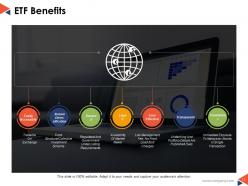
Slide 11: This slide shows ETF Benefits with these of the following benefits- Easily Accessible, Cost Effective, Instant Diver-sification, Transparent, Liquid, Convenient, Secured.
Slide 12: This slide presents Fastest growing ETF’s to invest in.
Slide 13: This slide showcases Bonds.
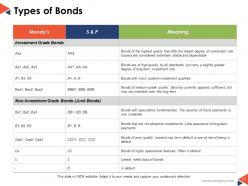
Slide 14: This slide presents Types of Bonds. Add the bonds data and use it.
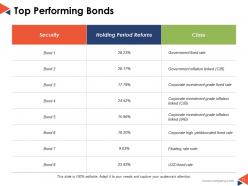
Slide 15: This slide showcases Top Performing Bonds.
Slide 16: This slide presents Stocks. Add your stocks information and use it in your business.
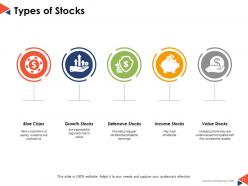
Slide 17: This slide shows Types of Stocks with these of the following- Blue Chips, Growth Stocks, Defensive Stocks, Income Stocks, Assets, Value Stocks.
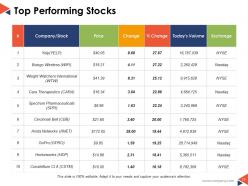
Slide 18: This slide presents Top Performing Stocks.
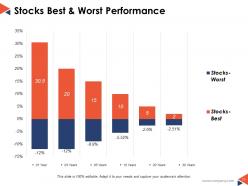
Slide 19: This slide showcases Stocks Best & Worst Performance.
Slide 20: This slide presents Hedge Funds.
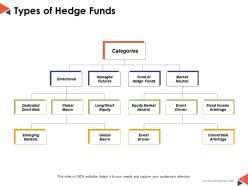
Slide 21: This slide showcases Types of Hedge Funds which further presents Categories Global Macro, Long/Short Equity, Dedicated Short Bias, Emerging Markets, Global Macro, Directional, Managed Futures, Convertible Arbitrage, Event Driven, Equity Market Neutral, Event Driven, Fixed Income Arbitrage, Market Neutral, Fund of Hedge Funds.
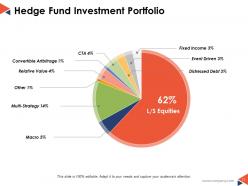
Slide 22: This slide shows Hedge Fund Investment Portfolio.
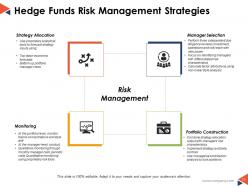
Slide 23: This slide presents Hedge Funds Risk Management Strategies Risk with these of following four strategies- Strategy Allocation, Manager Selection, Monitoring, Portfolio Construction.
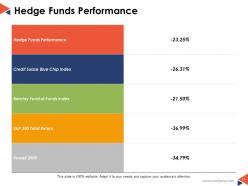
Slide 24: This slide presents Hedge Funds Performance.
Slide 25: This slide showcases Expense Icon Slide.
Slide 26: This slide shows Coffee Break image.
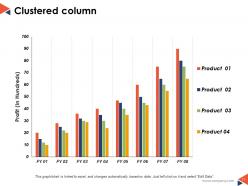
Slide 27: This slide presents Clustered column.
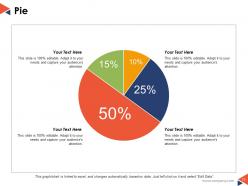
Slide 28: This slide showcases Pie charts. You can use it for your own use.
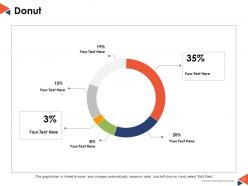
Slide 29: This slide presents Donut.
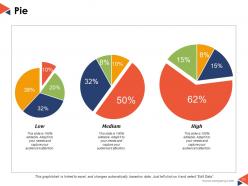
Slide 30: This slide showcases Pie.
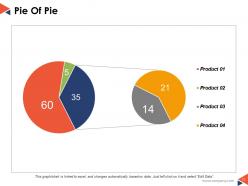
Slide 31: This slide presents Pie Of Pie.
Slide 32: This slide shows a Stacked Line graph in terms of percentage and years for comparison of Product 01, Product 02, Product 03 etc.
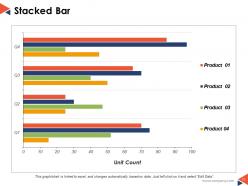
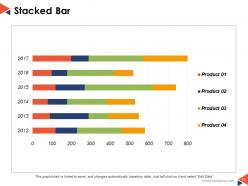
Slide 33: This slide shows a Stacked bar graph in terms of percentage and years for comparison of Product 01, Product 02, Product 03 etc.
Slide 34: This slide is titled Additional Slides
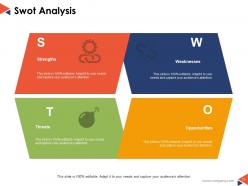
Slide 35: This slide shows Competitive SWOT Analysis to assess the indispensable factors.
Slide 36: This is a News Paper slide to flash company event, news or anything to highlight
Slide 37: This slide presents a PUZZLE slide with the following subheadings- Integrity and Judgment, Critical and Decision Making, Leadership, Agility
Slide 38: This is a Target slide. State your targets here.
Slide 39: This is a Circular slide to show information, specification etc.
Slide 40: This is a Venn diagram image slide to show information, specifications etc.
Slide 41: This is a Lego Box slide with the following subheadings- Teach, Encourage, Increase, Build.
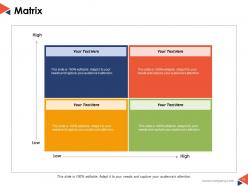
Slide 42: This slide shows a Matrix in terms of High and Low.
Slide 43: This slide presents a Mind map with text boxes
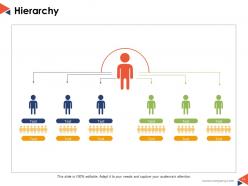
Slide 44: This is a Hierarchy slide showing- Supply Chain Manager, Supply Chain Council, Sourcing, Supplier Quality Engineer, Procurement, Logistics & Management, Supplier Management, Student, Contract Management.
Slide 45: This is a Thank You image slide with Address, Email and Contact number
Expense Powerpoint Presentation Slides with all 45 slides:
Closed doors automatically fling open with our Expense Powerpoint Presentation Slides. Gain easy entry into elite 'clubs'.











FAQs for Expense
You'll want to start with a solid expense policy - like, actually write down what people can spend and on what. Nobody should have to wonder if grabbing lunch with a client is cool or not. Get some software that automatically grabs receipt info because doing it by hand sucks. Set up approval flows so your managers can flag weird stuff before it becomes a problem. Monthly reports help you catch patterns too. Honestly, the whole thing works best when following the rules is easier than breaking them. Oh, and document your policy first - everything else builds from there.
Honestly, expense tracking doesn't have to suck if you automate it right. Get your team using mobile apps to snap receipt photos on the spot - way easier than losing paper receipts. Credit card integrations are clutch because they pull transactions automatically. The OCR stuff that reads receipts? Works like 80% of the time, which beats typing everything manually. Hook it up to your accounting software so data flows without extra work. Digital approval workflows are huge too - managers can approve stuff from their phones. I'd start small though, maybe test one tool with a few people first before rolling it out company-wide.
Manual data entry will kill your productivity - automate whatever you can. Those tiny recurring charges? They're sneaky budget killers, trust me. Create policies people can actually follow, not some massive manual everyone ignores. Don't save expense reviews for month-end either. You want automated alerts catching weird spending patterns before they become problems. Pre-approval thresholds are your friend here. Oh, and get an expense app that doesn't suck - if your team hates using it, they just won't.
Honestly, budgeting just makes you think twice before spending money on random stuff. You'll know exactly where every dollar goes instead of hitting month-end like "wait, where'd it all go?" Track what you're spending now for like a month first - that's your starting point. Then set realistic limits for different categories. The cool part is when you compare what you actually spent vs what you planned. Those little subscriptions you forgot about? They'll jump right out at you. Your team also gets way better at explaining why they need something when there's only so much money to go around.
Training is huge for expense management - honestly can't stress this enough. Your team needs to get why these policies exist, not just what the rules are. I've watched companies spin their wheels for ages until they finally did proper training. Show people how to actually use the expense tools. Real scenarios work way better than boring PowerPoint slides. When employees understand how their reporting affects budgeting and company finances, they're way more likely to follow through. It's pretty amazing how much compliance improves once people feel like they're part of the bigger picture instead of just jumping through hoops.
Track your expense-to-revenue ratio first - that's your main signal if things are improving. Processing time matters too because waiting forever for reimbursement is the worst. Compliance rates tell you if people actually follow your policies (spoiler: they probably don't at first). Don't skip employee satisfaction scores around expenses - grumpy employees will find creative ways to make your life harder. Set your benchmarks before changing anything, then check quarterly. Oh, and the sweet spot? When you're saving money AND people stop complaining about the process.
Dude, just get the expense software. Manual receipts are the worst - I spent like 3 hours last month trying to figure out random charges. The mobile apps let you snap photos right away, so no more scrambling at month-end. Real-time spending tracking is actually pretty sweet, plus approvals happen way faster. Your finance people won't hate you because everything stays compliant automatically. No more hunting down lost receipts or fixing spreadsheet mistakes either. Honestly, the time savings alone make it worth it. Most have free trials, so you can test it out first.
Start with spending limits and make everyone submit receipts - no exceptions. Get some expense tracking software that shows submissions as they happen. Random audits work wonders too, people stay way more honest when they know you might check. The systems that work best? They actually make cheating more of a pain than just doing it right. Your managers need to actually look at what they're approving instead of clicking "yes" on everything (I've seen that happen way too often). If you don't have digital expense tools yet, that's probably your first move.
Honestly, start with whether your team will actually use it - bad interface = nobody bothers. Mobile receipt capture is a lifesaver, plus you want it to play nice with whatever accounting software you're already stuck with. Automatic categorization saves tons of time too. Real-time reporting is clutch for staying on budget. If you're in something regulated, make sure the audit trail features don't suck. Their support better be decent because setup always gets weird. Oh, and definitely do the free trial thing - get people from different departments to mess around with it first.
Honestly, automating expense approvals is a game changer - you'll go from waiting days to getting stuff approved in hours. The system just routes everything to the right manager automatically based on rules you set up. No more hunting through email threads for lost receipts (seriously, why does this always happen?). Your finance team won't be constantly bugging people either since it sends reminders and bumps things up the chain when needed. Real-time spending visibility is pretty nice too. Just set it so anything under $50 gets auto-approved and you'll cut your workload immediately.
Okay so definitely keep receipts for anything over $25 and get your expenses in within 30 days. I got burned once when they rejected my $200 client dinner because I didn't explain what it was for - super annoying. Make sure you categorize stuff properly (meals, transport, hotels) and write why it was business-related. Oh and check those per diem limits first! I booked this nice hotel once and they only covered like half. Use the corporate card if you have one since it makes everything easier later. Also take pics of receipts right away - mine always disappear into the receipt graveyard otherwise.
Start with your major expense buckets - operational stuff, admin costs, marketing, capital expenses. Break those down into specifics like office supplies, travel, software subscriptions. Trust me, I wasted so many hours hunting down mystery purchases before I got organized! Everyone on your team needs to know which category things go in, so write up some quick guidelines. Maybe a cheat sheet? Honestly, consistency is everything here. Once you've got that down, you'll actually start seeing patterns in your spending and figure out where all your money's disappearing to each month.
Dude, just follow the expense policies or you'll regret it. Your reimbursements will get delayed or straight-up rejected, meaning you're stuck covering costs way longer than you should. Repeated violations? That's a one-way ticket to an uncomfortable chat with your boss - trust me, nobody wants that drama. The accounting team gets annoyed too since they have to hunt you down for missing receipts and explanations. Honestly, I learned this the hard way last year. Just save yourself the headache and double-check those guidelines before hitting submit.
So each industry has its own weird rules about how you categorize and track expenses. Healthcare gets super strict about entertainment spending, while finance companies need insane detail on client costs. Manufacturing? They've got environmental stuff to worry about. Honestly, the biggest mistake is trying to add compliance after the fact - total nightmare. Start by figuring out what your specific industry actually requires, then build your approval process around that. Your documentation needs to automatically grab whatever the auditors want. Way easier than scrambling later when someone comes knocking.
Honestly, automation is your best friend here - expense reports, invoices, that boring accounting stuff. Remote work kills office costs too, obviously. My old company did this smart thing with energy systems that turn lights/AC on and off based on who's actually there. Oh, and zero-based budgeting is brutal but works - you justify every single expense instead of just copying last year's budget. Renegotiate contracts yearly and bundle vendors for discounts. Pick one thing to automate this month and see what you save.
No Reviews