

Financial statement powerpoint presentation templates





Try Before you Buy Download Free Sample Product
 Impress Your
 Audience
 100%
100% Editable
 Save Hours
 of Time


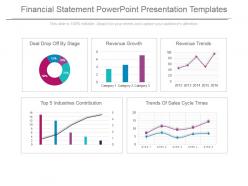
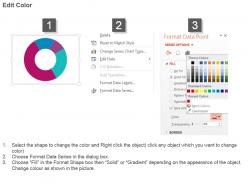
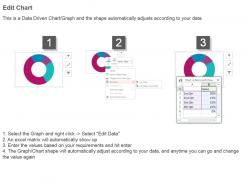
Financial statements are crucial for the smooth operations of any organization. Utilize our financial statement PowerPoint template and make creative PPT slides. Financial statements of an organization are its prime source of advice. Decisions, policies, amendments in objectives and other such crucial business-related strategies are formulated after intense scrutiny of the organization’s annual financial statement. Our financial statement PowerPoint design consists of editable excel linked charts and graphs which represent your financial data in an easy and understandable way. It is crucial for you to make use of our financial statement PPT visual as this conveys full and accurate information about the performance, position, progress and prospects of your business organization. By displaying financial numbers through this Presentation slideshow your prospective shareholders can ascertain the profit earning capacity, present position and future prospects of your company and decide about making their investments in your company. Simply click download and start setting examples for others. Your ideas will blossom with our Financial Statement Powerpoint Presentation Templates. The fruits of your effort will be sweet indeed.
People who downloaded this PowerPoint presentation also viewed the following :
Financial statement powerpoint presentation templates with all 4 slides:
Get geared for the exceptional with our Financial Statement Powerpoint Presentation Templates. They don't let averages bother you.

FAQs for Financial statement
You need three main pieces: income statement (revenue minus expenses), balance sheet (assets, liabilities, equity), and cash flow statement. The cash flow part is honestly where most people mess up - but it's super important for tracking real money movement. Don't forget a notes section for your assumptions and methodology. Auditors eat that up. Oh, and definitely include comparative periods so you can actually see trends developing. I'd start basic and then tweak it for whatever industry quirks you're dealing with. Way easier than trying to build something perfect from scratch.
Honestly, most templates are way more flexible than they look at first. Just start adding or removing the accounts that actually matter for your business - like if you're retail, break down inventory categories properly, or if you're service-based, set up different revenue streams for projects. Then mess with the formatting and time periods until it makes sense. Oh, and don't forget to throw your company branding on there. Industry regulations are another thing - some sectors have specific requirements you can't ignore. I'd grab a decent template first, then just keep tweaking it as you figure out what's missing or what's just clutter for your situation.
Ugh, the worst thing people do is just downloading some random template and cramming their numbers in without changing anything. Like, your coffee shop doesn't need a "manufacturing overhead" line item, you know? Also don't mix cash and accrual accounting - pick one and stick with it or everything gets messy. Make sure your cells are actually linked so when revenue changes, your ratios update automatically. I learned this the hard way when I had to manually recalculate everything. Save different versions as you go! And seriously, check that your balance sheet balances before you send it to anyone.
Yeah, financial statement templates are totally different depending on your industry. Retail companies need to track inventory and seasonal swings, but service businesses care more about labor costs and billable hours. Manufacturing gets super detailed with cost breakdowns that tech companies don't even bother with. Banks? They're basically playing by completely different rules because of all the regulatory stuff - honestly kind of a nightmare. Healthcare and nonprofits have their own weird line items too. I'd skip the generic templates and find something industry-specific. You'll actually get the metrics that matter for your business.
Cash flow and burn rate are your bread and butter - track those religiously. MRR too if you've got recurring revenue. CAC and LTV are what every investor wants to see first thing. Gross margins matter more than you'd think, and headcount costs always come up in conversations. The cash conversion cycle is honestly pretty tedious to calculate, but it tells you when money actually lands in your bank account vs when you invoice. I'd start simple with these basics - you can get fancy with other metrics later. This covers like 90% of what anyone will ask for.
Honestly, using proper financial templates is a game-changer for looking legit to investors. When you present stuff in the standard format they're used to, they can actually assess your business quickly instead of getting annoyed by messy spreadsheets. Plus, working through templates helps you catch any gaps in your reporting beforehand - way better than scrambling later. I'd start with basic income statement and balance sheet templates. Your numbers don't have to be perfect yet, but that clean presentation shows you're not just winging it. Makes such a difference in how serious people take you.
Okay so the biggest thing with nonprofit statements is tracking restricted vs unrestricted funds - that's what makes them totally different from regular business accounting. Your template needs to separate program costs from admin expenses because donors are obsessed with that ratio (honestly, sometimes too obsessed but whatever). Don't forget sections for in-kind donations and volunteer hours. Grant compliance reporting is huge too. The functional expenses statement shows exactly where money goes - programs vs fundraising vs overhead. Oh and definitely get a nonprofit-specific template, not some business one you try to modify.
Honestly, templates are a lifesaver for avoiding those stupid mistakes we all make. When you change one number, everything else updates automatically - no more forgetting to fix totals on different sheets. They've got validation rules built in too, which catch weird inconsistencies before you send anything out. Real-time error checking is clutch. The formatting stays consistent without you having to eyeball every single row. I swear spreadsheet errors used to keep me up at night! Start with something basic then tweak it for whatever you're actually reporting on.
Honestly, financial statement templates are total lifesavers - especially when you're swamped during busy season. They're pre-built with all the GAAP or IFRS formats you need, so you won't accidentally miss required line items or footnotes. Basically like having guardrails up. Your auditors will thank you too since everything's already organized how they expect to see it. Oh, and definitely go industry-specific if you can find them - way better than generic ones. Saves you from compliance headaches down the road. Trust me on this one!
Templates are honestly a lifesaver for forecasting - they give you that consistent framework where you just plug in your numbers and watch everything connect. I love testing different scenarios, like 15% sales growth vs 25%, and seeing how it ripples through cash flow and margins automatically. Way better than starting from zero each time (learned that the hard way). The good templates have all those financial relationships baked in already. Change your revenue assumption and boom - it flows through everywhere. Oh, and always start with revenue projections first, then work your way down the income statement.
So QuickBooks, Xero, and NetSuite are your best bets - they all play nice with Excel and Google Sheets for live financial updates. If you're already glued to spreadsheets anyway, Excel's Power Query will blow your mind. FreshBooks and Sage hook up to most cloud templates too. Your P&L and balance sheet just update themselves when new transactions come in, which is pretty sweet. Oh, and definitely check what your current accounting software can do first - most of them have template connections built right in. Could save you a bunch of tedious data entry.
Honestly, I'd check them quarterly if you can manage it. Most people do it annually but that's way too long IMO - your business shifts constantly and waiting a full year means you'll forget why you set things up that way. New expenses pop up, revenue changes, regulations get updated. I always set reminders with my quarterly closes since I'm already knee-deep in the numbers anyway. The worst thing is when templates get outdated and start screwing up your reporting. Trust me, fix issues as soon as you spot them rather than letting them pile up.
Okay so formatting is huge - keep fonts and spacing consistent throughout. Your headers need to be crystal clear and make sure all those numbers line up in columns. I'm probably weird about this, but I spend way too much time getting decimal points to align perfectly. It's worth it though! Put everything in standard order: balance sheet first, then income statement, cash flow. Include comparative periods if you can. Don't skip the basics like proper titles and reporting dates. Oh and footnotes for any assumptions you made. One last thing - proofread everything twice. Seriously, a typo in "receivables" will make you look like an amateur.
Honestly, templates are a game changer for spotting trends in your financial data. Without them, everything just gets lost in spreadsheet hell. You can actually see patterns across quarters and catch cash flow problems early. Plus you'll know which parts of your business are genuinely making money vs. just creating work (there's always one department that looks super busy but contributes nothing, right?). The best part? You're not rebuilding everything from scratch each month. Just plug in the numbers and focus on what they're telling you. Start simple with a P&L template first.
Check out the AICPA and SEC sites first - they've got official templates that won't get you in trouble compliance-wise. Excel and Google Sheets have decent built-in ones for basic stuff. Template.net and Vertex42 are actually pretty solid too, way more user-friendly than the government ones honestly. Oh, and see what your accounting software has - I always forget to check there first but they usually sync up perfectly with your data. Start simple with whatever you're already using, then get fancier if you need it.
-
Perfect template with attractive color combination.
-
Excellent Designs.