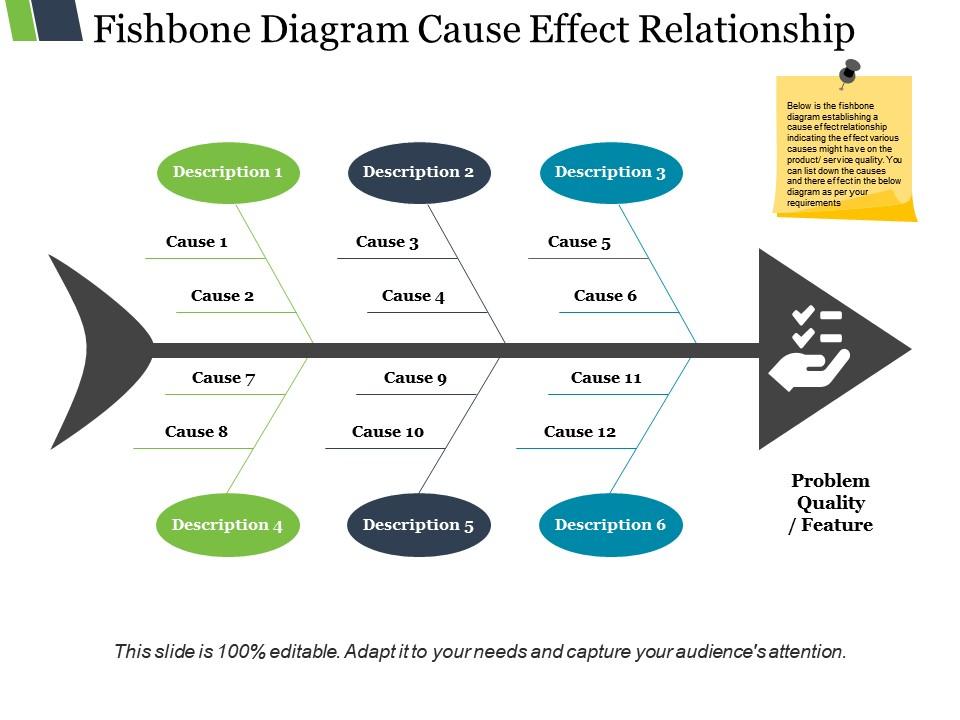
Fishbone diagram cause effect relationship ppt slide
Try Before you Buy Download Free Sample Product
Audience
Editable
of Time
Our Fishbone Diagram Cause Effect Relationship Ppt Slide come handy everywhere. They are a functional asset.
People who downloaded this PowerPoint presentation also viewed the following :
Fishbone diagram cause effect relationship ppt slide with all 5 slides:
Our Fishbone Diagram Cause Effect Relationship Ppt Slide allow great ideas to hatch. It helps fertilize brains.
FAQs for Fishbone diagram cause effect
Oh, Fishbone diagrams are super useful! Instead of just throwing around guesses about what's wrong, you map out all the possible causes visually. Picture a fish skeleton - you write the problem at the head, then branch out categories like people, processes, materials, whatever fits your situation. Honestly, I'm weirdly into how organized it makes everything look. Your whole team can brainstorm without missing stuff that might be obvious later. Forces you to actually think through different angles before rushing into fixes. Give it a shot next time something keeps breaking - way better than the usual "let's try this and see what happens" approach we all default to.
Fishbone diagrams are actually pretty smart for keeping meetings on track. You've got these set categories like equipment, process, people - so everyone knows where their ideas go. No more having that one guy ramble for 20 minutes about his theory on everything lol. The visual setup helps quieter people jump in because they can see exactly where they fit. Real-time building gets people bouncing ideas off each other too. Here's what works: give each person their own "bone" to lead. Boom - everyone contributes instead of just nodding along.
So basically you draw your main problem on the right side like a fish head, then add a straight line going left - that's your spine. Off that spine, you'll add diagonal lines for different categories like People, Process, Equipment, Materials - whatever makes sense for your situation really. Then under each category, add smaller lines for specific causes. The whole thing ends up looking like a fish skeleton (hence the name, obviously). Start with a clear problem statement, then just work through each category systematically. It's actually pretty effective at stopping teams from overlooking the obvious stuff that's right in front of them.
Fishbone diagrams are perfect for messy, complex problems with multiple causes - like quality issues or those customer complaints that keep popping up. I love using them when teams need structure instead of just randomly shouting ideas (you know how those meetings go). They're solid for digging into the actual "why" instead of jumping straight to solutions. Getting everyone on the same page about potential causes first? Super helpful. One thing though - the real magic happens in what you do with it afterward. The diagram itself won't solve anything if you don't actually investigate those causes.
So primary causes are your main categories - you know, the big buckets like People, Process, Equipment, Materials, Environment, Methods. Think of them as the trunk of your tree. Then secondary causes branch off from each primary one. Like if Equipment is causing problems, maybe it's because of outdated software or poor maintenance schedules. Honestly, I always found it easier to tackle the big picture stuff first. Just brainstorm your main categories, then dig into what's actually going wrong within each one. It's like organizing a messy closet - sort by type first, then deal with the details.
Honestly, fishbone diagrams work great in manufacturing and healthcare since they're always dealing with defects or patient safety stuff. IT teams use them constantly too - those post-incident meetings can get pretty intense. Quality control people are obsessed with them because it stops teams from just randomly guessing what went wrong. Hotels and banks pull them out when customer complaints go crazy. Short version: any job where "it's broken" isn't a good enough answer. Next time you're stuck on something that keeps happening, grab your team and start mapping out what could've caused it. Works way better than everyone just throwing out theories.
So here's what I do - start with your Fishbone to map out potential causes, then throw those into a Pareto chart to see which ones actually matter most. After that, you can run some quick stats or control charts to check if you're on the right track. Honestly, this combo has saved me so much time. The 5 Whys technique works great too if you want to dig deeper into specific causes from your diagram. Oh, and definitely use data collection sheets to back up each "bone" with real evidence - otherwise you're just guessing.
Ugh, the worst thing you can do is jump straight into causes without nailing down what your actual problem is first - you'll be all over the map. Don't just default to the standard categories either; pick ones that actually make sense for your situation. Oh, and watch out for that one person who always takes over meetings (you know the type). Resist fixing things while you're still brainstorming. Keep asking "why" until you hit the real root cause, not just what's obvious on the surface. Definitely back up your diagram with actual data later.
Honestly, digital Fishbone diagrams are so much better than the whiteboard mess we used to deal with. Your team can jump in from anywhere and add ideas in real-time. Miro and Lucidchart make it super easy to drag branches around, color stuff, and even link to docs or data. What's cool is you can see which causes get the most team input - way better than counting sticky notes like we're in kindergarten or something. Everything saves automatically too, so you won't lose your work when someone accidentally erases the board. Just grab a template online instead of starting from scratch.
Yeah, fishbone diagrams work everywhere! Hospitals use them when patients keep getting readmitted or there's a safety issue. Schools too - like when test scores tank or kids are acting up in class. You just swap out the categories. Instead of business stuff like "equipment" and "process," teachers might use "curriculum, resources, student factors." Pretty smart actually. I helped my sister map out why her department was always behind on projects - turned into this whole thing about communication gaps. Try it with whatever's bugging you right now. The visual really helps you see patterns you'd miss otherwise.
So basically, a Fishbone diagram breaks down your problem into chunks - people, process, environment, materials, that kind of stuff. Way better than just throwing random guesses at the wall. Your team can actually see all the potential causes laid out instead of missing obvious things (which honestly happens more than we'd like to admit). It's structured brainstorming that doesn't suck. You'll spot underlying issues you'd normally overlook, plus you get this clear picture of what might be screwing things up. Makes it super easy to figure out where to start investigating first.
You definitely need different people involved when you're making a fishbone diagram. Each person sees the problem from their own angle, which helps you catch causes you'd never think of otherwise. I've watched teams completely miss obvious stuff because they only had managers in the room instead of the people actually dealing with the issue daily. Different expertise means better brainstorming across all those categories - people, process, materials, whatever. The more varied your group is, the more thorough you'll be. Don't just grab whoever's available though. Get folks who really know the problem inside and out.
Dude, colors and icons totally change the game with fishbone diagrams. People actually get it instead of staring blankly at boring bullet points. I swear, add some arrows or highlight the main issues and suddenly everyone's nodding along. Your brain just follows those cause-and-effect branches naturally - like visual storytelling or whatever. Short sentences work too. Color-coding different categories makes everything pop, and honestly? Teams remember way more when there's actual visual stuff to look at. Even simple graphics help. Trust me, try it next time and watch people actually pay attention for once.
Keep each main category to 5-7 sub-causes tops, otherwise it gets messy fast. Be specific too - instead of "communication issues" write "delayed email responses" or whatever. I learned this the hard way after making diagrams that looked like total spaghetti! Color-coding helps a lot. Get different people involved when brainstorming since you'll miss obvious stuff on your own. Don't just guess at causes - back them up with actual data if you can. Oh, and prioritize by impact and likelihood afterward. Some causes matter way more than others when you're actually trying to fix things.
Honestly, just track if you actually fixed what you found. Did the problem happen less? Your metrics get better? Most importantly - are things staying fixed months later? I'd wait like 3-6 months before calling it a win. Quick fixes can be sneaky and hide bigger issues that'll bite you later. Ask your team too - did the whole diagram thing actually help them get it? Would they do it again? The real test is looking back and thinking "okay yeah, we fixed the actual problem" instead of just chasing symptoms around in circles.
-
i need for a class
-
Great quality product.
-
Informative design.