


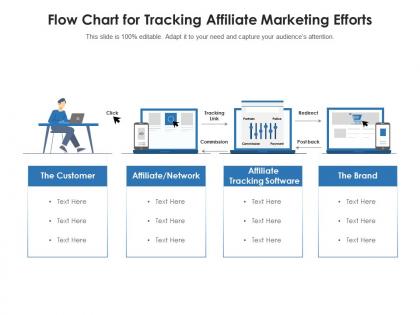
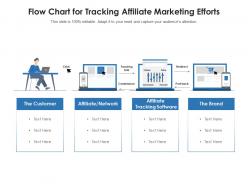
Flow chart for tracking affiliate marketing efforts




Try Before you Buy Download Free Sample Product
 Impress Your
 Audience
 100%
100% Editable
 Save Hours
 of Time


Our Flow Chart for Tracking Affiliate Marketing Efforts are topically designed to provide an attractive backdrop to any subject. Use them to look like a presentation pro.
People who downloaded this PowerPoint presentation also viewed the following :
Flow chart for tracking affiliate marketing efforts with all 2 slides:
Use our Flow Chart for Tracking Affiliate Marketing Efforts to effectively help you save your valuable time. They are readymade to fit into any presentation structure.
FAQs for Flow chart for tracking
So you'll want traffic source tracking to see where people are coming from, plus click tracking with unique affiliate IDs. Conversion tracking is huge - that's how you know who actually bought something. Attribution windows help you credit the right affiliate too. Cookie management trips up tons of people, honestly it's annoying but super important. Build in fraud detection checkpoints and real-time dashboards so you can catch weird stuff fast. Map out your customer journey first though - like literally sketch it out. Then you can build all the tracking around those specific paths. Oh and make sure you're tracking every single touchpoint from click to purchase.
Honestly, flowcharts are a lifesaver for affiliate stuff. You know how you're always juggling clicks, conversions, commission splits - trying to remember where everything goes? Yeah, that never works lol. With a visual map, you can actually see how traffic moves from your content to the merchant and back to your tracking. Super helpful when you're running multiple programs or your conversions randomly tank. You'll spot problems way quicker when it's all laid out. I'd map whatever you're doing now first, then go from there.
Honestly, I'd just grab Draw.io first since it's free and works great with Google Drive. Lucidchart and Miro are solid too - way better templates than most tools. Visio's okay if you're already paying for Microsoft stuff, but it feels dated to me. There are fancier options like ClickFunnels that have marketing-specific features built right in, which is pretty neat. But really? Start simple with Draw.io and map out your customer path from that first click all the way to conversion. You can always upgrade later once you know what you actually need.
So basically, tracking flowcharts show you exactly where people bail out of your funnel. You map the whole customer journey - click to purchase - and boom, you can see the dropoff points clear as day. Like if you're getting tons of clicks but zero sales, the flowchart tells you whether it's your landing page that sucks or maybe your checkout's broken. Way easier than staring at spreadsheet numbers all day (trust me on this one). Just sketch out your current funnel first, then add your real conversion data on top. The problem spots will jump out at you immediately.
Track clicks, conversions, conversion rate, revenue per click, and customer lifetime value - those are your must-haves. Traffic sources and affiliate rankings too, otherwise you're basically guessing what works. Oh and make your flowchart show how each metric connects to your next move, that part's crucial. Start simple with these basics first. You can get fancy with attribution models later once you've got this stuff figured out. Honestly, most people overcomplicate it from the start and end up drowning in data they don't actually use.
Dude, flowcharts are game-changers for affiliate stuff. You can see everything from click to commission in one view. Makes it super easy to catch problems early - like if your tracking's broken or conversions are tanking. Way better than trying to explain your whole setup out loud (seriously, that's torture). The best part? You'll actually understand where people drop off in your funnel. Then you can fix the weak spots and focus more on what's already working well. Just start mapping what you've got now, even if it looks like a hot mess. I guarantee you'll spot issues right away that you didn't even know existed.
Look, analytics is what separates the profitable affiliates from the ones hemorrhaging money. Track every single touchpoint - seriously, every click, landing page, and conversion. You'll start seeing patterns pretty quick about which traffic sources actually convert vs the ones that just eat your budget. I check my data weekly (sometimes more if I'm tweaking campaigns). The whole customer journey becomes crystal clear once you have solid tracking in place. Without it? You're just guessing and probably wasting cash on campaigns that don't work. Kill the underperformers fast and double down on what's actually making money.
Dude, test every single link in your setup monthly - I'm not kidding. Lost a $500 commission once because one stupid redirect broke and I didn't catch it for weeks. Check your tracking pixels are firing right, make sure conversions show up across mobile and desktop. Document changes too or you'll forget what you did (guilty as charged). Set alerts for weird traffic drops so you know immediately when something's off. Yeah it's boring work but honestly? Way better than wondering where your money went.
Honestly, the worst thing you can do is overcomplicate your flowchart from the start. I've seen people create these massive diagrams that nobody understands - including themselves lol. Focus on the basics first: click-to-conversion paths and attribution windows. Cross-device tracking will probably trip you up too (it gets everyone). Don't track every single metric just because you can. Stick to stuff that'll actually change your decisions. Document cookie lifespans and test everything regularly - sounds boring but you'll thank me later. Build simple, then add layers once you figure out what you actually need.
Look, that tracking flowchart is basically your cheat sheet for figuring out where your money's actually coming from. You can follow each sale backwards - from purchase all the way to that first click. Makes it dead simple to see which affiliates are crushing it vs. the ones just taking up space. Honestly, it's like having GPS for all your messy data. When you're digging through reports later, you'll know exactly what numbers to focus on and how they tie together. Spot the duds fast, then pump more resources into what's already working. Oh and start with your top 3 traffic sources first - don't try to map everything at once or you'll go crazy.
So CPC tracks right when someone clicks your link - super simple. CPA is way more annoying because you're waiting for them to actually buy something or sign up, which means dealing with cookie stuff and attribution windows (ugh). CPM just cares about impressions. Honestly, I'd start by figuring out what conversions you actually want to track first. Then work backwards from there to build your flowchart. CPC flowcharts are basically just traffic flow, but CPA gets messy since you're following people through their whole journey until they convert.
Honestly, adding affiliate software to your flowchart cuts out so much manual work it's ridiculous. You won't be constantly switching between platforms to check clicks and payouts anymore. Everything just flows into one visual system that actually shows you what's happening in real time. Which affiliates suck? You'll see it immediately. Attribution problems messing with your commissions? Caught before they blow up. The trick is mapping your current tracking setup first - I learned this the hard way - then figure out which integrations would save you the most time. Once it's running, your flowchart basically becomes this live dashboard that spots problems for you.
Update that flowchart monthly or whenever you add new programs - trust me on this one. Document every single touchpoint from click to conversion, and always have backup tracking for when pixels inevitably break. The flowcharts that actually work? They're dead simple and visual. Anyone should be able to follow yours without a computer science degree. Note your attribution model somewhere obvious too. Oh, and test everything quarterly - I can't tell you how many broken links I've found just sitting there killing conversions. Set that calendar reminder right now before you forget.
Check your flowcharts monthly if you're running campaigns actively - quarterly at minimum. Tracking breaks constantly and it's so frustrating. Pixels randomly stop working, attribution windows shift, new partners mess with your setup. APIs update without warning too (why don't they just tell us?). When you test new traffic sources or change commission structures, update everything right away. I set a monthly calendar reminder to audit the whole flow and run test conversions. Document whatever gaps you find. Trust me, catching issues early saves major headaches later.
Amazon Associates kills it because they map out every step from click to purchase with flowcharts. Wirecutter does the same thing - tracks which product reviews actually drive sales. Pretty smart if you ask me. ConvertKit and Shopify also give their affiliates visual maps showing how readers go from blog posts to signups to paying customers. The whole point is creating flowcharts for your specific funnel so you can see where people bail out. Makes it way easier to fix the weak spots.
-
Very well designed and informative templates.
-
Unique and attractive product design.
-
Content of slide is easy to understand and edit.
-
Much better than the original! Thanks for the quick turnaround.
-
Very unique, user-friendly presentation interface.