


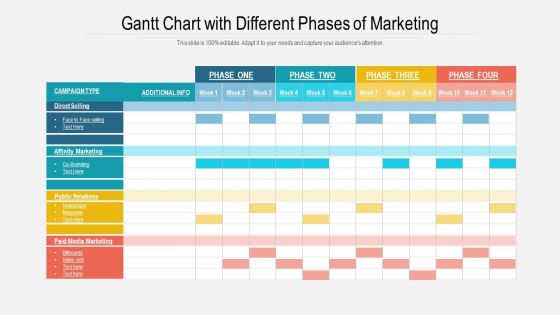
Gráfico de Gantt com diferentes fases de marketing





Try Before you Buy Download Free Sample Product
 Impress Your
 Audience
 100%
100% Editable
 Save Hours
 of Time


Apresentando nosso gráfico de Gantt com diferentes fases de marketing Slide de apresentação do PowerPoint. Apresente as várias fases do marketing eficiente de uma empresa, utilizando este modelo PPT. Com a ajuda deste slide PPT, você pode economizar seu tempo e esforços ao gerenciar o projeto. Aproveite as vantagens desse layout PPT para criar um plano de ação para a conclusão e desenvolvimento graduais do projeto. Escolha este tema PPT para representar visualmente o plano e o programa do projeto da sua empresa. Este gráfico PPT tabular organizado e bem estruturado permitirá que você ilustre suas tarefas semanais e o tempo da campanha de forma clara e concisa. Para ilustrar várias tarefas, como venda direta, marketing de afinidade e relações públicas, você pode incorporar este visual PPT. Organize suas ferramentas e tecnologias de forma eficaz, utilizando este gráfico PPT. Mostre a sobreposição e os links em seus projetos por meio deste design PPT. Sem esperar mais, clique no botão de download!
People who downloaded this PowerPoint presentation also viewed the following :
Gráfico de Gantt com diferentes fases de marketing com todos os 2 slides:
Nosso gráfico de Gantt com diferentes fases de marketing é explícito e eficaz. Eles combinam clareza e expressão concisa.
FAQs for Gantt chart with different
Track these key phases: research & planning, content creation, launch, promotion, and analyzing results. Map it backwards from your launch date - seriously, this saves so much headache later. Your Gantt chart should show research flowing into strategy, then content production, campaign execution, and optimization. Build in buffer time for approvals because stakeholders will definitely want changes at the last minute. Content has to be done before you can launch (duh), but other tasks can overlap. Honestly, the backwards planning thing is a game-changer for spotting bottlenecks early.
Honestly, Gantt charts are game-changers for this stuff. Break everything into smaller tasks first, then map out realistic start/end dates. You'll instantly see where you're being way too optimistic – trust me, I used to think I could launch three campaigns while redesigning our site. Nightmare. The visual shows dependencies too, so you know which tasks can't start until others wrap up. When things run late (and they will), you can adjust the whole timeline instead of panicking. Main thing is being brutally honest about how long each piece actually takes, not how long you want it to take.
So basically Gantt charts are like a visual timeline that shows your team who's doing what and when everything's due. Pretty handy for avoiding those "oh crap, I thought you were handling that" disasters. You'll see dependencies super clearly - like if Sarah can't start the social media stuff until Mike wraps up those brand guidelines. Honestly, there's something weirdly satisfying about checking tasks off as complete. The visual aspect helps you catch bottlenecks before they blow up into major headaches. I'd say update it weekly during your team check-ins so people can speak up about issues early. Works way better than trying to track everything in your head or random Slack messages.
Honestly, Asana or Monday.com are your best bet for marketing Gantt charts. They've got campaign templates already built in, which saves you a ton of time. Microsoft Project? Way too complicated unless you're running massive campaigns - it's like bringing a bazooka to a water balloon fight. If your team's obsessed with spreadsheets, Smartsheet works really well. Trello's timeline feature is solid for smaller teams, and ClickUp lets you customize everything (maybe too much tbh). My advice? Just start with whatever tool you're already using for projects. You can always switch later once you figure out what actually works for your workflow.
Honestly, Gantt charts are a lifesaver for this stuff. You'll see exactly when Sarah's drowning in three campaigns while Tom's twiddling his thumbs waiting for assets. Spot those conflicts weeks early and move things around before everything goes to hell. When you need extra budget or freelancers, just point to the chart - boom, there's your proof that Q4 is insane. The timeline makes it obvious who does what and when. I'd start with next quarter's projects, see where you're screwed. Trust me, those bottlenecks will jump out at you way faster than trying to keep it all in your head.
Honestly, the worst mistake is going crazy detailed from day one. You'll hate yourself later when you're constantly updating every little thing. Dependencies are huge too - marketing stuff connects to everything else, so map those out or your timeline becomes useless. I swear, half the Gantt charts I see are these gorgeous works of art that sit unused because they're way too complicated. Start broad for the big picture, then get specific as deadlines approach. Oh and buffer time is non-negotiable. Marketing projects always run long, it's just how it goes.
Yeah totally! Gantt charts work great with pretty much any method you're already using. I've seen teams mix them with Agile sprints for marketing stuff, or throw them on top of Kanban boards when you need to show deadlines. Content teams especially love pairing them with Scrum - honestly makes client meetings way smoother. Your team can still work however they want, but stakeholders get that visual timeline they're always asking for. Just add a Gantt view to whatever you're doing now. Perfect for presentations and keeping track of big milestones without changing your whole process.
Marketing metrics basically tell you when your timeline's gonna get screwed up. Poor CTR or conversion rates? You'll need more time for optimization, so extend those Gantt chart phases. Good metrics might let you speed things up or move resources around. I watched one team totally redo their content calendar after A/B tests showed their messaging sucked. Always build buffer time into your original chart - trust me on this one. Metrics will force changes no matter what. Set up weekly reviews and just roll with the timeline updates as they come.
Your stakeholders are gonna be your reality check when it comes to Gantt charts. They'll catch stuff you missed - like totally unrealistic deadlines or dependencies that don't make sense. Some of their feedback might seem annoying in the moment, but trust me, it beats scrambling later when everything falls apart. Don't wait until you're done to get their input either. Set up check-ins at major milestones so you can tweak things as you go. Each round helps you fix task order, move resources around, and keep everyone on the same page. Oh and definitely do this early - saves so much drama.
Honestly, Gantt charts are a game changer for marketing campaigns. You can see everything laid out - when stuff launches, how long it runs, what overlaps. Super helpful for catching resource conflicts early. I actually love checking things off when they're done (weird flex but whatever). The best part though? Comparing what you planned vs what actually happened. Like if your social media always runs late but email wraps up early, you'll know to adjust next time. Set up some progress markers so you can spot what's working and pivot fast.
Gantt charts are honestly a lifesaver for this stuff. When you map out all your marketing activities, you'll instantly see where things crash into each other - like when your content team is drowning while designers have nothing to do. I learned this the hard way last year. The visual timeline also shows which tasks can run at the same time versus what needs to happen step by step. Way better than those nightmare email chains trying to coordinate everything. Color-coding by team makes it even more obvious where you're spreading people too thin.
Honestly, just block out those big seasonal windows right on your Gantt chart first - like Christmas shopping or back-to-school madness. I always work backwards from those dates since they're basically unmovable. Color-code everything so it's obvious which campaigns hit which seasons. Buffer time is huge because things always get messy right before major launches (learned that the hard way). Map out your content creation and ad buys to land perfectly in those sweet spots. Oh, and separate swim lanes help too if you're juggling multiple seasonal pushes.
Start with your campaign launch dates since those are set in stone, then work backwards for content deadlines and approvals. Figure out which tasks can't start until others finish - that's your critical path stuff. Color-coding by priority is a game changer, trust me. Revenue impact should be your main deciding factor when campaigns overlap. Always pad your timeline for revisions because marketing people will definitely have opinions (learned this the hard way). Also maybe add extra time for design approval rounds - they take forever but whatever, it's part of the process.
Okay so milestones are literally lifesavers for those crazy long campaigns that go on forever. You break down the scary big stuff into smaller wins you can actually track. Like, instead of panicking about your entire product launch, you'll spot that your content team is two weeks behind before it becomes a disaster. I learned this the hard way on my last project – total mess without them. Set them at major deliverables or decision points. Short campaigns don't really need this, but anything over a month? Absolutely check progress weekly with your team or you're flying blind.
Honestly, color-coding your Gantt chart phases is a game changer - your team won't waste half the meeting figuring out basic timeline stuff anymore. Progress bars and milestone markers make everything super obvious at a glance. I always add little icons for different activities (social media vs email campaigns, whatever). Makes it way easier to scan quickly. Those connecting arrows between dependent tasks? Pure gold. Oh, and here's something that actually works - throw team member photos next to their assigned tasks. Sounds cheesy but people love seeing their face on there and it makes status updates less boring.
No Reviews