


Goals Objectives Strategies Company Objectives Goals Strategies Measures





Try Before you Buy Download Free Sample Product
 Impress Your
 Audience
 100%
100% Editable
 Save Hours
 of Time


Our Goals Objectives Strategies Company Objectives Goals Strategies Measures are topically designed to provide an attractive backdrop to any subject. Use them to look like a presentation pro.
People who downloaded this PowerPoint presentation also viewed the following :
Content of this Powerpoint Presentation
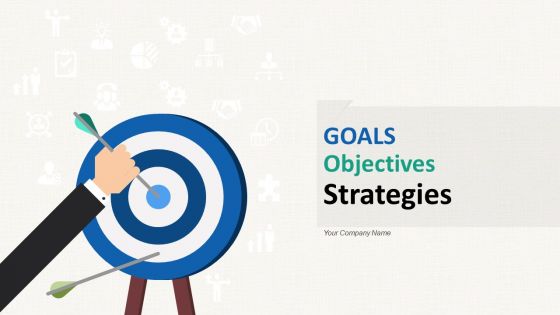
Slide 1: This slide introduces GOALS Objectives Strategies. State Your Company Name and begin.
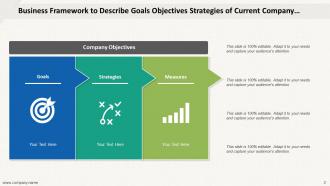
Slide 2: This slide shows Business Framework to Describe Goals Objectives.
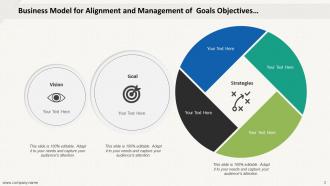
Slide 3: This slide presents Business Model for Alignment and Management of Goals.
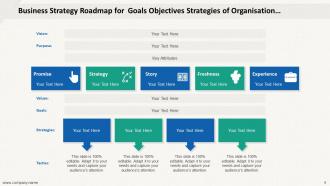
Slide 4: This slide displays Business Strategy Roadmap for Goals, Objectives, Strategies.
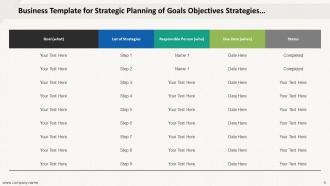
Slide 5: This slide represents Business Template for Strategic Planning of Goals.
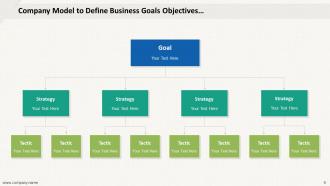
Slide 6: This slide showcases Company Model to Define Business Goals Objectives.
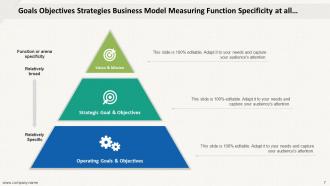
Slide 7: This slide shows Goals Objectives Strategies and Business Model Measuring.
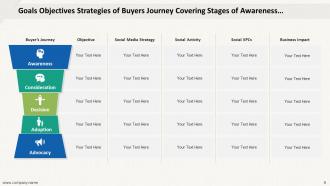
Slide 8: This slide presents Goals Objectives Strategies of Buyers Journey Covering- Awareness, Consideration, Decision, Adoption, Advocacy.
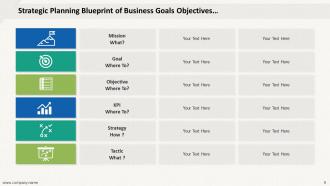
Slide 9: This slide displays Strategic Planning Blueprint of Business Goals and Objectives.
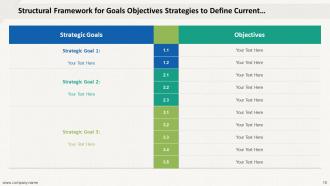
Slide 10: This slide represents Structural Framework for Goals, Objectives, Strategies.
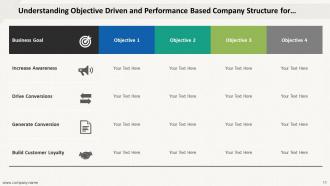
Slide 11: This slide showcases Understanding Objective Driven and Performance Based.
Slide 12: This is a Thank You slide with address, contact numbers and email address.
Goals Objectives Strategies Company Objectives Goals Strategies Measures with all 12 slides:
Use our Goals Objectives Strategies Company Objectives Goals Strategies Measures to effectively help you save your valuable time. They are readymade to fit into any presentation structure.
FAQs for Goals Objectives Strategies Company Objectives
Here's the thing - good presentation objectives need to be super specific and measurable. Don't write vague garbage like "audience will understand better." What does that even mean? Instead, go for concrete stuff: "identify three cost-saving strategies" or "choose between option A and B." Focus on what YOUR specific audience actually cares about, not just what you want to ramble about. I always write mine down first before touching slides - honestly saves me from going down random rabbit holes later. They'll keep you on track and help you ruthlessly cut content that doesn't serve the goal.
SMART criteria totally changed how I write presentation goals - like, night and day difference. Before, I'd write garbage like "inform the audience" which means absolutely nothing. Now it's more like "attendees will identify three budget strategies and pick one to try in 30 days." Way more specific, right? The time-bound piece is honestly what makes the biggest difference because it forces you to think about actual outcomes. Oh and the measurable part too - that's what helps you figure out if your content is actually working. You should try rewriting whatever objectives you have now using this framework. I bet you'll spot the weak parts immediately.
Think of objectives like giving your audience a GPS for your presentation. Tell them upfront what they'll walk away knowing - maybe 2-3 solid takeaways max. People love having that mental checklist to follow along with (honestly makes everyone feel way more accomplished). You'll also stay on track better instead of going down random rabbit holes that confuse everyone. I always reference those objectives throughout the talk too - keeps people engaged and they can actually follow your thinking. It's basically setting expectations so nobody's sitting there wondering where you're going with all this.
Honestly, just start by actually talking to people. Surveys work, but I've gotten some of my best insights from random coffee chats. Figure out what's really bugging them or what they're trying to accomplish. Once you have that, make a simple two-column list - their needs on one side, how your stuff helps on the other. Don't overthink it. The tricky part is being real about whether there's actually a match there. If you're forcing it, people will smell that from a mile away. I'd rather pivot my goals based on what I learn than push something that doesn't fit.
You gotta match your goals to what people actually need to get out of it. Pitches? Pure persuasion - make them say yes or write that check. But if you're just sharing info, go for clarity stuff like "help everyone understand the new policy changes." Training's different though - it's all about skills they can actually use. I used to write the same boring objectives for literally everything (ugh, what a waste). Now I just ask myself: what should they leave with? A decision? New knowledge? Some skill they didn't have before? That one question totally changes how you build the whole thing. Makes everything way more focused too.
You've gotta know your audience before setting any objectives - otherwise you're just shooting in the dark. Figure out their background first. Are they total beginners or do they already know some stuff? What do they actually want to learn? Once you understand that, your objectives basically write themselves. I mean, you can't aim to teach advanced concepts to people who don't even know the basics yet, right? That's just setting yourself up to fail. Do your homework on who's listening first. Then create goals that'll actually hit the mark for them. Makes the whole process way easier honestly.
Honestly, most people never bother checking if their presentation actually worked - which is crazy to me. Set up your measurement plan beforehand so you're not scrambling later. Send out quick surveys asking for feedback or biggest takeaways. Google Forms works fine for this stuff. If you were trying to inform people, test what they retained with polls or follow-up emails. Want to persuade? Track whether people actually changed their behavior or made different decisions. I usually send a simple "what stuck with you?" text a few days after. Short sentences work better than long surveys - people won't fill those out anyway.
Okay so first thing - don't be vague with your goals. "Inform the audience" means literally nothing. I see people try to educate AND persuade AND entertain all in one presentation, which never works tbh. Pick one thing and do it well. Also, think about what your audience actually needs instead of just what you want to ramble about. The real killer though? Making goals you can't measure. Skip "increase awareness" - go for something concrete like "attendees will identify three warning signs." Write down one specific outcome before you even think about slides. Trust me on this one.
Okay so visual aids are basically your secret weapon for making people actually *get* what you're talking about. Like, abstract stuff becomes way clearer when you show a timeline for project milestones or do a before/after comparison. People's brains just work better with pictures than walls of text - I learned this the hard way after watching too many audiences glaze over during my early presentations. The trick is being picky about which visuals you use. Don't just throw in random charts because they look professional. Ask yourself: does this image actually explain my point better than just talking? If it's just decoration, toss it.
Hit them with your roadmap right away - either a slide or just say it out loud. Something like "By the end of this, you'll know how to..." then list your 3-4 main points. People zone out crazy fast if they don't get why they should care, so connect it to their world somehow. I usually keep the objectives visible the whole time, maybe in a corner or header. Be specific about what they'll actually walk away with, not just "we'll discuss sales strategies" or whatever. Oh and use simple language - nobody needs to be impressed by fancy words when they're trying to follow along.
Okay so you've gotta watch people's faces constantly - like if they look confused or start checking their phones, that's your signal to switch it up. I'll literally throw out my whole planned section if I can tell they need something totally different. Have backup ways to explain stuff ready, and don't be afraid to go off-script. Ask them direct questions like "does this actually make sense?" Then pivot based on what they say. If something's too complex, add more examples or simplify your words right then. Those check-in moments are honestly game-changers for keeping everyone with you.
Your objectives are like your presentation's GPS - they keep everything on track. I can't tell you how many rambling presentations I've sat through where the speaker clearly had no clue what they actually wanted. Once you nail down your purpose, the content just flows better. You'll know which slides to keep, what stories actually matter, and how long to spend on each part. Honestly? Most people skip this step and wonder why their presentation feels scattered. Start simple - jot down 2-3 specific things you want your audience to do or think afterward. Everything else should support those goals or get tossed.
So instead of just saying "boost engagement 20%," tell the actual story behind that number. What does it mean for real people? Maybe it's helping stressed parents grab dinner ideas in 30 seconds instead of scrolling forever. Or students actually understanding math instead of just staring at problems. The trick is thinking about the before/after scenario your goal creates. Honestly, most objectives sound boring as hell because they're just metrics floating in space. But when you frame it around someone's actual problem getting solved? Way more compelling. Try writing one objective like a tiny story next time - you'll see what I mean.
Honestly, checking back on your objectives is what saves you from presentation hell. You know how these things turn into random info dumps? Your original goals are just your starting point - once you get into the research weirdness, you'll find better angles or realize some stuff just won't work with your timeline. I do weekly check-ins (literally set phone reminders) to stay focused on what your audience actually cares about. When people inevitably throw random requests at you halfway through, you can just ask "does this fit our main goals?" It's pretty much the only way to avoid scope creep madness.
Every design choice should tie back to what you're trying to accomplish. Clean layouts with lots of white space work great for informational presentations - makes data way easier to process. Bold colors and strong visuals? Perfect when you're trying to persuade someone. I totally bombed a presentation once because it looked amazing but didn't match my actual goal at all. For training stuff, focus on interactive elements and clear step-by-step visuals instead of getting fancy. Honestly, I always ask myself: "Does this slide actually help me hit my objective?" If the answer's no, time to simplify.
-
Colors used are bright and distinctive.