

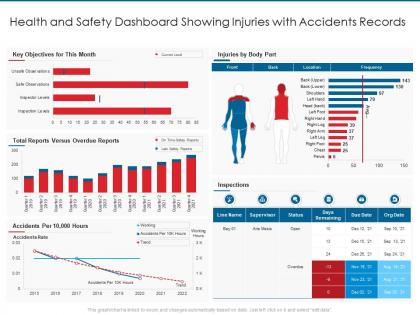
Health and safety dashboard showing injuries with accidents records




Try Before you Buy Download Free Sample Product
 Impress Your
 Audience
 100%
100% Editable
 Save Hours
 of Time


Our Health And Safety Dashboard Showing Injuries With Accidents Records are topically designed to provide an attractive backdrop to any subject. Use them to look like a presentation pro.
People who downloaded this PowerPoint presentation also viewed the following :
Health and safety dashboard showing injuries with accidents records with all 2 slides:
Use our Health And Safety Dashboard Showing Injuries With Accidents Records to effectively help you save your valuable time. They are readymade to fit into any presentation structure.
FAQs for Health and safety dashboard showing injuries
Honestly, start with the basics - OSHA recordables, near misses, and days since last incident. Training completion rates are huge too. Then add some proactive stuff like safety inspections done, how fast you close corrective actions, and employee suggestions (that last one really shows if people actually care). PPE compliance is obvious but necessary. Environmental monitoring depends on your industry obviously. The key is picking maybe 6-8 things your bosses will actually look at regularly instead of cramming everything in there. You can always add more metrics later once they're hooked on using the dashboard.
Dude, real-time data is a game changer - you catch problems while they're happening instead of finding out weeks later when someone's already hurt. Like if you notice more near-misses happening on night shifts, you can fix staffing right away. Those live dashboards are actually pretty motivating too, nobody wants to be the team with the flashing red warning lol. Oh and definitely set up alerts for the scary stuff so your phone buzzes when thresholds get hit. Way better than playing catch-up after accidents happen.
Honestly, getting your team actually engaged makes all the difference. When people feel safe speaking up, they'll report incidents and near-misses instead of keeping quiet. Your data becomes way more reliable because nobody's scared of getting blamed. Plus engaged employees don't just walk past hazards - they actually flag them (I mean, we've all pretended not to see stuff before). The dashboard stops being useless and shows what's really happening. Really though, build that psychological safety first and everything else just clicks into place.
Start with mapping out what you're doing manually right now - that's where the gold is. IoT sensors can handle temperature and air quality automatically. Wearable devices are pretty solid for health monitoring too. Your incident reporting apps? Most can push data straight to dashboards without anyone touching them. HR systems often have APIs for training records, which honestly saves so much time. I'd focus on your existing safety systems first since they're probably already halfway digital. The trick is finding what's already connected in your workplace and just... connecting it better, you know?
Honestly, the worst part is usually your data being a complete mess. I've seen companies still doing incident reports on actual paper - it's wild. Everything's scattered across different systems and none of it matches up. Then you've got executives wanting fancy dashboards while safety managers need the nitty-gritty details and real-time stuff. Oh, and somehow you're supposed to make safety metrics interesting instead of another soul-crushing compliance thing. Map out where all your data lives first, then figure out who's actually gonna use this thing daily.
Honestly, visuals are a game-changer for health and safety dashboards. Instead of staring at endless spreadsheet rows, you'll spot trends immediately - like rising incident rates or lagging training completion. Your brain just processes charts way faster than raw numbers. Heat maps are clutch for showing which departments need help ASAP. I learned this the hard way after spending way too much time squinting at data tables. Pick your visualizations based on who's looking though. Executives want the big picture trends, but safety managers need to dig into specifics.
Honestly, regulations are gonna dictate what you track and how you report it. OSHA incident rates, workers' comp claims, near-miss stuff - they all have specific requirements that shape your whole dashboard. Some are crazy prescriptive about timeframes too. You need the right metrics in the right format or you'll be totally screwed during audits. I'd map out your regulatory stuff first, then build data collection around that. Way easier than trying to retrofit everything later. That way you're always ready and your data actually matters instead of just looking pretty.
Three main things to tackle: data validation, regular audits, and solid documentation. Automated checks are a lifesaver for catching dumb errors like negative ages or blank fields - seriously saved me from looking like an idiot in front of executives more than once. Don't let discrepancies build up; do weekly reviews and fix issues right away. Document where every metric comes from and how you calculate it so others can double-check your work. Oh, and definitely create a feedback loop with field teams. They're the ones who'll tell you when your beautiful dashboard shows 120% customer satisfaction but clients are actually furious.
Honestly, a safety dashboard is a lifesaver when auditors come knocking. Everything's right there - incident reports, training records, inspection logs, compliance stuff. No more digging through random files or different systems like a maniac. You can pull reports instantly and show your safety trends over time. The real-time tracking part is huge too. Most dashboards will auto-generate audit reports, which saves hours of prep work. Just make sure you're tracking whatever metrics your industry regulators actually care about. Trust me, you'll thank yourself later when audit season rolls around and you're not stressed out of your mind.
Focus on making navigation dead simple first. Different people need totally different views - execs want the big picture KPIs while safety folks need all the nitty-gritty incident details. Mobile's huge since everyone's constantly checking stuff on their phones. Add real-time alerts, make reports exportable, and definitely include searchable logs. Honestly? The best dashboards are almost boring because they just work without making you think. Start by figuring out what each person actually does day-to-day, then build around those workflows instead of shoving everything together. Clear visual hierarchy and simple filters will save you so many headaches later.
Honestly, dashboards are game-changers for this stuff. Instead of drowning in spreadsheet hell, you'll actually see patterns pop out visually - like when accidents spike during your crazy busy months or if certain shifts keep having issues. Charts make trends super obvious compared to staring at endless rows of data (which nobody has time for anyway). You can dig deeper when something looks off, plus set up alerts so you catch problems early instead of finding out months later that everything went to shit. Really helps you see if your safety programs are actually doing anything or just burning budget.
So predictive analytics is like turning your safety tracking into a fortune teller - sounds weird but it works. You're not just looking at past accidents anymore. The system finds patterns in your data and flags where problems will probably pop up next. It looks at everything - weather, employee behavior, timing, whatever. Honestly, it's pretty slick once you get it running. You can send extra training to risky areas or beef up safety protocols before anything bad happens. My advice? Start simple - pick your most common incidents and trace back what data points were there beforehand.
Figure out your top 3-5 biggest risks first - that's honestly the game changer. Construction sites need to watch falls and equipment issues, while hospitals track infections and needle sticks. Completely different stuff. Set up your alerts and visuals around what matters most to YOUR people. Don't try tracking everything or you'll go nuts. Ask your frontline folks what scares them - they know better than anyone what's actually dangerous day-to-day. Some things need daily monitoring, others can wait for monthly reports. The whole point is making it useful, not just pretty to look at.
So the huge benefit is finally getting all your safety stuff in one spot - no more bouncing between like five different systems. Your dashboard pulls incident reports, compliance data, training records, all that scattered info into one view. Real-time visibility means you'll catch trends and problems way quicker. Honestly, the reporting alone makes it worth it since you won't be manually mashing together data from everywhere anymore. I'd start by listing out what systems you're using now and figure out what data you actually look at every day. That'll help you prioritize what needs connecting first.
Look, real-time alerts are a game changer - you'll spot safety problems instantly instead of finding out way too late. Equipment breaks? Workers wandering into danger zones? Your dashboard pings you right away. I mean, it's basically like having a safety net that actually works. Quick response times = way fewer accidents, which is honestly the whole point. Start with alerts for your biggest risks first - don't try to monitor everything at once or you'll go crazy. Then just add more as you figure out what matters most.
-
Amazing product with appealing content and design.