


Health and safety training matrix ppt powerpoint presentation outline good




Try Before you Buy Download Free Sample Product
 Impress Your
 Audience
 100%
100% Editable
 Save Hours
 of Time


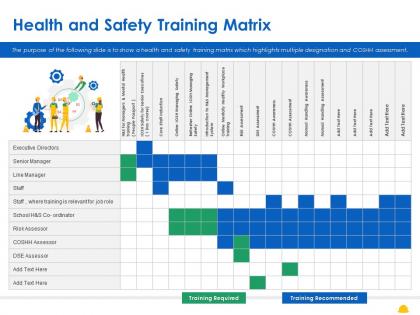
The purpose of the following slide is to show a health and safety training matrix which highlights multiple designation and COSHH assessment.
People who downloaded this PowerPoint presentation also viewed the following :
Health and safety training matrix ppt powerpoint presentation outline good with all 2 slides:
Use our Health And Safety Training Matrix Ppt Powerpoint Presentation Outline Good to effectively help you save your valuable time. They are readymade to fit into any presentation structure.
FAQs for Health and safety training matrix ppt powerpoint
So you'll want the basics first - employee names, their roles, what training they need, and when stuff expires. Don't overthink the format honestly. Add completion dates and who's delivering each course. Training status is super helpful too (like pending, done, overdue). I'd throw in competency levels if people need different skill tiers - that part gets messy fast though. Some folks add costs and locations but eh, probably overkill starting out. Main goal is seeing at a glance who needs what training when. Just use a simple spreadsheet first! You can get all fancy with software later once you figure out what actually works for your team.
Honestly, just grab the actual regulations first - OSHA, industry codes, whatever applies to you. Map those against your training categories so you know what's actually required vs what's just nice to have. Your compliance team probably knows this stuff by heart already, so bug them first. Set up columns for mandatory training, renewal dates, and any weird industry-specific stuff you need. Don't forget ongoing requirements - that's where people usually mess up. Short sentences work. Build it around real regulatory obligations, not generic safety fluff that just looks impressive. The whole point is covering your butt legally, not winning training awards.
Track both types of metrics - the predictive stuff like training completion rates and engagement scores, plus the after-the-fact numbers (incident rates, workers' comp claims, near-miss reports). Honestly, the behavior observations are where you'll see if training actually stuck. Monthly tracking works best. Don't get caught up in single data points though - trends matter way more. Oh, and workplace safety audits are gold for spotting gaps. I'd start with maybe 3-4 metrics that make sense for your specific situation. You'll drive yourself crazy trying to measure everything at once.
At minimum, do it yearly. But honestly? Quarterly reviews work way better. Regulations shift constantly, new equipment shows up, people's jobs change - it happens faster than you'd expect. Also, any time there's an incident or close call, that's your cue to immediately check if the training matrix actually covered what went wrong. The whole point is matching training to what people actually do every day, not some theoretical job description from 2019. Set a calendar reminder right now or you'll totally forget.
Your staff feedback is honestly the best way to keep training relevant. People doing the actual work know what's helpful vs what's just checking boxes. I'd set up quarterly surveys asking what training actually helped them and what felt useless. You'll probably find some "mandatory" stuff isn't worth the time investment. Plus workers spot safety gaps or new issues way before management does. Those informal check-ins work great too - sometimes better than formal surveys if people feel comfortable being honest. The matrix should evolve with real workplace needs, not just what looked good on paper originally.
Honestly, get a learning management system - it'll change your life. These platforms track everything automatically, so you're not stuck updating spreadsheets forever. You can see who's current with training, who's behind, and what expires soon. The automated reminders are clutch because nobody remembers this stuff on their own. Most systems play nice with your existing HR setup too, which is huge. Look for something with good dashboard reporting that handles your specific training needs. I mean, manual tracking is just brutal these days.
Honestly, the worst mistake is overcomplicating the whole thing. I've watched teams build these ridiculously detailed matrices that nobody ever touches again - such a waste of time. Focus on broad roles that actually make sense, not super specific job categories. Same with training - stick to what's truly required, not every random course someone thinks might be useful. Oh, and whatever tracking system you pick, make sure it's something you can realistically maintain. Start basic and add complexity later if needed. Also set up regular reviews since things change constantly.
So basically it's like a spreadsheet that shows what safety training everyone needs for their specific job. Then it tracks who's done what and when stuff expires. Super handy for spotting who's behind on certifications - you can see your whole team's status at a glance. It'll ping you before deadlines hit so you're not freaking out when inspectors show up. Trust me, having all that documentation organized makes audits way less stressful. I'd start by writing down every safety requirement per position, then figure out how you want to track it all.
Honestly, just make a color-coded spreadsheet showing who needs what training by when - saves so much headache later. Send reminders but don't go overboard (people get annoyed). The trick is getting ahead of it instead of scrambling when someone's cert expires next week. Tell them WHY they need each training too, otherwise it feels pointless. Set up automatic alerts if your system can handle it. Oh, and always give clear steps on how to actually do the training - sounds obvious but you'd be surprised how many places skip that part.
So training matrices are actually pretty brilliant - they turn safety into everyone's problem instead of just HR paperwork. You get this clear picture of who's missing what training, and suddenly people care about keeping up. Honestly, the visual part is what sold me on them. One look and you know if your team's ready or totally screwed. Like last month we caught that our entire night crew was behind on the new equipment stuff... could've been a disaster. Map out your critical skills first and the weak spots become super obvious. It's way better than guessing who knows what.
Start with your highest-risk people first - equipment operators, anyone handling chemicals, hazardous environment workers. They're your priority. OSHA compliance stuff comes next since you don't want those headaches. Most companies just blast everyone with the same training, which is honestly kind of wasteful. Office workers can wait for basic safety awareness - they're not gonna get hurt filing reports, you know? Make a quick scoring system: rank each role by how dangerous it actually is, what's legally required, and if you've had incidents before. That'll show you exactly where to focus your energy first.
Honestly, just start with Excel or Google Sheets - they're perfect for tracking who needs what training and when stuff expires. If you've got budget later, TalentLMS or Moodle are solid upgrades. Those enterprise ones like SAP? Total overkill unless you're dealing with thousands of people. Build it so you can filter by department and spot compliance deadlines quickly. I'd map everything out in a basic spreadsheet first anyway - helps you figure out what you actually need before spending money on fancy software that might be more complicated than it's worth.
Dude, visual training matrices are seriously so much better than those nightmare spreadsheets. Your brain just gets it instantly - colors, charts, icons all make sense way faster than squinting at tiny cells. I swear those endless data rows make my eyes glaze over after like 2 minutes. Color code completion status and throw in simple icons for different training types. You'll spot patterns super quick - which teams are slacking on certs, what's coming due soon, all that stuff. Honestly beats the hell out of scrolling through rows forever trying to find gaps.
Honestly, get them a mentor right off the bat - someone who actually knows the training matrix well. Those peer relationships work way better than just handing someone a manual. Set up check-ins at week 1, month 1, and 3 months to see how they're doing. Front-load all the safety training first since that's obviously the critical stuff. Give them a timeline so they're not guessing what comes next. Oh, and actually document everything in your system as they complete it - sounds boring but you'll thank yourself later when audit time rolls around.
Honestly, start by just asking your remote team what safety stuff they're actually worried about - that'll give you the best foundation. Then build modules around home office ergonomics, digital eye strain, and mental health (isolation is real). Track everything digitally so you can send reminders based on people's specific roles. Don't forget emergency prep for when they're working alone, proper lighting setup, and cyber security since remote workers get targeted more. Oh, and definitely cover break schedules and work-life boundaries - that's huge for remote folks.
No Reviews