

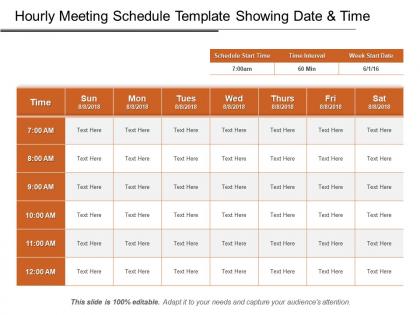
Hourly meeting schedule template showing date and time ppt design




Try Before you Buy Download Free Sample Product
 Impress Your
 Audience
 100%
100% Editable
 Save Hours
 of Time


Prepare your hourly meeting schedule with this readily available Hourly Meeting Schedule Template Showing Date And Time PPT Design template. The PPT template provides you with a blueprint for the tasks to be completed. Provide a simple-to-understand view of all the planned activities. Assign the tasks to the employees and subordinates on an hourly basis through this professionally designed PowerPoint slide. This PowerPoint layout will help you organize your meeting according to the schedule so that you do not miss any. Track the events and evaluate the progress of each task. Also, one can easily evaluate the time spent on each activity. This hourly meeting schedule allows you to plan your time efficiently. Arrange your tasks in a synchronized manner and keep the record of the workday activities by downloading this hourly meeting schedule PowerPoint slide design.
People who downloaded this PowerPoint presentation also viewed the following :
Hourly meeting schedule template showing date and time ppt design with all 5 slides:
Gear up for the elections with our Hourly Meeting Schedule Template Showing Date And Time Ppt Design. Establish your credentials as a good candidate.
FAQs for Hourly meeting schedule template showing date and
Okay so for your hourly template you'll want time slots, meeting purpose, who's coming, and where it's happening (or the zoom link). Duration estimates help too. I always throw in space for quick prep notes - saves you from that last-minute panic scrambling. Oh and buffer time! Like 5-10 minutes between meetings because rushing sucks. Add priority levels so you know what can be moved if something urgent pops up. The thing that really changed my game was putting a "what do we actually want to accomplish" field for each meeting. Makes you realize how many meetings are just... pointless honestly.
Having a clear hourly template is honestly a game-changer. Your team knows exactly what's happening when, so nobody's sitting there confused about what topic we're on. It stops meetings from turning into those endless time-wasters too. People actually show up prepared when they can see the agenda beforehand - weird how that works, right? You'll spot patterns pretty quickly if certain topics always eat up too much time. That usually means you need to give them their own meeting slot or just budget more time upfront.
Honestly, go digital for sure. Paper schedules are such a pain because meetings change constantly and then you're just staring at outdated info. Google Sheets is perfect - everyone can check it on their phone, make edits instantly, and you can set up notifications too. I've seen teams try to stick with printed ones and it never works. Even a shared Google Calendar does the trick. The real game-changer is that real-time syncing across everyone's devices. Way less headache than reprinting schedules every other day.
Figure out when your team actually gets stuff done first - like are you guys morning people or afternoon warriors? Then just swap out those time blocks in the template. My team does these 90-minute focus chunks but honestly, some groups I know can barely sit still for 30 minutes lol. You'll want to throw in buffer time between meetings too (trust me on this one). Maybe add specific slots for different departments if that makes sense. Try it out for a couple weeks and see what's actually working. Most templates are pretty flexible once you start messing around with them.
Ugh, the worst thing you can do is pack every single hour slot full - your team will hate you. Build in buffer time because meetings ALWAYS run over, trust me on this. Don't do back-to-back scheduling without breaks, and avoid putting important stuff right after lunch when everyone's in a food coma. Oh, and stop making every meeting exactly one hour just because it looks neat on the calendar. Figure out what meetings actually matter first, then create time blocks that make sense. Some things need 30 minutes, others need two hours - work with reality, not your template.
Honestly, mapping out your day hour by hour is a total lifesaver. You'll catch those annoying double-bookings before they bite you in the ass. I used to think buffer time was optional - spoiler alert: it's not. The cool thing is you start protecting your focus blocks instead of letting random meetings devour everything. Prime morning hours? Save those for what actually matters. Random 4pm slot? Perfect for the less critical stuff. Set it up the night before and you'll feel way more in control the next day.
Honestly, hourly templates are perfect for those crazy packed events - conferences, workshops, all-day training stuff. You've got speakers switching every hour, coffee breaks to squeeze in, networking time that can't run over. Board retreats too since everyone's trying to cram way too much into one day (why do they always do that?). Map out your big sessions first, then squeeze everything else around them. Works great when you're managing tons of moving pieces that all need to hit specific time slots. Much better than winging it and watching everything fall apart by lunch.
Color-coding is a game changer - I use different colors for meetings, calls, and personal stuff so I can see my day at a glance. Icons help too, like little phone or camera symbols. The trick is leaving enough white space so it doesn't look crazy overwhelming. I actually get anxious looking at cramped schedules, weird I know. Try alternating row colors or adding light borders between time slots. Makes your brain process everything faster. Short version: good visual design = less stress when you're trying to figure out where you need to be next.
Oh, color coding is seriously a lifesaver! I assign different colors to meeting types - blue for client stuff, red for internal meetings, green for one-on-ones. You'll spot conflicts way faster and actually see patterns in how you're spending time. Plus it just looks way more organized? Start with maybe 3-4 colors though, because I went overboard at first and had like 8 different categories which was... not helpful. It's one of those things that seems super basic but makes such a difference once you get into the habit.
Dude, just automate everything you can. Calendar apps will send invites and reminders automatically once you set up a template. Zoom and Teams do recurring meetings that match whatever schedule you want. The transcription stuff is honestly amazing - I used to stress about note-taking but now I just let it record everything. Oh, and Calendly is clutch for letting people book their own slots within your framework. Don't try setting up everything at once though. I made that mistake and spent like three hours configuring when I should've been in actual meetings lol.
Just send out quick surveys after meetings or grab people for 30 seconds to ask what's bugging them. Get specific though - like "were those 15-minute breaks long enough?" or "did morning sessions feel crazy rushed?" People will actually tell you the truth if you just ask! Track complaints for a couple weeks, then tweak your template. Maybe sessions are too long, or you need bigger gaps between stuff. Honestly, I'm always surprised how obvious the fixes become once you start asking. Test changes for a week - if they suck, you can always go back to the old way.
Get your schedule out 24-48 hours ahead - email's fine but Slack usually gets more eyeballs. Don't forget time zones if you're dealing with different locations. I always include what each meeting's actually about because people hate showing up blind to random calls. Morning-of reminders are clutch, especially for any changes. Oh, and definitely ask for confirmations - you'll be surprised how many people just ignore the invite then ghost you. That way you can chase down the quiet ones before everything falls apart.
Just add timezone columns to your template and stick virtual meeting links next to each slot. Buffer time is crucial though - like 10 minutes between video calls or you'll lose your mind. I learned that the hard way! Mark who's office vs remote so people know what's up. Honestly, some of those routine check-ins could just be async updates instead of dragging everyone into yet another call. Oh, and rotate meeting times once in a while so the same poor souls aren't always dealing with 6am or 9pm meetings.
Follow-up sections are honestly a game changer - they stop meetings from turning into idea graveyards. You capture action items, assign owners, set deadlines. All right there in the template. I've watched so many solid discussions just... die because everyone assumed someone else would handle the next steps. This way, you force accountability. Plus you've got a clear reference for your next meeting. When you're bouncing between back-to-back meetings all day (ugh), having that structure already built in means you won't be frantically trying to remember who said they'd do what.
Honestly, those hourly templates are a lifesaver for keeping meetings on track. Breaking everything into time chunks means people actually prep instead of just winging it. You know how discussions usually go off the rails? This stops that. Everyone sees they've got like 15 minutes for their thing, so they cut the fluff and get to the point. I've noticed we actually accomplish what we set out to do now - weird concept, right? Oh, and definitely save 5-10 minutes at the end for next steps. Trust me on that one.
-
Content of slide is easy to understand and edit.
-
Graphics are very appealing to eyes.