


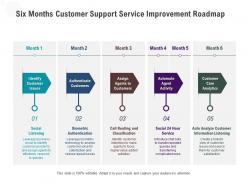
Six months customer support service improvement roadmap





Try Before you Buy Download Free Sample Product
 Impress Your
 Audience
 100%
100% Editable
 Save Hours
 of Time


A cohesive work plan is essential for achieving the desired target. Communicate your vision and lay a firm ground in front of your audience with our PowerPoint layout. Align your project milestones, budgets, deliverables, deadlines, and all the requisite information for a dynamic presentation by employing this amazingly designed Six Months Customer Support Service Improvement Roadmap. Maximize team efficiency and streamline a work plan efficiently by introducing our ready made roadmap PowerPoint theme. You can quickly establish coordination between different activities across the organization and present an insight to your colleagues by utilizing this useful business tool. Color code specific tasks, prioritize, and keep a close eye on the deadlines with the help of our eye catchy PowerPoint template. Download our Six Months Customer Support Service Improvement Roadmap for excelling at productive management.
People who downloaded this PowerPoint presentation also viewed the following :
Six months customer support service improvement roadmap with all 2 slides:
Use our Six Months Customer Support Service Improvement Roadmap to effectively help you save your valuable time. They are readymade to fit into any presentation structure.

FAQs for Six months customer support
Response time and customer satisfaction scores are your bread and butter - start there. First-contact resolution rates tell you if your team's actually solving problems or just passing them around. Ticket volume shows trends, escalation rates reveal when things go sideways. Oh, and Net Promoter Score is worth tracking if you want the long-term loyalty picture. Agent productivity matters too - cases per hour and all that - but honestly, don't sacrifice quality for speed. Leadership eats up CSAT numbers, so those plus response times will make you look good in meetings.
Start with chatbots for the basic stuff - order tracking, password resets, you know the drill. Automated ticket routing is huge too since it gets questions to the right person instantly. Follow-up emails and surveys can run themselves, which honestly saves so much time. Don't go crazy trying to automate everything at once though. Pick whatever process is making your team want to pull their hair out and start there. Once you see how much smoother things run, you'll wonder why you waited so long. The impact is pretty dramatic once it's all set up properly.
Honestly, customer feedback is like having a cheat sheet for what's actually broken. You stop guessing why people are mad and get real answers about wait times, which support channels suck, whatever. We thought our team was crushing it until people told us our chat response was garbage - whoops. Look for patterns in complaints to figure out where to train people better. You'll catch knowledge gaps and sometimes customers suggest features you never thought of. The trick is actually doing something with it though. Set up regular feedback check-ins and track if your changes help satisfaction scores.
Start with active listening and empathy stuff - that's your base. Role-playing works great, especially with real customer complaints you've gotten (honestly, real situations are always way weirder than anything you'd make up). Practice de-escalation techniques. Give them scripts for the common problems, but also teach them when it's okay to ditch the script. Oh, and don't forget regular refresher training because people get rusty fast. I'd figure out what's frustrating your team most in customer interactions first, then build training around those specific headaches.
Honestly, AI support is pretty hit or miss. You'll get crazy fast responses and it works around the clock, which customers love. Costs way less too since bots handle all the boring repetitive questions. Your actual support team gets to work on stuff that matters instead of "how do I reset my password" for the millionth time. But customers still hate chatbots that can't figure out what they're actually asking about – and the setup costs are brutal upfront. My advice? Start with easy stuff like FAQs and slowly add more features. Always keep real humans ready to jump in when things get complicated.
Here's what worked for us - get everyone using the same knowledge base first. Doesn't matter if they're on phones, email, whatever. Create response templates (I know, sounds boring as hell but trust me). Track the same metrics everywhere too. Weekly team meetings are huge - we'd go through weird cases and figure out how everyone should handle them next time. Oh and document your escalation process! Can't tell you how many fires that prevented. The biggest thing though? Just get your team actually talking to each other regularly.
Honestly, AI chatbots are insane right now - they don't sound like robots anymore and can handle pretty complex stuff. Predictive analytics is huge too, like flagging issues before customers even reach out. Video support's everywhere now, especially for tech problems. Oh and those sentiment tools that catch when someone's getting pissed off mid-conversation? Game changer. I'd probably just look at what's driving your team crazy right now and see if any of these actually help. The video thing might be overkill depending on your setup though.
Dude, personalization is huge for customer support. Using someone's name and knowing their purchase history makes them feel seen instead of just another complaint. Your team should pull up customer profiles before answering calls - saves so much time since people don't have to repeat their whole saga again. Short interactions, happier customers. Plus honestly? Nothing's more frustrating than explaining your problem three times to different people. When agents already know what's up, they can actually help instead of playing catch-up. It's wild how much this simple stuff impacts satisfaction scores.
Oh man, response time is everything for customer satisfaction. People are already annoyed when they contact you, so getting back to them quickly shows you give a damn. Even just saying "hey, got your message, looking into it" within an hour makes a huge difference - way more than crafting the perfect response later. I learned this the hard way watching our team stress over flawless answers while customers got more pissed waiting. Auto-replies help with common stuff, but honestly? Speed beats perfection almost every time. Just get back to them fast, even if you don't have the solution yet.
Okay so first thing - just listen to them vent. People get way less angry when they feel heard, it's honestly wild how well that works. Get the full story before you start problem-solving mode. Then be super clear about what you can actually do and when - don't promise stuff you can't deliver because that'll bite you later. Write everything down too, because if you're seeing the same complaints over and over, there's probably a bigger issue somewhere. Oh and definitely follow up after! Nothing's worse than thinking something's handled and then finding out the customer's still pissed.
Honestly, just tackle three things and you'll see a huge difference. Build out your FAQ section first - seriously, the same basic questions come up constantly and it's maddening. Also send heads-up emails before issues hit, like when you're doing maintenance or rolling out changes. But here's the real key: actually look at what's causing all those tickets in the first place. If your checkout process confuses everyone, fix the damn thing instead of answering "how do I pay?" emails forever. Way more effective than just being reactive all the time.
Honestly, morale is everything when it comes to customer service quality. Happy reps actually give a damn - you can hear it in their voice when they're helping customers. I've noticed that when teams feel appreciated, they'll spend time finding creative solutions instead of just rushing through calls. Stressed employees? They give you the bare minimum and move on. But engaged people will listen, show real empathy, and somehow turn angry customers into fans. It's pretty wild how that works. If your support quality is tanking, I'd check team satisfaction first - sometimes fixing the vibe internally solves all those external complaints.
Get a ticket system like Zendesk or Freshdesk - they're lifesavers for tracking response times and customer satisfaction. Heat maps showing your busiest hours are surprisingly addictive to look at! Make sure you're categorizing tickets so you can spot recurring issues. Weekly reports are clutch because they help you catch trends early. Like if billing questions suddenly spike, maybe there's a confusing checkout flow or something. Oh, and don't forget to monitor response times across email, chat, whatever channels you use. Patterns will jump out once you start looking at the data regularly.
So first thing - nail down your categories and search function. Most knowledge bases have terrible search, which drives me crazy. Split your content between customer stuff and agent procedures, but let some overlap so customers can tackle harder issues themselves. Tags and keywords are your best friend here. Make customer content super conversational with clear steps. Agent stuff can be more technical since they know what they're doing. Oh, and start by looking at your top 20 tickets - build everything around those patterns first.
Honestly, remote onboarding is trickier than people think. You can't just wing it like when everyone's in the office. Get your tools, processes, and company voice documented upfront - make it super clear since nobody can just ask the person next to them. Role-playing over video calls helps a ton, and definitely record everything so they can rewatch later. I always pair newbies with seasoned team members for call shadowing. Works surprisingly well even virtually. Don't forget regular check-ins though - remote folks get lonely and need those refreshers. Oh, and create crystal clear escalation paths so they're never stuck wondering who to ask for help.
No Reviews