

Project management dashboard upcoming deadlines waiting ppt powerpoint presentation icons




Try Before you Buy Download Free Sample Product
 Impress Your
 Audience
 100%
100% Editable
 Save Hours
 of Time


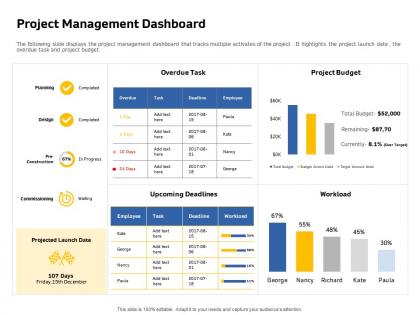
The following slide displays the project management dashboard that tracks multiple activates of the project . It highlights the project launch date , the overdue task and project budget.
People who downloaded this PowerPoint presentation also viewed the following :
Project management dashboard upcoming deadlines waiting ppt powerpoint presentation icons with all 2 slides:
Use our Project Management Dashboard Upcoming Deadlines Waiting Ppt Powerpoint Presentation Icons to effectively help you save your valuable time. They are readymade to fit into any presentation structure.
FAQs for Project management dashboard upcoming deadlines waiting ppt
Honestly, start with the obvious stuff - timeline milestones, budget tracking, and how you're using your resources. Task completion rates are clutch too since they show if people are actually getting shit done. I always throw in team workload distribution because nobody wants to be the person who burns out their best players. Stakeholder satisfaction is gold if you're measuring it already. But here's the thing - don't go overboard with like 15 different metrics or you'll spend more time tracking than actually managing. Six to eight max. You can always add weird niche KPIs later once you figure out what your team actually cares about.
Honestly, visuals are a game changer for dashboards. You'll spot trends instantly instead of hunting through endless spreadsheets - I can't go back to those text-heavy reports now. Red/yellow/green for project status works great. Progress bars show completion rates super clearly. Bar charts are perfect for team comparisons, though I probably overuse them sometimes. Don't go crazy with fancy stuff - it actually makes things harder to read. Just pick your most important metrics first. Then find the simplest way to show each one. Trust me, keeping it clean beats flashy every time.
Honestly, real-time data is a game changer for dashboards. Without it, you're basically staring at pretty charts of old news. I've watched teams struggle with weekly reports that are useless by Tuesday. Live updates let you catch problems immediately - budget issues, missed deadlines, resource problems. You can actually do something about them instead of finding out too late. Plus stakeholders stop bugging you for constant updates since they can see everything themselves. Just sync it automatically from whatever tools you're using. Way better than manually updating spreadsheets all the time.
Honestly, Agile and Scrum teams get the most out of dashboards - you really need that real-time view of sprint progress and burndown charts. Kanban's another obvious choice since those visual boards are pretty much dashboards already. Waterfall? Sure, it helps, but way less critical when everything follows a set sequence. Oh, and hybrid approaches totally need them too since you're basically managing chaos with multiple methodologies at once. Here's the thing though - if your process involves constant iterations or shifting priorities, dashboards aren't just nice to have. They're what keep your team from completely losing track of where things stand.
Honestly, dashboards are a lifesaver because everyone can just check one place instead of playing detective about project status. No more hunting down coworkers for updates or sitting through those soul-crushing status meetings every week. Your stakeholders can actually see what's happening, so they won't freak out as much. Real-time updates show who's doing what and when stuff is due. Oh, and definitely set up auto notifications when things change - trust me, it'll cut way down on the email ping-pong matches.
Honestly, just build different dashboards for different people. Execs want the big picture stuff - budget burn, timeline health, that kind of thing. Team leads need the nitty-gritty task details and who's working on what. Here's the thing though - don't dump everything on everyone's screen. It's just overwhelming noise. Project sponsors? They literally only care about hitting milestones and what might go wrong. Talk to each group first about what decisions they're making daily, then design around that. Use good visual design so the important stuff pops out immediately. Way more effective than one-size-fits-all reporting.
First, nail down what you're actually tracking - simple tasks or those nightmare multi-phase projects? Budget obviously matters here. Find something that plays nice with whatever you're already using (Slack, email, the usual suspects) instead of making everyone learn from scratch. Honestly, demos are pretty much useless - I'd test 2-3 options with a small group first. You want metrics your boss actually cares about, not just pretty dashboards. Keep it short and sweet with trials before you commit to anything long-term.
Honestly, dashboards are a game changer for catching problems early. Set up alerts for your critical stuff - budget limits, deadlines, resource crunches. Way better than digging through endless spreadsheets every week (been there, done that). The visual layout helps you spot patterns fast. Like if your team keeps missing the same types of milestones or you're always short on developers. Configure threshold notifications so you'll know immediately when things start going off track. Focus on the risk factors that actually matter for your specific project type - don't just track everything.
Dude, your dashboard's historical data is gold for planning ahead. Pull info from your last 3-5 projects and check what consistently went sideways - late tasks, budget blowouts, team bottlenecks. Which estimates were way off? What caused scope creep? I swear, scope creep is like that friend who "just needs five more minutes" but takes an hour. Anyway, use those patterns to build realistic timelines with actual buffer time. Don't just hope it'll be different next time. Focus on your top 3 problem areas first - that's where you'll see the biggest wins.
Oh man, data formats are the worst - your CRM and time tracker speak totally different languages. Then you've got timing nightmares where systems update whenever they feel like it. API limits will make you want to scream, especially when you can only pull data every few hours. Don't even get me started on legacy systems with their janky export buttons that barely work. User permissions become a mess real quick when platforms have different access rules. Honestly? Just connect 2-3 things first, get those solid, then add more later. Trust me on this one.
Honestly, real-time visibility is everything for remote teams. Your dashboard needs to show project status and deadlines without people constantly pinging Slack asking "wait, what's happening with X?" Time zones are clutch too - can't tell you how many meetings I've missed because of timezone confusion. Make sure task descriptions are super detailed since nobody can tap someone on the shoulder anymore. Comment threads help people collaborate across different hours. Oh, and set up notifications for the big stuff. We do quick dashboard reviews in our weekly meetings which actually works pretty well.
So you've got a few good options here. Start with their self-paced online course - covers filtering, alerts, customizing views, all that stuff. They do live demos twice monthly too, which honestly I'd recommend since you can ask questions on the spot. People always bring up things you wouldn't think of. There's also this quick reference guide with screenshots that's clutch for when you're actually using it day-to-day. I'd probably do the course first to get the basics down, then hit up one of those live sessions. Oh, and your whole team can access everything, so that's convenient.
Honestly, start by timing how much your team wastes on status updates and hunting down project info right now - it's probably way more than you think. Track project completion rates and budget stuff too. After you get the dashboard running for like 3-6 months, compare everything. The big wins usually come from fewer delayed projects and way less admin BS. I'd just throw together a basic spreadsheet to track this monthly. That way when your boss asks if it was worth it, you've got actual numbers instead of just saying "yeah it feels better." Oh, and don't forget stakeholder satisfaction - that one always looks good in reports.
Honestly, the worst mistake is jamming everything onto one screen. Users just shut down when there's too much going on. I'd pick maybe 5-7 metrics that actually matter to your team - not just whatever sounds impressive. Generic templates are pretty useless too unless you tweak them for how your people actually work. Oh, and definitely test it first! Sounds obvious but you'd be surprised how many people skip that step. Get your key stakeholders to play around with it and tell you what they really need to see.
Honestly, user feedback is like having a cheat code for dashboards. Your team will straight up tell you what metrics they completely ignore and what's actually confusing them. I've watched so many beautiful dashboards just... sit there unused because nobody bothered asking if they were helpful. Short feedback sessions work wonders - you'll catch pain points early and figure out what features might actually save people time. Just ask what they'd change about the current setup. Their suggestions are usually way more specific than you'd expect, and sometimes they'll mention stuff you never even considered.
-
Easily Editable.
-
Presentation Design is very nice, good work with the content as well.
-
Excellent products for quick understanding.
-
Informative presentations that are easily editable.
-
Thanks for all your great templates they have saved me lots of time and accelerate my presentations. Great product, keep them up!