

Incident and problem management process powerpoint presentation slides




Try Before you Buy Download Free Sample Product
 Impress Your
 Audience
 100%
100% Editable
 Save Hours
 of Time


Escalation is a systematic procedure for bringing a problem to the attention of a higher authority, as described by the projects escalation mechanism. Check out our professionally designed template on Incident and Problem Management processes. We have focused on the current state analysis of the company where the company is running on costs and project delays, challenges faced by project management, and issues faced by the manager have been discussed. We have outlined the escalation team structure and their roles. Furthermore, we have covered the various types of escalation, such as hierarchical and functional. The main focus of this PowerPoint template is on the escalation approach wherein we have worked on process flowchart, identification, validation, analysis, tracking and reporting, etc. The implementation plan, impact of the escalation project, and various dashboards are covered in this module. Understanding how to use escalation techniques correctly is crucial for project managers. Escalation should be viewed as a professional activity carried out in a timely and efficient manner. Customize this 100 percent editable template now.
People who downloaded this PowerPoint presentation also viewed the following :
Content of this Powerpoint Presentation
Slide 1: This slide introduces Incident and Problem Management Process. State Your Company Name and begin.
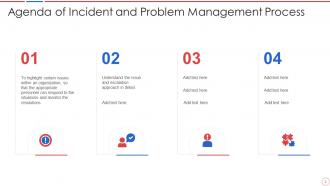
Slide 2: This slide shows Agenda of Incident and Problem Management Process.
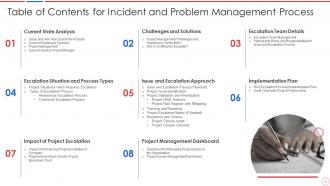
Slide 3: This slide presents Table of Contents for Incident and Problem Management Process.
Slide 4: This slide displays title for topics that are to be covered next in the template.
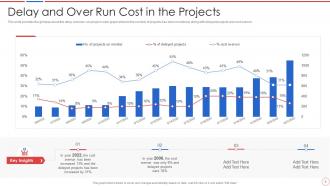
Slide 5: This slide represents delay and over run project costs graph wherein the number of projects has been monitored.
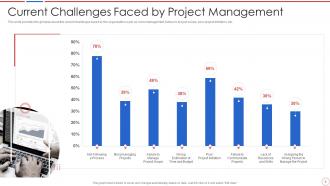
Slide 6: This slide showcases current challenges faced by the organization such as micromanagement, failure in project scope, etc.
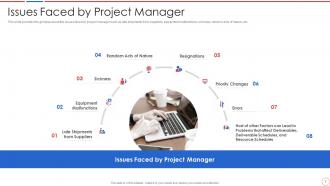
Slide 7: This slide shows issues faced by project manager such as late shipments from suppliers, equipment malfunctions, etc.
Slide 8: This slide presents title for topics that are to be covered next in the template.
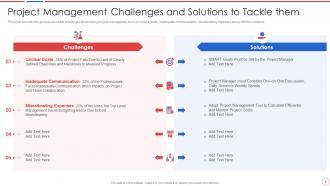
Slide 9: This slide displays Project management challenges and solutions to tackle them.
Slide 10: This slide represents reasons why it is difficult to escalate the issues such as clash creator, fear of backlash, etc.
Slide 11: This slide showcases title for topics that are to be covered next in the template.
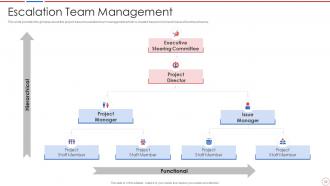
Slide 12: This slide shows project based escalation team management which is created based on hierarchical and functional teams.
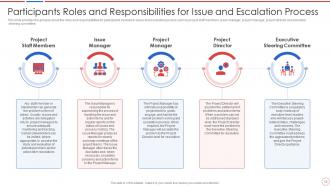
Slide 13: This slide presents Participants roles and responsibilities for issue and escalation process.
Slide 14: This slide displays title for topics that are to be covered next in the template.
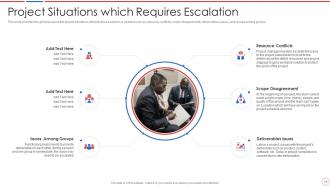
Slide 15: This slide represents project situations wherein the escalation is needed such as resource conflicts, scope disagreement, etc.
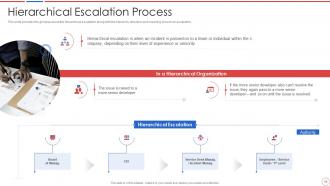
Slide 16: This slide showcases hierarchical escalation along with the hierarchy structure and meaning of such an escalation.
Slide 17: This slide shows functional escalation along with the functional structure and meaning of such an escalation.
Slide 18: This slide presents title for topics that are to be covered next in the template.
Slide 19: This slide displays issue and escalation process flowchart which covers various steps involved in this process.
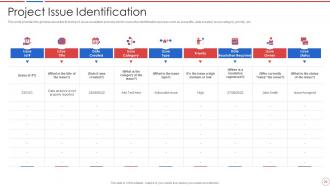
Slide 20: This slide represents first step of issue escalation process which covers the identification process.
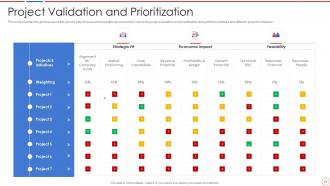
Slide 21: This slide showcases second step of issue and escalation process which covers the project validation and prioritization.
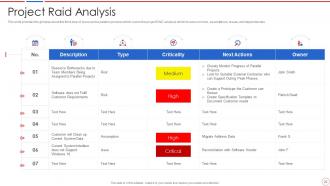
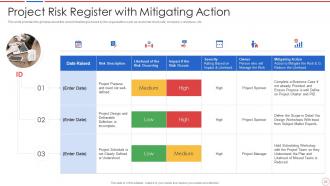
Slide 22: This slide shows third step of issue and escalation process which covers the project RAID analysis.
Slide 23: This slide presents current challenges faced by the organization such as customer churn rate, company’s revenues, etc.
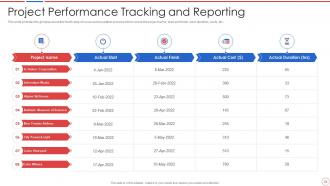
Slide 24: This slide displays fourth step of issue and escalation process which covers the project name, start and finish, etc.
Slide 25: This slide represents fifth step of issue and escalation process which covers the project escalation matrix.
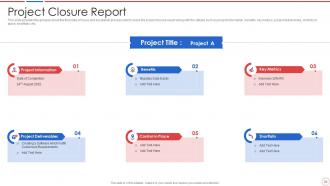
Slide 26: This slide showcases final step of issue and escalation process which covers the project closure report along with the details such as project information, benefits, etc.
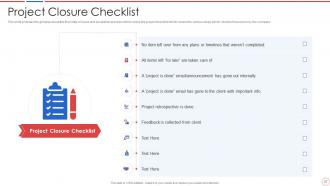
Slide 27: This slide shows final step of issue and escalation process which covers the project checklist.
Slide 28: This slide presents title for topics that are to be covered next in the template.
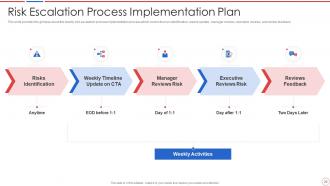
Slide 29: This slide displays weekly risk escalation process implementation process which covers the risk identification, weekly update, etc.
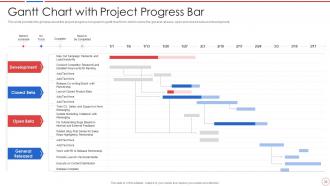
Slide 30: This slide represents Gantt Chart with Project Progress Bar.
Slide 31: This slide showcases title for topics that are to be covered next in the template.
Slide 32: This slide shows Impact of Introducing Project Escalation in Company.
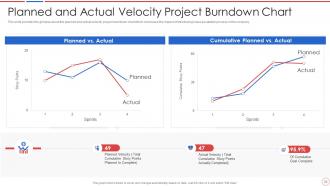
Slide 33: This slide presents Planned and Actual Velocity Project Burndown Chart.
Slide 34: This slide displays title for topics that are to be covered next in the template.
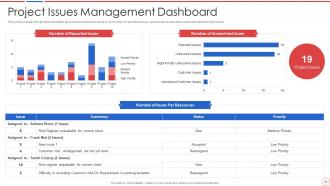
Slide 35: This slide represents Dashboard for Managing Project Issues in the Organization.
Slide 36: This slide showcases project issues wherein focus is on number of reported issues, unresolved issues and issues allocated per resources.
Slide 37: This slide shows Icons for Incident and Problem Management Process.
Slide 38: This slide is titled as Additional Slides for moving forward.
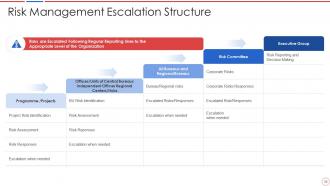
Slide 39: This slide shows Risk Management Escalation Structure.
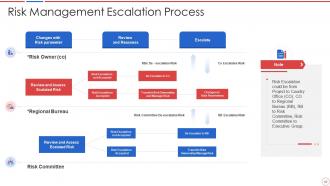
Slide 40: This slide presents Risk Management Escalation Process.
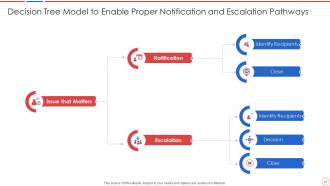
Slide 41: This slide displays Decision Tree Model to Enable Proper Notification and Escalation Pathways.
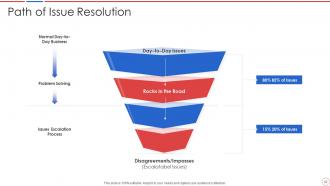
Slide 42: This slide represents Path of Issue Resolution
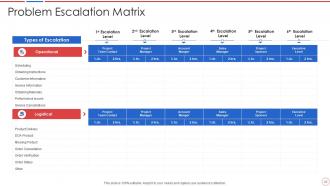
Slide 43: This slide showcases Problem Escalation Matrix
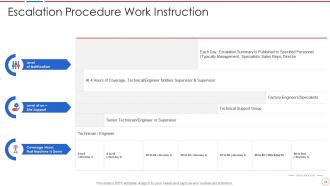
Slide 44: This slide shows Escalation Procedure Work Instruction
Slide 45: This is About Us slide to show company specifications etc.
Slide 46: This slide shows Post It Notes. Post your important notes here.
Slide 47: This is Our Target slide. State your targets here.
Slide 48: This slide shows 30 60 90 Days Plan with text boxes.
Slide 49: This is Our Mission slide with related imagery and text.
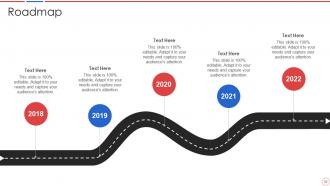
Slide 50: This slide shows Roadmap with additional textboxes.
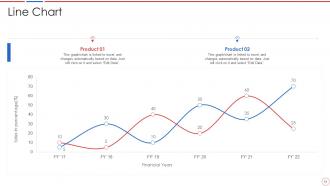
Slide 51: This slide displays Line chart with two products comparison.
Slide 52: This is Our Team slide with names and designation.
Slide 53: This is an Idea Generation slide to state a new idea or highlight information, specifications etc.
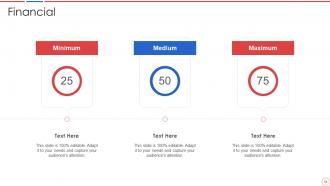
Slide 54: This is a Financial slide. Show your finance related stuff here.
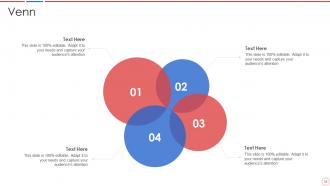
Slide 55: This slide shows Venn diagram with text boxes.
Slide 56: This is a Timeline slide. Show data related to time intervals here.
Slide 57: This is a Thank You slide with address, contact numbers and email address.
Incident and problem management process powerpoint presentation slides with all 65 slides:
Use our Incident And Problem Management Process Powerpoint Presentation Slides to effectively help you save your valuable time. They are readymade to fit into any presentation structure.























FAQs for Incident and problem management process
So you need the basics: incident detection, classification, response coordination, and tracking resolutions. Clear escalation procedures are huge - like who jumps in when everything's on fire. Define roles upfront so people aren't standing around wondering what to do. Communication protocols keep everyone in the loop. Post-incident reviews? That's honestly where you learn the most. Document everything and actually update your knowledge base (I know, boring but necessary). Oh, and practice these procedures regularly. Trust me, when real chaos hits, you want muscle memory, not panic.
Honestly, you can't just rely on one detection method - that's asking for trouble. Set up automated monitoring for your critical stuff, but make sure the alerts actually matter (nobody wants notifications going off every two seconds for nothing). Train your team to recognize early warning signs too. User reports are seriously underrated - make it brain-dead simple for people to report issues. I'd audit what you're currently missing first, then build multiple detection streams that all feed into one central spot. Work backwards from your biggest blind spots and you'll catch way more problems before they blow up.
Dude, communication literally saves your ass during incidents. Keep everyone updated - your team, bosses, customers, the whole gang. When people don't know what's happening, they freak out and start making wild assumptions. I've watched teams completely work against each other because nobody was talking! Set up dedicated channels and have someone own the updates. Be honest about what you know (and what you don't). Also, definitely don't let customers find out about your outage through Twitter first - that's just embarrassing.
Dude, automation seriously cuts down response times by taking care of all the boring repetitive tasks. You know - auto ticket creation, firing off notifications to the right team members, that kind of stuff. Pre-built runbooks that just run themselves without anyone babysitting them? Pure gold. Detection and initial triage is where you'll see the biggest difference. Your monitoring spots problems and kicks off escalations way faster than doing it manually. I'd honestly start with whatever incidents happen most often at your place, then build out from there. Once it's running smoothly, you'll wonder why you waited so long.
Honestly, start with MTTR and MTTD - those show how fast you're fixing stuff and catching problems before customers lose their minds. Track your incident volume trends too, because patterns matter. Customer satisfaction scores are huge though - I've seen teams nail the technical fix but totally bomb the communication part. Oh, and definitely watch repeat incidents. Nothing makes you look worse than the same system crashing twice in one week. Those four will give you a pretty solid picture of where you stand.
Honestly, just make a simple matrix with impact vs urgency scores. Rate stuff 1-4 for how many people it affects, then 1-4 for how fast you need to fix it. High/high = drop everything mode. The annoying part is when you get weird combos - like some tiny bug that's suddenly critical because your boss is demoing tomorrow (ugh). I usually just multiply the scores together to rank everything. Main thing is getting your team to agree on what a "3" looks like upfront, otherwise you'll have arguments every time something breaks.
Oh man, communication is always the worst part - everyone's talking but nobody's actually in charge of fixing anything. Then you get scope creep where a small issue suddenly becomes this massive crisis. Stakeholders start breathing down your neck wanting updates every five minutes, which honestly just slows everything down. Documentation? Forget about it when you're in firefighting mode, but then you're screwed during the post-mortem. Resource fights get ugly too when teams are competing for the same people. My take - pick ONE person to handle all communication and make roles crystal clear from the start.
So incident management basically talks to everything else in ITIL. You're constantly hitting up problem management for those annoying recurring issues, plus change management when you need to push fixes. Service desk handles all the user drama while you're fixing stuff. Your incident data also feeds availability and capacity teams - they love getting performance numbers. Asset management is honestly a lifesaver during those brutal 2am calls when you can't remember what server does what. The trick is keeping data flowing between all these teams smoothly. Otherwise you'll end up doing the same work twice or miss something that could've prevented the whole mess.
Honestly, start with the technical stuff - troubleshooting, diagnostics, root cause analysis. That's your foundation. Communication training is massive too since you're dealing with panicked stakeholders at weird hours. Definitely add stress management because 3 AM outages make everyone cranky (learned that one the hard way). Cover your specific tools and escalation paths. Post-incident reviews are clutch for learning from mistakes. Run tabletop exercises regularly - way better to mess up in practice than during real chaos. Oh, and build this stuff gradually. Don't try cramming everything into one training session.
Track your top 3 incident types first - don't try to boil the ocean right away. Historical data shows you when stuff usually breaks, which systems are drama queens, and helps predict what might go sideways next. Dashboards are actually pretty clutch here since you can spot trends instead of drowning in random alerts. I'd pick one metric this week and just focus on that. You'll start seeing patterns way faster when you're correlating different data points. Makes finding root causes less of a nightmare too. Start small though - you can always expand once you've got the basics down.
Dude, write everything down while it's still fresh - symptoms, what broke, timestamps, which systems got hit. Don't forget to note what you tried that didn't work (seriously saves so much time later). Once you figure out the actual fix, document each step like you're leaving notes for your future self who'll have zero memory of this mess. I always throw in good tags and keywords so it's actually searchable later. Be specific enough that if this same nightmare happens again, someone else can just follow your notes and not start from scratch. Trust me on this one.
Here's the thing - every time something breaks, you're getting free data about your weak spots. Don't just rush to fix and move on though. Look for patterns in what keeps failing. Those blameless post-mortems? They're goldmines if you actually dig into root causes instead of slapping quick fixes everywhere. I've seen teams waste so much time because they never step back to analyze trends. Set up monthly reviews of your incidents and turn those insights into actual preventive work. Otherwise you'll keep fighting the same fires forever.
ServiceNow's the big enterprise beast - tons of features but probably overkill unless you're huge. PagerDuty kills it for alerts and escalations. Jira Service Management makes sense if you're already in the Atlassian world. Opsgenie (Atlassian bought them too) handles on-call stuff really well. Honestly? They all track tickets and do escalations. The real choice comes down to what you're already using and your budget. I always tell people to trial 2-3 options - you'll know pretty quick which one clicks with your team's workflow.
Think of it as your emergency playbook - saves you from total chaos when things break. Everyone knows their role, who to call, how to communicate. No more scrambling around at 2 AM wondering what the hell to do first. Your recovery time drops big time because you're not burning minutes figuring out basic stuff. Honestly, even a crappy plan beats no plan when you're under pressure. Just write down whatever informal process you already have, then make it better over time. Start simple.
Honestly, communication is everything during outages. Get a dedicated Slack channel going and put someone in charge of updates - not your best engineer who should be fixing stuff. Update people regularly even when nothing's changed because silence freaks everyone out way more than "still working on it." I learned this the hard way when our CEO started calling me every 10 minutes during a database crash. Be straight about what you know, what you don't, and when you think it'll be fixed. People just want to know someone's on it and they're not being left in the dark.
-
Enough space for editing and adding your own content.
-
Nice and innovative design.
-
Top Quality presentations that are easily editable.
-
It saves your time and decrease your efforts in half.