


Incident Response Playbook Process Flow Diagram Depicting Ransomware Incidents Occurrence




Try Before you Buy Download Free Sample Product
 Impress Your
 Audience
 100%
100% Editable
 Save Hours
 of Time


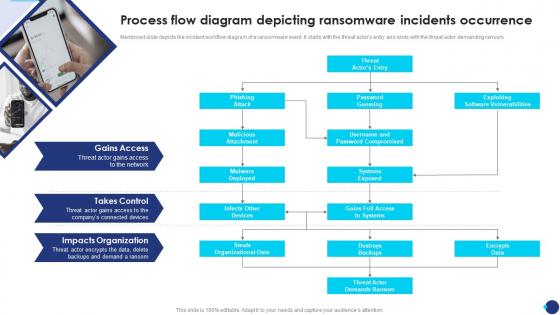
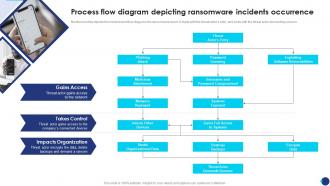
Mentioned slide depicts the incident workflow diagram of a ransomware event. It starts with the threat actors entry and ends with the threat actor demanding ransom.
People who downloaded this PowerPoint presentation also viewed the following :
Incident Response Playbook Process Flow Diagram Depicting Ransomware Incidents Occurrence with all 6 slides:
Use our Incident Response Playbook Process Flow Diagram Depicting Ransomware Incidents Occurrence to effectively help you save your valuable time. They are readymade to fit into any presentation structure.





FAQs for Incident Response Playbook Process Flow Diagram Depicting
First thing - figure out what assets actually matter and how they connect to everything else. You can't protect what you don't know about. Set up communication plans for your team, stakeholders, law enforcement contacts. Test your backups religiously because I've seen too many places discover their "bulletproof" backup system was garbage when they needed it most. Have containment procedures ready to isolate infected systems fast. Legal stuff matters too - breach notifications, cyber insurance contacts should be documented and accessible. Practice with tabletop exercises so people don't panic and forget everything when it hits. Everyone needs to know their role beforehand.
Look, start with a solid vulnerability assessment - technical stuff AND human factors. Most breaches? They're honestly just basic oversights. Run pen tests, check for unpatched systems, audit those backup procedures. Your employees need phishing simulations too since they're usually how attackers get in. Don't do this once and call it done though. Network segmentation, endpoint protection, incident response plans - all need regular checkups. I'd say quarterly tech scans, maybe annual tabletop exercises so you can see how your team actually handles pressure. Those exercises always reveal weird gaps you didn't expect.
Dude, train your people - seriously can't stress this enough. Most ransomware sneaks in when someone clicks a sketchy email or downloads something they shouldn't have. I literally watched a company get wrecked because an employee fell for a fake "urgent IT update" message. Pretty brutal honestly. Your team needs to recognize suspicious emails and know when to hit the panic button. Don't make it a one-and-done training session though. Run those fake phishing tests monthly to keep everyone on their toes - repetition is everything here.
You've gotta isolate those infected systems right now - stop the bleeding first. I know panic mode kicks in hard, but containment is everything. Next, figure out what actually got hit and how bad it is. Focus on getting your most critical stuff back online first - payroll, customer systems, whatever keeps the lights on. Oh, and call legal and PR teams ASAP because there's probably notification rules you need to follow. Document every single thing you're doing too. Trust me, you'll need that paper trail for insurance and all the compliance headaches coming your way.
Get yourself a good EDR tool - CrowdStrike's solid but pricey. Network monitoring catches lateral movement before things get nasty. Don't forget forensic imaging tools and secure comms for your team. Oh, and offline backups that actually stay offline (learned that one the hard way). Test everything beforehand though. Seriously. Finding out your backup system's broken while ransomware's running wild? Yeah, that's a nightmare you don't want. Most people skip the testing part but it'll save your butt when something real hits.
Okay so the 3-2-1 rule is your best friend here - three copies of everything, two different storage types, one kept offline. Air-gapped backups are crucial because ransomware can't touch what it can't reach. Daily automated backups are great, but you've gotta test them regularly. Trust me, finding out your backups are toast when you actually need them is the worst feeling ever. Immutable storage helps too if you can swing it. Oh, and rotate those offline backups often - don't just set it and forget it.
Okay so first thing - you've got like 72 hours max to notify people and regulators in most states. Healthcare has its own HIPAA mess on top of that. Here's what's wild though: paying ransoms can actually break sanctions laws if these hackers are on some government list (which they often are, honestly). Don't touch anything yet - preserve that evidence because the FBI will want it. Look, I know you're drowning right now, but call your lawyers and law enforcement immediately. They'll walk you through this nightmare while you're still trying to figure out what got hit.
Look, executives just want to know business impact and timelines. IT folks need the nitty-gritty technical stuff. For customers and public? Give them reassurance but don't overshare details. Honestly, prep your message templates ahead of time - when everything's burning down, you won't have bandwidth to write good comms. Have legal check anything going external since some industries have disclosure rules. Keep internal teams updated regularly but be more careful with public stuff. Oh, and pick ONE person as your spokesperson. Mixed messages from different people just makes everything messier.
Watch for weird file encryption happening everywhere and mass renaming with random extensions. Network traffic usually spikes hard when it spreads. CPU maxes out too since it's doing crazy amounts of encryption work. Users suddenly can't access their stuff - that's your biggest red flag honestly. You'll spot sketchy processes and random executables popping up in temp folders. Set alerts for this stuff in whatever monitoring you're using. Oh, and drill it into people's heads to report file issues right away instead of spending an hour trying to "fix" it themselves.
Disconnect those infected machines right away - don't mess around waiting for it to magically fix itself. Got recent backups stored offline? That's your golden ticket. Restore from those clean copies ASAP. No good backups? Yeah, that sucks but happens to everyone eventually. You're looking at rebuilding everything from scratch with fresh OS installs. Document the whole mess for insurance and forensics stuff. Here's the kicker though - patch whatever vulnerabilities they exploited before you bring anything back online, otherwise you're just asking for round two. Seriously, test your backup recovery process now if you haven't already.
Don't negotiate yourself - seriously, that's a terrible idea. Call the cops and your cyber insurance people first. These hackers have done this a million times, you haven't. If you absolutely have to talk to them, get a specialized firm to handle it. They know what they're doing. Document everything but don't promise stuff you can't deliver. Oh and paying them doesn't guarantee anything anyway - you might still lose your data or get hit again later. Your insurance team should really be running point on this whole mess.
So threat intel basically gives you a heads up when ransomware crews are eyeing your industry. You can patch stuff they're actively hitting before they come for you. Plus you get those IOCs to dump into your security tools - honestly, the automatic SIEM alerts are clutch here. Different groups have their favorite tricks too. Some are all about RDP attacks, others start with phishing emails. It's pretty wild seeing their patterns once you know what to look for. Just grab some feeds that match your sector and set up those alerts. Game changer.
Dude, the worst thing you can do? Jump back online before figuring out how they got in. That's just inviting them back for seconds. I've watched so many teams skip the forensics part because their boss is freaking out about downtime - huge mistake. Restoring from backups won't cut it if the original hole is still there. They probably left backdoors too. Oh, and reset every single password, even the random service accounts nobody thinks about. Honestly, rushing the root cause analysis is where most people screw themselves over.
Don't treat ransomware response like some separate thing - it works way better when it's part of your whole security setup. Your incident response playbooks should connect with threat detection, backups, all that stuff. Makes me think of home security systems that actually communicate with each other, you know? Have your SOC team run ransomware drills alongside phishing and breach scenarios. That way when shit hits the fan, they react automatically across different attack types. Map out what you're already doing for incident response first, then figure out where ransomware steps can strengthen your existing controls.
Track your response times first - detection, containment, recovery. Those are gold for seeing if you're actually getting faster. Measure data loss and downtime too, plus how long it took to update stakeholders (that one always gets forgotten). Financial impact is crucial but honestly, staring at those numbers afterward just hurts. I'd also look at soft stuff like whether your playbooks actually worked or if everyone was running around confused. Oh, and set baselines now while you're thinking about it - you'll thank yourself later when you're not trying to piece together what went wrong during the chaos.
-
“Love it! I was able to grab an exciting proposal because of SlideTeam.”
-
Great quality slides in rapid time.