


Informationssicherheits-Powerpoint-Präsentationsfolien




Try Before you Buy Download Free Sample Product
 Impress Your
 Audience
 100%
100% Editable
 Save Hours
 of Time


Unsere Informationssicherheits-Powerpoint-Präsentationsfolien sind thematisch gestaltet und bieten einen attraktiven Hintergrund für jedes Thema. Verwenden Sie sie, um wie ein Präsentationsprofi auszusehen.
People who downloaded this PowerPoint presentation also viewed the following :
Inhalt dieser Powerpoint-Präsentation
Folie 1 : Diese Folie stellt das Bewusstsein für Informationssicherheit vor. Geben Sie Ihren Firmennamen an und beginnen Sie.
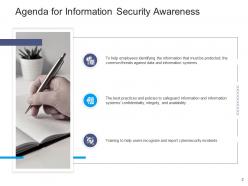
Folie 2 : Diese Folie zeigt die Agenda für das Bewusstsein für Informationssicherheit.
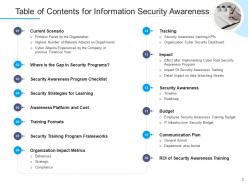
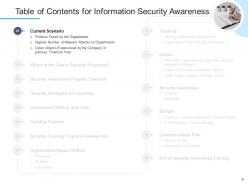
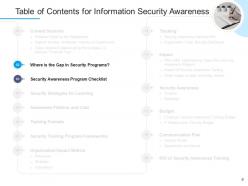
Folie 3 : Diese Folie zeigt das Inhaltsverzeichnis für das Bewusstsein für Informationssicherheit.
Folie 4 : Diese Folie zeigt das Inhaltsverzeichnis für das Bewusstsein für Informationssicherheit.
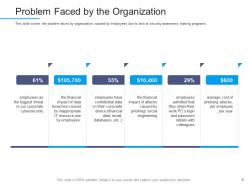
Folie 5 : Diese Folie behandelt das Problem, mit dem Unternehmen konfrontiert sind, das von Mitarbeitern aufgrund fehlender Schulungsprogramme zum Sicherheitsbewusstsein verursacht wird.
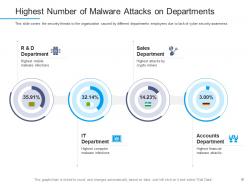
Folie 6 : Diese Folie zeigt Sicherheitsbedrohungen für das Unternehmen, die von Mitarbeitern verschiedener Abteilungen aufgrund mangelnden Bewusstseins für Cybersicherheit verursacht werden
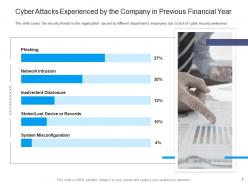
Folie 7 : Diese Folie stellt die Sicherheitsbedrohungen für das Unternehmen dar, die von Mitarbeitern verschiedener Abteilungen aufgrund mangelnden Bewusstseins für Cybersicherheit verursacht werden.
Folie 8 : Diese Folie zeigt das Inhaltsverzeichnis der Präsentation.
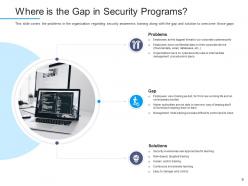
Folie 9 : Diese Folie behandelt die Probleme in der Organisation in Bezug auf Schulungen zum Sicherheitsbewusstsein sowie die Lücken und Lösungen zur Überwindung dieser Lücken.
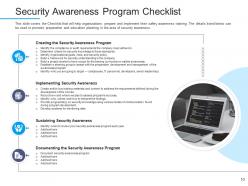
Folie 10 : Diese Folie behandelt die Checkliste, die Organisationen bei der Vorbereitung und Durchführung ihrer Sicherheitsschulung hilft.
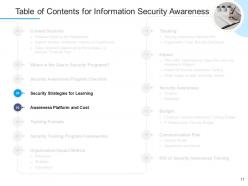
Folie 11 : Diese Folie zeigt das Inhaltsverzeichnis der Präsentation an.
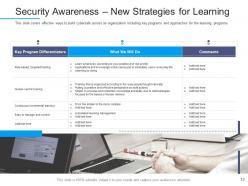
Folie 12 : Diese Folie stellt effektive Möglichkeiten dar, um Cybersicherheit in einer Organisation aufzubauen, einschließlich wichtiger Programme und Ansätze für die Lernprogramme.
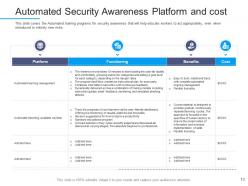
Folie 13 : Diese Folie behandelt die automatisierten Schulungsprogramme für das Sicherheitsbewusstsein, die dazu beitragen, dass Mitarbeiter angemessen handeln, auch wenn sie mit völlig neuen Risiken vertraut gemacht werden.
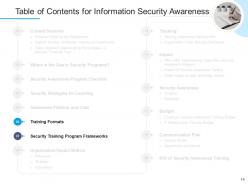
Folie 14 : Diese Folie präsentiert das Inhaltsverzeichnis der Präsentation.
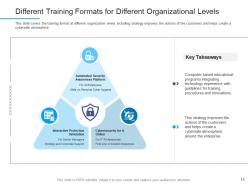
Folie 15 : Diese Folie behandelt das Schulungsformat auf verschiedenen Organisationsebenen, einschließlich der Strategie, verbessert die Aktionen der Kunden und trägt zur Schaffung einer cybersicheren Atmosphäre bei.
Folie 16 : Diese Folie zeigt mögliche Positionen, die Anweisungen unterliegen könnten, Informationsquellen für Anweisungen und Metriken zur Bewertung des Trainingserfolgs.
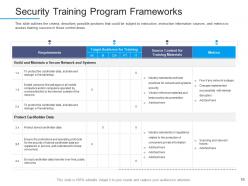
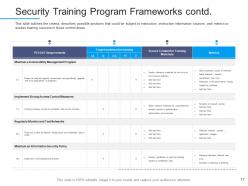
Folie 17 : Diese Folie stellt die Rahmen des Sicherheitstrainingsprogramms dar.
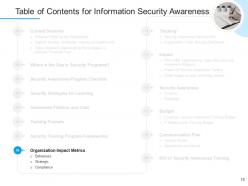
Folie 18 : Diese Folie zeigt das Inhaltsverzeichnis der Präsentation.
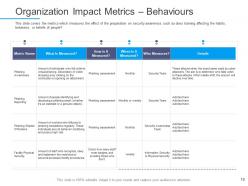
Folie 19 : Diese Folie präsentiert die Metriken, die die Wirkung der Vorbereitung auf das Sicherheitsbewusstsein messen, wie z. B. beeinflusst Schulungen die Gewohnheiten, Verhaltensweisen usw.
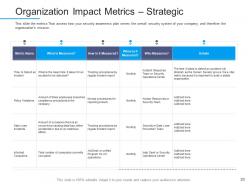
Folie 20 : Diese Folie zeigt, wie Ihr Sicherheitsbewusstseinsplan dem gesamten Sicherheitssystem Ihres Unternehmens dient.
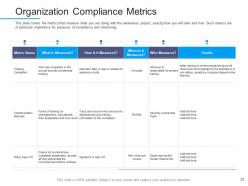
Folie 21 : Diese Folie zeigt Metriken an, die messen, was Sie mit dem Sensibilisierungsprojekt tun.
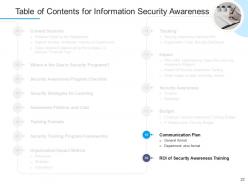
Folie 22 : Diese Folie stellt das Inhaltsverzeichnis der Präsentation dar.
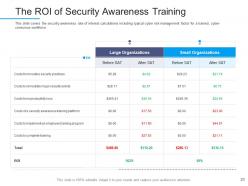
Folie 23 : Diese Folie zeigt die Sicherheitsbewusstseinsrate von Zinsberechnungen einschließlich des typischen Cyber-Risikomanagementfaktors für einen geschulten.
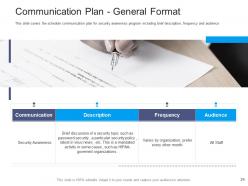
Folie 24 : Diese Folie präsentiert den Zeitplan für die Kommunikation mit dem Programm zur Sensibilisierung für die Sicherheit, einschließlich einer kurzen Beschreibung, Häufigkeit und Zielgruppe.
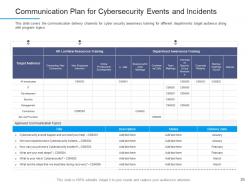
Folie 25 : Diese Folie zeigt den Kommunikationsplan für Cybersicherheitsereignisse und -vorfälle.
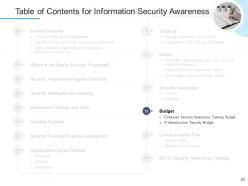
Folie 26 : Diese Folie zeigt das Inhaltsverzeichnis der Präsentation an.
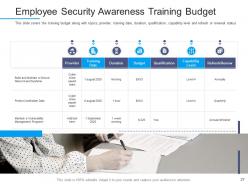
Folie 27 : Diese Folie stellt das Schulungsbudget für das Sicherheitsbewusstsein der Mitarbeiter dar.
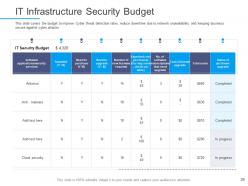
Folie 28 : Diese Folie zeigt das Budget zur Verbesserung der Erkennungsraten von Cyber-Bedrohungen, zur Reduzierung von Ausfallzeiten aufgrund von Netzwerkausfällen und zum Schutz des Unternehmens vor Cyber-Angriffen.
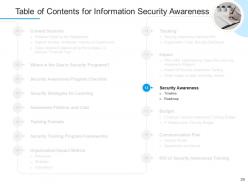
Folie 29 : Diese Folie präsentiert das Inhaltsverzeichnis der Präsentation.
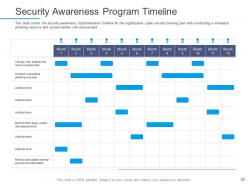
Folie 30 : Diese Folie behandelt den Zeitplan für die Implementierung des Sicherheitsbewusstseins für den Schulungsplan für Cybersicherheit des Unternehmens.
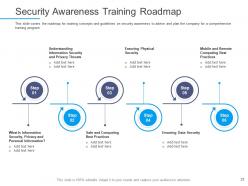
Folie 31 : Diese Folie zeigt den Fahrplan für das Sicherheitsbewusstseinstraining.
Folie 32 : Diese Folie stellt das Inhaltsverzeichnis der Präsentation dar.
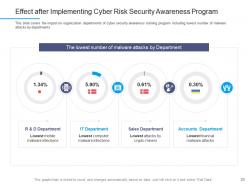
Folie 33 : Diese Folie zeigt die Auswirkungen des Schulungsprogramms für Cybersicherheitsbewusstsein auf die Organisationsabteilungen.
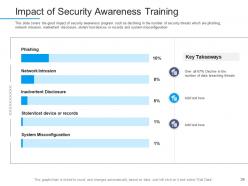
Folie 34 : Diese Folie zeigt die positiven Auswirkungen von Sicherheitsbewusstseinsprogrammen, wie z.
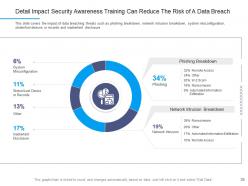
Folie 35 : Diese Folie zeigt, wie Sicherheitsbewusstseinstraining das Risiko einer Datenschutzverletzung verringern kann.
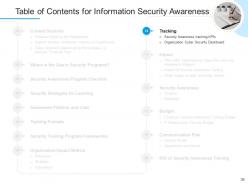
Folie 36 : Diese Folie zeigt das Inhaltsverzeichnis der Präsentation an.
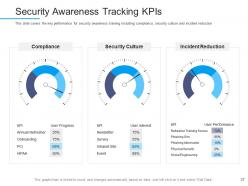
Folie 37 : Diese Folie stellt die KPIs zur Verfolgung des Sicherheitsbewusstseins dar.
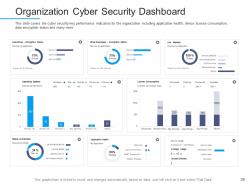
Folie 38 : Diese Folie behandelt die wichtigsten Leistungsindikatoren der Cybersicherheit für das Unternehmen, einschließlich Anwendungszustand, Gerätelizenzverbrauch, Datenverschlüsselungsstatus usw.
Folie 39 : Diese Folie zeigt Symbole für das Bewusstsein für Informationssicherheit.
Folie 40 : Diese Folie trägt den Titel „Zusätzliche Folien“, um vorwärts zu gehen.
Folie 41 : Dies ist eine Über uns-Folie, um Firmenspezifikationen usw. zu zeigen.
Folie 42 : Dies ist die Folie „Unsere Mission“ mit den dazugehörigen Bildern und Texten.
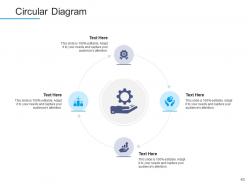
Folie 43 : Diese Folie zeigt ein Kreisdiagramm mit zusätzlichen Textfeldern zum Anzeigen von Informationen.
Folie 44 : Dies ist eine Folie zur Ideengenerierung, um eine neue Idee vorzustellen oder Informationen, Spezifikationen usw. hervorzuheben.
Folie 45 : Diese Folie zeigt Post-It-Notizen. Veröffentlichen Sie hier Ihre wichtigen Notizen.
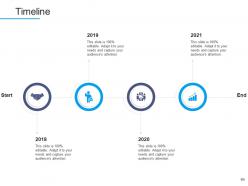
Folie 46 : Dies ist eine Timeline-Folie. Zeigen Sie hier Daten zu Zeitintervallen an.
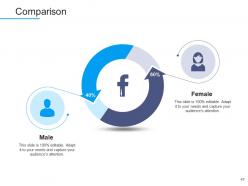
Folie 47 : Dies ist eine Vergleichsfolie zum Vergleich zwischen Waren, Einheiten usw.
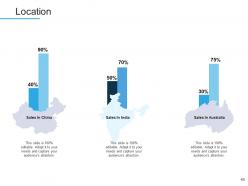
Folie 48 : Dies ist eine Standortfolie mit Karten, um Daten zu verschiedenen Standorten anzuzeigen.
Folie 49 : Diese Folie zeigt Puzzle mit zugehörigen Symbolen und Text.
Folie 50 : Dies ist eine Dankesfolie mit Adresse, Kontaktnummern und E-Mail-Adresse.
Informationssicherheitsbewusstsein Powerpoint-Präsentationsfolien mit allen 50 Folien:
Nutzen Sie unsere Powerpoint-Präsentationsfolien zum Informationssicherheitsbewusstsein, um Ihre wertvolle Zeit effektiv zu sparen. Sie sind vorgefertigt, um in jede Präsentationsstruktur zu passen.
FAQs for Information security awareness
You'll want regular training sessions and those fake phishing tests - they actually work pretty well. Clear policies help too, plus keeping everyone updated on new threats. Leadership support is huge, otherwise people just ignore it. Honestly, the hardest part is making it not boring as hell. Nobody wants to sit through another "cyber hygiene" presentation, you know? Focus on stuff that actually relates to their jobs instead of generic warnings. Oh, and definitely figure out what your team doesn't know first - like test them or whatever. Then build everything around fixing those gaps. Way more effective than random training.
Dude, you gotta tailor training to what people actually do at work. Finance team? Hit them hard with wire fraud and invoice scams since that's their world. Marketing should learn about social media threats and sketchy emails from randos. HR handles so much personal stuff - they need the privacy protection training. Honestly, those boring "don't click suspicious links" sessions are pretty much worthless now. Build scenarios that match real threats each team sees. Show sales how scammers pose as fake prospects to steal customer info. When training connects to their daily grind, people actually remember it instead of just zoning out.
Watch out for phishing emails - they're so good now it's scary. Fake emails that look totally legit but steal your login info or get you to click bad links. Also never download sketchy stuff or plug in random USB drives (who even does that anymore though?). Social engineering's another big one where scammers call pretending they're from IT asking for passwords. Pretty ballsy if you ask me. Just stay suspicious and double-check through official channels before giving out sensitive stuff. When in doubt, verify first.
Phishing is basically scammers pretending to be legit companies to steal your info. They're getting really good at it too - almost got me with a fake Amazon email recently. Always double-check who's actually sending stuff before you click anything. URLs are a dead giveaway if you look close enough. Weird domains, random typos, that kind of thing. When something feels super urgent or sounds too good to be true? Yeah, it probably is. I always go directly to the company's real website instead of clicking email links. Takes like two extra seconds but saves you from potentially getting screwed over.
Honestly, social engineering is how most hackers actually get in - way more than the technical stuff you see in movies. They're basically just manipulating people instead of breaking code. Like they'll call pretending to be from IT support, or create some fake emergency to pressure you. Sometimes they even build trust over weeks first, which is kinda creepy if you think about it. Even super secure systems don't matter if someone just gives away their password or clicks a bad link. Best thing you can do? Stay suspicious of random urgent requests, especially for passwords. Always double-check through another way first.
Dude, you really need a password manager. I know it sounds like a pain, but hackers literally just try common passwords until something works - and if you're using "password123" for multiple sites, you're screwed. I've been using Bitwarden for like two years now and it's honestly saved me so much hassle. It generates crazy strong passwords and remembers them all. Plus it'll tell you if any of your accounts got breached, which happens way more than you'd think. Just start with your bank and email accounts first, then work your way down.
Ugh, compliance is such a headache but you gotta figure out what applies to you. GDPR if you're dealing with EU folks' data, HIPAA for health stuff, SOX for public companies. Processing credit cards? That's PCI DSS. California has CCPA too - I swear every state's gonna have their own thing soon. First thing I'd do is audit what sensitive data you're actually collecting and where it lives. Then you can map out which regulations hit your business. Way easier than trying to tackle everything at once. Most companies overthink this part honestly.
Working from home opens up some sketchy security holes you probably haven't thought about. Your home WiFi isn't bulletproof like the office network, and coffee shop internet? Forget about it. Family members might hop on your laptop when you're not looking - my brother totally did this once. Phishing emails love targeting remote workers too since we're more distracted. Always fire up that VPN before doing anything work-related. Update your software regularly and throw a strong password on your router. Oh, and if you get a weird email asking for sensitive stuff, call or text the person directly to double-check it's legit.
So first thing - figure out what data you're actually dealing with that's sensitive. Encrypt everything when it's moving around and when it's stored. Only give access to people who really need it, and use good authentication. I can't tell you how many times I've seen people just email confidential stuff like it's nothing - drives me crazy! Back everything up properly and don't just keep data sitting around forever. Honestly, just start by looking at what sensitive info your team handles right now, then tackle each security measure one by one. You'll get there.
So honestly, the best way is mixing hard data with real-world tests. Track your completion rates and quiz scores, sure, but follow up later to see what people actually retained. Those fake phishing emails? Total game changer - they show if people's behavior really changed, not just if they crammed for the test. Also check your incident reports - are you seeing fewer "oops I clicked that sketchy link" situations? The trick is measuring knowledge AND whether they're actually doing things differently. Oh, and definitely get baseline numbers before you start, then check quarterly. Otherwise you're just guessing if it worked.
Honestly, just report it right away to IT security or your manager - even if you're not totally sure something's fishy. Time really matters with this stuff. Jot down what seemed weird (strange emails, files acting up, whatever) but resist the urge to poke around and investigate yourself. I know it's tempting, but you could accidentally make things worse. Don't chat about it with coworkers either until security says it's cool - you never know if someone internal might be involved. Better to look paranoid than let a small problem blow up into something massive.
Honestly, mix up your security training with videos and interactive stuff - it's so much better than those endless text modules. Show actual phishing examples through video scenarios. Create simulations where people practice responding to incidents. Infographics work great for breaking down tricky concepts like encryption too. Our brains just absorb information better when we're seeing, hearing, and doing things simultaneously. I mean, anything's better than another death-by-PowerPoint session about passwords, right? Try throwing in some real testimonials from breach victims or add quiz games. Different formats hit different learning styles, so you'll actually see people remembering this stuff later.
Honestly, most people fall for stuff because of overconfidence - that whole "it won't happen to me" thing. Once you've clicked sketchy links a few times without problems, you start getting careless. Authority bias is huge too - nobody questions an email from "the CEO," right? Time pressure makes it worse since you're rushing through security warnings. I'll admit I've done it myself when I'm being lazy and want the easy route. Social engineering works because it hits our trust and curiosity buttons. My advice? Stay suspicious of everything, even if it feels paranoid.
Honestly, security training works best when it doesn't feel like training. Do short sessions about stuff they'll actually encounter - phishing emails, data handling, that kind of thing. Make it hands-on instead of death by PowerPoint (we've all been there). When someone spots something sketchy or follows protocol? Give them props for it. Monthly security tips work better than cramming everything into one annual session. Quick team chats about current threats keep people alert. The whole point is making everyone feel responsible, not just dumping it all on IT.
Honestly, the scariest stuff right now is AI-powered attacks. Criminals are using machine learning to make phishing emails and deepfake videos that'll fool almost anyone. Supply chain attacks are getting worse too - they're going after your vendors to reach you. There's also this ransomware-as-a-service thing that's basically letting amateur hackers launch pro-level attacks (kinda wild how accessible cybercrime has become). Oh, and those IoT devices in your office? Still security disasters. My advice: if an email looks too polished, question it. Also bug your IT people about vetting third-party vendors better.
-
Unique and attractive product design.
-
Appreciate the research and its presentable format.
-
Topic best represented with attractive design.
-
Very unique and reliable designs.
-
Awesomely designed templates, Easy to understand.
-
Use of icon with content is very relateable, informative and appealing.
-
It saves your time and decrease your efforts in half.
-
Great experience, I would definitely use your services further.
-
Awesomely designed templates, Easy to understand.