


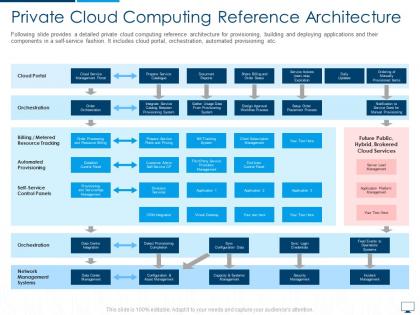
Private cloud computing reference architecture cloud computing infrastructure adoption plan




Try Before you Buy Download Free Sample Product
 Impress Your
 Audience
 100%
100% Editable
 Save Hours
 of Time


The cloud is becoming an increasingly important part of our lives, and businesses are starting to recognize the value of cloud computing. If you’re looking for a way to jump on the cloud bandwagon, or if you want to learn more about private cloud reference architecture and infrastructure adoption plan, Slideteam has got you covered. We have a wide range of high-quality cloud computing ppts that will give you all the information you need to make informed decisions about your business’s future in the cloud. So what are you waiting for? Grab our templates now and get started.
People who downloaded this PowerPoint presentation also viewed the following :
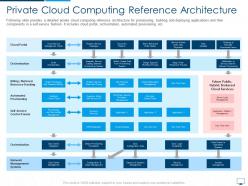
Private cloud computing reference architecture cloud computing infrastructure adoption plan with all 2 slides:
Use our Private Cloud Computing Reference Architecture Cloud Computing Infrastructure Adoption Plan to effectively help you save your valuable time. They are readymade to fit into any presentation structure.
FAQs for Private cloud computing reference architecture cloud computing
So basically, it's about who's running your servers. Private cloud means you own the hardware - either in your office or rented somewhere - so you get total control over security and can customize whatever you want. Public cloud is like renting space on Amazon or Google's massive server farms with everyone else. Way cheaper and you can scale up fast, but obviously less control. Most places I've worked just mix both anyway, which honestly makes sense. Oh, and if you're dealing with super strict regulations or sensitive data, private's probably the way to go.
Look, first figure out if you're dealing with super sensitive data that literally can't touch public cloud. That's usually what pushes people toward private. Budget's the other big thing - private clouds cost a ton upfront plus you need actual IT people to babysit them. I've seen too many companies think they'll just "wing it" on the management side and it's always a disaster. Honestly, most places don't need full control anyway, they're just scared of public cloud. Hybrid setups work way better for most organizations than jumping straight into private.
Honestly, the main thing is you get your own dedicated setup - no sharing with random companies. Your data just sits there isolated. Control-wise, you can set whatever security policies you want instead of being stuck with Amazon's or Google's defaults. Everything stays behind your firewall too, which old-school IT guys love for some reason. Downside? You're doing all the security work yourself. But if your team knows their stuff, you can tweak everything to fit exactly what you need. Compliance gets way easier when you're not fighting someone else's rules.
So virtualization is basically how you chop up your physical servers into a bunch of virtual machines that run separately. It's like taking one beefy computer and making it act like several smaller ones - honestly pretty cool stuff. You can spin resources up or down whenever you need them, which means no more buying new hardware every time you want to scale something. Your whole infrastructure becomes this pool of resources instead of just individual boxes sitting there. Makes scaling apps way faster too, and you actually use all that expensive hardware you already paid for.
Dude, redundancy is your best friend here. Get multiple servers in different spots and set up load balancing to spread the traffic around. Automated failover is clutch - when shit hits the fan, you want systems switching over without you scrambling at 3am. Good monitoring tools are worth every penny, like having eyes on everything constantly. Clustering makes a massive difference too. Honestly, most outages I've dealt with could've been prevented with better cluster setups. Start by figuring out where your single points of failure are, then build backups for all the critical stuff. Takes some upfront work but saves your sanity later.
So with private clouds, you get way more control over where your data sits and who touches it - super important for compliance stuff. Healthcare and finance companies love this because they can set up custom security rules and keep everything on their own infrastructure. No sharing servers with random businesses either, which honestly always sketched me out with public clouds. The audit trails are cleaner too. If you're dealing with strict regulations, it's much easier to prove you're following the rules when everything's contained in your own environment. I'd start by figuring out what regulations you actually need to hit first though.
So it really depends on how big you're going, but expect around $10-50K+ upfront for hardware, networking stuff, and licenses. Monthly you're probably looking at $2-10K for power, cooling, maintenance - all that fun stuff. Honestly though? The staffing costs will probably kill you if you don't have people who know this stuff already. That's usually where the real money goes. Oh and don't forget you'll need to replace hardware every 3-5 years or so. I'd definitely get quotes from multiple vendors first, but really figure out your staffing situation before you commit to anything.
So hybrid clouds are pretty sweet - you keep sensitive data on your private setup while throwing everything else on public cloud. Peak season hits? Just burst over to public for extra juice. Your compliance stuff and sketchy proprietary data stays locked down on-premises where it belongs. Dev and testing can live wherever's cheapest honestly. The trick is figuring out what absolutely can't leave your building first, then work backwards from there. Once you nail that part, the rest falls into place. Way better than going all-in on either side if you ask me.
You can't run a private cloud without automation, trust me. Manual management is a nightmare - like herding cats but the cats are on fire. Start with your biggest time-wasters: resource provisioning, scaling, system patches, and monitoring. That stuff runs itself once you set it up right. Your team stops drowning in routine tickets and can actually work on cool projects instead. I'd tackle whatever's eating most of your hours first. The difference is night and day, honestly. Oh, and 24/7 monitoring becomes automatic too, which is huge.
So basically you'd replicate your critical stuff to different locations within your private cloud setup. When your main systems crash, just fire up those replicated workloads on your backup environment - way quicker than restoring from traditional backups. Best part? You're not stuck waiting for some vendor to get their act together during an emergency. Testing DR procedures becomes pretty straightforward too since you won't mess with production. Honestly, I'd start by figuring out what systems are absolutely critical, then decide which ones need real-time replication vs just daily backups.
Data migration is going to be your biggest nightmare - trust me on this one. Legacy systems just don't want to cooperate with cloud setups, and you'll spend way more time troubleshooting than you planned. Staff training takes forever too. Oh, and mapping all your security/compliance stuff? Total pain. I learned this the hard way, but don't try moving everything at once. Pick some non-critical workloads first so you can mess up without breaking anything important. Timeline's always double what you think it'll be.
So here's the deal with private cloud - you're basically stuck with whatever hardware you've bought, which limits how much you can scale. Public cloud though? Sky's the limit since you're using Amazon's or Google's massive infrastructure. The downside is those bills can get scary fast (learned that one the hard way). Hybrid setups let you use your own stuff most of the time, then burst out to public cloud when things get crazy. I'd figure out your worst-case capacity needs first, then decide if you want to buy all that hardware upfront or go hybrid for the flexibility.
Honestly, private cloud is pretty sweet for team stuff. Everyone can jump into the same files and tools from wherever - no more of that "wait, which version are we using?" chaos. Security's way better than public cloud too, which your IT folks will love. Your team gets to customize everything for how you guys actually work instead of forcing some generic setup. Oh and scaling up for big projects is super easy. I'd start by figuring out which tools your team fights with most right now - those are probably your best candidates for moving over first.
Honestly, start with something like Nagios or Zabbix for basic infrastructure monitoring. Prometheus + Grafana is solid for metrics and dashboards - way cleaner interface than most alternatives. OpenStack has its own monitoring tools but they're kinda meh, so most people end up adding third-party stuff anyway. You'll definitely want Ansible or Puppet for config management, saves you tons of manual work. Oh, and grab an ELK stack for log aggregation. That combo will cover your bases. Build it out gradually though - don't try to implement everything at once or you'll go crazy.
Honestly, private cloud is perfect for IoT stuff because those devices generate insane amounts of data. You'll get dedicated resources that scale when hundreds of sensors start dumping info into your network - and trust me, that happens way faster than you think! Edge computing runs closer to your devices too, so latency drops for critical things like manufacturing or security systems. The best part? You keep full control over sensitive data instead of shipping it all to Amazon or whoever. I'd start by figuring out your most important IoT projects first, then size your cloud around those specific needs.
-
Easily Understandable slides.