


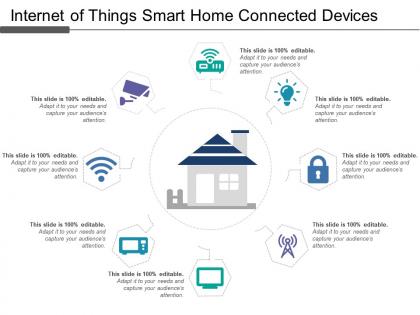
Internet of things smart home connected device




Try Before you Buy Download Free Sample Product
 Impress Your
 Audience
 100%
100% Editable
 Save Hours
 of Time


SlideTeam's internet of things smart home connected device presentation can help you understand everything about IoT technology. If you're looking to learn more about the basics of IoT and how it applies to your business, this is the perfect resource for you. Not only will you gain an understanding of the underlying technology, but you'll also see real-world examples of how businesses are using IoT devices to increase efficiency and improve customer service. And if that's not enough, we've got a whole host of templates and resources to get you started on building your own presentations. So download our free IoT ppt templates now.
People who downloaded this PowerPoint presentation also viewed the following :
Internet of things smart home connected device with all 5 slides:
Rise to the occasion with our Internet Of Things Smart Home Connected Device. You will bring your audience on their feet in no time.

FAQs for Internet of things smart
Smart speakers are huge right now - Alexa, Google Home, all that stuff. Nest thermostats are everywhere too. Those Ring doorbells? Honestly they're in like every neighborhood at this point lol. Smart lights and plugs are super popular since they don't cost much to start with. Security cameras and smart locks are picking up steam too, especially if you hate carrying keys. Oh and my cousin got one of those locks and now acts like she's living in the future. I'd probably start with a speaker and some basic bulbs - you'll actually use them and they won't break the bank.
Smart home stuff actually saves way more money than I expected. Your thermostat learns your schedule and stops heating an empty house - that's like half your electric bill right there. Those smart plugs kill phantom power from TVs and whatever else just sitting there sucking electricity. Motion-sensor lights were a game changer too, no more leaving the basement lights on for three days straight. Oh, and smart appliances run when rates are cheaper at night. Honestly start with the thermostat, it'll make the biggest dent in your bills.
Ugh, smart home stuff can be sketchy honestly. Hackers love these things because most people never change those default passwords - like seriously, who keeps "admin123"? They'll spy through your cameras or mess with your thermostat remotely. The data collection is nuts too, they're tracking when you're home, asleep, whatever. Change passwords right away and update firmware when it bugs you about it. Oh and if you can swing it, put them on their own WiFi network so they can't access your laptop and stuff. Just check what info they're grabbing before buying.
Dude, smart home stuff is actually pretty amazing for accessibility. Voice commands let you control lights, locks, temperature - no need to physically reach anything. My neighbor has mobility issues and swears by her smart doorbell since she can see who's there without getting up. Apps on your phone work too if voice isn't your thing. Some of the newer voice assistants can even help with wheelchair controls, which honestly blows my mind. I'd say pick maybe two devices that solve your biggest daily headaches first, then add more once you figure out what works for you.
So AI is what makes your smart home devices actually learn your habits instead of just being fancy remotes. Like, your lights start turning on when you get home because the system figured out your schedule. Voice stuff like Alexa works because of AI processing what you're saying. Your thermostat might even warn you before your heating system craps out - which honestly saved my neighbor like $3k last winter. The devices can talk to each other too, so everything works together smoothly. I'd grab one AI device first and see how it adapts before going crazy with the whole setup.
Look for Matter, Zigbee, or Z-Wave support first - they're like universal translators for smart home stuff. Pick one main ecosystem (Google, Alexa, HomeKit) and try to stick with it mostly. Trust me, I bought this doorbell that looked amazing but wouldn't connect to anything I already had. Super annoying. Short sentences work better sometimes. If things don't play nice together, SmartThings or Hubitat can usually force them to cooperate. Always double-check your platform's compatibility list before buying anything though.
First thing - change those default passwords and turn on two-factor authentication everywhere you can. Most people totally skip this then act shocked when their Ring doorbell starts talking in random languages lol. Set your firmware to update automatically, check what data you're actually sharing in each app's settings. If you're feeling fancy, put all your smart stuff on a separate network. Oh and go through your accounts every few months - revoke access for devices you forgot you even had. Each gadget is basically a door into your life, so treat it that way.
So basically these things use sensors and algorithms to figure out your routine, then they just handle the temperature automatically. You control it through an app - seriously such a lifesaver when you're already in bed. Most people save around 10-15% on their bills since it's not heating/cooling an empty house. Oh, and there's this cool geofencing thing where it knows you're driving home and starts adjusting before you arrive. You'll get all this data about your usage patterns too, which is actually pretty interesting to look at. Just make sure your HVAC system works with it first - learned that one the hard way!
Honestly, you're looking at maybe 3-5% bump in property value, though it really varies by area. The fancy stuff pays off - whole-house systems, smart thermostats, good security setups. Basic smart bulbs? Meh, buyers expect that already. Here's the thing though - if your system's glitchy or doesn't work together well, it'll actually hurt you. Nobody wants to inherit someone else's tech headaches, you know? I'd stick with energy-saving features and security since pretty much everyone cares about those. Just make sure it all actually works before listing!
Smart cameras are probably your best bet for monitoring stuff remotely. Door sensors will buzz your phone the second someone opens something they shouldn't. Motion detectors do the same thing if there's weird activity. Remote locks are pretty handy too - you can lock up from anywhere. Honestly? I'm kind of obsessed with checking my cameras when I'm supposed to be working lol. Some systems connect with actual monitoring companies if you want that extra layer. Don't go crazy at first though. Grab one or two devices, see how you like them, then add more based on what your place actually needs.
Honestly, smart homes are about to get so much better over the next few years. Your thermostat will actually talk to your lights and security system without you having to set up twenty different apps - thank god because the current setup is a nightmare. Voice control is evolving past "turn on kitchen lights" to real conversations. Matter protocol is finally forcing all these companies to work together, which is huge. Energy stuff will be massive too with smart panels and EV charging integration. Oh, and ambient health sensors are coming fast. Pick your ecosystem now though - switching brands later sucks and gets pricey.
Ugh, smart home stuff can be so finicky! First thing - unplug it for like 30 seconds, then check your WiFi isn't acting up. Most of these problems are just connection issues. Your device might be too far from the router too. Try deleting it from the app and adding it back - super annoying but it usually works. Oh, and see if there's a firmware update waiting. I always forget about those. Update your app while you're at it. If you're still stuck, factory reset is your last resort but honestly it'll probably fix whatever's broken.
Yeah, they're pretty bad for the environment tbh. All those rare earth minerals and plastics to make them, plus the mining process uses crazy amounts of energy. Most people toss them every few years when newer models come out - I'm definitely guilty of this too. The worst part? Those batteries and circuits just sit in landfills forever since they don't decompose. Try to find brands that'll take your old devices back when you upgrade. Makes a difference, even if it's small.
Think of smart speakers as your smart home's command center. Voice commands let you control lights, thermostats, locks, cameras - basically anything connected. Most work with Alexa, Google Home, or Apple HomeKit, though some brands still don't play nice together (which is honestly annoying). Here's where it gets cool: you can create routines that do multiple things at once. Say "goodnight" and boom - lights off, doors locked, thermostat adjusted. My advice? Check what devices you already have first before going crazy buying new smart stuff.
Definitely ask your landlord before doing anything that needs drilling or hardwiring - trust me on this one. Smart plugs and battery sensors are your best bet since you can just pack them up when you leave. Regular smart bulbs work great too. WiFi cameras get weird legally depending on your state, so maybe look that up first? I'd skip smart thermostats and door locks unless your landlord's really chill about modifications. Oh, and save all the original stuff so you can swap everything back later. Basically stick with portable things that won't mess up your deposit.
-
Great designs, Easily Editable.
-
Really like the color and design of the presentation.