


Conteneurs et Docker





Try Before you Buy Download Free Sample Product
 Impress Your
Audience
 100%
Editable
 Save Hours
of Time


Présentation PowerPoint d'introduction aux Docker et aux conteneurs. La présentation offre un bref aperçu de la virtualisation. Explique le concept de conteneurisation, le système d'exploitation hôte, l'infrastructure, etc. à l'aide de ces présentations PowerPoint faciles à utiliser. Prenez l'assistance de la mise en page des conteneurs Linux PPT et décrivez les avantages de la conteneurisation par rapport à la virtualisation. Cela inclut un modèle PowerPoint présentant des avantages tels qu'une portabilité accrue, une évolutivité améliorée, un déploiement simple et rapide, une productivité accrue et une sécurité améliorée. Fournissez un bref aperçu de Docker à l'aide de ces mises en page PaaS PPT prêtes à l'emploi. Mettez en évidence les principaux avantages de Docker, tels que le retour sur investissement et les économies de coûts, la puissance CI, la compatibilité et la maintenabilité, la simplicité et une configuration plus rapide, une préparation rapide, des plateformes multi-cloud, etc. Décrivez l'architecture de base de Docker à l'aide de cette présentation Kubernetes PPT. Les cas d'utilisation de Docker sont également spécifiés dans nos modèles PowerPoint. Comparez et opposez la virtualisation et la conteneurisation en téléchargeant notre présentation PowerPoint sur Docker conçue de manière professionnelle.
People who downloaded this PowerPoint presentation also viewed the following :
Contenu de cette présentation Powerpoint
La dynamique des infrastructures informatiques modernes a changé depuis les débuts de Docker fin 2014. L'entreprise héberge plus de 7 millions d'applications, avec plus de 13 milliards de téléchargements d'images mensuels et plus de 11 millions de développeurs impliqués dans le processus. Alpine, BusyBox, Ubuntu et Python sont devenus les conteneurs Docker les plus populaires pour déployer des programmes dans différents environnements.
Ces plateformes logicielles ont rationalisé le développement, le déploiement et les tests d'applications. Elles ont également facilité la gestion de systèmes à grande échelle dans des entreprises comme Adobe, Netflix, PayPal et bien d'autres.
Ce blog explore ces approches pour vous donner un avantage concurrentiel. Les modèles PowerPoint prêts à télécharger de SlideTeam vous aideront à en apprendre davantage sur les conteneurs Docker et les raisons de leur utilisation. Parcourez et téléchargez ces présentations pour obtenir des informations sur les principaux cas d'utilisation et applications de ces outils pratiques de développement logiciel.
Modèle 1 : Virtualisation
Il est temps de commencer votre parcours de virtualisation. Utilisez ce modèle PPT pour comprendre comment optimiser l'utilisation du matériel informatique physique. Cette diapositive décrit le concept de virtualisation et ses processus.
Modèle 2 : Conteneurisation
Vous avez besoin de construire et de distribuer des applications plus rapidement et en toute sécurité ? Cette diapositive PowerPoint décrit la conteneurisation, un autre type de virtualisation qui permet aux applications de s'exécuter sans interférer avec le système d'exploitation, le matériel ou d'autres services d'application.
Modèle 3 : Docker
Docker est une autre plateforme logicielle pour déployer et exploiter des applications conteneurisées. Cette diapositive PowerPoint prête à l'emploi fournit un aperçu de cette plateforme de développement logiciel.
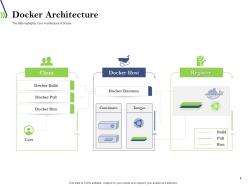
Modèle 4 : Architecture Docker
Ce modèle PPT approfondit l'architecture de Docker. Cette diapositive montre les trois principaux composants de Docker : le client Docker, l'hôte Docker et le registre Docker.
Modèle 5 : Cas d'utilisation de Docker
Ce modèle PowerPoint explique les avantages de Docker. Ses applications incluent une configuration simplifiée, une productivité accrue des développeurs, la consolidation des serveurs, la multi-location, la gestion du pipeline de code, la séparation des applications, les fonctionnalités de débogage et un déploiement plus rapide.
Modèle 6 : Virtualisation vs Conteneurisation
Cette diapositive PPT illustre les différences d'infrastructure entre la virtualisation et la conteneurisation.
Modèle 7 : Qu'est-ce qu'un Dockerfile ?
Ce modèle fournit une brève introduction aux procédures de ligne de commande qui aident les utilisateurs à développer une build automatisée.
Modèle 8 : Qu'est-ce qu'une image Docker ?
Ce modèle PPT prédéfini décrit les étapes pour exécuter des logiciels et des applications.
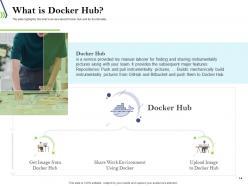
Modèle 9 : Qu'est-ce que Docker Hub ?
Ce modèle PPT fournit un aperçu de Docker Hub et de sa fonctionnalité. Il facilite le développement, la gestion et la livraison d'applications conteneurisées par l'équipe.
Modèle 10 : Qu'est-ce que Docker Compose ?
Ce modèle PPT prédéfini décrit Docker Compose comme une solution pour exécuter des conteneurs en tant que service unique.
Slide 1 : Qu'est-ce que Docker ? Slide 2 : Qu'est-ce qu'un conteneur ? Slide 3 : Pourquoi utiliser des conteneurs ? Slide 4 : Avantages des conteneurs Slide 5 : Architecture de Docker Slide 6 : Docker Engine Slide 7 : Docker Images Slide 8 : Docker Registries Slide 9 : Docker Containers Slide 10 : Cycle de vie d'un conteneur Slide 11 : Commandes Docker de base Slide 12 : Construire une image Docker Slide 13 : Publier une image Docker Slide 14 : Exécuter un conteneur Slide 15 : Accéder à un conteneur Slide 16 : Arrêter et supprimer un conteneur Slide 17 : Volumes Docker Slide 18 : Réseaux Docker Slide 19 : Docker Compose Slide 20 : Déployer une application avec Docker Compose Slide 21 : Docker Swarm Slide 22 : Déployer une application avec Docker Swarm Slide 23 : Kubernetes Slide 24 : Déployer une application avec Kubernetes Slide 25 : Sécurité Docker Slide 26 : Conclusion
Utilisez nos diapositives de présentation PowerPoint Introduction à Docker et aux conteneurs pour vous faire gagner un temps précieux. Elles sont prêtes à être intégrées dans n'importe quelle structure de présentation.










FAQs for Introduction to dockers and containers
So Docker containers are like shipping boxes for your code - they pack up your app with everything it needs to run. Way lighter than VMs though. VMs copy entire operating systems which is honestly overkill most of the time. Containers just share the host OS instead, so they're crazy fast to start up and use way less resources. The best part? Your app runs exactly the same on your laptop and in production. No more "works on my machine" drama. Just try containerizing something simple first - you'll be surprised how much smoother deployments get.
So Docker basically wraps your app and all its dependencies into this portable container that runs the same everywhere. No more "works on my machine" BS when you deploy to production. They spin up crazy fast compared to VMs - we're talking seconds. When traffic hits, just launch more instances to handle the load. You can even do those fancy zero-downtime deployments where you gradually swap old containers for new ones. Honestly, the auto-scaling stuff is pretty slick once you get it dialed in. I'd start small though - pick one service and containerize that first to learn the ropes.
So a Dockerfile is basically your recipe for building a Docker image. You write step-by-step instructions - what OS to use, which files to copy over, dependencies to install, startup commands. Anyone can follow it to recreate your exact setup. Honestly the syntax feels weird at first but you'll get it pretty quick. Once you've got a good Dockerfile, you can spin up identical containers literally anywhere. Super useful when you're trying to avoid the whole "works on my machine" thing lol. Just start simple and build from there - don't overthink it.
So Docker networking basically sets up virtual networks where your containers can chat with each other. The cool part? Containers on the same network can just use each other's names instead of hunting down IP addresses - way easier. Sure, the default bridge network does the job for simple stuff, but honestly I'd recommend making custom networks once you get the hang of it. Better control that way. You can open up whatever ports you need to the host or between containers. Oh and definitely use `docker network create` for different app stacks. Keeps everything cleaner and more secure.
Honestly, Docker's a game changer for getting rid of "works on my machine" problems. Your code runs the same everywhere - dev, testing, production, whatever. Most people use it for microservices and deployment stuff, but where it really shines is local development. Need a database? Spin one up without installing anything permanently on your laptop. CI/CD pipelines love it too. Oh, and scaling in the cloud becomes way less painful. My buddy at work got me started by just containerizing one tiny service first - that's probably your best bet to see what the hype's about.
Docker volumes are your best bet here. I found this out after losing my database like three times (ugh). Bind mounts work if you need specific host directories mapped, but volumes are way cleaner since Docker handles everything. Create them with `docker volume create` or just throw `-v` in your `docker run` command. Honestly though? Put everything in docker-compose files. Your teammates will thank you instead of playing guessing games about what data actually needs to stick around.
Honestly, running containers as non-root is probably the biggest thing you can do right off the bat. Keep those base images updated too - Alpine's great for this since it's so minimal. Never put secrets directly in Dockerfiles, that's just asking for trouble. Environment variables or proper secrets management instead. Oh, and definitely scan your images regularly for vulnerabilities. I got burned on this during an audit once, not fun. Use --user flags to limit privileges and don't mount sensitive host stuff unless you absolutely have to. Actually, run `docker scan` on your current containers first - you'll probably be surprised what's already exposed.
So Docker Compose is basically a lifesaver when you're running multiple containers. Instead of typing out a million `docker run` commands, you just throw everything into one YAML file - services, networks, volumes, whatever. Then `docker-compose up` and your whole stack fires up at once. Honestly, once I started using it for apps with databases and web servers and all that jazz, I couldn't go back. Your dev environment matches production too, which is nice. Just convert whatever multi-container mess you've got now into a compose file. Trust me on this one.
Honestly, the biggest pain points are gonna be orchestration getting messy fast and data persistence - that stuff trips everyone up. Networking between services breaks in weird ways too. Security gets annoying since you're now protecting like 10 different entry points instead of one. Your containers will fight over resources and kill performance if you're not careful. Debugging is absolutely brutal compared to a monolith - I still hate it tbh. Plus monitoring becomes this whole thing when everything's scattered. My take? Start with maybe 3-4 containers max, get your deployment pipeline solid first, then grab some decent monitoring tools early.
So basically Docker builds images in layers, right? Each line in your Dockerfile creates a new layer that gets cached. When you build similar images, it reuses the same layers instead of rebuilding everything from scratch - saves a bunch of space and time. It's kinda like sharing Lego pieces between different builds. The cool part is when you're tweaking your code, only the stuff that actually changed needs to rebuild. Oh and here's something that'll save you headaches later: put your code changes toward the bottom of your Dockerfile so you're not constantly rebuilding the earlier layers.
For Docker monitoring, I'd definitely go with Prometheus + Grafana first. Prometheus pulls all your container metrics and Grafana makes these really nice dashboards. Free too, which is awesome. Datadog and New Relic are solid if you don't mind paying. Oh, and there's the ELK stack for logs - though honestly that can get complex fast. Docker has `docker stats` built-in for quick peeks at what's happening. But yeah, start with Prometheus/Grafana since it handles both system stuff and your app metrics without breaking the bank.
Honestly, Kubernetes is a beast - super powerful but crazy complex. Docker Swarm? Way easier to wrap your head around. I've literally watched teams spin up Swarm in half an hour, no joke. But here's the deal: everyone's going K8s because that's where the jobs are. The auto-scaling and networking stuff is pretty sweet too. My take? If you're new to this whole orchestration thing, mess around with Swarm first. Get the concepts down, then tackle Kubernetes when you actually need all that extra functionality. Don't torture yourself jumping straight into K8s.
Dude, containerization is a game changer for DevOps. Package your apps with all dependencies so you never deal with "works on my machine" again. CI/CD gets way faster since containers boot up instantly. Testing becomes so much cleaner because your test environment actually matches production. Auto-scaling happens automatically based on demand - honestly blew my mind the first time I saw it work. Rollbacks? Just swap container versions and you're done in seconds. Oh, and start small with one service to learn the ropes first.
First thing - run `docker logs
So multi-stage builds are your best friend here - they keep images super thin. Toss a .dockerignore file in there to skip junk files. Alpine base images are tiny compared to Ubuntu (I learned this the hard way). Put your Dockerfile commands in order of how often they change - stable stuff at the top so Docker can cache those layers. Oh and don't install debugging tools in production, that's just asking for bloat. One process per container too. Actually check your resource limits instead of just winging it - most people way overestimate what they need.
-
Nice and innovative design.
-
Appreciate the research and its presentable format.