


Ansible For Devops Powerpoint Presentation Slides




Try Before you Buy Download Free Sample Product
 Impress Your
 Audience
 100%
100% Editable
 Save Hours
 of Time


Provide a brief overview of Ansible by employing readily available Ansible For DevOps PowerPoint Presentation Slides. The presentation well explains the advantages of Ansible, features and capabilities, architecture, and configuration management. Characteristics and capabilities of Ansible applications such as configuration management and cloud provisioning can be easily depicted with this configuration management PowerPoint slideshow. Utilize stunning images and high-grade icons to make the presentation attention-grabbing and knowledgeable. You can easily describe the Ansible installation flowchart for an organization by taking advantage of DevOps PowerPoint layouts. Showcase the differences between Ansible and Puppet, which will help your organization implement Ansible and its configuration effectively. Details about the company, such as target audience and contact details, can also br presented in an effective manner. Grab this amazing presentation without any further delay and familiarize your audience with the Ansible concept.
People who downloaded this PowerPoint presentation also viewed the following :
Content of this Powerpoint Presentation
Slide 1: This slide introduces Ansible for DevOps. State your Company name and begin.
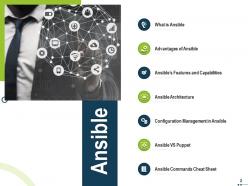
Slide 2: This slide displays Ansible introduction.
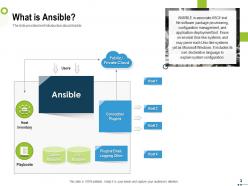
Slide 3: The slide provides brief introduction about Ansible.
Slide 4: This slide displays Advantages of Ansible
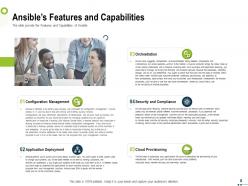
Slide 5: The slide provide the Features and Capabilities of Ansible
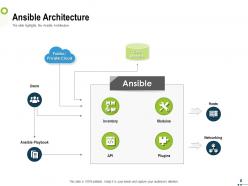
Slide 6: The slide highlights the Ansible Architecture.
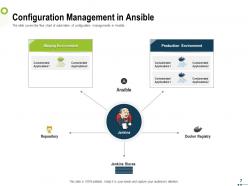
Slide 7: The slide covers the flow chart of automation of configuration managements in Ansible.
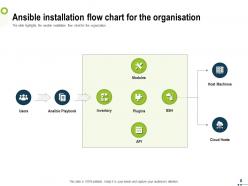
Slide 8: The slide highlights the ansible installation flow chart for the organization
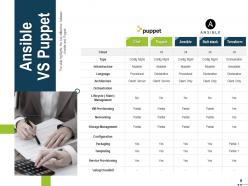
Slide 9: The slide highlights the key difference between Ansible and Puppet
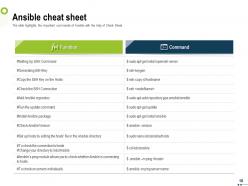
Slide 10: The slide highlights the important commands of Ansible with the help of Cheat Sheet
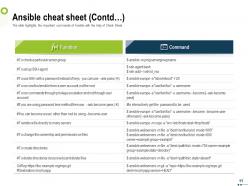
Slide 11: The slide highlights the important commands of Ansible with the help of Cheat Sheet
Slide 12: This is Accelerating with Ansible Icons Slide
Slide 13: This slide is titled as Additional Slides for moving forward.
Slide 14: This slide displays Vision, Mission and Goals.
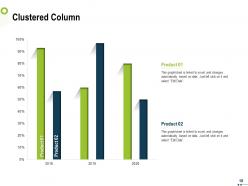
Slide 15: This slide shows Clustered Column chart for comparison of products.
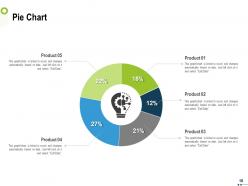
Slide 16: This slide displays Pie Chart for comparison of products.
Slide 17: This is Our team slide with Slide with Names and designations.
Slide 18: This slide shows Comparison between male and female facebook users.
Slide 19: This is About us slide to showcase Company specifications.
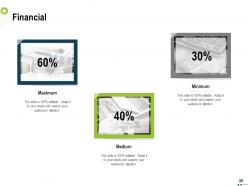
Slide 20: This slide displays Finance related stuff.
Slide 21: This is Thank You slide with Contact details.
Ansible For Devops Powerpoint Presentation Slides with all 21 slides:
Use our Ansible For Devops Powerpoint Presentation Slides to effectively help you save your valuable time. They are readymade to fit into any presentation structure.








FAQs for Ansible For Devops
So Ansible is basically this config management tool that doesn't need agents on your servers - just SSH, which is clutch when you're dealing with tons of machines. Uses YAML playbooks that read almost like plain English, way easier than Puppet or Chef honestly. SaltStack might be more powerful but who has time for that learning curve? You write your tasks, push them out, done. I'd start small - maybe automate adding users or installing packages first. Actually their getting-started docs are pretty solid too. Way less headache than the alternatives.
Look, Ansible just handles all that boring deployment crap you're doing by hand right now. Write your playbooks once - they cover everything from spinning up servers to app configs to updates. Then it's just `ansible-playbook deploy.yml` and you're done. Same result every single time. Honestly, the "works on my machine" drama disappears because everyone's running identical scripts. Best part? It's agentless so you don't have to mess with installing stuff on target servers (which I've always hated doing). My advice - pick whatever manual step makes you want to cry and automate that first. You'll feel the difference immediately.
So basically you've got four main pieces: tasks, handlers, variables, and hosts. Tasks do the actual work - installing stuff, copying files, whatever. Handlers kick in when something changes and need to restart services. Variables let you tweak things for different environments, and hosts tell it which servers to hit. YAML syntax is honestly the trickiest part at first, but once you get it, everything clicks. What's cool is you can version control everything and run it over and over. Just start super simple - like installing one package. You'll figure out how it all connects way faster that way.
Dude, Ansible is honestly perfect for this. Both your dev and ops people can work with the same YAML playbooks - way better than trying to decipher someone's ancient bash scripts, trust me. Devs can actually peek under the hood and contribute to infrastructure stuff since everything's version controlled like regular code. Your ops team gets consistent, documented processes instead of the usual "works on my machine" headaches. Plus developers can spin up environments that actually match production. I'd start by getting both teams to build one simple playbook together. You'll be surprised how quickly things click.
So Ansible checks what's currently running before it changes anything - if everything's already how you want it, it just skips that step. Super handy because you won't accidentally mess things up running the same playbook twice. I've definitely done that before and panicked for nothing lol. Your deployments stay consistent every time, which saves you from those 2am "everything's broken" calls. The whole thing works because it compares current state to desired state first. Just test it in staging though - sometimes the idempotency gets weird with certain modules.
So Ansible Galaxy is like a huge library of pre-made roles and playbooks that other people already built and tested. Why reinvent the wheel, right? You can search for stuff like web server setups, database configs, security tools - pretty much anything common. I always check there first now before writing my own code. Installing is super easy with `ansible-galaxy install` or just drop them in your requirements.yml file. One thing though - definitely look at the ratings and when it was last updated before using anything in prod. Some of those older roles can be sketchy.
So Jenkins has this Ansible plugin that's pretty solid - just install it and point to your playbooks in the pipeline config. GitLab's honestly easier though, you just throw ansible-playbook commands right into your .gitlab-ci.yml file. Make sure Ansible's actually installed on whatever runners you're using. Both can pass env variables to playbooks which saves you from hardcoding stuff. Oh, and don't forget the SSH key setup - your pipeline won't be able to hit your servers otherwise. Inventory management's the other piece you'll need to sort out upfront.
First thing - split your inventory by environment. Trust me, accidentally nuking prod because you mixed up files is not fun. Use brackets to group stuff logically like [webservers] and [databases]. Keep variables in separate group_vars/ and host_vars/ folders instead of dumping everything in one massive file. Dynamic inventory scripts are honestly a lifesaver if you're using AWS or whatever cloud setup. Static files work fine when you're starting out, but they get outdated super quick. I'd say begin simple, then switch to dynamic once things get more complex.
Yeah, Ansible's actually perfect for this. You write your playbooks once, then just swap out the cloud variables and creds for different environments. Works across AWS, Azure, GCP, whatever you're using. No more switching between different CLI tools - that part alone is worth it. The cool thing is you can orchestrate stuff that spans multiple clouds at the same time, handle all the dependencies between resources. Just set up your inventory files with different provider groups first, then create playbooks that point to the right credential profiles. Makes keeping configs consistent way easier than doing it manually.
Dude, Ansible is a game changer. You write everything in YAML files - your servers, configs, deployments, all of it. No more clicking around dashboards like some kind of caveman. The best part? Everything's version controlled now, so you can actually see what broke and when. Your whole team can review infrastructure changes through PRs, same as regular code. Disaster recovery becomes stupid simple since you can rebuild from scratch. Oh and "works on my machine" problems basically disappear. Honestly, just pick one annoying manual task you're doing and write a playbook for it. You'll be hooked.
Honestly, go with Ansible when you're doing basic server stuff - setting up VMs, configuring services, or just automating whatever across multiple machines. It's perfect for traditional infrastructure work. Kubernetes? That's for when you're running containers at scale, which sounds like way more than you need right now. I mean, K8s is cool but it's total overkill if you don't have containerized apps. Start with your actual problem first. Need to automate server setup and config? Ansible. Managing containerized workloads? Then maybe consider Kubernetes.
Ansible Vault is your first priority - encrypt anything sensitive like passwords or API keys. Don't mess around with that stuff sitting in plain text. Set up dedicated service accounts with proper SSH keys instead of using your personal ones. Logging is huge too, you need audit trails to see who changed what and when. Oh and lock down who can access your inventory files and playbooks. I know it seems like a lot but honestly, Vault should be your starting point since that's where you're most exposed right now.
Ansible's great for container stuff - way better than SSH-ing into boxes all the time to run docker commands manually. The docker_container and docker_image modules handle most of what you need. Pull images, start/stop containers, manage volumes and networking through playbooks. Pretty straightforward once you get the hang of it. For Kubernetes, there's the k8s module that'll deploy pods and services declaratively. I'd start small though - write a basic playbook for one container on one host first. Then you can expand it to handle your whole container setup across different environments. Trust me, it's a game changer.
Oof, yeah you're gonna hit two big walls - performance and inventory chaos. Those static inventory files become absolute beasts when you're dealing with thousands of hosts. Crank up your `forks` setting and throw in `strategy: free` for parallel runs, it's a game changer honestly. Dynamic inventories are your friend here - hook into cloud APIs instead of managing flat files like some kind of masochist. For long operations, `async` tasks will save your sanity. Oh, and break those massive playbooks into smaller roles. Trust me on this one. Profile your current runtimes first though - find your worst bottlenecks before you go crazy optimizing everything.
Oh yeah, Ansible's got both REST and Python APIs that work great for this. REST API's perfect if you want to trigger playbooks through HTTP calls - we use it all the time in our CI/CD stuff. Python API though? That's where it gets interesting. You can build inventory on the fly, run tasks, handle results - basically whatever you need. Also check out ansible-runner as a Python library, makes things way easier. I'd probably start simple, maybe just a basic webhook that kicks off a playbook. Once you get that working, you'll see how flexible it really is.
-
Editable templates with innovative design and color combination.
-
Use of icon with content is very relateable, informative and appealing.
-
The content is very helpful from business point of view.
-
Great designs, Easily Editable.
-
Understandable and informative presentation.
-
Amazing product with appealing content and design.