


Introducción a las presentaciones de diapositivas de Docker y contenedores





Try Before you Buy Download Free Sample Product
 Impress Your
Audience
 100%
Editable
 Save Hours
of Time


Introducción a los contenedores y Docker: Diapositivas de presentación de PowerPoint La presentación ofrece una breve descripción general de la virtualización. Explica el concepto de containerización, sistema operativo host, infraestructura, etc. mediante el uso de estas presentaciones de PowerPoint fáciles de usar. Toma la asistencia del diseño de PPT de contenedores de Linux y describe las ventajas de la containerización sobre la virtualización. Esto incluye plantillas de PowerPoint que muestran ventajas como mayor portabilidad, mayor escalabilidad, despliegue simple y rápido, mayor productividad y mejor seguridad. Proporciona una breve descripción general de Docker con la ayuda de estos diseños de PPT de PaaS listos para usar. Resalta los principales beneficios de Docker, como el retorno de la inversión y el ahorro de costos, la potencia de CI, la compatibilidad y el mantenimiento, la simplicidad y la configuración más rápida, la preparación rápida, las plataformas de nube múltiple, etc. Describe la arquitectura central de Docker utilizando este conjunto de diapositivas de PPT de Kubernetes. Los casos de uso de Docker también se especifican en nuestras plantillas de PowerPoint. Compara y contrasta la virtualización y la containerización descargando nuestro docker ppt diseñado profesionalmente.
People who downloaded this PowerPoint presentation also viewed the following :
Contenido de esta presentación de Powerpoint
La dinámica de la infraestructura moderna de TI ha cambiado desde que Docker debutó a finales de 2014. La empresa aloja más de 7 millones de aplicaciones, con más de 13 mil millones de descargas mensuales de imágenes y más de 11 millones de desarrolladores involucrados en el proceso. Alpine, BusyBox, Ubuntu y Python han surgido como los contenedores Docker más populares para implementar programas en diferentes entornos.
Estas plataformas de software han agilizado el desarrollo, implementación y prueba de aplicaciones. También han facilitado la gestión de sistemas a gran escala en empresas como Adobe, Netflix, PayPal y muchas más.
Plantilla 1: Virtualización
Es hora de comenzar tu viaje de virtualización. Utiliza esta Plantilla de PPT para comprender cómo optimizar el uso del hardware físico de la computadora. Esta diapositiva describe el concepto de virtualización y sus procesos. Este resumen describe un hipervisor como un programa que crea y ejecuta máquinas virtuales. Emplea esta presentación para aislar funciones del hardware, lo que resulta en mejores capacidades y densidad.
Plantilla 2: Containerización
¿Necesitas construir y distribuir aplicaciones de manera más rápida y segura? Esta Diapositiva de PowerPoint describe la containerización, otro tipo de virtualización que permite que las aplicaciones se ejecuten sin interferir con el sistema operativo, el hardware u otros servicios de aplicaciones. Esto simplifica la implementación de trabajos y funciones repetitivos. Utiliza este Marco de PPT para proporcionar alta movilidad a través de espacios de trabajo digitales.
Plantilla 3: Docker
Docker es otra plataforma de software para implementar y operar aplicaciones containerizadas. Esta Diapositiva de PowerPoint lista para usar proporciona una descripción general de esta plataforma de desarrollo de software. Destaca el marco de Docker, que incluye contenedores estandarizados que contienen todo lo que el software necesita para ejecutarse. Esta presentación te ayudará a comprender los dockers y garantizar un rendimiento estable de la aplicación.
Plantilla 4: Arquitectura de Docker
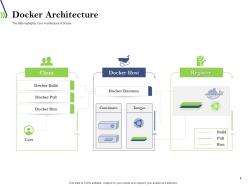
Esta Plantilla de PPT profundiza en la arquitectura de Docker. Esta diapositiva muestra los tres componentes principales de Docker: Cliente Docker, Host Docker y Registro Docker. Utiliza este marco para comprender la arquitectura del sistema Docker y las relaciones entre sus componentes.
Plantilla 5: Casos de uso de Docker
Esta Plantilla de PowerPoint explica las ventajas de los Dockers. Sus aplicaciones incluyen configuración simplificada, mayor productividad de los desarrolladores, consolidación de servidores, multi-tenancy, gestión de tuberías de código, separación de aplicaciones, funciones de depuración e implementación más rápida. Esto te ayudará a comprender los beneficios de los Dockers en los procedimientos de desarrollo y despliegue de software.
Plantilla 6: Virtualización vs Containerización
Necesitas la mejor herramienta para mejorar el uso de recursos en máquinas físicas. Esta Diapositiva de PPT ilustra las diferencias de infraestructura entre la virtualización y la containerización. Esta comparación te ayudará a comprender las propiedades de ambas tecnologías y su importancia en el desarrollo de un ciclo de vida de aplicaciones sin problemas.
Plantilla 7: ¿Qué es Docker File?
Docker se ejecuta con las instrucciones de compilación que se encuentran en el Dockerfile. Este Diseño de PPT proporciona una breve introducción a los procedimientos de línea de comandos que ayudan a los usuarios a desarrollar una compilación automatizada, lo que ayuda a eliminar las disparidades entre los entornos.
Plantilla 8: ¿Qué es Docker Image?
Las imágenes de Docker sirven como un plano para construir un contenedor utilizando Docker. Esta Plantilla de PPT prediseñada describe los pasos para ejecutar software y aplicaciones. Contiene código, tiempo de ejecución, bibliotecas, variables ambientales y archivos de configuración.
Plantilla 9: ¿Qué es Docker Hub?
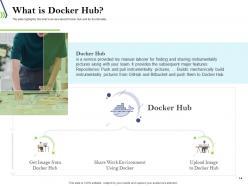
Esta Plantilla de PPT proporciona una descripción general de Docker Hub y su funcionalidad. Facilita el desarrollo, la gestión y la entrega de aplicaciones en contenedores por parte del equipo. Esta aplicación de código abierto es gratuita para todos los sistemas operativos y contiene capacidades como repositorios y compilaciones. Es ideal para que los desarrolladores y colaboradores de código abierto tengan acceso al software necesario.
Plantilla 10: ¿Qué es Docker Compose?
Este Preset de PPT describe Docker Compose como una solución para ejecutar contenedores como un solo servicio. Esto ayuda a agilizar el proceso de desarrollo e implementación. Utiliza este diseño para controlar todo el ciclo de vida de la aplicación.
Ejecuta todo el Software
Nuestras Plantillas de PPT te ayudarán a agilizar el proceso de implementación de software. Utiliza las Presentaciones de PowerPoint de SlideTeam para sobresalir en DevOps.
Slide 1: ¿Qué es Docker? Slide 2: Contenedores Slide 3: Imágenes Slide 4: Arquitectura de Docker Slide 5: Instalación de Docker Slide 6: Comandos básicos de Docker Slide 7: Creación de contenedores Slide 8: Administración de contenedores Slide 9: Redes de Docker Slide 10: Volúmenes de Docker Slide 11: Dockerfile Slide 12: Construcción de imágenes Slide 13: Publicación de imágenes Slide 14: Docker Compose Slide 15: Escalado de aplicaciones Slide 16: Orquestación de contenedores Slide 17: Docker Swarm Slide 18: Kubernetes Slide 19: Ventajas de Docker Slide 20: Desventajas de Docker Slide 21: Casos de uso de Docker Slide 22: Integración continua y entrega continua Slide 23: Monitoreo de contenedores Slide 24: Seguridad de contenedores Slide 25: Futuro de Docker Slide 26: Conclusión
Nuestras Diapositivas de Presentación de Introducción a Docker y Contenedores le ayudarán a ahorrar tiempo valioso. Están listas para adaptarse a cualquier estructura de presentación.










FAQs for Introduction to dockers and containers
So Docker containers are like shipping boxes for your code - they pack up your app with everything it needs to run. Way lighter than VMs though. VMs copy entire operating systems which is honestly overkill most of the time. Containers just share the host OS instead, so they're crazy fast to start up and use way less resources. The best part? Your app runs exactly the same on your laptop and in production. No more "works on my machine" drama. Just try containerizing something simple first - you'll be surprised how much smoother deployments get.
So Docker basically wraps your app and all its dependencies into this portable container that runs the same everywhere. No more "works on my machine" BS when you deploy to production. They spin up crazy fast compared to VMs - we're talking seconds. When traffic hits, just launch more instances to handle the load. You can even do those fancy zero-downtime deployments where you gradually swap old containers for new ones. Honestly, the auto-scaling stuff is pretty slick once you get it dialed in. I'd start small though - pick one service and containerize that first to learn the ropes.
So a Dockerfile is basically your recipe for building a Docker image. You write step-by-step instructions - what OS to use, which files to copy over, dependencies to install, startup commands. Anyone can follow it to recreate your exact setup. Honestly the syntax feels weird at first but you'll get it pretty quick. Once you've got a good Dockerfile, you can spin up identical containers literally anywhere. Super useful when you're trying to avoid the whole "works on my machine" thing lol. Just start simple and build from there - don't overthink it.
So Docker networking basically sets up virtual networks where your containers can chat with each other. The cool part? Containers on the same network can just use each other's names instead of hunting down IP addresses - way easier. Sure, the default bridge network does the job for simple stuff, but honestly I'd recommend making custom networks once you get the hang of it. Better control that way. You can open up whatever ports you need to the host or between containers. Oh and definitely use `docker network create` for different app stacks. Keeps everything cleaner and more secure.
Honestly, Docker's a game changer for getting rid of "works on my machine" problems. Your code runs the same everywhere - dev, testing, production, whatever. Most people use it for microservices and deployment stuff, but where it really shines is local development. Need a database? Spin one up without installing anything permanently on your laptop. CI/CD pipelines love it too. Oh, and scaling in the cloud becomes way less painful. My buddy at work got me started by just containerizing one tiny service first - that's probably your best bet to see what the hype's about.
Docker volumes are your best bet here. I found this out after losing my database like three times (ugh). Bind mounts work if you need specific host directories mapped, but volumes are way cleaner since Docker handles everything. Create them with `docker volume create` or just throw `-v` in your `docker run` command. Honestly though? Put everything in docker-compose files. Your teammates will thank you instead of playing guessing games about what data actually needs to stick around.
Honestly, running containers as non-root is probably the biggest thing you can do right off the bat. Keep those base images updated too - Alpine's great for this since it's so minimal. Never put secrets directly in Dockerfiles, that's just asking for trouble. Environment variables or proper secrets management instead. Oh, and definitely scan your images regularly for vulnerabilities. I got burned on this during an audit once, not fun. Use --user flags to limit privileges and don't mount sensitive host stuff unless you absolutely have to. Actually, run `docker scan` on your current containers first - you'll probably be surprised what's already exposed.
So Docker Compose is basically a lifesaver when you're running multiple containers. Instead of typing out a million `docker run` commands, you just throw everything into one YAML file - services, networks, volumes, whatever. Then `docker-compose up` and your whole stack fires up at once. Honestly, once I started using it for apps with databases and web servers and all that jazz, I couldn't go back. Your dev environment matches production too, which is nice. Just convert whatever multi-container mess you've got now into a compose file. Trust me on this one.
Honestly, the biggest pain points are gonna be orchestration getting messy fast and data persistence - that stuff trips everyone up. Networking between services breaks in weird ways too. Security gets annoying since you're now protecting like 10 different entry points instead of one. Your containers will fight over resources and kill performance if you're not careful. Debugging is absolutely brutal compared to a monolith - I still hate it tbh. Plus monitoring becomes this whole thing when everything's scattered. My take? Start with maybe 3-4 containers max, get your deployment pipeline solid first, then grab some decent monitoring tools early.
So basically Docker builds images in layers, right? Each line in your Dockerfile creates a new layer that gets cached. When you build similar images, it reuses the same layers instead of rebuilding everything from scratch - saves a bunch of space and time. It's kinda like sharing Lego pieces between different builds. The cool part is when you're tweaking your code, only the stuff that actually changed needs to rebuild. Oh and here's something that'll save you headaches later: put your code changes toward the bottom of your Dockerfile so you're not constantly rebuilding the earlier layers.
For Docker monitoring, I'd definitely go with Prometheus + Grafana first. Prometheus pulls all your container metrics and Grafana makes these really nice dashboards. Free too, which is awesome. Datadog and New Relic are solid if you don't mind paying. Oh, and there's the ELK stack for logs - though honestly that can get complex fast. Docker has `docker stats` built-in for quick peeks at what's happening. But yeah, start with Prometheus/Grafana since it handles both system stuff and your app metrics without breaking the bank.
Honestly, Kubernetes is a beast - super powerful but crazy complex. Docker Swarm? Way easier to wrap your head around. I've literally watched teams spin up Swarm in half an hour, no joke. But here's the deal: everyone's going K8s because that's where the jobs are. The auto-scaling and networking stuff is pretty sweet too. My take? If you're new to this whole orchestration thing, mess around with Swarm first. Get the concepts down, then tackle Kubernetes when you actually need all that extra functionality. Don't torture yourself jumping straight into K8s.
Dude, containerization is a game changer for DevOps. Package your apps with all dependencies so you never deal with "works on my machine" again. CI/CD gets way faster since containers boot up instantly. Testing becomes so much cleaner because your test environment actually matches production. Auto-scaling happens automatically based on demand - honestly blew my mind the first time I saw it work. Rollbacks? Just swap container versions and you're done in seconds. Oh, and start small with one service to learn the ropes first.
First thing - run `docker logs
So multi-stage builds are your best friend here - they keep images super thin. Toss a .dockerignore file in there to skip junk files. Alpine base images are tiny compared to Ubuntu (I learned this the hard way). Put your Dockerfile commands in order of how often they change - stable stuff at the top so Docker can cache those layers. Oh and don't install debugging tools in production, that's just asking for bloat. One process per container too. Actually check your resource limits instead of just winging it - most people way overestimate what they need.
-
Nice and innovative design.
-
Appreciate the research and its presentable format.