

Inventory Report Powerpoint PPT Template Bundles





Try Before you Buy Download Free Sample Product
 Impress Your
 Audience
 100%
100% Editable
 Save Hours
 of Time


Our Inventory Report Powerpoint PPT Template Bundles are topically designed to provide an attractive backdrop to any subject. Use them to look like a presentation pro.
People who downloaded this PowerPoint presentation also viewed the following :
Inventory Report Powerpoint PPT Template Bundles with all 19 slides:
Use our Inventory Report Powerpoint PPT Template Bundles to effectively help you save your valuable time. They are readymade to fit into any presentation structure.

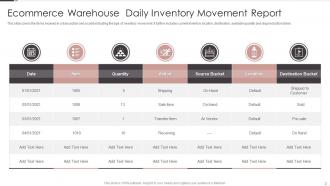
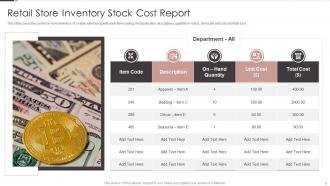
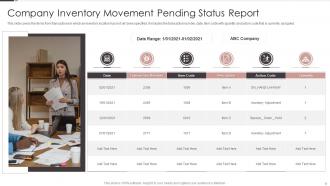
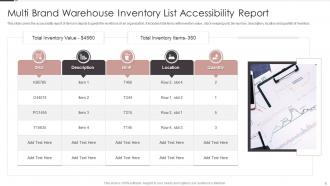
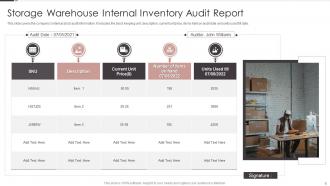
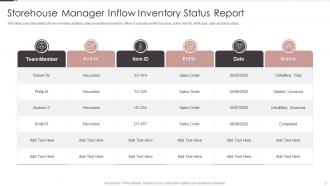
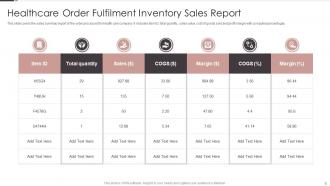
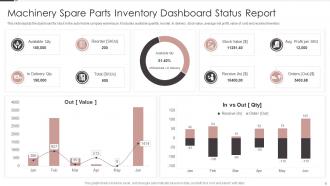






FAQs for Inventory Report Powerpoint
So basically you need stock levels, item descriptions/SKUs, and where everything's located. Reorder points and supplier info too. Track what's moving - inbound, outbound, and the stuff just sitting there forever (ugh, we've all got those dead items). Value calculations are key, both cost and retail. Oh, and aging analysis helps spot the slow movers before they become a problem. I'd throw a summary dashboard at the top because nobody wants to dig through pages of data. Variance tracking catches mistakes early which honestly saves so much headache later. Start simple and build from there based on what you actually end up using.
So basically you get a consistent way to track your stock without starting from zero every single time. Saves me hours honestly - I used to spend forever just on formatting alone. Your quantities, locations, reorder points all stay organized the same way across everything. Short sentences work better for catching trends too. You'll spot low stock way before it becomes a crisis, which is clutch. The trick is figuring out what data actually matters for your specific setup first. Don't overthink it though - even a basic template beats winging it every month.
Honestly, start with the big four: current stock levels, turnover rates, carrying costs, and how often you're running out of stuff. Lead times and reorder points are lifesavers too - I learned that the hard way when my supplier went MIA for three weeks. ABC analysis helps you figure out which products actually matter. Track this stuff monthly at least, but weekly's better if you can manage it. Oh, and don't sleep on stockout frequency - that one bites you fast. These metrics will catch most disasters before they tank your budget.
Look, inventory reports basically show you what's actually moving vs what's just sitting there taking up space. You'll catch trends early - like when your bestseller is about to run out (been there, it sucks). The template thing makes it super easy to compare monthly data and spot patterns you'd miss otherwise. I mean, beats flying blind with your purchasing decisions. Set up reorder points based on real numbers, plan for busy seasons, and stop that whole "guess what we need" cycle. Honestly saved my butt more times than I can count.
Honestly, I'd just start with Excel - most people already know it and it handles the math stuff pretty well. Google Sheets is solid too if your team needs to work on it together. Power BI and Tableau are crazy powerful but probably overkill unless you're drowning in data. Actually, QuickBooks has some decent template builders built right in that are super easy to use. My advice? Don't overthink it. Start simple with Excel or Sheets, then move up if you need more bells and whistles later.
Honestly, throw some charts into that inventory report - it'll save everyone's sanity. Nobody wants to stare at endless rows of numbers. I'd start with a simple bar chart showing which products are moving fast vs sitting around forever. Color-code your stock levels too (red for low, green for good, whatever). Those conditional formatting tricks in Excel are clutch - they'll auto-highlight problems before you even notice them. Progress bars work great for turnover rates since percentages alone are kinda abstract. Trust me, add just one visual and watch how quickly people actually get what you're showing them.
Weekly reports work for most places, but honestly it depends how crazy your turnover is. Food and fashion? Those guys need daily tracking or they're screwed. My cousin runs a restaurant and checks inventory twice a day - learned that the hard way after running out of salmon on a Friday night. Slower stuff like furniture can probably get away with monthly. I'd say start weekly and see how it feels. You want to catch problems before you're either drowning in stock or telling customers "sorry, we're out."
Oh man, the worst thing people do is just download any random template and call it done. Like, you've got to actually customize it for what YOU'RE tracking, not some generic business. I see teams where everyone enters data differently too - drives me nuts when one person uses "lbs" and another uses "pounds." Your reports are useless if nobody looks at them regularly. Set up actual review times or they'll just sit there forever. And honestly? Train your team on formatting standards from day one. Way easier than fixing a messy spreadsheet later.
Honestly, auditors get so happy when they see you've got a solid inventory template system going. It keeps everything consistent - your data formats, timestamps, all that approval stuff. Makes surprise audits way less of a nightmare since you're not scrambling around looking for paperwork everywhere. Your template needs to grab the important compliance stuff automatically - lot numbers, expiration dates, who had what when. That way you can pull audit-ready reports whenever. Oh, and definitely make certain fields required so people can't skip the important bits when they're rushing around during crazy busy times.
Retail and manufacturing companies get the most out of these templates, honestly. Healthcare too since they can't mess around with supply shortages. Food service places are obsessed with them - imagine running out of burger patties on a Saturday night, nightmare fuel. E-commerce businesses use them like crazy because they're dealing with multiple warehouses and sales channels. Pretty much any business moving physical products regularly will benefit. Oh, and restaurants hate waste almost as much as they hate shortages. Start simple with a basic template, then tweak it based on what numbers actually move the needle for your business.
Honestly, adding trends to your inventory reports is such a smart move. You go from just seeing current stock to actually predicting what's gonna happen next. Seasonal spikes become obvious, and you'll spot declining demand before it hurts. I wish I'd done this sooner at my last job - would've saved us from so many stockouts. The historical stuff is cool but forecasting is where the magic happens. Start with basic 30-60-90 day projections and you'll see the difference right away. Way better than constantly scrambling to reorder everything last minute.
Dude, get your accuracy right or you're screwed. Wrong inventory data means you'll over-order stuff nobody wants or run out of bestsellers - both kill your profits. I watched one team spend three weeks hunting down "missing" inventory that was just typos in their system. Pretty embarrassing honestly. Your template only works if the numbers are actually correct going in. Do cycle counts regularly and make sure whoever's entering data knows how much precision matters. Those little mistakes add up fast and mess with everything downstream.
Just grab any basic template and start tweaking it honestly. Add columns for whatever you actually track - SKU numbers, reorder points, supplier contacts, warehouse spots. Time periods are easy to switch around too (weekly vs monthly). I always throw in conditional formatting to make low stock jump out at you. Company logo makes it look more professional if that matters. The thing is, don't stress about getting it perfect from the start. Most templates bend pretty easily to what you need. Just think about what data you're constantly looking up anyway - that's probably what belongs on your report.
Look for automated data pulls and real-time updates first - that's honestly game-changing. You'll need customizable fields for your specific inventory stuff, plus visual dashboards because staring at plain spreadsheets is brutal. Filtering, sorting, and low-stock alerts are must-haves. Export options matter too. Integration with whatever systems you're already using is huge - copying data manually between platforms will drive you insane. Oh, and user permissions so different people can see what they need. Start by figuring out which metrics actually matter for your day-to-day operations though.
Honestly, having a solid inventory report template is a game changer for supplier relationships. Your suppliers can actually plan ahead when you're consistently sharing real stock levels and demand patterns with them. They'll love you for being organized - trust me on this one. Plus you'll have hard data to negotiate better pricing instead of just winging it. The best part? You can catch potential stockouts early and give them a heads up. It's like being that customer they actually want to work with because you make their lives easier too.
-
Wow, never been this impressed with any online service provider. Really appreciate the customer support all along from the navigation to purchasing the right products.
-
I am really satisfied with their XYZ products. Used their slides for my business presentations and now I am taking their help for my son's high-school assignments. Super satisfied!!