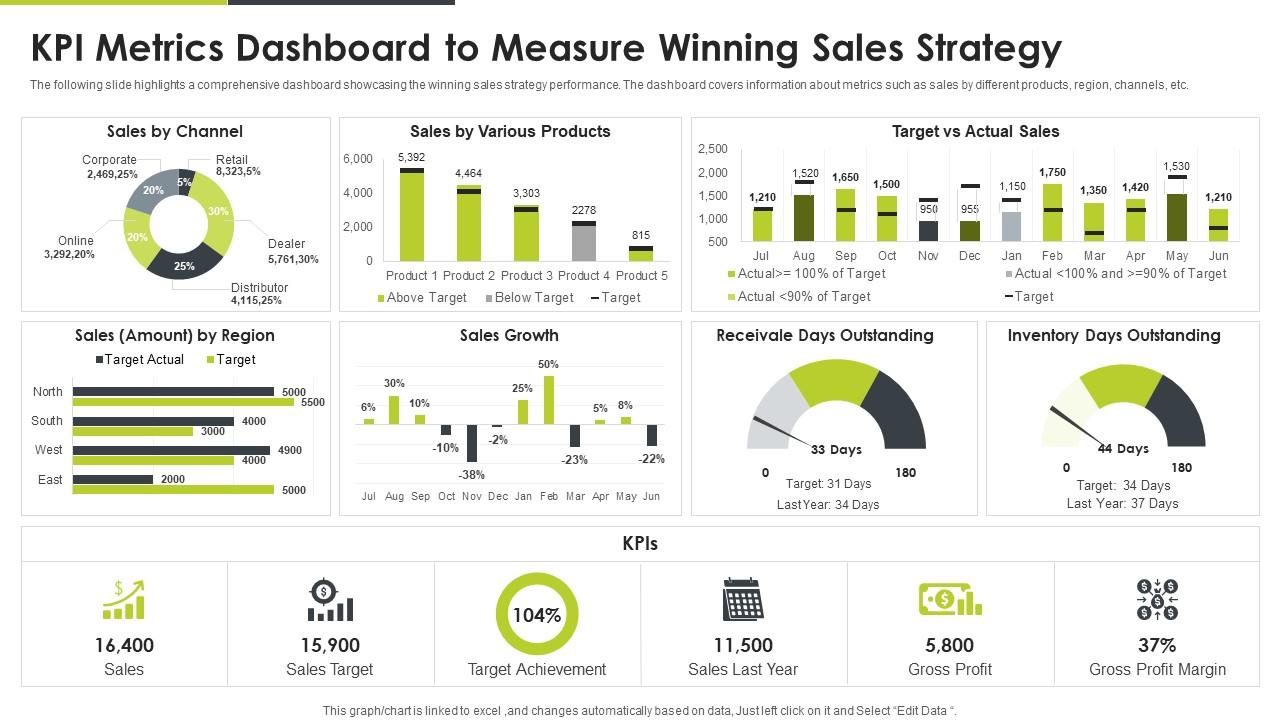
KPI Metrics Dashboard To Measure Winning Sales Strategy
Try Before you Buy Download Free Sample Product
Audience
Editable
of Time
The following slide highlights a comprehensive dashboard showcasing the winning sales strategy performance. The dashboard covers information about metrics such as sales by different products, region, channels, etc.
People who downloaded this PowerPoint presentation also viewed the following :
KPI Metrics Dashboard To Measure Winning Sales Strategy with all 7 slides:
Use our KPI Metrics Dashboard To Measure Winning Sales Strategy to effectively help you save your valuable time. They are readymade to fit into any presentation structure.
FAQs for KPI Metrics Dashboard To Measure
Honestly, pick your top 5-7 metrics first - that's where I'd start. You'll want real-time data (or close to it) so people aren't looking at stale numbers. Don't cram everything on one screen though, it gets messy fast. Put your most critical stuff at the top where everyone sees it first. Use consistent colors and formatting so it doesn't look like a rainbow threw up on your dashboard. Context is huge too - add targets or comparisons so people actually know if a number is good or terrible. I've seen too many dashboards where nobody could tell if they should be celebrating or panicking.
Start with checking out what your competitors track publicly - their reports and industry publications usually show what actually matters. Pick 3-5 KPIs that connect directly to your main goals (customer acquisition, keeping people around, revenue stuff). Don't get fancy right away. I'd honestly just focus on metrics your team can actually do something about. You can always pile on more later, but there's no point tracking things that don't tell you if you're winning or losing. Trade associations are pretty good for this too - they'll show you what the successful companies obsess over.
Clean layouts are your best friend here - give your data room to breathe with plenty of white space. Stick to a consistent color scheme: green for wins, red for issues, neutral for everything else. Charts need to be dead simple since nobody wants to decode fancy visuals during standup (honestly, half the team's probably still on their first coffee). Put your most critical KPIs front and center where they can't be missed. Keep fonts readable and create clear hierarchy. Oh, and start by sketching what actually matters to your stakeholders first - then build everything around those key metrics.
Your KPI dashboard basically becomes a live command center instead of some stale report. You'll see what's happening right now, not last week's news. Honestly, it's pretty amazing when you catch problems before they blow up instead of finding out after everything's already broken. Quick decisions become way easier. Anomalies? You spot them instantly. Hot opportunities don't slip by while you're waiting for the weekly update. Though I'd start with just your most critical metrics first - trying to do everything at once is kind of a nightmare.
Honestly, the worst thing you can do is cram everything onto one screen - nobody wants to stare at dashboard spaghetti. Pick like 5-7 metrics tops and make sure someone actually owns each one. Skip the vanity stuff too - page views might look fancy but who cares if they don't help you make decisions? Your data needs to be solid and update often enough to matter. Oh, and test it with real users first! I've seen too many beautiful dashboards that just collect digital dust because nobody finds them useful. Start small, then build based on what people actually need.
Honestly, start with solid data governance right from the beginning. You'll want automated validation rules and someone actually owning each data source. Regular audits help catch weird stuff early. Document everything - where your data comes from, how it gets transformed. Seriously, future you will be grateful when someone's asking questions about random numbers. Pull from one source of truth instead of whatever Excel files people have saved locally (we've all been there). Get data stewards who actually look at the numbers regularly. They're usually pretty good at spotting when something's obviously wrong.
Honestly, UX makes or breaks dashboards. I've watched teams build these gorgeous-looking things that nobody touches because they're just... a mess to navigate. People bail if they can't find their key metrics in like 10 seconds. Keep visualizations clean and match the detail level to who's actually using it. My biggest tip? Talk to your users first - ask what numbers they care about and how they want to see them. Sounds obvious but you'd be surprised how often people skip this step. Navigation should feel natural, not like solving a puzzle.
Look, KPI dashboards are a game changer because you get real-time data instead of guessing what's happening. Way better than drowning in spreadsheets every time your boss asks for numbers, trust me on that one. You'll spot problems early and actually see which strategies work. The trick though? Only track metrics that help with decisions you're making regularly. Don't just throw random data at the wall. Figure out what choices you need to make first, then build around those specific metrics that'll influence those calls.
So for KPI dashboards, I'd probably start with what data you're already using. If it's Google stuff, Data Studio is free and works great. Tableau and Power BI are the big names but they cost money and take forever to learn - though they're pretty powerful once you get it. Honestly? I've built some decent dashboards just using Excel when I was being lazy. Klipfolio's solid if you want something more automated. Really depends on your budget and how tech-savvy your team is. What kind of KPIs are you tracking anyway?
Honestly, just pull your historical data from the last year or two - that's usually enough to spot the real patterns. Most dashboard tools have forecasting built right in, which is great because doing that math manually is a nightmare. Look for seasonal stuff, growth trends, those weird dips that happen every quarter. I'd start with maybe 2-3 of your main KPIs first rather than going crazy with everything at once. Regression analysis sounds fancy but it's basically just drawing trend lines to see where you're headed. The data needs to be clean though, or you'll get garbage predictions.
Honestly, the whole point is giving people just what they actually need to see. Sales folks want their conversion numbers and pipeline stuff. Executives? They're looking at big picture revenue trends. Nobody wants to dig through a bunch of irrelevant metrics - it's like having to skip through songs you hate to find the good ones. When you tailor dashboards to specific roles, people will actually use them instead of ignoring them. Decisions happen way faster too since the info matches what they're thinking about daily. I'd start by literally asking each person what questions they need answered every day, then work backwards from there.
Honestly, start with weekly updates and see how it goes. Daily is better if your team's making quick decisions - like sales stuff changes fast, right? But monthly financial reports? Weekly's totally fine for those. Real-time sounds fancy but I've seen so many dashboards updating constantly when the numbers barely budge. Such a waste. Match your update schedule to how fast things actually change and how often people check it. My old boss was obsessed with hourly updates for metrics that moved like molasses - drove everyone nuts. You'll figure out the right rhythm once you see how your team actually uses the data.
Honestly, any company drowning in data will love these things. Retail is huge on them - tracking sales and inventory, especially when Black Friday hits. Manufacturing uses them for production rates and when machines break down (which is always). Healthcare monitors patient stuff and bed availability. Finance companies? They've got dashboards tracking loan performance, compliance, probably what color pens they're using - those guys measure everything. Marketing teams and SaaS companies are obsessed with campaign metrics and user engagement. If you're constantly asking "how are we doing on X," you need one.
Oh man, mobile compatibility is a game changer for tracking KPIs. Your team can literally check dashboards from anywhere - during client calls, on the train, wherever. No more being chained to your desk wondering if that campaign's doing well or if sales numbers are decent. Remote workers and execs love it too since they don't need their laptops constantly. Just make sure your dashboard actually looks good on phones though - I've seen way too many that are basically unusable on smaller screens. Honestly saves so much time when everyone can stay updated on the go.
Look, start with the basics that actually matter - budget vs what you're spending, whether you're hitting milestones, and if your team's being used efficiently. Track scope creep too because that stuff sneaks up on you. Quality metrics are huge - defect rates, customer feedback, whatever makes sense for your project. I mean, delivering crap on time isn't exactly a win. Team velocity helps you see if people are burning out or cruising. Don't go crazy though - pick maybe 6 key things you can check quickly without needing a PhD to understand them.
-
“Ample and amazing variety of templates available, really helpful for making professional PPT for day to day workings.”
-
Really like the color and design of the presentation.