

Lean Project Management Powerpoint Presentation Slide





Try Before you Buy Download Free Sample Product
 Impress Your
 Audience
 100%
100% Editable
 Save Hours
 of Time


Need to present lean project tools and techniques, SlideTeam offers you the lean project management PowerPoint Presentation. You can easily impart your business information with help of this lean practices PowerPoint slides. This lean thinking presentation templates contain slides on project planning process, dimensions of business planning, elements of project lifecycle, business objective, business scope, program phases, critical path, activity planner, week scheduler, yearly scheduler, tasks status dashboard, work breakdown structure, planning stages, work process, team management, planning and timeline, concept development, activity network, risk identification, progress against baseline schedule, alternatives evaluation and budgeting. With this lean manufacturing PowerPoint template, you can showcase various topics like six sigma, startup business, waste management, enterprise planning, improvement process, risk assessment, value stream mapping, and construction planning and change management. You can save time and enhance your Presentation skills by using our lean project management PowerPoint Presentation. Our project management ppt Slides will further your efforts. Their effect will draw in a bigger applause.
People who downloaded this PowerPoint presentation also viewed the following :
Content of this Powerpoint Presentation
Slide 1: This slide introduces Lean Project Management. State Your Company Name and get started.
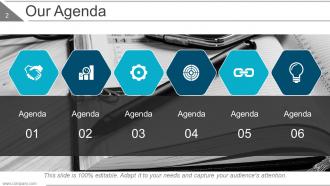
Slide 2: This is an Our Agenda slide. State your agendas here.
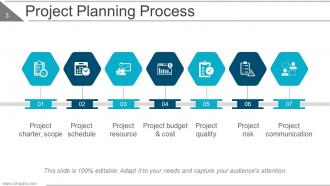
Slide 3: This slide shows Project Planning Process with the following points- Project charter, scope, Project schedule, Project resource, Project budget & cost, Project quality, Project risk, Project communication.
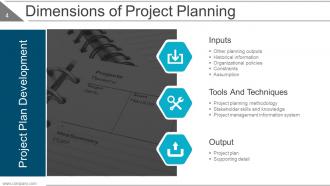
Slide 4: This slide presents Dimensions of Project Planning with- Inputs: Other planning outputs, Historical information, Organizational policies, Constraints, Assumption. Tools And Techniques: Project planning methodology, Stakeholder skills and knowledge, Project management information system. Output: Project plan, Supporting detail.
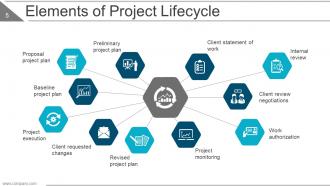
Slide 5: This slide shows Elements of Project Lifecycle with- Preliminary project plan, Proposal project plan, Baseline project plan, Project execution, Client requested changes, Revised project plan, Project monitoring, Work authorization, Client review negotiations, Internal review, Client statement of work.
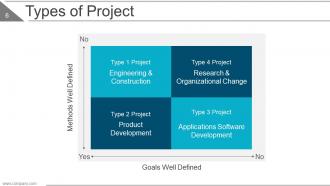
Slide 6: This slide showcases Types of Project in matrix form showing- Product Development, Engineering & Construction, Research & Organizational Change, Applications Software Development.
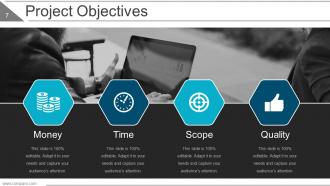
Slide 7: This slide shows Project Objectives consisting of- Money, Time, Scope, Quality.
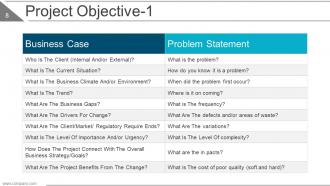
Slide 8: This slide presents Project Objective with Business case and Problem statement.
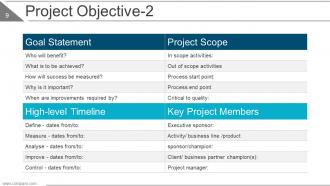
Slide 9: This slide presents Project Objective with Goal statement, project scope, timeline and key project members.
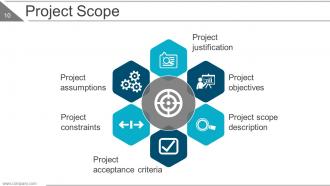
Slide 10: This slide shows Project Scope with the following points- Project justification, Project objectives, Project scope description, Project assumptions, Project constraints, Project acceptance criteria.
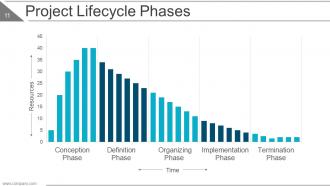
Slide 11: This slide shows a Project Lifecycle Phases graph.
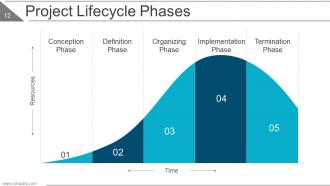
Slide 12: This slide shows a Project Lifecycle Phases crest graph showing- Conception Phase, Definition Phase, Organizing Phase, Implementation Phase, Termination Phase.
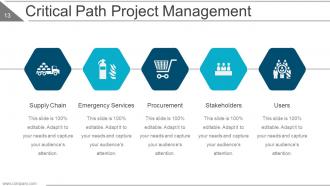
Slide 13: This slide presents Critical Path Project Management with the following subheadings- Supply Chain, Emergency Services, Procurement, Stakeholders, Users.
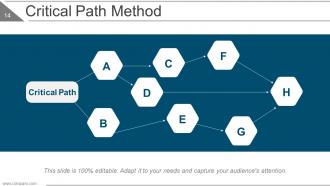
Slide 14: This slide shows a Critical Path Method diagram. Show information etc. here.
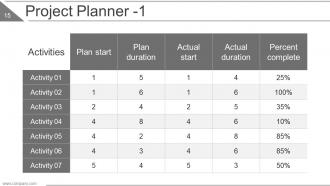
Slide 15: This slide presents a table for Project Planner.
Slide 16: This slide presents a calendar for Project Planner.
Slide 17: This slide presents an Activity planning chart.
Slide 18: This slide presents a Week scheduler. Show weekly reports, schedules etc. here.
Slide 19: This slide presents a Yearly scheduler. Show yearly reports, schedules etc. here.
Slide 20: This slide shows a Project Tasks Status Dashboard with- Tasks In Progress, Not Started Tasks, Complete Tasks.
Slide 21: This slide presents a Work Breakdown Structure with the following subheading- Fulfilment Customer Data Protection divided into- Project management, Scope narrative, Deliverable structure, Flow diagram, Schedule, Budget, Status reports, Regulations impact analysis, Regulations analysis and opinion, Summery of business impacts, Help desk process, Current state, Future state, System development, Large partner requirements, Technical requirement, Enhanced/ new EDI, Testing, Communication, Large partners, All other partners.
Slide 22: This slide showcases Stages of Project Planning such as- Starting the project, Carrying out the work, Closing the project, Organizing and preparing.
Slide 23: This slide shows Work Process with the following points- Assessment, Deciding Outcomes, Planning, Intervention, Evaluation.
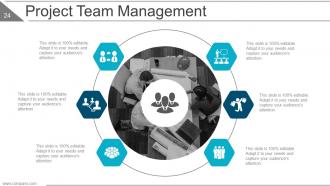
Slide 24: This slide presents Project Team Management with relevant imagery and text boxes. State team specifications here.
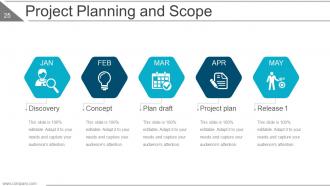
Slide 25: This slide presents Project Planning and Scope with the following points- Discovery, Concept, Plan draft, Project plan, Release 1.
Slide 26: This is a Coffee Break slide to halt. You can change the slide content as per need.
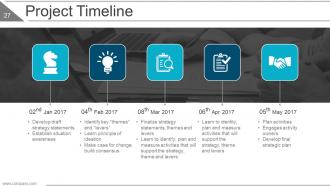
Slide 27: This slide showcases a Project Timeline with examples such as- Develop draft strategy statements, Establish situation awareness, Identify key “themes” and “levers”, Learn principle of ideation, Make case for change build consensus, Finalize strategy statements, themes and levers, Learn to identify, plan and measure activities that will support the strategy, theme and levers, Plan activities, Engages activity owners, Develop final strategic plan.
Slide 28: This slide presents a Project Schedule in gantt chart form.
Slide 29: This slide presents Concept Development with the following subheadings- Augmented Product, Actual Product, Core Product.
Slide 30: This slide shows an Activity Network Diagram.
Slide 31: This slide displays Potential Delays In Execution with the following points- Execution difficulties, Misalignment between projects and their business objectives, Late or delayed projects, Dependency conflicts, Overlapping and redundant projects, Fragmentation, No accountability, Diffuse decision making, Unrealized business value, Resource conflicts.
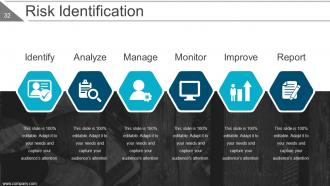
Slide 32: This slide shows Risk Identification with- Identify, Analyze, Manage, Monitor, Improve, Report.
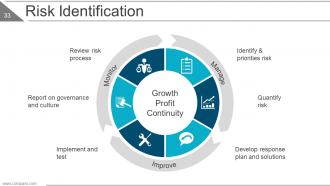
Slide 33: This slide shows Risk Identification with- Quantify risk, Develop response plan and solutions, Report on governance and culture, Implement and test, Review risk process, Identify & priorities risk, Monitor, Manage, Improve, Growth Profit Continuity.
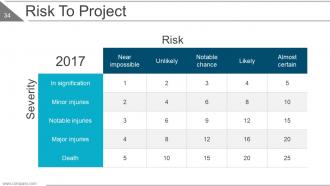
Slide 34: This is a Risk To Project table.
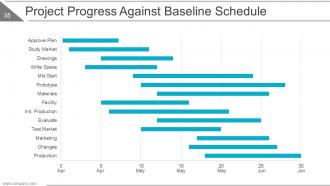
Slide 35: This slide presents Project Progress Against Baseline Schedule in gantt chart form.
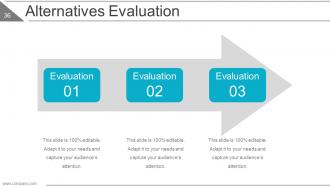
Slide 36: This slide shows Alternatives Evaluation. State about these aspects here.
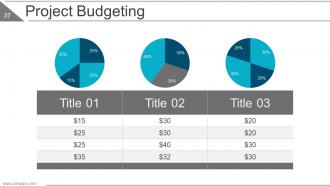
Slide 37: This slide showcases Project Budgeting in pie chart form.
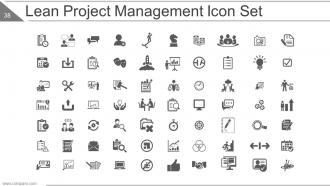
Slide 38: This slide presents Lean Project Management Icon Set. Use the icons as per need.
Slide 39: This slide is titled Additional Slides to move forward. You can alter the slide content as per need.
Slide 40: This is an About Us slide. State team/company specifications here.
Slide 41: This is an Our Mission slide. State your company mission here.
Slide 42: This is an Our Goal slide. State goals etc. here.
Slide 43: This is Our Team slide with names, designation and image boxes.
Slide 44: This slide shows Financial score. State financial aspects here.
Slide 45: This slide showcases a Dashboard. State kpis, metrics.
Slide 46: This is a Location slide showing global presence, growth etc.
Slide 47: This is a Timeline slide to show growth, evolution or milestones.
Slide 48: This is an Important Notes slide. Mark reminders, events etc. here.
Slide 49: This is a Newspaper slide. Show highlights, events etc. here. You can alter the slide content as per need.
Slide 50: This is a Puzzle image slide to show information, specifications etc.
Slide 51: This is a Target image slide to show targets, goals etc.
Slide 52: This is a Circular image slide to show information, specifications etc.
Slide 53: This is a Comparison slide to show comparison, information, specifications etc.
Slide 54: This is a Mind map image slide to show information, specifications etc.
Slide 55: This is a Venn diagram image slide to show information, specifications etc.
Slide 56: This is a Lego image slide to show information, specifications etc.
Slide 57: This is a Silhouettes image slide to show people related information, specifications etc.
Slide 58: This is a Hierarchy image slide to show information, specifications etc.
Slide 59: This is a Generate idea BULB image slide to show information, specifications etc.
Slide 60: This is a Matrix slide to show information, specifications etc.
Slide 61: This is a Magnifying glass image slide to show information, specifications etc.
Slide 62: This is a Quotes slide to convey company messages, beliefs etc.
Slide 63: This is a Funnel image slide to show information, specifications etc.
Slide 64: This slide is titled Our Charts to proceed forward. You can alter the slide contents as per need.
Slide 65: This is a Column Chart slide to show product/entity comparison, information etc.
Slide 66: This is a Line Chart slide to show product/entity comparison, information etc.
Slide 67: This is a Donut pie chart slide to show product/entity comparison, information etc.
Slide 68: This is a Bar chart slide to show product/entity comparison, information etc.
Slide 69: This is an Area chart slide to show product/entity comparison, information etc.
Slide 70: This is a Scatter chart slide to show product/entity comparison, information etc.
Slide 71: This is a Stock chart slide to show product/entity comparison, information etc.
Slide 72: This is a Radar chart slide to show product/entity comparison, information etc.
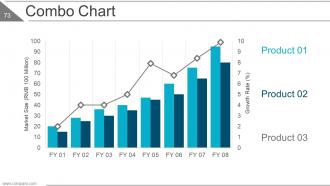
Slide 73: This is a Combo chart slide to show product/entity comparison, information etc.
Slide 74: This is a Thank You slide with Contact Numbers, Address# street number, city, state, Email Address.
Lean Project Management Powerpoint Presentation Slide with all 74 slides:
Our Lean Project Management Powerpoint Presentation Slide are equipped to cater to every fancy. They abound with great facilities.
-
Lean Project Management
-
Our Agenda
-
Project Planning Process
-
Dimensions of Project Planning
-
Elements of Project Lifecycle
-
Types of Project
-
Project Objectives
-
Project Objective 1
-
Project Objective 2
-
Project Scope
-
Project Lifecycle Phases
-
Project Lifecycle Phases
-
Critical Path Project Management
-
Critical Path Method
-
Project Planner 1
-
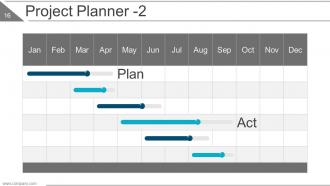
Project Planner 2
-
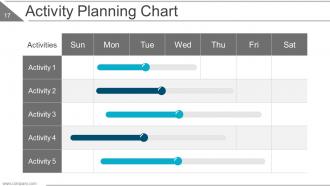
Activity Planning Chart
-
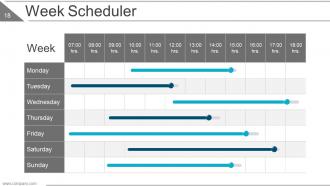
Week Scheduler
-
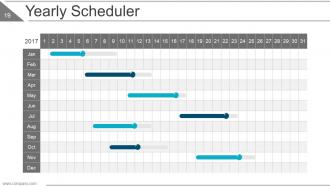
Yearly Scheduler
-
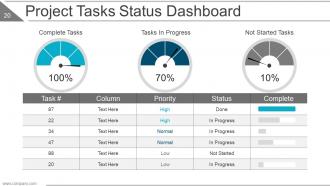
Project Tasks Status Dashboard
-
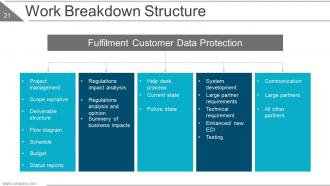
Work Breakdown Structure
-
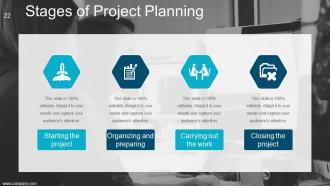
Stages of Project Planning
-
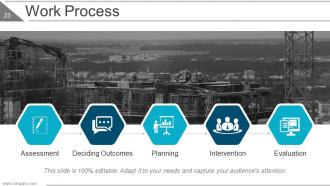
Work Process
-
Project Team Management
-
Project Planning and Scope
-
Coffee Break
-
Project Timeline
-
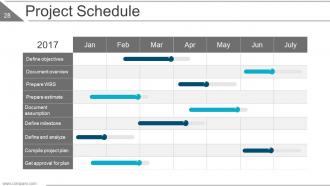
Project Schedule
-
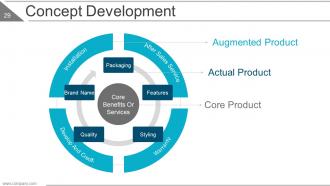
Concept Development
-
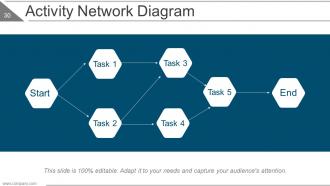
Activity Network Diagram
-
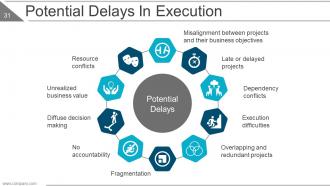
Potential Delays In Execution
-
Risk Identification
-
Risk Identification
-
Risk To Project
-
Project Progress Against Baseline Schedule
-
Alternatives Evaluation
-
Project Budgeting
-
Lean Project Management Icon Set
-
Additional Slides
-
About Us
-
Our Mission
-
Our Goal
-
Our Team
-
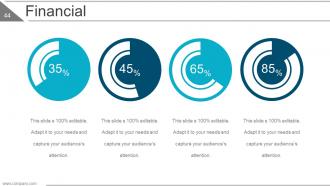
Financial
-
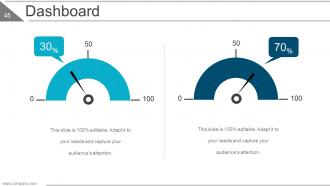
Dashboard
-
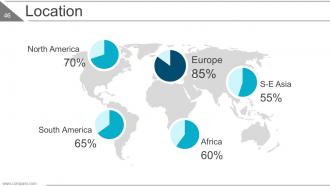
Location
-
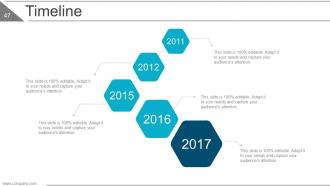
Timeline
-
Important Notes
-
Newspaper
-
Puzzle
-
Target
-
Circular
-
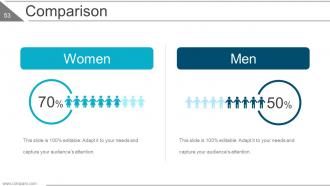
Comparison
-
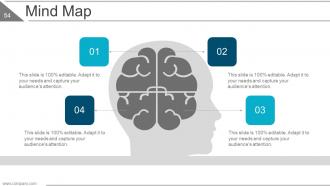
Mind Map
-
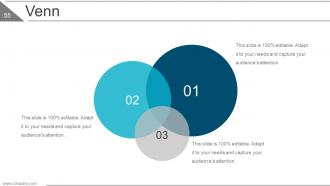
Venn
-
Lego
-
Silhouettes
-
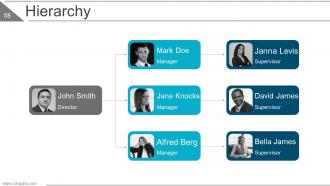
Hierarchy
-
Generate Idea
-
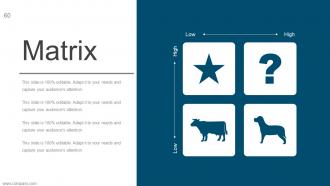
Matrix
-
Search
-
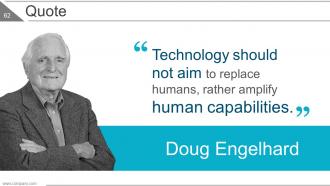
Quote
-
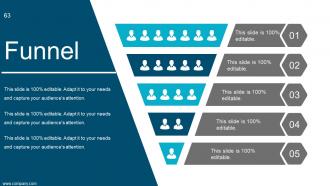
Funnel
-

Our Charts
-
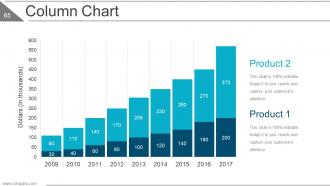
Column Chart
-
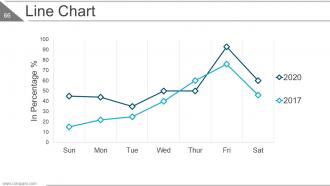
Line Chart
-
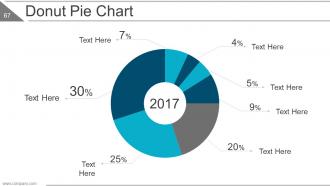
Donut Pie Chart
-
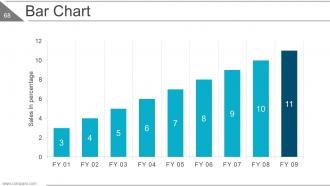
Bar Chart
-
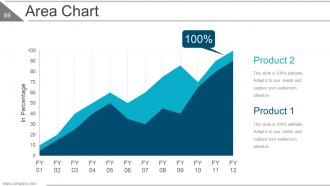
Area Chart
-
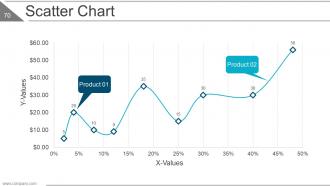
Scatter Chart
-
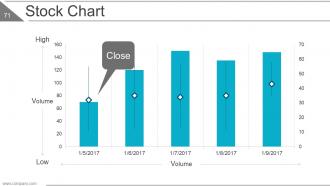
Stock Chart
-
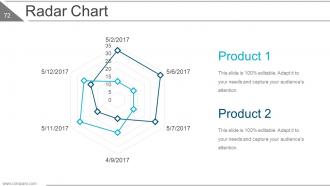
Radar Chart
-
Combo Chart
-

Thank You Slide
FAQs for Lean Project Management
So lean project management is all about cutting out the BS and focusing on what actually matters. You deliver value fast and often instead of planning everything to death upfront like traditional methods. Your team gets to make real decisions, which honestly makes everyone way happier. The whole thing revolves around spotting waste and nixing it immediately - could be unnecessary meetings, redundant approvals, whatever. It's way more flexible since you're constantly learning and adjusting. I'd say start by looking at your current workflow and find one annoying bottleneck you can eliminate this week.
Okay so basically lean project management is all about cutting out waste - stuff like overproduction, waiting around, defects, pointless busywork. Map out your workflows first to spot bottlenecks. Kanban boards are super helpful for tracking what's in progress. Once you start identifying inefficiencies it becomes weirdly satisfying, like popping bubble wrap or something. Focus only on things that actually matter to your customer. Everything else? Ditch it. Do shorter feedback cycles too so you're constantly improving. I'd start by picking one current project and just... see where you're bleeding time. You'll be shocked.
Start with value stream mapping - think of it as getting an X-ray of your whole process to see where things get stuck. Kanban boards are a must for tracking work in progress (plus they're oddly satisfying to update). When problems pop up, try the 5 Whys technique to dig deeper instead of just fixing surface issues. Daily standups and retrospectives keep the improvement momentum going. Kaizen events work well for focused improvement sprints too. Honestly though, don't dump all this on your team at once - pick one or two tools first and build from there.
Just ask your customers straight up what they need and what they'd actually pay for - don't guess. Do some interviews or surveys to figure out their real pain points. Then look at what you're building and see if it actually solves those problems. Honestly, most features are just fluff that nobody asked for. Keep checking back with them throughout the project too, because priorities shift. I learned this the hard way when I spent months on something customers didn't even want. Focus on what they're literally telling you matters most.
Oh, continuous improvement? That's literally what makes Lean work - without it you're just treading water. Start with quick weekly check-ins where people can actually say what's not working. No blame, just honest talk. Small experiments should feel normal, not terrifying. I've watched teams completely flip once they began tracking simple stuff together and hyping up the small victories. Make it feel like a team thing, not some mandate from management (that never works anyway). Try 15-minute "what's bugging us?" sessions first. Build momentum from there.
So here's what's worked for me - start by mapping out your current dev process and spot where time gets wasted. Then use Lean's value stream thing to find bottlenecks in your sprints. Your daily standups are perfect for catching waste as it happens (honestly feels like cheating sometimes). Mix Lean's pull system with how you prioritize your backlog - stops you from building features nobody actually wants. Oh, and those retrospectives? That's where you can really lean into continuous improvement. Just pick the biggest time-waster you found and attack it in your next sprint planning.
Look, there's three main things you should actually care about: cycle time (how long stuff takes start to finish), lead time (request to delivery), and value-added ratio - that's just time spent on things customers give a damn about. Most teams go way overboard here, honestly. Defect rates and customer satisfaction scores matter too. But here's the thing that actually moves the needle - flow efficiency. Basically how much time you're working vs just sitting around waiting. I'd start with maybe 2-3 of these max. Don't try tracking everything or you'll drive yourself nuts.
Honestly, Kanban boards are game-changers for Lean workflows. They make everything visible - you'll instantly see what's stuck and where the bottlenecks are hiding. Start with three basic columns: "To Do," "Doing," "Done." Move cards through as work progresses. The magic happens when you limit work-in-progress (stops people from juggling too much). I used to think they were overhyped until I actually tried one - now my whole team stays aligned without constant check-ins. You can literally point at the board and say "this is why we're behind." Super satisfying when things flow smoothly.
Look, the hardest part is honestly just getting people to buy in. Everyone's so used to waterfall that they freak out about all the feedback and constant tweaking - it feels messy compared to those nice, neat project timelines. Your team might push back hard at first. Start with a small pilot project though, and make sure leadership's really behind it. Training helps too, but what really works is showing quick wins early on. Once people see how much smoother things flow without all that waste, they usually come around. The chaos thing sorts itself out pretty fast once you get rolling.
So with Lean PM you're pulling stakeholders into the process way more often. Daily standups, regular demos, quick feedback cycles - not just those big quarterly meetings. Your stakeholders need to actually show up and make fast decisions instead of disappearing until the final review. The whole thing flips from "ta-da, here's your product" to "help us figure this out as we go." Honestly? It's kinda chaotic at first but it works better. Just make sure they know they're signing up to be involved, not just waiting around to approve stuff at the end. Oh and don't expect everyone to love the constant check-ins initially.
Oh totally, Lean works everywhere! You're just cutting waste and making things flow better. Healthcare uses it for patient intake and reducing wait times. IT teams speed up deployments and cut down handoffs between departments. The trick is figuring out what actually helps your end user, then getting rid of everything else - sounds obvious but most places are drowning in pointless steps they don't even notice anymore. Map your current process first. You'll find so much hidden waste it's honestly ridiculous. Then just attack the bottlenecks.
Toyota's the classic case - they basically created lean manufacturing and it changed everything for them. Virginia Mason Medical Center used it in healthcare and cut patient wait times in half, which is pretty impressive. Skanska did something similar in construction, shaving tons of time off projects. Software teams do this too but call it agile (same concept though). Oh, and here's the thing - they all went after waste and workflow issues instead of just slashing budgets randomly. I'd start by mapping out what you're doing now so you can see where things get stuck.
You've gotta walk the walk first - can't expect your team to buy into continuous improvement if you're not doing it too. Be open about your screwups and what you learned. That psychological safety thing is massive for getting Lean to stick. Actually give people time to implement this stuff instead of drowning them in extra work. So many Lean transformations crash and burn because everyone's too swamped to do it properly. When someone spots waste or suggests something better? Celebrate it. Make speaking up feel rewarding and your team will start thinking Lean naturally.
For Lean Project Management certs, I'd definitely go with Lean Six Sigma first - Green Belt or Black Belt both mix lean with actual project work. ASQ and the Lean Enterprise Institute have decent standalone options too. Green Belt's probably your sweet spot since you can use that stuff right away on whatever you're working on. The whole certification landscape is kind of a mess right now with so many choices, but at least most are online now. My cousin did his Green Belt last year and said it was actually pretty practical, not just theory stuff.
Dude, lean practices are seriously underrated for risk management. You're constantly hunting down waste, which forces you to spot problems way earlier than usual. Those short iterations? They're lifesavers - no more nasty surprises at project end. Visual boards and standups might seem basic, but they'll show you bottlenecks before they wreck everything. The whole thing keeps your work-in-progress low, so when stuff inevitably goes sideways, you can actually pivot without losing your mind. Honestly just start with daily standups and some visual tracking - you'll see the difference pretty quick.
-
Thanks for all your great templates they have saved me lots of time and accelerate my presentations. Great product, keep them up!
-
Easily Understandable slides.