


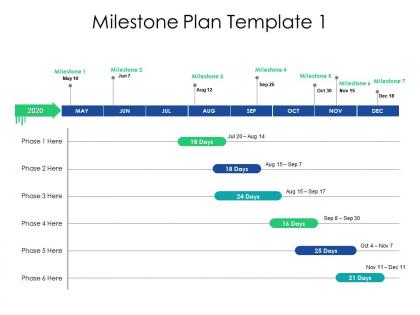
Milestone plan template ppt powerpoint presentation backgrounds




Try Before you Buy Download Free Sample Product
 Impress Your
 Audience
 100%
100% Editable
 Save Hours
 of Time


Delve on the importance of fair coverage with our Milestone Plan Template Ppt Powerpoint Presentation Backgrounds. Elaborate on journalism.
People who downloaded this PowerPoint presentation also viewed the following :
Milestone plan template ppt powerpoint presentation backgrounds with all 2 slides:
Decode journalese with our Milestone Plan Template Ppt Powerpoint Presentation Backgrounds. Acquaint folks with the actual intention.
FAQs for Milestone plan template ppt
So for your milestone template, definitely include clear descriptions and target dates for each one. Who's responsible needs to be crystal clear too - learned that the hard way! Success criteria are huge because otherwise people argue about what "finished" actually means. Dependencies between milestones matter, and honestly? Add a notes section even if it seems unnecessary. You'll thank me later when you need to remember some random context from three months ago. Oh, and build in status tracking plus risk flags. But seriously, keep the whole thing simple or your team will just ignore it completely.
Honestly, milestone templates are lifesavers for tracking projects. Think of them like those "You Are Here" signs at the mall - you instantly know where you stand. Pick maybe 5-7 big checkpoints and review them weekly. That way you'll catch delays early instead of scrambling last minute (been there, done that). Your stakeholders get clean updates without getting buried in every tiny detail. Plus you can compare what you planned versus reality, which makes you way better at estimating timelines for next time. Really helps prevent those "how did we get so behind?" panic moments.
First thing - ditch those generic milestones and swap them for stuff that actually matters in your field. I usually change up all the descriptions so they match how we actually talk about project phases (way better for getting everyone on board). Map out your real deliverables against whatever template you're using, but honestly? Most templates assume every project moves at the same pace, which is total BS. Some phases need way more time than others. The goal is making it feel like YOUR plan, not some random template you found online. Otherwise people can tell immediately and it's awkward.
Dude, definitely throw in some timelines and progress bars - makes everything so much clearer. People's brains just work better with visuals than walls of text, you know? I swear, half the room zones out when you're just reading bullet points. Color-coded milestones are clutch too. Stakeholders can actually see where bottlenecks might hit and figure out how their stuff connects to everyone else's work. Oh, and those little status icons next to each milestone? Game changer for meetings. People can scan through updates without having to decode paragraphs of project-speak.
Honestly, these templates are game-changers because they stop those awkward meetings where everyone's like "wait, what exactly are we doing again?" Your whole team gets on the same page about deadlines and who's handling what - no more blame games when stuff goes sideways. Breaking massive projects into smaller pieces makes everything feel less overwhelming too. Oh, and stakeholders can check progress themselves instead of constantly bugging you for updates (which is amazing). I'd grab a basic template first, then let your team tweak it. They'll actually use the thing if they help create it.
Honestly, the worst part is always scope creep - everyone wants to tack on "just one tiny thing" and suddenly your milestone is huge. Get your team involved upfront so timelines aren't completely insane. Dependencies will mess you up too; when one thing gets delayed, everything else falls like dominoes. I always try to build in buffer time, though good luck selling that to management lol. Be super specific about what's included in each milestone and what isn't. Regular check-ins help catch problems before they explode. Oh, and don't treat your template like it's set in stone - you'll need to update it when reality inevitably smacks you in the face.
Check your milestone template every 2-3 weeks when things are moving fast. Monthly works fine during slower phases like project kickoff or wrap-up. But here's the thing - if something major shifts (budget, scope, timeline), review it immediately. Don't be one of those teams that gets stuck following outdated milestones while everything changes around them. I've watched good projects crash because of that stubborn mindset. Set calendar reminders or you'll totally forget. Your template should bend with reality, not fight it. That's honestly what separates projects that succeed from ones that don't.
For milestone templates, Microsoft Project or Smartsheet are your best bet if you need heavy-duty project management stuff. Excel's honestly perfect though if you want something simple that everyone already knows. I've watched so many teams waste forever evaluating fancy tools when Excel would've worked fine. Asana and Monday.com hit that sweet spot between easy and functional. My advice? Just start with whatever your team's comfortable with - you can always switch later once you figure out your process. No point overthinking it.
Look at your team's past projects first - that's your real data, not some fantasy timeline. I always add 20-30% buffer time because everything takes longer than you think it will. Break big milestones into smaller pieces so you can catch problems early. Honestly, the best thing you can do is run your timeline by whoever's actually doing the work. They'll spot the unrealistic stuff way before you do. Oh, and start conservative - you can always speed things up later once you figure out what you're really dealing with. Way better than scrambling to catch up.
Think of dependencies as "I can't do X until Y is done" - they're super important for getting your timeline right. Look for templates with "depends on" fields or visual stuff like arrows connecting tasks. Honestly, the color-coded ones are my favorite because you can see everything at a glance. Map out what's blocking what first, then work backwards to set realistic dates. I've seen teams get totally stuck because someone didn't realize task A was waiting on task B to finish. Start with dependencies, build your milestones around those constraints.
Look at your company's main goals first, then figure out which milestones actually move the needle on those priorities. I usually just make a simple list - it doesn't have to be fancy. Each milestone should connect to something your executives actually care about. Here's the thing though - when you're updating people, talk about the business impact instead of just saying "we're 60% done." Leadership eats that stuff up because they can see why your project matters. It's honestly the fastest way I've found to get buy-in. Plus it keeps your team motivated when they understand the bigger picture.
So milestones are like checkpoints - "hey we finished the design phase!" Deliverables are actual stuff you hand over. Reports, apps, presentations, whatever. Milestones don't really have physical outputs. They're more celebration moments. But deliverables? Those are concrete things people can actually use or review. Here's where it gets confusing though - they totally overlap sometimes! Your milestone might be "Phase 1 done" and the deliverable is the prototype that proves it. I always mess this up in templates honestly. Quick test: ask yourself if it's a moment in time or an actual thing you're giving someone. That usually sorts it out pretty fast.
Oh, so basically these milestone templates are like built-in reality checks for your project. Every checkpoint becomes a moment where you can actually pause and see what's going sideways before it gets worse. I always map out the big deliverables first, then use those milestones to spot dependencies and figure out where I might need extra buffer time. Honestly, it's saved my butt more than once when projects started spiraling. You'll want to assign someone to own the risks at each milestone too - makes accountability way clearer. Think of it as scheduled panic prevention, which sounds dramatic but it's true.
Color-code everything and throw in some progress bars - stakeholders eat that visual stuff up. Set up regular milestone reviews, but keep your updates short and sweet. What's done, what's next, any problems brewing. Dashboards are honestly magic for this - makes everything feel real somehow. Always include dates, deliverables, and who owns what so nobody can claim confusion later. Here's the thing though: different people need different update schedules. Your executives probably want monthly summaries while your project teams are gonna need weekly check-ins. Build a communication plan right into your template from day one.
Yeah, you can definitely make this work! Ditch those old-school "Requirements Complete" milestones and swap them for sprint stuff like "Sprint 3 Demo" or "MVP Release." I actually struggled with this transition myself - kept wanting everything locked down. Focus on actual working software instead of paperwork milestones. Your sprint reviews become the real checkpoints now. Map out which sprints hit meaningful business wins, and don't stress if things shift around. That's kinda the whole point of Agile anyway. Track demos and feedback sessions as your major markers.
No Reviews