


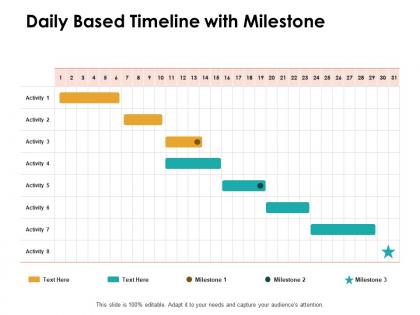
Daily based timeline with milestone ppt powerpoint presentation file templates




Try Before you Buy Download Free Sample Product
 Impress Your
 Audience
 100%
100% Editable
 Save Hours
 of Time


Enable folks to battle insecurities with our Daily Based Timeline With Milestone Ppt Powerpoint Presentation File Templates. Brief individuals feeling jittery.
People who downloaded this PowerPoint presentation also viewed the following :
Daily based timeline with milestone ppt powerpoint presentation file templates with all 2 slides:
Calm the jitters with our Daily Based Timeline With Milestone Ppt Powerpoint Presentation File Templates. Deal with any indication of insecurity.
FAQs for Daily based timeline with milestone ppt powerpoint
So basically you want clear time blocks and specific checkpoints throughout your day. Work backwards from your big deadlines to figure out where you need to be at each point. Buffer time is honestly a lifesaver - I learned that the hard way because nothing ever goes according to plan lol. Color-code stuff by how urgent it is so you can quickly scan and see what's what. Oh, and add priority levels to each milestone so you know what you can let slip if something more important comes up. Don't forget space for quick notes!
Honestly, those daily milestone templates are lifesavers for keeping projects moving. You get this consistent framework that shows exactly where you should be each day - no more guessing games. Spotting problems becomes way easier when you're checking in regularly. Your team stays focused on what actually matters instead of getting scattered. Quick fixes happen before tiny issues snowball into disasters. Plus you're not starting from scratch every time (I used to waste so much time on that). Pick maybe 3-5 daily milestones that really move the needle. Trust me, it'll change how you run projects.
Hey! So project management and software dev teams get the most out of these daily timeline templates. Event planning too - those people are crazy organized. Manufacturing uses them a lot for keeping processes consistent, and I've seen healthcare facilities do the same thing. Really though, any job with tight deadlines works. The magic happens when you've got tasks that depend on each other - like, if Bob doesn't finish his part by Tuesday, then Sarah can't even start hers. That's when these templates actually save your butt. Quick test: does your work have daily dependencies? If yeah, you'll probably love these things.
Honestly, visuals are everything when it comes to timelines. Your brain processes images way faster than text anyway, so throw in some colors and icons. Nobody's gonna stare at boring dates and text blocks - trust me on that one. Progress bars and checkmarks give people that little dopamine hit when they see milestones getting checked off. Color coding different phases is clutch too. Makes everything so much easier to scan quickly. Clean layouts with good visual hierarchy? Game changer. People will actually engage with your timeline instead of just scrolling past it like another wall of text.
Honestly, I'd start with **Notion** - their timeline templates are ridiculously good and you can tweak everything without wanting to throw your laptop. **Airtable** is solid too for the reusable milestone thing. Microsoft Project has all the bells and whistles but feels like using a sledgehammer to hang a picture frame, you know? **Trello** actually works better than you'd think if you add custom fields. Oh, and **Monday.com** has decent timeline views if you're already stuck with it for other stuff. Even Google Sheets can pull this off with some conditional formatting magic, though that's more of a weekend project vibe.
So basically, you take your huge project and chop it into tiny daily goals instead of staring at one monster deadline. Way less stressful that way. Each day you hit a mini-milestone and actually feel like you're getting somewhere - honestly, those small wins keep you sane. When something goes sideways, you catch it fast instead of panicking two weeks later. Your team can see who's crushing it and who needs help too. Just work backwards from your final due date and figure out what needs to happen each day. Game changer, trust me.
Honestly, the worst thing you can do is cram every single task into your timeline. Like, I get wanting to track everything, but it just becomes this monster that stresses you out instead of helping. Pick maybe 3-5 things that actually matter - the big stuff that'll make or break your project. Don't be super rigid about dates either because stuff always comes up. Oh, and update it! I can't tell you how many people create these elaborate timelines then never touch them again. Also - this might be obvious but don't just steal someone else's milestones. Their project isn't yours. Start small, see what works.
Look, daily milestones are like breaking your big scary goals into tiny pieces you can actually handle. I do this with everything now - way less overwhelming. Your brain gets those little reward hits when you check stuff off, which honestly keeps you going way better than just staring at some massive end goal. Plus you can pivot fast if something's not working instead of waiting months to realize you're off track. The trick though? Make sure those small daily wins actually connect to what you're trying to achieve long-term. Otherwise you're just running around being "busy" but not really getting anywhere meaningful.
Yeah, they work great with pretty much any PM setup you're already using. Scrum teams can turn them into mini-goals within sprints. Kanban folks use them as progress markers between columns. Even those old-school waterfall projects benefit - you're just chopping up those monster phases into daily chunks. Honestly, I think daily milestones make tracking way less painful than those weekly check-ins that drag on forever. Just look at your current framework's main phases first. Then figure out what realistic daily progress actually looks like for each one. Don't overcomplicate it.
Honestly, less is more with these updates. Start with the wins - people eat that stuff up. Then hit blockers and what's next, but skip the data dump. Those red/yellow/green status indicators are your best friend because executives literally just scan for colors half the time. Send them at the same time each day so people know what to expect. Focus only on stuff that actually needs their input or affects their decisions. Recovery plans for delays are clutch - don't just say "we're behind." Make everything scannable since most folks need to digest it in like 30 seconds between meetings. Trust me, I've watched too many eyes glaze over from oversharing!
Oh totally, cultural stuff makes a huge difference with timeline templates. Some cultures are super rigid about deadlines while others are way more relaxed about them. What's weird is how differently teams celebrate hitting milestones too - like some want big recognition and others think it's cringey. Communication around due dates gets tricky since some people are blunt about delays and others beat around the bush forever. I'd honestly just make different versions for each region. Set clear rules upfront about how everyone reports progress so you're not constantly confused about what "almost done" actually means.
Definitely go with flexible time slots instead of rigid hours - way more realistic. Priority levels are clutch, plus you need status options like "done," "working on it," or "behind schedule." Color-coding sounds basic but trust me, it saves so much mental energy when you're scanning through everything. Notes sections are super helpful for each milestone, and if you're collaborating, make sure people can be assigned to different tasks. Oh, and drag-and-drop is non-negotiable when things inevitably shift around. Start simple though - you can always add bells and whistles once you know what actually helps your workflow.
Build those feedback checkpoints right into your timeline templates - like, actually schedule them at major milestones. After each big deliverable, do quick 15-minute review sessions with stakeholders before moving forward. Way more effective than those marathon end-of-week meetings that drag on forever. Document everything in your timeline tool so people can track what changed and why. The whole point is making feedback feel natural, not like some annoying speed bump. Honestly, once you get this rhythm going, it's a game changer. Start tomorrow if you can.
Hey! Color schemes make such a difference for timelines. I learned this the hard way after making some truly hideous rainbow presentations lol. Keep it simple - maybe 3-4 colors tops. Use the same color for similar stuff (green = done, red = deadlines) so people can scan fast. Contrast matters too. One trick that saved me: stand across the room and squint at your timeline. Can't tell the colors apart? Your audience won't either. Trust me, boring beats confusing every time. Less is definitely more here.
Give yourself way more breathing room between milestones - remote stuff always takes longer than you think. I'd space checkpoints out by like 30-45 minutes instead of cramming them together. Tech issues are inevitable, plus people need time to actually respond to messages. Oh, and be stupidly specific about everything since you can't just walk over and ask questions. Put links to docs, Slack channels, whatever right in your timeline. Define what "done" actually means for each milestone. I made this mistake big time during our last sprint - never again! Clear approvals and resource locations save everyone's sanity.
No Reviews