


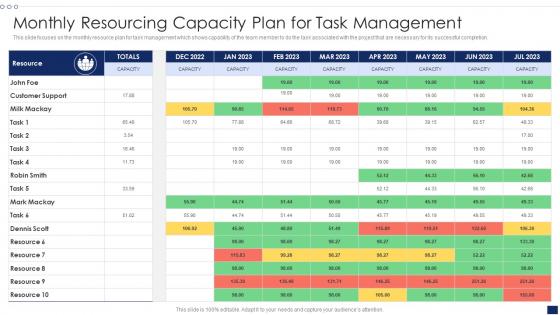
Monthly Resourcing Capacity Plan For Task Management




Try Before you Buy Download Free Sample Product
 Impress Your
 Audience
 100%
100% Editable
 Save Hours
 of Time


This slide focuses on the monthly resource plan for task management which shows capability of the team member to do the task associated with the project that are necessary for its successful completion.
People who downloaded this PowerPoint presentation also viewed the following :
Monthly Resourcing Capacity Plan For Task Management with all 6 slides:
Use our Monthly Resourcing Capacity Plan For Task Management to effectively help you save your valuable time. They are readymade to fit into any presentation structure.





FAQs for Monthly Resourcing Capacity Plan
You'll want to start with three main pieces: figure out what skills and people you have now, forecast what you'll need for upcoming projects, then do a gap analysis to see where you're short. That gap part is where everyone seems to struggle, but it's super useful. Also factor in your timeline and budget - sounds obvious but people forget. Build in some contingency planning too because projects always change. Oh, and set regular check-ins to adjust things as priorities shift. Trust me, they will.
Start by breaking your projects into specific roles and skills, then see how that matches your team's actual capacity. Historical data from past projects is seriously a lifesaver for estimating timelines and how much work things really take. Don't forget to account for vacation days, training time, and scope creep - because let's be real, it happens on like 90% of projects. Build in a 10-15% buffer too since random stuff always pops up. Oh, and update your forecasts as you go instead of just setting them once and never touching them again.
Dude, technology totally transforms this stuff. Workforce analytics tools predict demand patterns and track utilization rates in real-time. Super helpful for catching bottlenecks early. AI platforms can forecast staffing needs using your historical data too - honestly the scheduling software alone will save you tons of time each week. You'll get these dashboards that show your team's capacity instantly. Makes it way easier to decide when you need to shuffle people around or bring in contractors. Oh and it handles all the boring manual work you'd normally waste hours on.
Honestly, getting the right people on the right tasks makes or breaks your timeline. You'll cruise when everyone's skills match what they're doing. But spread your team too thin? Total disaster waiting to happen. I've watched entire projects crash because someone yanked key people for "emergency" stuff elsewhere - so frustrating. It also wrecks morale fast when half your team is drowning while others twiddle their thumbs. Map out who you need before anything starts, then actually stick to it once you set those deadlines.
Honestly? Demand forecasting is a nightmare - nobody can predict how long stuff actually takes. Your team will have skill gaps in weird places too. Timing's always off. Available people aren't necessarily free when you need them, and someone important will definitely take PTO right before your deadline (Murphy's law or whatever). Oh, and priorities change constantly, so that perfect plan you made? Probably useless next week. I'd just build in tons of buffer time and update everything weekly instead of trying to nail it perfectly from the start.
You've gotta bake flexibility right into your capacity plan from day one. Weekly or bi-weekly reviews work best - reassess what you actually need vs what's happening with scope. Trust me, scope never stays put (learned that the hard way). Buffer capacity for your critical people and keep a skills matrix handy so you know who can jump on new stuff quickly. Honestly, most teams treat their capacity plan like it's written in stone. Don't do that. Make it a living doc and put scope changes on every planning meeting agenda. Oh, and maybe grab coffee before those meetings - they can get intense.
Hey! So I'd focus on four main things to see if your resourcing plan is actually working. Check utilization rates first - you want people around 80-85% billable, not crazy higher. Delivery timelines vs estimates matter too. Skill gap coverage is honestly the big one though - shows if you've got the right people on the right stuff. Employee satisfaction is huge because burned out teams will tank everything fast. Oh, and pull these monthly - don't wait forever to catch problems. Anything trending wrong needs immediate attention.
Honestly, you can't do capacity planning without getting stakeholders involved - it's like trying to plan a road trip blindfolded. Different departments will tell you about upcoming projects and what skills they actually need instead of you just guessing. Regular planning sessions work best, but make them collaborative. Don't just present your decisions to people. When stakeholders help create the plan, they're way more likely to follow it later. Plus you'll catch conflicts early - like when marketing and engineering both want the same developer in March (been there!). Short version: loop people in from the start.
Honestly, data analytics is a total game changer for resource planning. Historical demand data helps you predict what's coming down the pipeline. You can track which teams are swamped vs. underutilized and catch bottlenecks early. The predictive stuff is wild - I've watched companies forecast skill gaps months out and actually prepare for them. Real-time optimization becomes possible too, which sounds fancy but really just means moving people around smarter. My advice? Don't go crazy at first. Pick something simple like team utilization rates and build from there.
Cross-training is huge - when people can jump between roles, planning becomes so much easier. Honestly, most teams I've worked with think they're completely swamped but they're really sitting at like 70% capacity. The numbers don't lie. Track what you're actually getting done vs what you planned. Skills matrices help you spot problems before they blow up. Oh, and for busy seasons? Contractors are way better than hiring full-time people you don't need year-round. Start by figuring out what your team actually does all day - it's probably different than you think.
Build labor rules right into your capacity planning from day one - max hours, breaks, overtime limits, all that stuff. We got hit with violations once because I didn't catch scheduling issues early enough. Honestly, labor laws change so much it's annoying to keep up with, but you have to. Your planning software should flag problems before schedules go live. Different locations have different rules too, which makes it messier. Run audits comparing your actual hours to what you planned - catches gaps before they become real problems. Trust me, it's way easier than dealing with compliance issues after the fact.
Look, every industry has its own crazy patterns you've got to plan around. Retail goes nuts during holidays, accounting firms basically live at the office during tax season. Healthcare's all about shifts and certifications - can't just throw anyone on the floor. Tech companies are constantly juggling project teams that shift every few months, which honestly drives me insane. Construction? Weather rules everything. Try building when it's pouring rain and see how that goes. Don't forget about union rules and compliance minimums either. Map out when your busy seasons hit and what staffing levels you absolutely can't drop below.
So first thing - figure out what skills you're missing compared to what you'll need down the road. Then look at who you've already got and see if they can be trained up instead of hiring new people. Honestly, most companies waste so much money on external hires when their current team could totally handle it with some training. Build those development timelines right into your planning from the start. Don't forget to budget for it though! Create clear paths for people to move up internally. The timing matters too - you want people ready when you actually need those skills, not six months later.
Honestly, visual dashboards are your best friend here - way better than dumping spreadsheets on people. I'd do regular meetings for the big discussions and email updates between those. Some project management tools like Asana can share live data too, which is pretty neat. The real thing though? Match what you're sharing to who you're talking to. Executives just want the high-level stuff while project managers need all the nitty-gritty details. Don't go crazy with too many methods or you'll spend more time communicating than actually planning. Two or three approaches should cover it.
Build buffer scenarios right into your capacity planning - basically model what you'd need if shit hits the fan. Think about your biggest risks first. Key people quitting, projects getting delayed, demand suddenly spiking. Then figure out how much extra capacity each scenario would require. I'd aim for 15-20% buffer minimum, but honestly depends on how crazy unpredictable your industry is. Don't just set it and forget it though. Review quarterly and tweak your assumptions as things change.
-
Fantastic collection of visually appealing PowerPoint templates. They certainly uplift the look of the presentation.
-
“Love it! I was able to grab an exciting proposal because of SlideTeam.”