

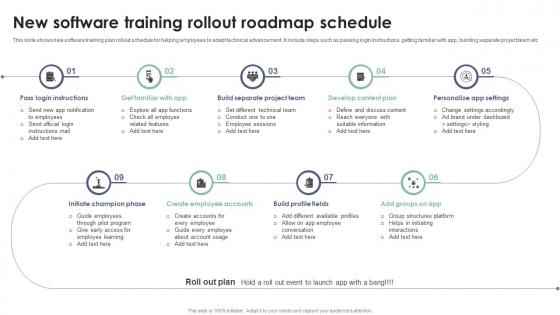
New Software Training Rollout Roadmap Schedule




Try Before you Buy Download Free Sample Product
 Impress Your
 Audience
 100%
100% Editable
 Save Hours
 of Time


This slide shows new software training plan rollout schedule for helping employees to adapt technical advancement. It include steps such as passing login instructions, getting familiar with app, building separate project team etc.
People who downloaded this PowerPoint presentation also viewed the following :
New Software Training Rollout Roadmap Schedule with all 6 slides:
Use our New Software Training Rollout Roadmap Schedule to effectively help you save your valuable time. They are readymade to fit into any presentation structure.





FAQs for New Software Training
Start with clear goals and figure out what your team actually knows vs what they need to know. Build it step-by-step - basics first, then harder stuff. Real projects work way better than just theory, trust me on that one. Give people practice time and check in regularly to see how they're doing. Oh, and make it flexible since some people pick things up faster than others. Documentation and tutorials are obvious must-haves. Peer mentoring helps too if you can swing it. Focus on the biggest skill gaps first - that's where you'll see the most impact.
Honestly, just do a skills gap analysis first. Compare what your team can actually do vs what projects need. Survey the devs and check their reviews - see where people are getting stuck or moving too slow. Your PMs will have the best insight here since they deal with the chaos daily. Map out your current tech stack and where you're heading to spot skill gaps early. Oh, and peek at what competitors are doing too. Pull reports from your project tools to find the real bottlenecks. Way better than just guessing what's wrong.
Honestly, good tech makes all the difference for software training. Interactive stuff like simulations and hands-on labs work way better than boring lectures - I mean, who actually pays attention to those? You can set up personalized learning paths that adjust based on how someone's doing, plus add some gamification to keep things interesting. Virtual environments are pretty solid too. Analytics will show you where people get stuck, which is super helpful. Just don't go overboard with flashy tools if your team isn't ready for them. Pick whatever matches how your people actually learn and their comfort level with tech.
Look at completion rates and test scores first - that's your baseline data. But honestly, the real gold is in those post-training surveys where people tell you if they actually feel confident using the stuff. I always check back in like 30-60 days later because that's when you know if it actually stuck or just faded away. Track how fast they're applying skills on real projects too. Don't skip the engagement metrics during sessions either. Oh, and definitely loop in their managers - they'll spot skill improvements way before the data shows it.
Don't separate soft skills from the technical stuff - mix them together. During code reviews, make people explain their changes out loud. Add teamwork to project work. Use real debugging sessions for problem-solving practice. Honestly, I've worked with way too many devs who write great code but completely bomb when they have to talk to clients or managers. Role-play customer conversations when you're doing user stories. Include presentation skills during architecture discussions. Pick one soft skill each training cycle and weave it throughout everything - don't just dump it all into one awkward "communication workshop" day.
Honestly? Build them a simple roadmap that goes from basic daily-use stuff to the more specialized tools. Don't throw everything at them in week one - I've watched that disaster play out before. Start with what they'll actually need right away, then add layers as they get comfortable. Give them realistic timelines with checkpoints where they can practice hands-on. A checklist they can work through themselves is clutch. Way better than having people constantly ask "wait, what was I supposed to do again?" Plus they'll actually be productive faster instead of drowning in software overload.
Honestly, the trick is switching things up every 10-15 minutes so people don't zone out. Get them clicking buttons instead of just watching you do everything. Skip those boring "John Doe" examples - use stuff from their actual jobs instead. I throw in polls or quick discussions, sometimes just pause and ask if anyone's confused. Here's the thing though - let them mess up a little during exercises. They learn way more when they have to figure it out themselves. Give small wins along the way and always tie each section back to what they'll actually use at work.
Honestly, just set up a bunch of different ways to get feedback throughout your whole training thing. Post-training surveys are obvious but also do regular check-ins with people. Anonymous forms work amazing - nobody holds back when their name isn't attached! Don't forget the trainers either, they see exactly where everyone gets stuck. I'd track completion rates and test scores quarterly to see what's actually sticking. The main thing is being consistent about it, not just asking randomly. Maybe block out time each month to go through everything? Oh and actually DO something with the feedback you collect.
Honestly, the hardest part is dealing with people who think they know way more than they actually do - that skill gap is insane. Plus managers hate "losing" their people to training time, so good luck with that battle. Oh, and everyone's gonna want to throw their favorite random tech into the mix too. Content goes stale crazy fast in this industry. One day you're teaching best practices, next week there's three new frameworks everyone's obsessing over. Get executive buy-in first or you're screwed. Do a skills survey upfront and keep your roadmap stupid simple - like 2-3 things max initially.
Here's what works - mix it up constantly. Some people need to see stuff (screenshots, flowcharts), others learn better by listening to demos they can replay later. Then you've got the hands-on crowd who basically need to mess around in a sandbox until things click. Oh, and don't forget the note-takers who want everything written down step-by-step. I usually demo something first, then hand out the written guide, then let people practice. Honestly, sticking to just one method is how you lose people - learned that the hard way.
Get a decent LMS first - Canvas or Moodle work great for organizing everything. For demos, Loom is honestly amazing for quick screen recordings. Set up safe lab environments where students can mess around without breaking stuff. GitHub Codespaces or CodePen are solid for real-time coding together. Oh, and you'll definitely need good assessment tools plus something like Notion for documentation. Communication channels are huge too - students always have questions. I'd probably start with one tool per category, then see what else you actually need based on whatever languages you're teaching.
Honestly, you've gotta stay plugged in somehow - I follow industry newsletters and stalk LinkedIn for the good stuff. GitHub's yearly surveys are amazing for spotting what's actually happening vs what people just talk about. Here's what works for me: monthly check-ins where I separate real trends from total BS. Always leave wiggle room in your training calendar because something will pop up. Oh, and don't go all-in right away - test things small first. Those quarterly conferences are worth it too, even the virtual ones. Sounds like a lot but once you get the rhythm down it's pretty manageable.
Dude, mentorship is seriously worth it for coding stuff. Formal courses teach you the basics, but mentors show you how things actually work in the real world - like, why would you even structure code that way, you know? They can explain the weird edge cases and help you avoid the mistakes they made. Plus you get feedback that's actually relevant to what you're working on instead of generic course examples. I'd just reach out to someone whose work you respect and ask if they want to grab coffee sometime to chat about development. Worst case they say no, but most people are pretty cool about helping out.
Honestly, go with cloud-based stuff so everyone can jump in from wherever. Break everything into bite-sized chunks - trust me, nobody's doing a 2-hour training session from their couch. Interactive elements work way better than boring presentations anyway. Since people can't just walk over to ask questions anymore, you'll need regular check-ins and maybe some group sessions for the collaborative learners. Oh, and make it self-paced across time zones - that's huge. Virtual labs and recorded demos are your friends here.
Honestly, measuring training ROI is easier than people make it seem. Track the obvious stuff first - productivity gains, fewer mistakes, how fast new people get up to speed. Employee satisfaction matters too since turnover is expensive as hell. I always forget about knowledge retention tests but those actually tell you if people remember what they learned lol. Set your baseline before training starts, then compare the after data. Monthly dashboards work great for this - way easier to show your boss actual numbers instead of just saying "trust me, it's working."
-
Professionally designed slides with color coordinated themes and icons. Perfect for enhancing the style of the presentations.
-
Every time I ask for something out-of-the-box from them and they never fail in delivering that. No words for their excellence!