

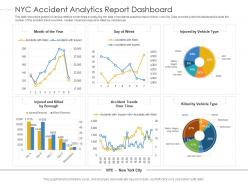
Nyc accident analytics report dashboard snapshot powerpoint template





Try Before you Buy Download Free Sample Product
 Impress Your
Audience
 100%
Editable
 Save Hours
of Time


Our NYC Accident Analytics Report Dashboard Snapshot Powerpoint Template are topically designed to provide an attractive backdrop to any subject. Use them to look like a presentation pro.
People who downloaded this PowerPoint presentation also viewed the following :
Nyc accident analytics report dashboard snapshot powerpoint template with all 2 slides:
Use our NYC Accident Analytics Report Dashboard Snapshot Powerpoint Template to effectively help you save your valuable time. They are readymade to fit into any presentation structure.
FAQs for Nyc accident analytics report dashboard
Focus on the stuff that actually matters for decisions - accident rates, how bad they are, and where they're happening (heat maps work great for this). Time patterns are super important too. Peak hours, which days are worst, seasonal stuff. I'd definitely include what types of vehicles and main causes like speeding or distracted driving. Weather data helps too if you can get it. Response times are clutch if available. Honestly, the whole point is making it useful - anyone should be able to look at your dashboard and immediately know where to send resources or run safety campaigns.
Honestly, visualizing accident data beats staring at spreadsheets any day. You'll see heat maps that show exactly where crashes happen most, plus time charts that reveal when rush hour gets crazy dangerous. Weather patterns start making sense too - like how many more accidents happen when it's raining (which, duh, but seeing the actual numbers is wild). The breakdown by cause really helps you figure out which intersections need fixing first. Just make sure whatever dashboard you're using updates regularly - working with old data when you're trying to prevent accidents is pretty much useless.
Start with NYC Open Data's Motor Vehicle Collisions dataset - that's your best bet. NYPD crash reports are solid too. For extra context, grab Census API demographic stuff and NOAA weather data. DOT has intersection data but honestly their API docs are kinda messy, though the actual data is good. You can pull traffic info from them as well. The Open Data portal is super accessible and goes back years, so I'd hit that first. Once you've got that foundation down, then layer in the other sources. Should give you plenty to work with.
So basically you'd feed all your crash data, traffic patterns, weather stuff into ML models - they'll catch patterns you'd totally miss. Like how certain intersections get sketchy during rain or rush hour. Random forests work great for this kind of thing, honestly better than trying to eyeball it yourself. Pull maybe 3-5 years of accident data first. Then overlay real-time traffic feeds to build your baseline. Your dashboard can spit out heat maps showing where crashes are likely next month. Gradient boosting's solid too if you want better accuracy.
Oh man, weather data is where things get really interesting! Rain and snow create these obvious accident spikes - roads get slippery, people can't see as well. The dashboard has filters for precipitation, temp, visibility, all that stuff. I usually start with the weather overlay when I'm trying to figure out why some random Tuesday had like 50 accidents. Plus you can use it to predict when things might get crazy and maybe staff up your emergency teams accordingly. Honestly, check out that snowstorm from February - the correlation will blow your mind. Makes for killer presentations too.
So you'll want to layer your accident data onto interactive maps - heat maps are perfect for showing hotspots and patterns. Mapbox or Leaflet work great since they connect easily with most analytics tools. Make sure users can zoom into neighborhoods, filter by accident type or severity, and see how things like construction zones affect incidents. Honestly, the coolest part is clicking any point to get full incident details. You can customize everything to highlight what your stakeholders actually care about - time patterns, weather correlation, dangerous intersections, whatever. Both tools are pretty flexible for this kind of thing.
I'd start with age and location - those are your bread and butter filters. Manhattan's gonna be completely different from Staten Island, obviously. Time patterns matter too (what hour, day of week, season). Then look at vehicle types and weather since those really mess with how bad accidents get. Honestly, the coolest insights come when you start mixing age demographics with specific spots and times. Neighborhood characteristics are solid data points too. Street types also play a huge role in frequency and severity. Once you've got age and location down, you can branch out into the other stuff. The cross-referencing is where it gets fun.
Honestly, I'd go with every 2-3 days if you can swing it. NYC accident data comes in pretty regularly, so you'll spot trends faster that way. Daily feels like overkill unless there's some crazy spike happening - the numbers don't really jump around that much day to day. But weekly should be your absolute minimum since people expect reasonably current data when they're pulling reports. Maybe set up auto-refresh for Tuesdays and Fridays? That way you're covered but can still do manual updates if something urgent pops up. Works pretty well in my experience.
Honestly, you're gonna hate this but each department has their own weird data format. NYPD does their thing, DOT does something totally different, FDNY has yet another system - it's like they never talked to each other. Reports roll in at random times too, which makes timing a nightmare. Some departments give you tons of detail while others barely tell you anything useful. The bureaucracy around data sharing? Don't even get me started on that mess. My advice: pick just two departments first. Build some standard templates that actually work, then slowly add more departments once you've figured out the system.
So basically, check out where accidents keep happening and when. If there's like a crazy intersection where pedestrians get hit during rush hour, that's where you'd want better crosswalk signals or speed bumps. The trend stuff is really useful for figuring this out. Filter by accident type too - maybe bike lanes are super dangerous or school zones need work. I mean, it's all about turning those numbers into actual fixes, you know? Better infrastructure and more cops where the data shows you actually need them.
Python with Plotly Dash is probably your best bet - way easier than wrestling with D3.js unless you're already comfortable with it. PostGIS handles all the NYC location data perfectly, and honestly the city's dataset is surprisingly clean for government data. FastAPI works great for the backend stuff. Tableau's nice but seems like overkill unless your team's already using it everywhere. I'd skip it and just build a Dash prototype first. You can literally have something interactive running in like 2-3 hours, then just keep adding features. React + D3 looks fancier but takes forever to set up properly.
Yeah, traffic patterns totally mess with accident rates depending on where you are. Manhattan's constant gridlock causes tons of fender-benders, but people aren't going fast enough for really bad injuries. Brooklyn's truck routes are honestly the worst - accidents everywhere. Meanwhile, outer borough highways see fewer crashes overall but way more serious ones since everyone's flying. Peak traffic hours definitely spike incidents in certain zip codes. When you're looking at the dashboard, try matching those busy times with accident clusters. It's pretty obvious which neighborhoods need better traffic lights or whatever once you see the data laid out.
Dude, automated validation checks are your best friend here - they'll catch weird outliers and missing stuff before it breaks your dashboard. I made that mistake once and it was embarrassing lol. Cross-check your data against official NYPD reports regularly, and honestly? Skip the scraping if you can - verified APIs are way less headache. Document everything too - where your data comes from, when it refreshes, all that boring but necessary stuff. Oh and set up clear data lineage so when something goes wrong (and it will), you can actually figure out what happened.
Start with surveys and feedback forms right in your dashboard - super easy wins. Focus groups are clutch though, especially with different groups like cyclists vs business owners since they'll want totally different data points. Borough community boards are honestly underrated for this stuff. The main thing? Actually show people when you use their suggestions. Someone asks for pedestrian injury hotspots, add it and tell them you did. Makes people feel heard. Oh, and just throw a "suggest an improvement" button on there to start - doesn't have to be fancy.
Make your visual hierarchy super clear - people need to spot accident patterns fast without drowning in data. Color-code severity levels consistently and put your key metrics right at the top where they can't miss them. Filters should be obvious, not hidden somewhere random. Oh, and definitely make it work on mobile since everyone's always checking stuff on their phones during meetings now. The biggest thing though? Test it with people who've never seen it before. You'll think everything makes perfect sense until some poor user gets completely lost trying to find basic info. Trust me, fresh eyes catch the weirdest problems.
-
Very unique, user-friendly presentation interface.
-
Very unique and reliable designs.
-
Appreciate the research and its presentable format.
-
Excellent products for quick understanding.
-
Top Quality presentations that are easily editable.