

Payroll Flowchart Powerpoint PPT Template Bundles




Try Before you Buy Download Free Sample Product
 Impress Your
 Audience
 100%
100% Editable
 Save Hours
 of Time


Our Payroll Flowchart Powerpoint PPT Template Bundles are topically designed to provide an attractive backdrop to any subject. Use them to look like a presentation pro.
People who downloaded this PowerPoint presentation also viewed the following :
Payroll Flowchart Powerpoint PPT Template Bundles with all 18 slides:
Use our Payroll Flowchart Powerpoint PPT Template Bundles to effectively help you save your valuable time. They are readymade to fit into any presentation structure.

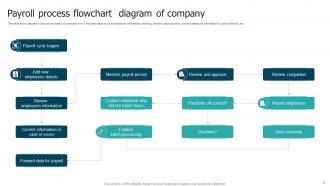
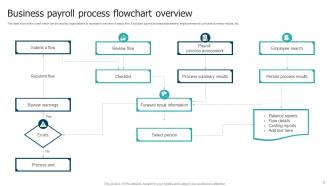
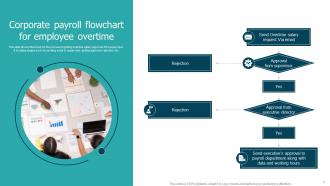
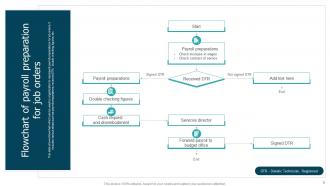





FAQs for Payroll Flowchart Powerpoint
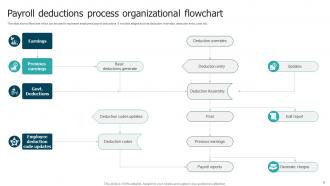
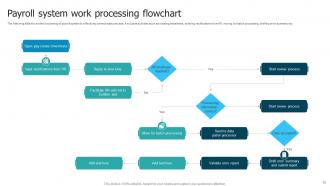
So you'll want to map out employee data collection, time tracking verification, and gross pay calculations first. Then hit deductions processing - taxes, benefits, all that fun stuff. Net pay determination and payment distribution come next. Approval checkpoints are honestly where most people mess up, but they're super important for catching mistakes before paychecks go out. Don't forget compliance verification and record-keeping too. Your flowchart should show who handles what and when things get passed between departments. Start by documenting what you're doing now, then figure out where things usually go wrong or get stuck.
So basically it shows your whole team who handles what and when during payroll. No more guessing games or people making assumptions about the process. Everyone can see exactly how info moves from time tracking to actual paychecks - honestly cuts down on so many headaches. Mistakes drop because people finally get how their part connects to everything else. Plus new hires pick it up way quicker, which is huge. I'd say walk through it together first as a team. Then stick it somewhere visible where people can actually reference it when they need to.
Don't overcomplicate your flowchart - I learned this the hard way. You'll miss crucial stuff like overtime calcs and tax withholdings if it's too messy. Always include approval steps! So many people forget manager sign-offs and go straight from timesheet to payment. Break big processes into smaller charts instead of cramming everything together. What happens when timesheets get rejected? Show those error paths too. Honestly, the best thing I did was grab a few real payroll examples and walk through my chart step by step. Caught tons of gaps that way.
Automation totally flips payroll flowcharts on their head. You're not mapping manual steps anymore - now it's about decision points and when systems hand things off to humans. Way more strategic than charting someone calculating overtime by hand (seriously, who misses that?). Most of your time goes to mapping data flows between systems and approval workflows. The real win? Using flowcharts to spot bottlenecks in your automated processes. I'd start by identifying what still needs human touch - that's where you'll find the best opportunities to streamline even more.
So basically, your payroll flowchart is like a roadmap that shows every spot where you need to follow labor laws. It tracks overtime math, tax stuff, break deductions - all that fun accounting work. The cool part is you can spot problems before they blow up into violations. Each decision point shows exactly which regulations apply. When auditors come knocking (and they will), you've got your whole process documented right there. Smart move is checking it every few months since labor laws change constantly. Honestly beats scrambling to explain your payroll decisions after the fact.
Lucidchart's honestly your best bet - they've got templates made for this stuff and the collaboration features are solid. Visio works too if you're already in the Microsoft ecosystem. Draw.io is surprisingly good for a free option, looks way more professional than you'd expect. PowerPoint can work in a pinch but gets annoying fast with complex flows. Oh, and Miro's pretty cool if your team's into that whole digital whiteboard thing - though sometimes I feel like people use it just because it looks fancy. Google Drawings is there too but kinda basic. I'd just grab Lucidchart's free trial first.
Yeah, so payroll flowcharts are pretty basic when you're small - like collect hours, calculate pay, cut checks, boom. But once you grow? Total nightmare honestly. You've got approval chains everywhere, different departments weighing in, compliance stuff to check. LLCs can just do simple owner draws which is nice, but corporations have to deal with stock options and all that benefits mess. I swear I've seen some enterprise ones that literally look like the NYC subway system - just lines going everywhere! My advice? Start simple and only add the complicated stuff when you absolutely have to.
Look, you really can't skip talking to the actual people involved if you want your flowchart to be worth anything. HR knows all the approval stuff, finance handles compliance, and your managers deal with timesheet drama daily. Don't forget IT either - those guys always know where the weird manual workarounds are buried (trust me on this one). I'd do quick 15-minute chats with each group right at the start. Otherwise you'll end up with something that looks pretty but totally misses how things actually work. Your flowchart needs to show reality, not what the handbook says happens.
Honestly, color coding is your best friend here - different colors for each department so people know exactly where they belong. Throw in some icons too. Little clocks for deadlines, dollar signs for payments, stuff like that. Bold arrows and those diamond decision shapes keep everyone from getting totally lost in walls of text. I mean, nobody wants to squint at a confusing chart when they're already swamped at work. Keep it simple enough that someone can take one look during a crazy week and immediately see what's next. Trust me, visual stuff makes all the difference.
Honestly, just treat it like any other document that actually matters - review it every quarter with your team. Walk through each step and catch stuff that's changed. I've seen way too many flowcharts just sitting there looking pretty while everyone ignores them completely. When something changes, update it right away instead of waiting until audit season when you're panicking. Keep a master copy and maybe highlight new stuff in different colors so people can see what's fresh. Oh, and actually put those review meetings in your calendar now - seriously, you'll be glad you did later.
So for your payroll flowchart, throw in decision diamonds whenever weird stuff might happen. Like "overtime > 40 hours?" or "timesheet missing?" - then create separate paths that branch off to show how you'd fix each problem. Honestly, this is gonna save you so much headache later. I learned this the hard way when Janet from accounting kept forgetting to submit her hours on time lol. Make sure each exception path shows who deals with it and what they actually do to sort it out. Trust me, you'll be glad you mapped this out when the inevitable chaos hits.
Honestly, feedback loops are game-changers for payroll stuff. You'll catch mistakes before they blow up into huge headaches. Monthly check-ins with your team work great - they can flag weird issues or suggest fixes. Employees will definitely complain about payroll problems anyway, so might as well show you're listening, right? The cool thing is you can tweak processes as you go instead of finding disasters during year-end. Look for patterns where things go wrong. Even basic checkpoints make a massive difference. Your future self will thank you when everything runs smoother.
Honestly, flowcharts are perfect for training new HR people. Way better than making them slog through those boring procedure manuals nobody actually reads. You can literally walk them through each step - from timekeeping all the way to cutting paychecks. They'll spot the approval checkpoints and figure out where stuff usually breaks down. The best part? They can use it on their own when you're not around to answer questions. I'd have them practice with fake scenarios their first week - maybe run through a few different employee situations so they get the hang of it.
Honestly, a good payroll flowchart makes employees way happier because they actually know what's going on. Nobody likes that mystery where their paycheck just magically appears (or doesn't). When people can see the whole process - from turning in timesheets to money hitting their account - they're not stressed about when they'll get paid. Fewer errors happen too since everyone knows their part. The transparency thing is huge for building trust. I'd definitely show it to your whole team so they get the timeline and what they need to do. It's like removing all the guesswork from something that really matters to people.
Just be super specific about which systems do what instead of keeping it vague. Like instead of "calculate wages," write "HRIS pulls timesheet data" or "ADP handles deductions automatically." Diamond shapes work great for validation points - you know, where the software catches errors or needs approval. Show your cloud storage, direct deposit APIs, tax systems with arrows so people can actually follow the data flow. Honestly, this is way more useful than abstract flowcharts because stakeholders can see exactly where their tech fits. Oh and don't forget the system-to-system handoffs - those are usually where things break anyway.
-
A perfect platform for all your presentation needs. Unlimited products at an affordable price.
-
A perfect platform for all your presentation needs. Unlimited products at an affordable price.