


Prozessdokumentationsdesign Powerpoint-Vorlagen




Try Before you Buy Download Free Sample Product
 Impress Your
 Audience
 100%
100% Editable
 Save Hours
 of Time


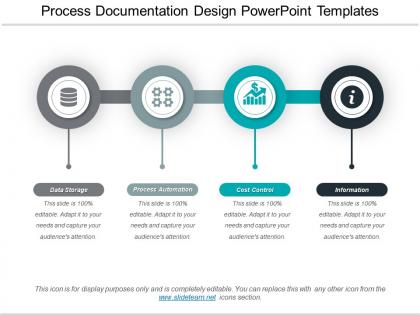
Möchten Sie PowerPoint-Präsentationen auf Prozessdesigndokumenten entwerfen? Wir bieten Ihnen eines der am besten strukturierten und am besten recherchierten Prozessdokumentationsdesigns für PowerPoint-Vorlagen an, damit Sie dies problemlos tun können. Diese PowerPoint-Präsentation hilft ihren Referenten, visuell dynamische und informative Präsentationen zu Geschäftsprozessdokumentationen zu gestalten. Mit Hilfe dieser Prozessdokumentationsvorlage können Sie die Beschreibung einer Reihe von Prozessen demonstrieren, die zur Erfüllung einer Geschäftsaufgabe erforderlich sind. Verschiedene Schritte zur Erledigung der Aufgabe, zB Datenspeicherung, Prozessautomatisierung, Kostenkontrolle und Informationen, können mit dieser professionellen Geschäftsprozessdokumentvorlage leicht hervorgehoben werden. Das Foliendesign ist nützlich für Geschäftsprozessmanager und Führungskräfte. Technische Manager können dieses Design auch verwenden, um ihren internen Teammitgliedern ein technisches Prozessdokument zur Verfügung zu stellen. Diese Prozessdokumentation wird sehr nützlich sein, um den Geschäftsprozess für einen neuen Mitarbeiter zu verstehen, der der Organisation beitritt. Laden Sie also dieses großartige PPT-Diagramm für die Prozessdokumentation herunter, indem Sie auf die Download-Schaltfläche klicken, und legen Sie los. Verwandle das Schwierige in das Elementare. Unsere Powerpoint-Vorlagen für das Design der Prozessdokumentation übernehmen die Konvertierung.
People who downloaded this PowerPoint presentation also viewed the following :
Process Documentation Design Powerpoint-Vorlagen mit allen 5 Folien:
Begeistern Sie die Leute mit unseren Powerpoint-Vorlagen für das Prozessdokumentationsdesign. Die Bande wird sich in Bewegung setzen.
FAQs for Process documentation
Start with the basics: title, purpose, numbered steps. Map out who does what at each stage - trust me, this saves so much confusion later. List the tools people need upfront and be clear about inputs/outputs. Nobody wants to guess what they're supposed to deliver. Add decision points where the process might branch off. Throw in time estimates and approval checkpoints too. Honestly, the formatting matters more than you'd think - use tons of bullet points and headers so people can scan quickly. Test it with someone totally fresh to the process. If they stumble, you know where to fix it.
You know how everyone on your team probably documents stuff differently? Templates fix that mess. When you all use the same format, nobody's hunting around for basic info or wondering what they're supposed to include. New people can actually figure out your system without asking a million questions. Honestly, it's kind of a game-changer for avoiding those awkward "wait, how do we do this?" conversations. The best part? You can spot where your processes are broken when they're all written the same way. Just pick one template and start there - don't overcomplicate it.
Dude, healthcare and manufacturing get huge benefits from process templates - compliance stuff is no joke there. Financial services too, obviously. Software dev teams are obsessed with them because nobody wants to waste time figuring out basic workflows over and over. Oh, and food service/logistics companies since they're doing the same things constantly. Honestly, if you're in any industry with regulations breathing down your neck or tons of repetitive tasks, templates will save your sanity. Even just having everything written down somewhere helps way more than you'd think.
So basically, process documentation is like keeping receipts for compliance - it creates your audit trail and proves you're actually doing what you say you're doing. When auditors come knocking, you'll have everything mapped out instead of scrambling to explain your procedures. I've seen teams get burned by this before. Also helps you catch risks early since you can actually see where things might break down or get bottlenecked. My advice? Start with your most critical stuff first, especially anything customer-facing or heavily regulated.
Dude, visuals are a game-changer for process docs. Nobody wants to read massive blocks of text - I mean, who has time for that? Screenshots and flowcharts make everything so much clearer. People can actually see what they're supposed to do instead of trying to decode confusing instructions. Plus it cuts down on mistakes since you can check if you're doing it right. Works great for different learning styles too. I'd start with screenshots for anything digital and maybe some simple flowcharts when there's decision-making involved. Your team will definitely appreciate not having to wade through paragraphs.
Don't overthink it - simple beats fancy every time. I've seen people create these monster 10-page templates that nobody touches because they're such a pain. Your team will just ignore them. Get input from whoever's actually going to use these things before you build anything (wish someone told me that sooner lol). Also? Don't make every single field required. Some processes are just messier than others. Honestly, start super basic with one template, test it on a real process, then tweak based on feedback. Way better than spending weeks building something perfect that sits unused.
Dude, just hook up automation tools like Zapier or Power Automate to pull live data straight into your templates. Notion and Confluence are solid for this - they'll sync with your project management stuff so when deadlines or team assignments change, your docs update automatically. Google Docs can do it too, which is kinda wild honestly. The whole point is connecting everything so you're not stuck with those crusty Word templates nobody ever remembers to update. Static docs are basically dead at this point. When your systems talk to each other, role changes and process tweaks just happen without you having to babysit everything.
Honestly, just do quarterly reviews or whenever you change stuff up. Get someone who actually uses the processes daily to own each template - they'll catch the outdated crap way faster than management will. Version control saves your sanity too. Track changes so you're not playing detective later. I swear, half the teams I know completely ditch their templates because they're ancient and useless! Calendar reminders help. Short feedback loop where people can instantly flag problems. Oh, and make it part of regular work, not some massive year-end project nobody wants to touch.
Dude, process docs are seriously clutch for new hires. You can hand them step-by-step guides instead of having them shadow Karen for three weeks (no offense to Karen lol). Nothing falls through the cracks that way - no more awkward "oh wait, forgot to tell you about the Tuesday thing" conversations. Your team can actually update them without reinventing the wheel each time. I'd start with whatever processes happen most often, then fill in the weird edge cases later. Way better than throwing people into the deep end and hoping they figure it out.
So high-level templates are basically the bird's eye view - main steps, who's involved, general flow. Detailed ones get into every single substep and tool you'll need. Like a regular map vs those super specific GPS directions that tell you which lane to be in, you know? I'd go high-level first when you're showing it to executives or just figuring things out initially. The detailed stuff is what your team actually follows day-to-day. Honestly, starting with the big picture helps get people on board before you bog them down with all the nitty-gritty operational details.
Honestly, just bake the feedback stuff right into your templates from the start. Add review checkpoints and comment sections at the important parts. I always throw in a "stakeholder review" step after the first draft - trust me, it'll save you tons of grief down the road. Make fields for reviewer names, dates, and feedback categories like clarity and accuracy. Also set up a simple tracking table for logging what changes people wanted and what you actually did. The trick is making it systematic instead of just winging it. Oh, and definitely schedule quarterly reviews with stakeholders to catch problems early.
Honestly, simple is better - use headings and bullet points so people aren't hunting around forever. White space is your friend too. I learned this the hard way, but keep formatting consistent across everything or your team will lowkey hate you for it. Screenshots and flowcharts are great when they actually explain something (not just filler). Always include what people need before starting, the actual steps, and troubleshooting for when stuff inevitably breaks. Oh, and test it with a couple teammates first - they'll spot the confusing parts you missed.
Honestly, those templates are game-changers for finding where stuff breaks down. You can actually compare how different teams handle similar work and spot the obvious bottlenecks. They track your starting point too - metrics, complaints, the whole mess. So when you circle back in a few months, it's clear what got better and what's still garbage. Everyone contributes more because the format isn't confusing. I'd check them every quarter or so - that's usually when the real patterns become obvious. Works way better than I expected when we first started doing it.
Okay so first thing - check if people are actually using your templates. adoption rates don't lie. Then look at how long tasks take now vs before. Are there fewer mistakes happening? That's accuracy and it matters way more than you'd think. Oh and see which teams grab them most - some departments are just template people, others aren't. But real talk? User feedback scores are probably your best bet. I've seen templates that looked amazing but everyone hated using them. Also track how often you're tweaking things - constantly updating means something's off. Start with adoption and completion times though, they're super easy to measure and you'll see results fast.
Pick one solid template and make everyone stick to it - same headers, sections, formatting, the whole thing. Honestly, I've watched teams completely fall apart because every department thought they were being "creative" with their docs. Total nightmare. Make a quick style guide so people know what words to use and how stuff should look. Someone needs to check new docs regularly, but don't be a pain about it. Give people good examples to copy from, maybe throw together a simple checklist. Oh, and start by looking at what you've already got - find your best template and use that as the foundation. Makes the whole process way less painful.
-
Enough space for editing and adding your own content.
-
Very unique, user-friendly presentation interface.