

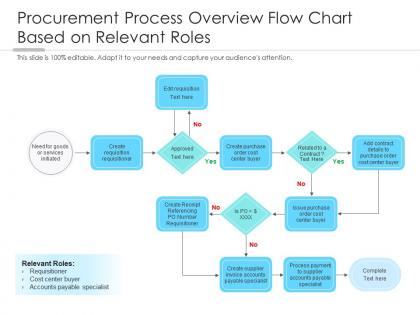
Procurement process overview flow chart based on relevant roles




Try Before you Buy Download Free Sample Product
 Impress Your
 Audience
 100%
100% Editable
 Save Hours
 of Time


Our Procurement Process Overview Flow Chart Based On Relevant Roles are topically designed to provide an attractive backdrop to any subject. Use them to look like a presentation pro.
People who downloaded this PowerPoint presentation also viewed the following :
Procurement process overview flow chart based on relevant roles with all 2 slides:
Use our Procurement Process Overview Flow Chart Based On Relevant Roles to effectively help you save your valuable time. They are readymade to fit into any presentation structure.
FAQs for Procurement process overview flow chart based
So you'll need the basics: need identification, budget approval, vendor selection, RFP process, contract stuff, purchase orders, receiving goods, invoice processing, payment. Sounds overwhelming but it actually flows once you sketch it out. Decision points are huge - like approval thresholds and what happens when your go-to vendor flakes on delivery (happens more than you'd think). Don't forget to assign owners for each step or nothing gets done. Honestly, start by mapping what you're doing now first, then figure out where things actually get stuck.
So basically, a procurement flowchart just shows everyone the exact steps for buying stuff - no more "wait, who do I ask again?" moments. People know upfront what paperwork they need and where requests go next. Honestly, the approval process moves way faster when there's no confusion about the workflow. Plus you avoid those annoying compliance issues since everyone's following the same path. Oh, and fewer mistakes happen too. I'd start by sketching out whatever messy process you have now, then figure out where things get stuck and clean it up from there.
Lucidchart is probably your best bet - they've got procurement templates already built in which is clutch. Visio's solid too but honestly more corporate feeling. If budget's tight, diagrams.net (used to be draw.io) works fine and won't embarrass you in meetings. My team actually uses Miro for everything else so we just stick with that sometimes. Really depends what your colleagues are already comfortable with. I'd definitely try Lucidchart's free trial first though - those templates will save you from starting completely from scratch, and who has time for that anyway?
So here's the thing - mapping out your procurement process visually shows you exactly where stuff gets jammed up. Those approval stages that take forever? Vendor selections that mysteriously drag on for weeks? They'll jump right out at you on a flowchart. I was honestly shocked when I first did this at my old job. Day-to-day you're just handling individual requests, but the visual makes patterns super obvious. Short sentences work here. Instead of randomly trying fixes everywhere, you can zero in on the actual problem spots and tackle those first. Way more efficient than guessing what's broken.
Honestly, flowcharts are game-changers for procurement because nobody has to keep asking "wait, where are we with this again?" Everyone can see exactly what step they're on and who needs to do what next. Bottlenecks become super obvious when they're mapped out visually instead of buried in email chains. Your stakeholders can actually track their own requests without bugging you every five minutes - which is honestly the best part. I'd start with sticky notes to map what you're doing now. You'll probably be shocked at how messy it actually looks on paper.
So you basically need to map out everyone who touches your procurement process - requesters, approvers, legal, finance, the whole crew. Figure out when each person jumps in, what they're reviewing, and how long they usually take. Trust me, skip this step and you'll suddenly remember compliance exists when it's way too late! This mapping directly shapes your flowchart structure. Will approvals happen simultaneously or one after another? Where do bottlenecks form? What info gets passed between people? Start by listing everyone involved in procurement decisions, then trace their actual role. It's one of those obvious-seeming things that isn't.
Honestly, flowcharts are lifesavers for compliance stuff. They basically force you to hit every required checkpoint - no more "oops I forgot to get that vendor cert" moments. Map out where you need approvals, docs, all that regulatory headache material. Catching problems early beats scrambling when auditors show up (trust me on this one). New people can actually follow what they're supposed to do instead of guessing. When regs change - which they always do - just update the chart and boom, everyone's current. Oh, and start with your biggest compliance pain points first. Those are usually where things go sideways anyway.
So the high-level one just shows the big picture stuff - identify what you need, find suppliers, review bids, pick someone. Like a roadmap basically. Detailed flowcharts get into the weeds with every little step, who approves what, decision points, all that. I always tell people the high-level version is perfect when you're explaining things to your boss or training someone new. But honestly? You'll want the detailed one for actual work so you don't miss anything important. It's like having GPS directions vs just knowing "drive north" - both useful but for different reasons.
So flowcharts are actually super helpful for vendor stuff - they keep you from accidentally playing favorites or forgetting steps. Map out your whole evaluation process beforehand: scoring criteria, decision points, all that. When you're dealing with multiple suppliers (which is always chaos), having that visual roadmap keeps things fair. Short sentences work. You compare everyone the same way instead of winging it each time. Honestly saved my butt last quarter when we had like six vendors pitching. Just sketch your process first, then use it as a checklist through the whole RFP to contract thing.
Start with cycle time - how long each stage takes vs what you planned. Monitor approval bottlenecks and vendor response times too. Cost savings are obvious to track. Purchase order accuracy is critical because errors mess everything up (learned that the hard way). Check if people actually follow your flowchart process. Exception rates tell you a lot - constantly skipping steps? Your flowchart probably sucks. Track compliance rates while you're at it. Begin with those basics, then add metrics based on whatever problems pop up. Monthly dashboards work well for catching trends before they bite you.
Your flowchart needs decision points and backup routes built right in. Don't make it linear - add branches for when suppliers flake out, rush orders hit, or materials run short. I've watched teams completely lose it when their rigid process falls apart during emergencies. Set up review checkpoints so you can pivot suppliers or switch methods on the fly. Think modular design, like having GPS alternatives when traffic sucks. Honestly, most people skip this step then wonder why they're scrambling. Start by figuring out your three biggest supply chain risks and map different workflows for each scenario.
Don't overcomplicate it with a million decision points - just hit the essential stuff. Get your stakeholders involved early or you'll miss the weird edge cases that always pop up (trust me on this one). Here's the thing though - don't just copy your current messy process. Actually fix the broken parts while you're at it. Map out who does what at each step, including approval limits and deadlines. Test it with real scenarios first. I learned this the hard way, but running through a couple actual procurement examples will catch those gaps you totally missed.
So first thing - figure out where your procurement stuff actually connects to other processes. Finance approvals, inventory, vendor setup, all that. Then map how data moves between them and spot the handoff points. Honestly, most people just make these standalone flowcharts which is pretty useless. What you want is to find where procurement decisions kick off actions in other departments (or the other way around). I'd start with swim lanes or maybe some process mapping tool that actually links everything together. Oh and don't try to do it all at once - pick one solid integration first, then build from there.
Look, if you don't review your procurement flowchart regularly, it'll just become another useless document collecting digital dust. Things change constantly - new regulations pop up, your team grows, approval processes get outdated. I've seen people completely ignore official processes because they're so broken. Quarterly reviews help you catch bottlenecks and inefficiencies before they cost you time and money. When new people join, they need something that actually makes sense, not some flowchart from 2019 that nobody follows anymore. Honestly, if you notice everyone's working around your official process instead of following it, that's your cue to update it immediately.
So basically, a procurement flowchart lets you see where stuff can go wrong before it actually does. Map out your whole sourcing process and you'll spot the sketchy parts - like when you're depending on just one supplier or there's some weird approval holdup. Honestly, it's way easier to catch problems when you can actually see the whole thing laid out visually instead of just trying to keep track in your head. You know how patterns are hard to notice otherwise? This makes them obvious. Then you can prep backup plans for the riskiest steps ahead of time.
-
Commendable slides with attractive designs. Extremely pleased with the fact that they are easy to modify. Great work!
-
Illustrative design with editable content. Exceptional value for money. Highly pleased with the product.
-
Perfect template with attractive color combination.
-
Innovative and Colorful designs.
-
Innovative and Colorful designs.
-
Amazing product with appealing content and design.