


Product development plans tools and techniques powerpoint presentation slides




Try Before you Buy Download Free Sample Product
 Impress Your
 Audience
 100%
100% Editable
 Save Hours
 of Time


Product Development Plans Tools And Techniques PowerPoint Presentation slides to go through the number of stages of product development. Incorporate product life cycle PPT templates to plan a strategy on the product development based on research and changes in the market. This professionally designed Product Development Plans Tools And Techniques PPT presentation slideshow comprises of slides on product idea screening, new product introduction, product overview, product roadmap, product analysis and more. Use product development tools and techniques such as BCG matrix, Ansoff matrix, Kano map and more. Conduct market analysis, market segmentation, product market mapping to strategically place your product in the market. Evaluate competitive strategies to know where you stand in the market along with your competitors. Create a marketing launch plan to buzz about the newly developed product. This content-ready new product development presentation PPT covers every aspect of the product development and introduction. Download this professionally designed product development steps complete presentation to develop new product and improve the existing ones. Achieve far beyond the dream you have with our Product Development Plans Tools And Techniques Powerpoint Presentation Slides. They enable you to blow past your goals.
People who downloaded this PowerPoint presentation also viewed the following :
Content of this Powerpoint Presentation
Slide 1: This slide introduces Product Development Plans, Tools & Techniques. State Your company name and begin.
Slide 2: This slide is for Agenda. You can use it for your company agenda.
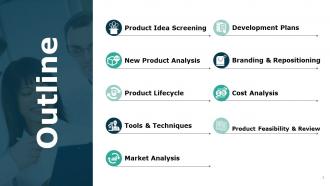
Slide 3: This slide shows Outline with these points - Development Plans, Branding & Repositioning, Product Feasibility & Review, Cost Analysis, Market Analysis, Product Idea Screening, New Product Analysis, Tools & Techniques, Product Lifecycle.
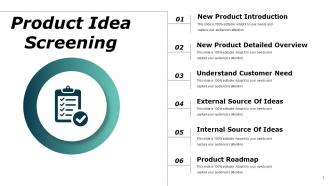
Slide 4: This slide shows Product Idea Screening with these six parameters- New Product Detailed Overview, Understand Customer Need, External Source Of Ideas, Internal Source Of Ideas, Product Roadmap, New Product Introduction.
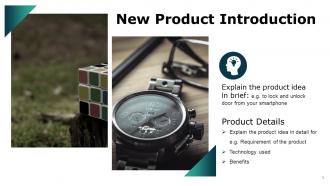
Slide 5: This slide shows New Product Introduction which further help you about the product ides brief.
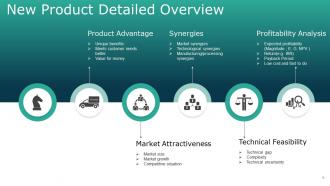
Slide 6: This slide showcases New Product Detailed Overview with these parameters- Profitability Analysis, Expected profitability (Magnitude ; E. G. NPV ), Return(e.g. IRR), Payback Period, Low cost and fast to do, Synergies, Market synergies, Technological synergies, Manufacturing/processing synergies, Product Advantage, Unique benefits, Meets customer needs better, Value for money, Technical Feasibility, Technical gap, Complexity, Technical uncertainty, Market Attractiveness, Market size, Market growth, Competitive situation.
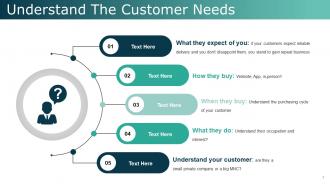
Slide 7: This slide is for Understand The Customer Needs with these parameters- What they expect of you: if your customers expect reliable delivery and you don't disappoint them, you stand to gain repeat business, How they buy: Website, App, in-person, When they buy: Understand the purchasing cycle of your customer, What they do: Understand their occupation and interest, Understand your customer: are they a small private company or a big MNC.
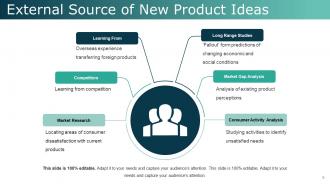
Slide 8: This slide showcases External Source of New Product Ideas with these six factors- Market Research, Competitors, Learning From, Long Range Studies, Market Gap Analysis, Consumer Activity Analysis.
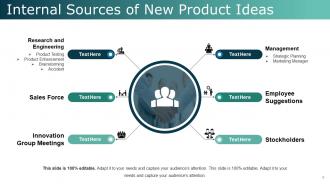
Slide 9: This slide showcases Internal Sources of New Product Ideas with these parameters- Stockholders, Employee Suggestions, Management, Sales Force, Innovation Group Meetings, Research and Engineering.
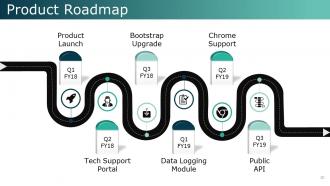
Slide 10: This slide shows Product Roadmap with these factors- Product Launch, Tech Support Portal, Bootstrap Upgrade, Data Logging Module, Chrome Support, Public API.
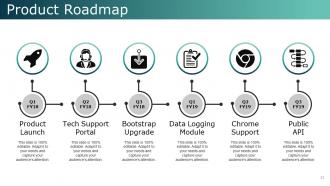
Slide 11: This slide shows Product Roadmap Product Launch, Bootstrap Upgrade, Chrome Support, Tech Support Portal, Data Logging Module, Public API.
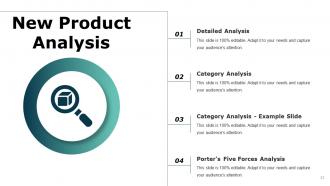
Slide 12: This slide shows New Product Analysis which further shows these four steps- Detailed Analysis, Category Analysis, Category Analysis - Example Slide, Porter’s Five Forces Analysis.
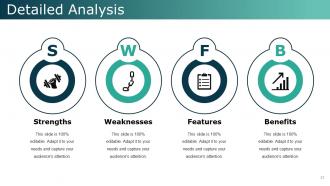
Slide 13: This slide presents Detailed Analysis with these four factors- Weaknesses, Features, Benefits, Strengths.
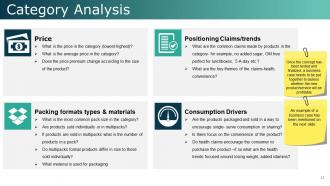
Slide 14: This slide presents Category Analysis with these four parameters- Consumption Drivers, Positioning Claims/trends, Price, packing formata types & materials, Once the concept has been tested and finalized, a business case needs to be put together to assess whether the new product/service will be profitable
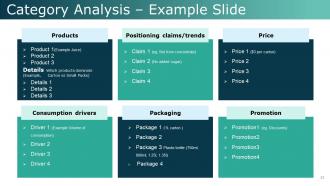
Slide 15: This slide shows Category Analysis – Example Slide with these feature to use- Products, Positioning claims/trends, Price, Consumption drivers, Packaging, Promotion.
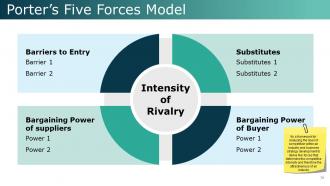
Slide 16: This slide showcases Porter’s Five Forces Model Bargaining Power of suppliers, Bargaining Power of Buyer, Barriers to Entry, Substitutes, Intensity of Rivalry, Its a framework for analyzing the level of competition within an industry and business strategy development to derive five forces that determine the competitive intensity and therefore the attractiveness of an industry
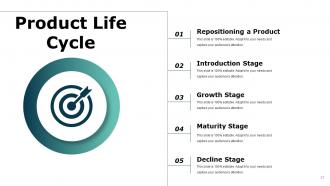
Slide 17: This slide presents Product Life Cycle with this five steps- Repositioning a Product, Introduction Stage, Decline Stage, Maturity Stage, Growth Stage.
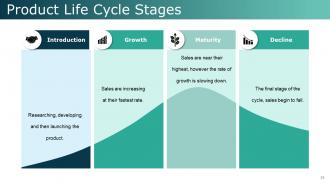
Slide 18: This slide shows Product Life Cycle Stages- Growth, Introduction, Maturity, Decline.
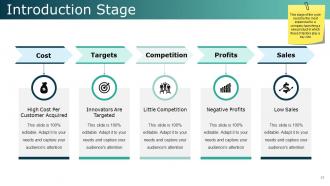
Slide 19: This slide showcases Introduction Stage Sales, Low Sales, Cost, Profits, Targets, This stage of the cycle could be the most expensive for a company launching a new product in which these 5 factors play a key role
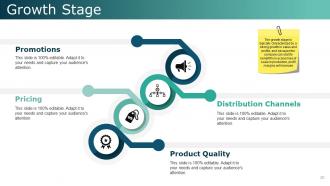
Slide 20: This slide shows Growth Stage with these four stages- Promotions, Pricing, Distribution Channels, Product Quality, The growth stage is typically characterized by a strong growth in sales and profits, and because the company can start to benefit from economies of scale in production, profit margins will increase
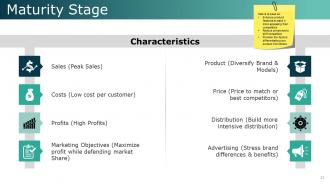
Slide 21: This slide presents Maturity Stage which further showcases Characteristics Sales (Peak Sales), Costs (Low cost per customer), Profits (High Profits), Marketing Objectives (Maximize profit while defending market Share), Product (Diversify Brand & Models), Price (Price to match or best competitors), Distribution (Build more intensive distribution), Advertising (Stress brand differences & benefits), Enhance product features to make it more appealing than competitors, Reduce prices due to stiff competition, Promote the factors differentiating your product from others.
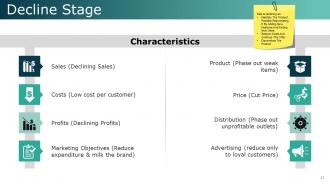
Slide 22: This slide shows Decline Stage which further shows Characteristics Marketing Objectives (Reduce expenditure & milk the brand), Sales (Declining Sales), Costs (Low cost per customer), Profits (Declining Profits), Product (Phase out weak items), Distribution (Phase out unprofitable outlets), Advertising (reduce only to loyal customers), Price (Cut Price), Maintain The Product, Possibly Rejuvenating It By Adding New Features And Finding New Uses, Reduce Costs And Continue The Offer, Discontinue The Product.
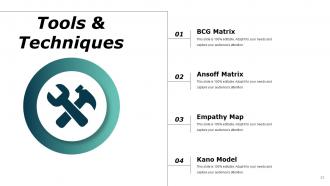
Slide 23: This slide presents Tools & Techniques with these four criterias- BCG Matrix, Ansoff Matrix, Empathy Map, Kano Model.
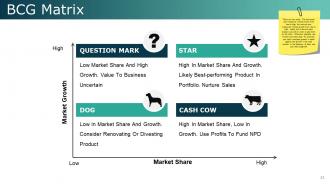
Slide 24: This slide presents BCG Matrix. There are two axes. The horizontal axis measures market share from low to high; the vertical axis measures market growth from low to high. Apply this criteria to each product you sell in order to plot them on the chart. Wherever possible use market and sales data; for example, you could compare growth in sales against the growth in the total market. In the absence of data, use your best judgment
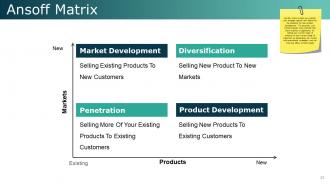
Slide 25: This slide presents Ansoff Matrix. Use the matrix to help you consider your strategic options and determine the necessity for new product development. For example, your market analysis may conclude that there is plenty of opportunity for selling your current range of products to your current range of customers by penetrating the market with promotional strategies, such as multi-buy offers, to build loyalty
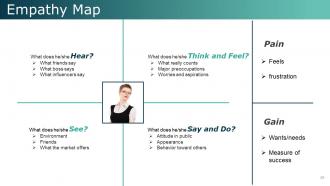
Slide 26: This slide presents Empathy Map which you can use and make it as per your requirement.
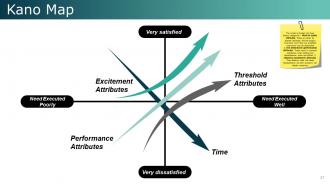
Slide 27: This slide showcases Kano Map with these features with which you can analyse- Excitement Attributes, Performance Attributes, Time, Threshold Attributes, Need Executed Poorly, Need Executed Well, Very satisfied, Very dissatisfied, The model is divided into three distinct categories:1. Must be (basic) attributes. These are taken for granted attributes that the product must have and if they are unfulfilled consumers may be dissatisfied 2. One dimensional (performance) attributes. These result in customer satisfaction when fulfilled and dissatisfaction when not fulfilled. 3. Attractive (excitement) attributes. Their absence does not cause dissatisfaction but their presence can delight customers
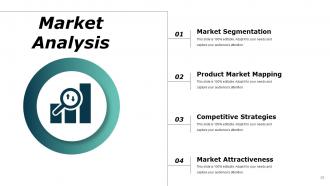
Slide 28: This slide presents Market Analysis these four factors you ca consider- Market Segmentation, Product Market Mapping, Competitive Strategies, Market Attractiveness.
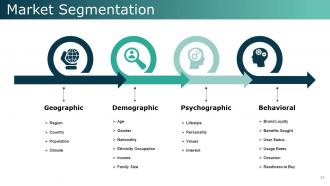
Slide 29: This slide presents Market Segmentation with these main categories- Geographic, Demographic, Psychographic, Behavioral.
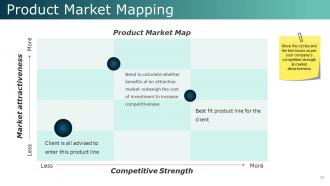
Slide 30: This slide showcases Product Market Mapping which further includes these main points- Product Market Map, Market attractiveness, Competitive Strength, Best fit product line for the client, Client is all advised to enter this product line, Need to calculate whether benefits of an attractive market outweigh the cost of investment to increase competitiveness.
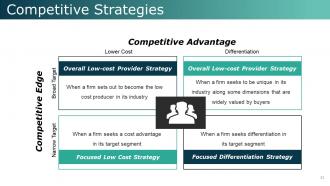
Slide 31: This slide presents Competitive Strategies with these import categories we have listed- Overall Low-cost Provider Strategy, Overall Low-cost Provider Strategy, Focused Differentiation Strategy, Focused Low Cost Strategy, When a firm seeks to be unique in its industry along some dimensions that are widely valued by buyers, When a firm seeks differentiation in its target segment, When a firm seeks a cost advantage in its target segment, When a firm sets out to become the low cost producer in its industry, Competitive Edge, Narrow Target, Broad Target, Lower Cost, Differentiation, Competitive Advantage.
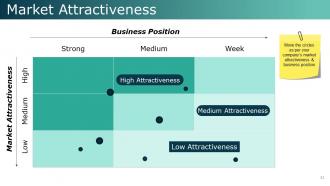
Slide 32: This slide presents Market Attractiveness with these parameters- Medium, High, Low, Business Position, Market Attractiveness, High Attractiveness, Medium Attractiveness, Low Attractiveness.
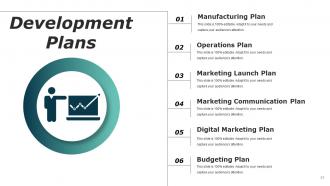
Slide 33: This slide shows Development Plans which further showing different categories- Operations Plan, Marketing Launch Plan, Marketing Communication Plan, Digital Marketing Plan, Budgeting Plan, Manufacturing Plan.
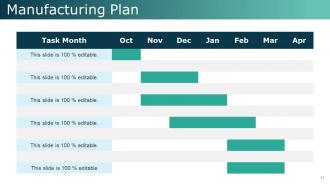
Slide 34: This slide showcases Manufacturing Plan. You can add the content in this plan as you want.
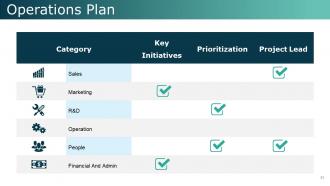
Slide 35: This slide presents Operations Plan with categories. You can add the categories as per your requirement.
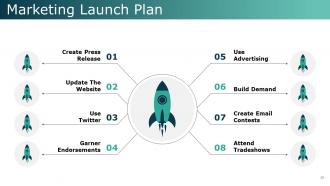
Slide 36: This slide showcases Marketing Launch Plan Create Press Release, Update The Website, Use Twitter, Garner Endorsements, Use Advertising, Build Demand, Create Email Contests, Attend Tradeshows.
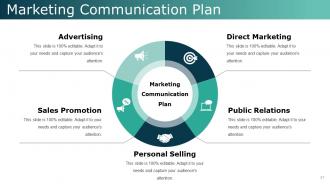
Slide 37: This slide shows Marketing Communication Plan- Marketing Communication Plan, Advertising, Sales Promotion, Personal Selling, Direct Marketing, Public Relations.
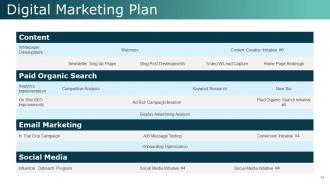
Slide 38: This slide presents Digital Marketing Plan. With this you can add your marketing plan or add content in it.
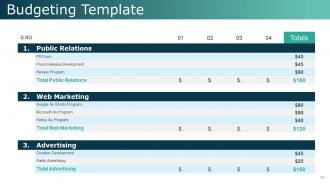
Slide 39: This slide is about Budgeting Template. Add your own budget and categories as per your requirement.
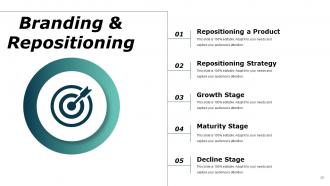
Slide 40: This slide presents Branding & Repositioning with these five points to consider- Repositioning a Product, Repositioning Strategy, Decline Stage, Maturity Stage, Growth Stage.
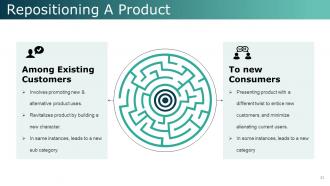
Slide 41: This slide presents Repositioning A Product which further includes- Involves promoting new & alternative product uses, Revitalizes product by building a new character, In same instances, leads to a new sub category, Among Existing Customers, Presenting product with a different twist to entice new customers, and minimize alienating current users, In some instances, leads to a new category, To new Consumers.
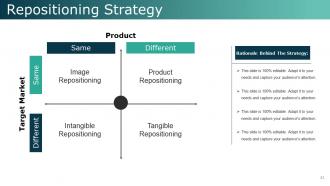
Slide 42: This slide presents Repositioning Strategy with these following lised parameters- Same, Different, Product Repositioning, Image Repositioning, Intangible Repositioning, Tangible Repositioning, Rationale Behind The Strategy, Product, Target Market.
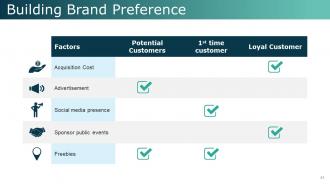
Slide 43: This slide presents Building Brand Preference. You can use these factors as such or use it with changes.
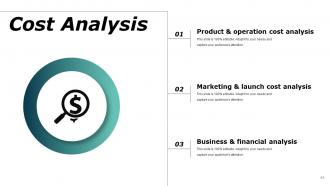
Slide 44: This slide showcases Cost Analysis with these three analysis categories- Product & operation cost analysis, Marketing & launch cost analysis, Business & financial analysis.
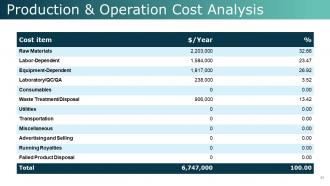
Slide 45: This slide shows Production & Operation Cost Analysis. With this table you can make your analysis more reliable and exact.
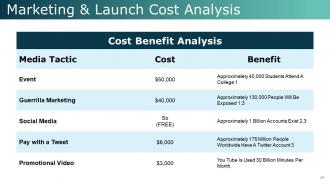
Slide 46: This slide presents Marketing & Launch Cost Analysis which further includes cost benefits analysis. Add your own content and use it.
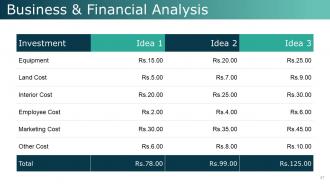
Slide 47: This slide showcases Business & Financial Analysis. we have made some of the investment categories.
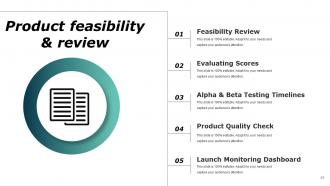
Slide 48: This slide presents Product feasibility & review with further these points- Feasibility Review, Evaluating Scores, Launch Monitoring Dashboard, Product Quality Check, Alpha & Beta Testing Timelines.
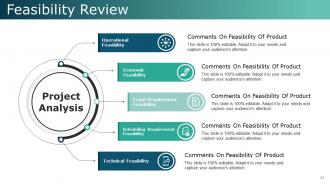
Slide 49: This slide presents Feasibility Review with these five categories- Scheduling Requirement Feasibility, Legal Requirement Feasibility, Economic Feasibility, Operational Feasibility, Technical Feasibility, Project Analysis.
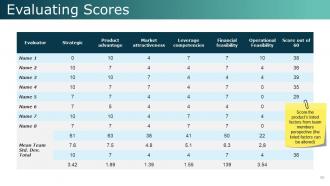
Slide 50: This slide presents Evaluating Scores.Score the product’s listed factors from team members perspective (the listed factors can be altered)
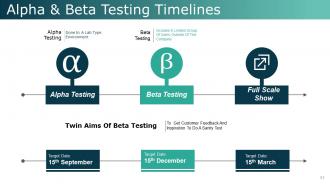
Slide 51: This slide showcases Alpha & Beta Testing Timelines. You can use this as per your requirement.
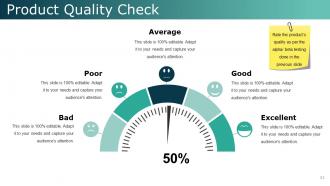
Slide 52: This slide presents Product Quality Check with these meter categories- Bad, Poor, Average, Good, Excellent, Rate the product’s quality as per the alpha/ beta testing done in the previous slide.
Slide 53: This slide is showing about Launch Monitoring Dashboard. Add your content and use it.
Slide 54: This slide is for Icon For NDP
Slide 55: This slide is titled Additional Slides.
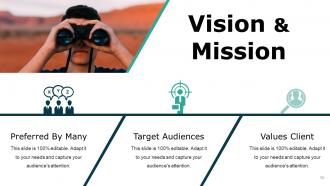
Slide 56: This slide represents Our Mission. State your mission, goals etc.
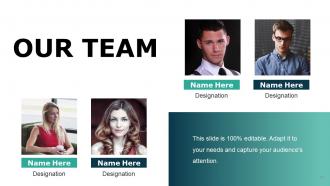
Slide 57: This slide showcases Our Team with Name and Designation to fill.
Slide 58: This slide helps show- About Our Company. The sub headings include- Creative Design, Customer Care, Expand Company
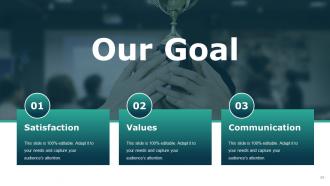
Slide 59: This slide shows Our Goals for your company.
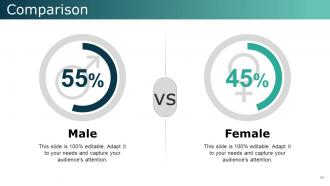
Slide 60: This slide showcases Comparison with which you can use for comapring male and females.
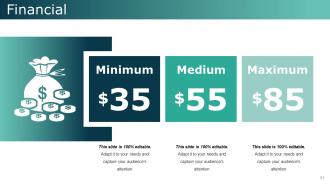
Slide 61: State your Financial score in this slide with relevant imagery and text.
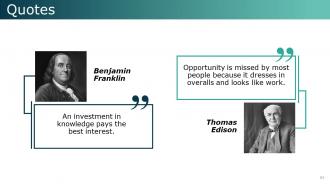
Slide 62: This is a Quotes slide to convey message, beliefs etc.
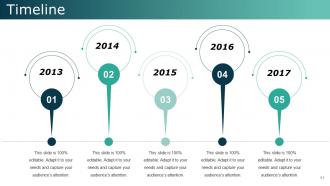
Slide 63: This is a Timelines slide to show- Plan, Budget, Schedule, Review.
Slide 64: This slide forwards to Charts & Graphs.
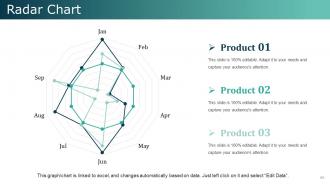
Slide 65: This slide presents a Radar Chart graph/chart. Compare Product 01, Product 02 and use as per required.
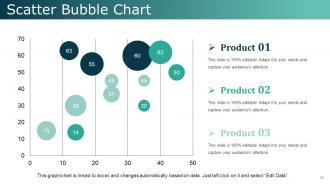
Slide 66: This slide shows Scatter Bubble Chart
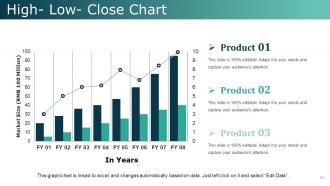
Slide 67: This slide showcases High- Low- Close Chart for the comparison of the products.
Slide 68: This is a Thank You slide with Address:# street number, city, state, Contact Numbers and Email Address.
Product development plans tools and techniques powerpoint presentation slides with all 68 slides:
Assess the aftermath of the event with our Product Development Plans Tools And Techniques Powerpoint Presentation Slides. Be able to judge the fallout.




FAQs for Product development plans tools and techniques
Honestly, start with whether your team can actually collaborate on it - like real-time comments and decent file sharing. Version control is clutch too. The interface better not suck because people will just abandon clunky tools (learned that the hard way). You'll want something that plays nice with whatever apps you're already using since nobody wants to juggle ten different logins. Project tracking helps you see if things are on fire or not. Oh, and pick something that won't break when your team grows. Maybe test it on a smaller project first?
Look, these tools basically give your whole team a shared space to see what's going on. No more of those annoying "what's the status?" email threads that go on forever. Designers, engineers, and PMs can all work on the same files and drop feedback right on prototypes. Everything stays in one spot - communication, documents, decisions, all of it. The trick is finding tools that actually play nice together, otherwise you're just making things messier. I'd start by figuring out where your team's communication breaks down most. That's usually where you'll get the biggest win.
Look, prototyping tools are lifesavers - they're what stops you from building something nobody wants. Quick way to test ideas without burning cash on full development. I always tell people to catch those design problems early, when fixing them doesn't cost a fortune. Too many teams I know jumped straight to building and... yeah, that didn't end well. Pick the right level though - sometimes sketching on napkins works fine, other times you need the fancy interactive stuff. Start simple and add complexity as you figure things out. Trust me on this one.
So I'd start with Google Trends and SurveyMonkey - they're perfect for testing ideas quickly. Typeform is clutch for interviews, their templates are honestly a lifesaver. Hotjar shows you how people actually use your product, which is wild to watch sometimes. For checking out competitors, Ahrefs or SEMrush work well (though they can get pricey). Facebook Audience Insights helps with demographics too. Honestly just use the free versions first - you'll figure out what's actually useful before spending money on upgrades.
Honestly, these tools are game-changers because everyone can actually see what's going on instead of guessing. You'll catch problems early before they blow up your whole timeline. Dependencies become way clearer too - like when design is stuck waiting for research that's lost in someone's email hell (happens more than you'd think). The automated updates are clutch since nobody has to chase people down for status reports anymore. Everything lives in one spot instead of being scattered everywhere. Start by figuring out where your team's communication usually falls apart first.
Honestly, these tools are a lifesaver for tracking what everyone's actually doing. Real-time progress updates mean you'll catch problems early instead of scrambling later. The collaboration stuff is probably the biggest win though - way better than trying to manage everything through Slack or email chaos. When your stakeholders inevitably flip requirements (and trust me, they will), you can adjust without your whole timeline going to hell. Oh, and the visibility thing is huge for keeping everyone on the same page. I'd grab one tool first and get your main team used to it before expanding.
So you basically want to drop these tools right where your team makes decisions - like when you're brainstorming or right after shipping something new. Set up automated surveys in your app, maybe grab Hotjar or UserVoice and connect them to whatever project management thing you're already using. The tricky part? You'll get absolutely buried in feedback data. I learned this the hard way lol. Pick one tool first and make sure the insights actually go somewhere useful - not just another pretty dashboard nobody checks. Connect it to wherever you already track feature requests and you're golden.
Honestly, design thinking tools are game-changers for innovation. You get forced to actually understand what users need instead of guessing. My team was skeptical about empathy mapping at first - seemed kinda fluffy - but it totally works. Quick iterations become way easier, plus you fail early when it's cheap to pivot. The whole process breaks you out of assumptions that kill good products. Just try user personas on your next project. Seriously, even that one thing will shift how you approach problems. Oh, and the validation part saves you from building stuff nobody wants.
Honestly, PLM tools are game-changers because they put all your product stuff in one spot. Your team stops playing "hunt the latest file version" - you know how that goes. Engineering, manufacturing, marketing... everyone sees the same data and deadlines. Those awkward "wait, which specs are we using?" meetings? Gone. The automation handles approvals and sends updates automatically, which cuts down on so much email ping-pong it's not even funny. I'd map out where your team wastes the most coordination time first, then find PLM features that fix those exact headaches.
Honestly, start with velocity and cycle time - they'll tell you the most. Velocity shows how much your team knocks out each sprint. Cycle time tracks how long stuff takes from idea to done. Then add feature adoption rates because, let's be real, sometimes we build things users completely ignore (been there). Bug rates and sprint burndown are solid too. Oh, and definitely track user feedback scores - angry users are loud users. But here's the thing: don't go crazy tracking everything. Pick 3-4 that actually matter for what you're trying to accomplish. Data overload is real and you'll just end up paralyzed.
Honestly, cloud tools are a game-changer for collaboration - your whole team can jump in from anywhere and see changes instantly. Gone are the days of emailing files back and forth like it's 2005! But here's the catch: you're screwed without internet, and those monthly fees definitely pile up. Traditional software? You buy it once and you're done, plus you actually own it. The trade-off is you'll be stuck doing manual updates and forget about smooth team workflows. For most product teams, I'd still go cloud first - the collaboration wins are just too good to pass up.
Start with access controls - lock down who can see your repos and project stuff. Two-factor auth is a must, and honestly any tool without it in 2024 is trash anyway. Data encryption for everything, both when it's moving around and sitting there. Also get audit logs running so you know if someone's been poking around where they shouldn't. Oh, and check how your tools connect to other systems - that's where things usually break. Just enable MFA on everything first though. That'll fix most of your headaches right away.
Look, when you're doing product dev remotely, you basically need tools that replace your office setup. Figma's great for design stuff since everyone can jump in and edit together. For tracking everything, Notion or Linear work well - honestly Linear's interface is way cleaner if you ask me. Slack keeps the random updates flowing without constant meetings. The weird thing is async communication sometimes beats in-person because you've got everything written down later. Still need Zoom calls though for those messy brainstorming sessions where you're just throwing ideas around. My advice? Pick one tool per thing and actually make sure people use them consistently.
Honestly, you don't need to spend much starting out. Figma's free for design stuff - way better than I expected when I first tried it. Trello or Asana work great for keeping track of everything (though I always end up with way too many boards). GitHub is a must if you're coding anything. For surveys and user feedback, Google Forms does the job fine. Oh, and don't sleep on pen and paper for wireframes - sometimes it's faster than digital tools. Start with the free versions first, then upgrade whatever you actually use regularly. Most of these have pretty generous free tiers anyway.
Dude, integration is everything when you're choosing dev tools. Seriously learned this the hard way with some fancy prototyping tool that looked amazing but couldn't sync with our design system at all. What a nightmare. Your tools need to play well with your existing setup - especially project management, version control, and whatever you use for communication. Otherwise you'll spend forever manually moving data around and jumping between platforms. Before you commit to anything, map out your current workflow first. Then actually test how the new tool fits in. Trust me on this one.
-
Use of icon with content is very relateable, informative and appealing.
-
Innovative and Colorful designs.