


Project Communication Plan Powerpoint Presentation Slides






Try Before you Buy Download Free Sample Product
 Impress Your
 Audience
 100%
100% Editable
 Save Hours
 of Time


Are you worried about making impressive PowerPoint presentation? Don't feel so as we have countless PowerPoint templates on our website that can help you create your PPT even more attractive. This content-ready project communication plan PowerPoint presentation has appropriate slides to show various channels of communication. With this project charter PPT graphics, you can present flow of business information. By using our project management steps PPT slides are designed to demonstrate project charter, communication management, project plan, communication planning, communication management strategy, strategic communication and reporting. Our professionally designed project management PPT backgrounds can convey your business ideas more effectively. The business communication strategy PPT slides are custom designed to meet the need of current professional scenario. You can download this content ready project communication plan presentation to give an overview of the relationship between different types of information. Tell us your audience and aim and will choose the right Project Communication Plan Powerpoint Presentation Slides for you. Dont bore, alienate or confuse your audience with a bad presentation.
People who downloaded this PowerPoint presentation also viewed the following :
Content of this Powerpoint Presentation
Slide 1: This slide introduces Project Communication Plan.
Slide 2: This slide showcases Communication Plan. This is a way of maintaining a communication plan for a project.
Slide 3: This slide shows template can be used to prepare a communication plan which could be shared with the project team to list down their activities.
Slide 4: This slide shows Project Name with Project Leader.
Slide 5: This slide show cases- Communication, Format, Frequency, Distribution.
Slide 6: This is a Coffee Break slide to halt. You can change the image as per requirement/need.
Slide 7: This slide is titled Charts & Graphs to move forward.
Slide 8: This is a Clustered Column slide to show product/entity comparison.
Slide 9: This is a two parts divided Clustered Column slide to show product/entity comparison.
Slide 10: This is a Stacked Line slide to show product/entity comparison.
Slide 11: This is a Pie Of Pie image slide to present two product/entity comparison.
Slide 12: This is a Clustered Column Line image slide to show product/entity comparison.
Slide 13: This is a Stacked bar graph slide to show product/entity comparison.
Slide 14: This is a Filled Radar slide to show product/entity comparison.
Slide 15: This slide is titled Additional Slides to move forward. You can change the slide content as per need.
Slide 16: This is Our Main Mission slide with- Mission, Vision, Value. State them here.
Slide 17: This is Our Team slide with name, designation and image box to fill the required information.
Slide 18: This is an About Us slide. State company/team specifications here.
Slide 19: This is a Comparison slide for males and females. State comparison, specifications etc. here.
Slide 20: This is a Financial score slide to state financial aspects etc.
Slide 21: This is a Quotes slide to convey messages, beliefs etc.
Slide 22: This is a Dashboard slide to state Low, medium and High.
Slide 23: This is a Timeline slide to show milestones, growth highlights etc.
Slide 24: This is a Location slide of USA map to show US specific growth, presence, etc.
Slide 25: This is a Target image slide. State your targets here.
Slide 26: This is a Bulb or Idea image slide to show ideas, innovative information etc.
Slide 27: This is a Magnifying Glass image slide to show information, specifications etc.
Slide 28: This is a Thank You slide with Address# street number, city, state, Contact Numbers, Email Address.
Project Communication Plan Powerpoint Presentation Slides with all 28 slides:
Our Project Communication Plan Powerpoint Presentation Slides guarantee cheers. The audience is bound to express delight.
-

Effective Project Communication Plan: Tools and Strategies
-
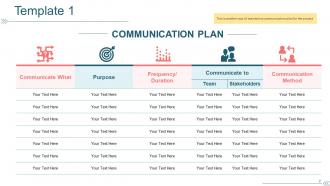
Effective Communication Plan Template for Project Management
-
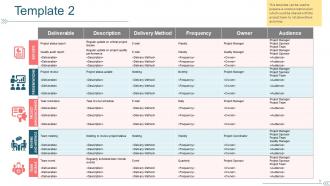
Comprehensive Project Communication Plan Template
-
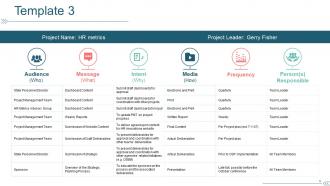
Comprehensive HR Metrics Project Dashboard Template for Effective Reporting
-
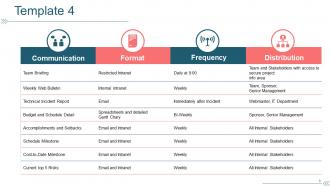
Project Communication Template: Formats, Frequencies, and Distribution
-
Enjoy Your Coffee Break: Refreshing Moments with a Warm Cup
-

Effective Charts and Graphs for Visual Data Representation
-
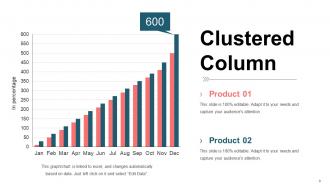
Clustered Column Chart for Product Performance Analysis
-
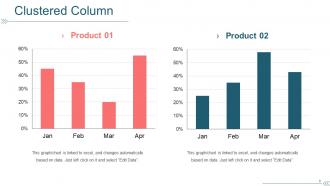
Comparison of Product Performance: January to April
-
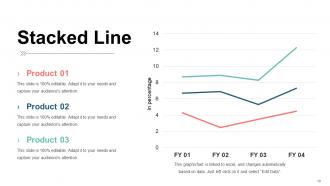
Stacked Line Chart for Product Performance Analysis
-
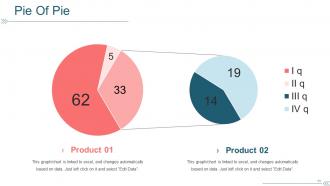
Comparative Data Analysis of Product 01 and Product 02
-
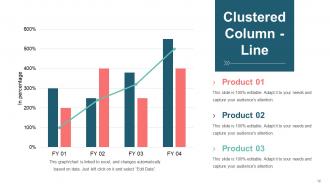
Visualizing Product Performance with Clustered Column and Line Chart
-
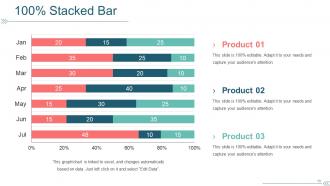
100% Stacked Bar Chart: Monthly Product Performance Analysis
-
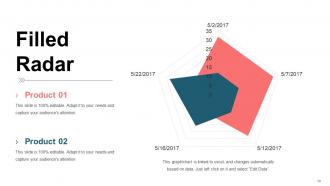
Dynamic Filled Radar Chart for Product Comparison
-

Additional Slides for Presentation Enhancement
-

Mission, Vision, and Value Overview Slide
-
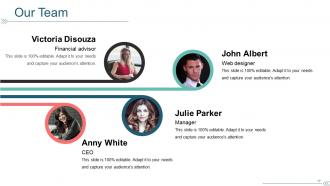
Meet Our Team of Professionals
-

Professional Team Overview for Corporate About Us Page
-
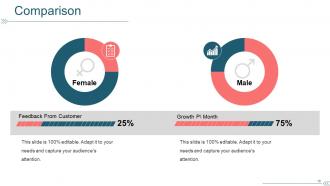
Gender Comparison: Customer Feedback and Growth Performance
-
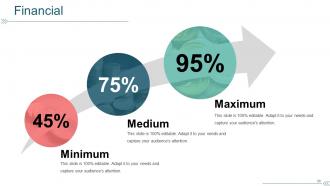
Financial Performance Metrics: Minimum, Medium, and Maximum Percentages
-

Inspiring Quotes by Bill Gates on Quality and Aesthetics
-
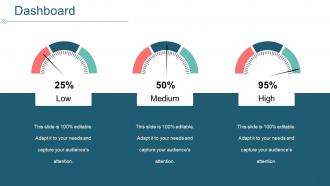
Interactive Performance Dashboard with Visual Indicators
-
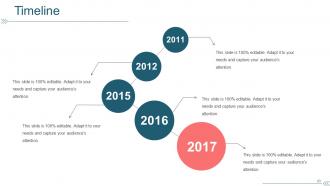
Editable Timeline Graphic for Presentations
-
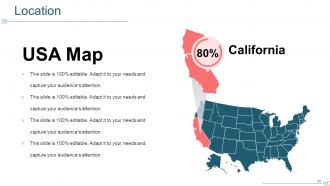
Editable USA Map Highlighting California's 80% Population
-
Achieving Business Goals: Target Icon and Collaboration
-
Creative Idea Bulb Icon with Brain and Symbols for Innovation
-

Visualizing Data Distribution with a Magnifying Glass Chart
-

Professional Business Thank You Slide with Contact Information
FAQs for Project Communication Plan
Okay so you need four main things for a solid communication plan. Map out your stakeholders first - execs want totally different updates than your dev team does. Then figure out timing and how you'll actually reach people. Weekly emails? Slack for quick stuff? Whatever fits your team's vibe. Oh, and definitely assign who handles what communications - I swear half the projects I've worked on fell apart because everyone thought someone else was sending updates. Lastly, create ways for people to give feedback so you can pivot if needed. Honestly, just start with that stakeholder mapping this week.
Okay so first thing - make a list of literally everyone who touches your project. Obviously sponsors and users, but don't forget about finance (they control the money), IT people, and yeah even that one legal person who somehow always has something to say. Figure out what each group actually wants to hear about. Some people need those super detailed reports while others just want the highlights. Oh and pay attention to how they like getting info too - some prefer emails, others want face-to-face updates. Honestly the whole thing comes down to matching your communication style to what each person needs based on how much pull they have.
So basically, good tech keeps everyone connected without you having to hunt people down all the time. I use Slack for quick stuff, Asana for tracking who's doing what, and video calls when you actually need to see faces (though let's be real, most could just be emails). The trick is finding tools your team won't ignore after week one. Don't pile on too many platforms or you'll just create a mess. Oh and honestly? Start with like two tools max, then add more if you need them. Simple beats fancy every time.
Honestly, weekly updates hit the sweet spot for most projects I've worked on. Daily check-ins are way too much unless something's on fire or you're in those intense sprint cycles. Executives and external clients? They usually prefer bi-weekly or monthly since they don't want to drown in details. Start with weekly and see how people react - some will bug you for more info when deadlines get tight, others will straight up tell you to chill if you're sending too much. Just pick a schedule and stick with it. People get annoyed when they can't predict when updates are coming.
Honestly, just stick with the basics at first. Slack or Teams for quick chats, Zoom for meetings when you can't avoid them. Asana's pretty solid for tracking who's doing what - way better than endless email chains. Speaking of email, you'll still need it for the formal stuff unfortunately. Oh, and definitely get a shared drive set up (Google Drive works fine) for templates and meeting notes. Don't go crazy with tons of tools though. Pick what your team will actually use consistently. You can always add more later if needed.
Honestly, start by figuring out who's gonna clash before they do. Map out where people's priorities don't line up - different deadlines, overlapping responsibilities, that kind of stuff. I've watched projects completely blow up because nobody bothered checking if everyone actually understood the plan the same way. Schedule regular check-ins so people can complain early instead of letting things fester. Oh, and when conflicts happen (they will), just tackle them head-on with whoever's involved. Change your approach if you need to. Write down what you decided so nobody "forgets" later.
Track the obvious stuff first - email opens, meeting attendance, survey responses. But honestly? Those numbers can be total BS sometimes. What really matters is whether you're seeing fewer project delays and less confusion overall. Are people asking the same questions over and over? That's a red flag. Set up some kind of monthly check-in to see if stakeholder satisfaction is actually improving. Oh, and how fast issues get resolved - that's huge. If nothing's getting better after a couple months, just switch up your approach. No point beating a dead horse.
Oh man, cultural stuff can absolutely wreck your project if you're not careful. Like, Americans tend to be super direct, but in some cultures that comes off as rude. Time zones are the obvious headache, but there's also weird things like - does your team expect the boss to make all decisions? How long is too long to wait for someone to respond in a meeting? I had this project with our Tokyo office once and let me tell you, the silence thing threw me off completely. You'll want to figure out how each culture prefers to communicate and build in extra time for people to actually understand each other. Don't just assume everyone got it.
Honestly, overcommunication beats confusion every time. Set up weekly check-ins and grab a project management tool - I like Asana but whatever works for your team. Create one central spot where all the important stuff lives so nobody's working off old info (this is huge). Document decisions and shoot quick updates through Slack or email. Oh, and definitely set expectations about how fast people need to respond to messages - saves so much drama later. The key thing is picking your channels and sticking to them. Trust me, having everything scattered across random emails and texts will drive you nuts.
Build feedback into your communication plan right from the start - seriously, don't just tack it on later. Quick pulse surveys work great after big updates. I'd also set up regular check-ins with your main stakeholders. Honestly though? The best insights usually come from just chatting with people casually - like grabbing coffee and asking if they're actually getting what they need. When feedback rolls in, use it! Adjust your messaging, try different channels, whatever. Document the changes so people see you're listening. Oh, and make feedback a regular agenda item in meetings.
You definitely need clear communication roles or things get messy fast. I learned this the hard way when a project went sideways because we all thought someone else was updating the client - awkward! Assign who talks to whom about what. Decision-making speeds up when people know exactly who to bug for approvals or escalations. It also keeps everyone accountable instead of playing the blame game later. A RACI matrix works great for this - maps out who's responsible, accountable, consulted, and informed for different communications. Post it somewhere everyone can see and actually use it.
Honestly, visuals are a game-changer for project stuff. Gantt charts beat boring bullet points every time for timelines. Pie charts make budget breakdowns actually readable - way better than those nightmare spreadsheets nobody wants to stare at. Flowcharts show dependencies super clearly. Dashboards give stakeholders the quick overview they need without drowning them in details (which they'll ignore anyway). Just don't go crazy throwing random charts everywhere. Match your visual to what you're trying to explain. Oh, and pro tip - pick whatever format makes your point most obvious to someone who's probably multitasking during your presentation.
Dude, bad communication will absolutely destroy your project. Scope creep happens constantly, deadlines get missed, and your team ends up working on totally different things. Stakeholders hate being left out of the loop - honestly, I've seen people get so pissed about this. Budget goes to hell because problems don't surface until it's too late. Team morale? Forget about it. Everyone feels disconnected and frustrated. Set up regular check-ins from the beginning. Trust me, it's so much easier than trying to fix everything later when it's already a mess.
So basically, agile wants you talking constantly - daily standups, demos every few weeks, endless Slack pings. Traditional projects? More like weekly emails and monthly meetings where half the people are clearly multitasking. Honestly, I think the formal documentation route works better when things move slow and you need that paper trail. But if your project changes fast, you'll go crazy waiting for steering committees to approve stuff. Just figure out what rhythm actually helps your team get work done versus what feels like checking boxes. Some teams thrive on constant check-ins, others need space to think.
Honestly, the worst thing is when people think everyone's tracking the same info - spoiler alert, they're not. Also hate when important stuff gets buried in those endless email threads that nobody actually reads. I've watched so many projects blow up because of communication fails. Quick check-ins work way better than marathon meetings. Get a shared dashboard going so people can actually see what's happening. Oh, and figure out your channels - like Slack for random updates, email for the serious decisions. Always double-check that people got your message though, especially the critical stuff.
-
Best Representation of topics, really appreciable.
-
Unique and attractive product design.