


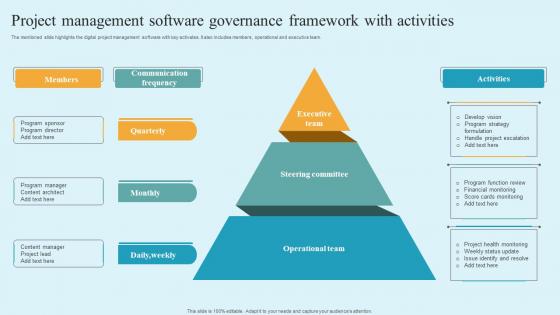
Project Management Software Governance Framework With Activities




Try Before you Buy Download Free Sample Product
 Impress Your
 Audience
 100%
100% Editable
 Save Hours
 of Time


The mentioned slide highlights the digital project management software with key activates. It also includes members, operational and executive team.
People who downloaded this PowerPoint presentation also viewed the following :
Project Management Software Governance Framework With Activities with all 6 slides:
Use our Project Management Software Governance Framework With Activities to effectively help you save your valuable time. They are readymade to fit into any presentation structure.





FAQs for Project Management Software Governance
You'll definitely need role-based access controls and audit trails - trust me on the audit thing, I thought it was pointless until we got hit with compliance last year and suddenly every click mattered. Approval workflows are huge too, plus automated compliance checks so you're not manually catching everything. Oh, and standardized templates because otherwise people just wing it. Map out what you're already doing for approvals first - that way you can see what the software can actually handle vs what you'll still need to babysit. Clear escalation paths are clutch when stuff inevitably breaks.
Start building compliance into your workflows right from the beginning - don't try to add it later, trust me on this one. Most PM tools let you set up automated audit trails and approval processes that actually make your life easier than juggling a bunch of spreadsheets. Configure role-based permissions so people can only access what they should. Document everything with timestamps showing who did what and when. Auditors eat that stuff up. I know it sounds like extra work upfront, but it'll save you so much headache down the road when inspection time rolls around.
You absolutely need your stakeholders on board with PM software governance - seriously, this makes or breaks everything. Get users, IT folks, and leadership involved right from the start when you're picking platforms and setting policies. I learned this the hard way watching a perfectly good system sit unused because nobody bothered asking what people actually needed. Your stakeholders know which features matter and what'll fly in your company culture (or crash and burn). Oh, and keep asking for their feedback regularly. They'll tell you when your governance approach needs tweaking, which it probably will.
Honestly, project management software is a game changer for this stuff. You get instant visibility into budgets, timelines, all that - no more chasing people down for updates or digging through random spreadsheets. The good ones automatically flag when things go sideways, like budget overruns or missed deadlines. Plus you'll have a solid audit trail of decisions later (trust me on this one). I'd start with setting up dashboards for your steering committee first. They eat that real-time data stuff up. Way better than sitting through those painful weekly status meetings where half the info is already outdated.
Honestly, most teams go way overboard with governance right from the start. They build these crazy complex approval systems that look impressive but totally kill productivity when people need stuff done fast. Training gets skipped constantly too - companies just launch everything and assume people will figure it out (spoiler: they won't). Another huge mistake? Treating it like you can just set everything up once and walk away. That never works. My advice is start basic, see what actually breaks or annoys people, then slowly add more rules. Way better than overwhelming everyone with bureaucracy from day one.
Honestly, start with the basics - track your project success rates and how long stuff takes to resolve. Budget adherence is huge too. But here's the thing that really matters: are people actually using your processes? If adoption rates suck, your governance is pointless. I'd also look at onboarding speed - can new team members get productive quickly? The real win is fewer project surprises and better outcomes overall. Oh, and definitely do quarterly check-ins to see what's working. Sometimes you'll need to tweak things based on feedback, which is totally normal.
Start with role-based access - people should only see what they actually need for their work. Two-factor auth is non-negotiable at this point, honestly. Set up automated backups because you'll thank me later when something inevitably goes wrong. Encrypt everything, both when it's moving around and when it's just sitting there. Oh, and audit your user permissions regularly! I can't tell you how many companies forget to remove access when people leave. Train your team on all this stuff too - they're usually the ones who accidentally mess things up, not hackers.
Look, you gotta match your governance to how your team actually works. Waterfall needs strict upfront approvals and formal change processes - makes sense since it's all sequential. But Agile? Total opposite. Light approvals, sprint-based reviews, way more flexibility. I swear, forcing Waterfall governance on Agile teams is like watching a car wreck in slow motion. Map your current policies against where your methodology naturally has checkpoints. Then adjust the oversight rhythm to match how they're already operating. Oh, and retrospectives are gold for Agile governance - use them.
Honestly, the biggest mess I see with remote teams is everyone updating stuff differently - like some people skip fields, others forget to log hours completely. Communication breakdowns don't help either. Someone tweaks a workflow setting and boom, half the team finds out when things stop working. Bad habits spread way faster when you can't just walk over and check what someone's doing. Weekly governance check-ins help a ton, plus those simple checklists for routine stuff. Sounds boring but it actually keeps everyone on the same page without being too rigid about it.
Honestly, don't count on people remembering stuff - build it right into the system. Set up auto-notifications for missed deadlines and require sign-offs at major checkpoints. Role-based permissions work great so people can't mess with things outside their lane. Real-time dashboards keep everyone in the loop without constant check-ins (which I hate anyway). Log everything with timestamps and owners - sounds boring but you'll thank me later. Most critical thing? Clear escalation paths. Nothing worse than problems just sitting there because nobody knows who should handle them.
Honestly, start with user adoption - if people aren't actually using your governance stuff, nothing else matters. Track how well teams stick to your processes and templates, plus keep an eye on data quality scores. Security incidents are obviously a big one (nobody wants to explain those to leadership). Time-to-value for new projects tells you if you're helping or just adding red tape, which... let's be real, happens more than we'd like. Compliance rates matter too. I'd review these monthly at first - you can always get more detailed once you see what's working.
Don't treat training like some checkbox you tick after everything's built - weave it right into your governance setup from day one. Match training depth to permission levels, so project leads get the heavy stuff while regular team members get the basics. Honestly, I've watched so many companies half-ass this part then act shocked when nobody uses their shiny new tool. Make training completion block access to certain features, run refreshers regularly, and set up solid support channels with clear escalation. Your governance team should check quarterly how well training's actually working and fix gaps based on real user pain points.
Start with automated compliance tools and AI analytics - they'll catch problems way before things get messy. Set up role-based access so people can only touch what they're supposed to. Audit trails are huge too, automatically tracking every single change (seriously saves so much headache later). Real-time dashboards show you project health and compliance stuff at a glance. Honestly though, if you just do automated alerts for budget and deadline issues first, you'll probably catch like 80% of the major problems. Those are the big ones that usually bite you.
So AI basically gives you real-time visibility into whether your projects are actually following company rules. No more manually checking everything - the software flags risks and can even predict budget issues before they blow up. You'll get dashboards showing governance stuff across projects, plus automated reports and alerts when someone's cutting it close on compliance. Honestly, the predictive part is pretty slick. Just don't make the mistake of using default settings though. Configure it to match how your company actually works or you'll end up with useless noise.
Honestly, the best thing about project management software is how it kills all that "what's happening with this project?" confusion. Everyone can see budgets, timelines, and status updates in real-time. No more waiting around for monthly meetings to get basic info. The dashboards are pretty sweet for executive reporting - your stakeholders can just log in and see live data instead of bugging you constantly. You'll want to set up role-based permissions so people only see what they need to. Oh, and the audit trails are clutch for governance stuff. Automated reports keep leadership happy without you doing extra work.
-
The templates are the best in class. Very clear and innovative graphics! I am excited to explore and download more presentations.
-
Extremely professional slides with attractive designs. I especially appreciate how easily they can be modified and come in different colors, shapes, and sizes!