


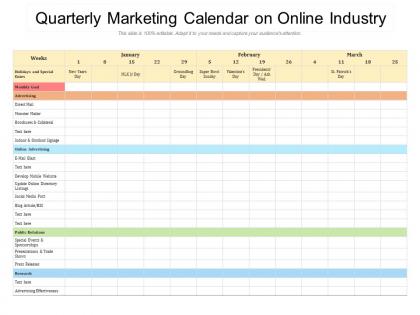
Quarterly marketing calendar on online industry




Try Before you Buy Download Free Sample Product
 Impress Your
 Audience
 100%
100% Editable
 Save Hours
 of Time


Our Quarterly Marketing Calendar On Online Industry are explicit and effective. They combine clarity and concise expression.
People who downloaded this PowerPoint presentation also viewed the following :
Quarterly marketing calendar on online industry with all 2 slides:
Give your audience a fulfilling experience. They will find our Quarterly Marketing Calendar On Online Industry elevating.
FAQs for Quarterly marketing calendar
Start with campaign deadlines and content publishing dates - that's your backbone. Map out seasonal stuff, product launches, and whatever industry dates your audience cares about. I learned the hard way to factor in lead times because forgetting those was honestly a disaster. Build in who's doing what and when they need assets ready. Performance checkpoints are clutch so you can see what's actually working. Oh, and don't overthink your team's bandwidth - be realistic about capacity. Keep it simple at first. You can always add more layers once you've got the basics down.
Honestly, your marketing calendar is perfect for this! Map out when your audience goes crazy - back-to-school for retail, tax season for finance, whatever. Work backwards from those dates to plan everything. I'm always doing Christmas campaigns in July which feels absolutely insane but hey, it works. Don't just focus on major holidays though. Find those weird little seasonal moments your industry cares about. Like, there's probably some random "National Whatever Day" that's perfect for your brand. The goal is riding that wave instead of scrambling when everyone else already has their ads running.
Honestly, CoSchedule is probably your best bet for marketing calendars - it's built exactly for this stuff. Asana works well too, especially if your team's already doing other projects there. I'm weirdly fond of Trello's visual boards, they just make sense to me. Google Sheets sounds boring but it actually works great when you're starting out or don't want to spend money yet. Monday.com and Notion are decent options too. The real trick is finding something everyone will actually use instead of abandoning after two weeks. I'd say try CoSchedule's free trial first, or honestly just grab a basic template and see how it feels.
Weekly updates are the bare minimum, but daily tweaks work way better if you've got the bandwidth. I learned this the hard way after setting mine monthly and watching everything flop lol. Real-time data changes everything – you'll catch trending stuff and those random opportunities that just pop up. Performance metrics don't lie either. Friday afternoons work great for me, like 30 minutes reviewing what bombed or killed it that week. Then I adjust the next week accordingly. Way better than throwing money at stale campaigns that stopped working three weeks ago.
Honestly, you need a marketing calendar - it's like having a roadmap for all your content instead of posting random stuff. Plan around holidays and product drops so you're not scrambling (I swear I've forgotten Valentine's Day exists until the day before). You can batch similar posts together, which saves tons of time. It keeps your messaging consistent across Instagram, email, whatever platforms you're using. Even a basic Google sheet works better than winging it. Trust me, you'll spot content gaps way before they become "oh shit" moments.
Oh absolutely! Social media holidays are like gold mines for content ideas. Start with the obvious stuff - Black Friday, Valentine's Day - but then dig into the weird ones too. National Pizza Day? Perfect if you're a food brand. I spend way too much time on random holiday websites honestly lol. Map these out 2-3 months ahead so you're not scrambling last minute. But don't plan everything to death - you'll want flexibility for when something goes viral. Check what your competitors are doing first, then find the gaps they're missing. Some of those niche industry days barely get touched and you could totally own them.
Track stuff that actually matters for your goals - traffic, conversion rates, cost per acquisition, ROI. Email open rates too if you're doing email campaigns. Social engagement and lead quality scores. Seriously though, so many people get obsessed with vanity metrics that don't do anything for the bottom line. Connect your calendar activities to actual revenue whenever you can. I'd set up a basic dashboard showing these KPIs next to your planned campaigns. Makes it super easy to see what's working and what's not hitting.
Holidays are honestly marketing gold - people are already thinking about spending money, so you're not fighting uphill. Black Friday, Valentine's Day, back-to-school stuff... that's when wallets open up naturally. I get way too excited about Halloween campaigns because there's so much room to get weird and creative with it. The trick is planning way ahead though - like 3-6 months out. Otherwise you end up scrambling last minute and it shows. Seasonal events give you ready-made content ideas and tap into emotions people are already feeling. Map out your 2024 holidays now if you haven't yet!
Just sync your calendar straight to your CMS publishing schedule - keeps everything lined up. I'd set up workflows that automatically move your scheduled stuff into the CMS draft queue. Way less manual copying and pasting that way. Both systems need to handle the same tags and categories though. Real-time updates are clutch so when publish dates change, everything adjusts automatically. Honestly, getting your team to actually stick with using it is harder than the tech setup part. Oh, and start simple with basic two-way sync before you get all fancy with automation. Trust me on that one.
Honestly, you should totally start using a marketing calendar - it's a game changer for staying consistent instead of just posting random crap when you remember. I used to forget about holidays that could've boosted sales all the time. Planning campaigns ahead means no more Sunday night panic about what to post Monday morning. Plus you can actually see what's working across your different platforms. Start super basic though - just throw your content ideas into Google Calendar like two weeks out. Trust me, even that simple setup will save your sanity and probably make you more money too.
So basically you've gotta sync up with how your industry actually works, you know? Retail means Black Friday madness and back-to-school chaos. B2B is all about those quarterly cycles - don't even bother during summer when everyone's on vacation. Healthcare has those annoying compliance rules you can't mess with. Hospitality? They book stuff months ahead. Every field has its own weird timing thing going on. Just figure out when your people are actually engaged and what deadlines matter in your space, then plan everything around those key moments.
Okay so collaboration tools are honestly a lifesaver for marketing calendars. Instead of some dusty spreadsheet, you get real-time editing where everyone can jump in and comment on campaigns. Task assignments happen right in the calendar view, which is clutch. Most let you tag people and set up approval workflows too - no more awkward "um, did anyone actually post that?" situations. Oh and the deadline notifications save your butt constantly. Just make sure whatever you pick plays nice with your current setup, otherwise half your team won't bother using it.
Honestly, the worst thing you can do is map out every single post months in advance - leaves zero room for jumping on trends or reacting to what's happening. Also don't create separate calendars for each platform because then nothing connects and it's chaos. Q4 always gets crazy overloaded too, which is dumb because that's when you're already swamped. Oh and build in time for approvals! Trust me on that one. Your boss will always have "one tiny change" at the last second. Just start with a basic spreadsheet first - those expensive planning tools can wait until you figure out what actually works for your team.
Honestly, just dig into your past 6 months of campaign data first - look for patterns in what days and times work best. Your website traffic and social media engagement will show you when people are actually paying attention (which might surprise you). I spent way too much time guessing before I started doing this regularly. Check out when your competitors are posting too so you're not all fighting for the same attention. Pull together your performance metrics and see what jumps out. Trust me, the data tells a way better story than just winging it with timing.
Honestly, just make that calendar impossible to ignore and get everyone's hands dirty in the planning. I do these bi-weekly meetings where we walk through all the upcoming campaigns and deadlines - sounds boring but it actually works. Give your team edit access to whatever tool you're using (Asana, Monday, even a basic Google Sheet if that's your vibe). Assign clear owners for each piece and set up those automated reminders. But here's what really matters - when you're first building it out, actually ask for their input. People buy into stuff way more when they helped create it instead of just being told what's happening.
No Reviews