

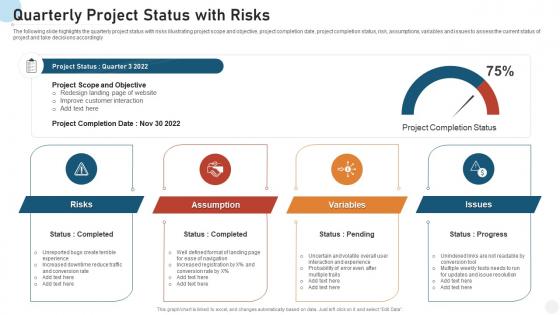
Quarterly project status with risks




Try Before you Buy Download Free Sample Product
 Impress Your
 Audience
 100%
100% Editable
 Save Hours
 of Time


Our Quarterly Project Status With Risks are topically designed to provide an attractive backdrop to any subject. Use them to look like a presentation pro.
People who downloaded this PowerPoint presentation also viewed the following :
Quarterly project status with risks with all 7 slides:
Use our Quarterly Project Status With Risks to effectively help you save your valuable time. They are readymade to fit into any presentation structure.
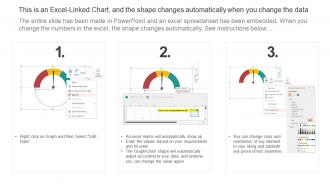





FAQs for Quarterly project
Definitely start with the basics - budget vs actual spend and timeline stuff (milestones you've hit or totally missed). Scope changes are huge to track too. I always add team velocity metrics because honestly, it saves you from awkward conversations when things are running late. Resource utilization matters a lot if you're sharing people across projects - learned that one the hard way. Quality metrics like defect rates help if they apply to your project type. Oh, and always include what's next so people aren't left wondering. Dashboards make everything look more professional too.
Honestly, regular updates are a lifesaver for keeping your team in sync. Share what you've finished, what's next, and any roadblocks you're hitting. That way people can actually help instead of guessing what's going on. Nobody wants those weird moments where someone's like "wait, didn't this ship last week?" and you're scrambling to explain. I'd go with something simple - maybe weekly check-ins covering progress, upcoming stuff, and where you need backup. Way better than everyone just... doing their own thing and hoping it works out. Trust me, it prevents so much confusion down the road.
Ugh, the worst thing you can do is be super vague or sugarcoat problems. Like, don't just say "things are going well" when they're clearly not. Stakeholders would rather hear bad news early than get blindsided later - trust me on this one. Also, procrastinating on flagging issues will bite you. Don't dump every tiny detail on people either, and focus on actual results instead of just listing what you did. Oh and obviously keep your updates current instead of letting them sit there for weeks. Basically: be honest, specific, and don't wait around.
Honestly, I'd go with weekly for most stuff. Really depends though - if it's high-stakes or moving super fast, maybe twice a week. Routine projects? You can probably get away with every other week. The timing consistency matters way more than how often you do it. Trust me, stakeholders absolutely hate radio silence and surprises more than another meeting on their calendar. For executives, less frequent works but make it more strategic - focus on the big risks and milestones they actually care about. I'd start weekly and see how people react, then adjust from there.
Gantt charts are great for timelines, Kanban boards show you workflow status. Dashboard reports work well for the big picture stuff. But honestly? I've watched teams go completely overboard with fancy tools when a basic status board does the trick. Start simple - try Asana or Monday.com if you want everything in one place. Even a good spreadsheet with some color coding can work wonders. The real trick is finding something your entire team will actually stick with. Oh, and don't get tempted to add more features right away. Test one tool for a few weeks first.
Honestly, you've gotta tailor each report to what actually matters to them. Execs want the big picture - budget, timeline, major risks. Skip the technical stuff or you'll lose them fast. Your team though? They need all the details about tasks and what's blocking them. I made this mistake once, went way too deep on server configs with our VP and watched his eyes glaze over completely. Stakeholders mostly care how it impacts their world specifically. Here's what works: create different templates and always start with their biggest worry. Short sentences for busy people, more detail for your team.
Think of RAG like traffic lights for your project. Red means you're dealing with serious problems that need fixing ASAP. Amber's for when you've got potential issues brewing - stuff to keep an eye on. Green means smooth sailing. Honestly, it's pretty brilliant because anyone can look at a dashboard and instantly know what's up without reading through tons of details. Just don't be that person who keeps things green when problems are obviously starting to pile up. Better to flag amber early than deal with a red crisis later - trust me on that one.
Just be straight up about what's going wrong - none of that corporate BS where you bury the bad news. I always do "Risk: [the problem], Impact: [how screwed we are], Action: [my fix]" because people hate digging for info. Don't just dump problems on them either, that's honestly the worst thing you can do. Always come with solutions ready. Quick example: if your developer just quit, tell them upfront it'll delay launch by two weeks, but you're already interviewing replacements and shifting tasks around. People respect honesty way more than sugar-coating, and they'll trust you more when the next crisis hits.
Honestly, stakeholder feedback runs the whole show when it comes to status reports. Your CEO wants the big picture - progress and major risks. Meanwhile, your dev team needs the nitty-gritty stuff like task updates and what's blocking them. People will definitely speak up if your reports suck (and they will). I learned this the hard way on my last project. Ask them upfront what they actually want to see. Then adjust how often you send updates and what you include. Different people care about totally different things, so you can't just send the same report to everyone.
So basically compare where you are now against your original plan - budget, timeline, scope, all that stuff. I usually just throw everything into Excel (works way better than fancy software IMO). Calculate the percentage difference between planned vs actual for each piece. Track the same metrics every week or two weeks, whatever works. Honestly, if anything's off by more than 10-15% from your baseline, that's when you need to dig deeper. The trick is staying consistent with how you measure things - otherwise you're just comparing apples to oranges.
Honestly, just pick a rhythm and stick with it. Weekly updates work best - same template every time so people know what's coming. Progress, roadblocks, what's next. That whole thing. Put your data somewhere everyone can see it instead of answering the same questions over and over (dashboards are your friend here). Don't sugarcoat problems - call out delays early before they become disasters. The tricky part? Figure out what your stakeholders actually want first. Some people need daily check-ins, others just want the weekly summary. Ask them upfront what level of detail they're looking for.
Always call out scope changes right at the top - don't bury them hoping nobody will notice. I learned this the hard way when a client freaked out three months later asking when we "agreed" to extra features. Put a clear "Scope Change" header and explain what's different and why. Then break down how it affects your timeline and budget. Get written approval before you actually do the work though. Honestly, stakeholders have terrible memories about this stuff. Your future self will be grateful when someone inevitably says "wait, I never approved that." Trust me on this one.
Honestly, milestone docs are pretty straightforward once you get the hang of it. Document what was supposed to happen vs what actually went down, plus any timeline/budget hits. Learned this after way too many awkward status calls lol. Specific dates and deliverables are key - if something got missed, explain why and how you're fixing it. Keep updates short though, like 2-3 sentences max since people just skim anyway. Visual stuff helps too, like "3 of 5 done." I always tweak my template after projects end.
Look, status reports are basically your project radar - they catch problems while you can still do something about them. I've watched way too many projects crash because nobody knew what was actually happening until it was too late. Pretty brutal to witness, honestly. You'll see exactly where your budget and timeline stand, plus any issues brewing before they explode. The trick is focusing on stuff you can actually act on rather than just making reports that look impressive but don't help you make real decisions. When something's off, you can shift resources or adjust plans instead of scrambling later.
Okay so for status reports that actually work, you need real numbers - not that "making progress" nonsense that tells nobody anything. Include specific blockers and who's handling them, plus next steps with actual deadlines. I always do a quick "what changed since last week" bit at the top. Bold the important stuff so people can scan it fast - honestly, most execs won't read past the first paragraph anyway. Oh, and call out what you need from other people clearly. The whole thing should answer where you are, what's broken, and what's next.
-
Colors used are bright and distinctive.