

Remarketing powerpoint presentation slides




Try Before you Buy Download Free Sample Product
 Impress Your
 Audience
 100%
100% Editable
 Save Hours
 of Time


Reconnect with the people who previously interacted with your organization and help them to recall your original brand message with the Remarketing PowerPoint Presentation Slides. Use the PPT design to highlight the benefits of retargeting like ROI maximization through direct response and build brand familiarity with the target audience. The rebranding PowerPoint presentation also includes types of retargeting like generic, behavioural, and sequential retargeting. This behavioural targeting PowerPoint presentation also implements the use of techniques like the site, email, mobile, dynamic, email, search, and CRM. Also, this customer funnel PPT design can be used to segment your audience on the basis of intent, products reviewed and conversion segmenting (loyalty campaigns) leading to loyalty. The renovating PPT graphic explains how you can target your customers by choosing the correct software. Display the impact of retargeting using the smart-art in the reviving PowerPoint slideshow, and create a tracking advertisement campaign performance dashboard for your employees.
People who downloaded this PowerPoint presentation also viewed the following :
Content of this Powerpoint Presentation
Slide 1: This slide introduces Remarketing. State Your Company Name and begin.
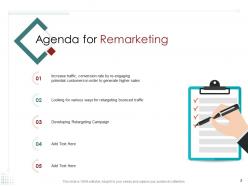
Slide 2: This slide displays Agenda. State your Agendas here.
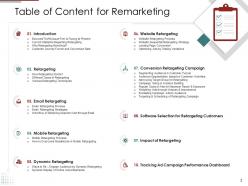
Slide 3: This slide displays Table of Content for the presentation describing- Email retargeting, Mobile retargeting, Dynamic retargeting etc.
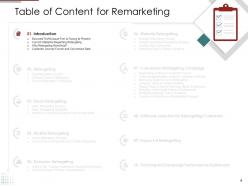
Slide 4: This is another slide showing Table of Content for the presentation highlighting Introduction.
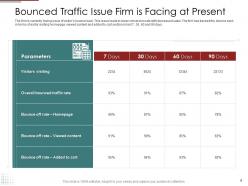
Slide 5: This slide shows Bounced Traffic Issue Firm is Facing at Present.
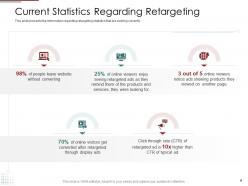
Slide 6: This slide presents the information on Current Statistics Regarding Retargeting that are existing currently.
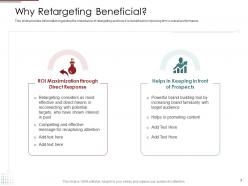
Slide 7: This slide provides information regarding the importance of retargeting and how it is beneficial in improving firm’s overall performance.
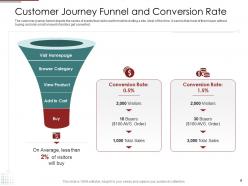
Slide 8: This slide shows Customer Journey Funnel and Conversion Rate depicting the series of events that visitor perform while visiting a site.
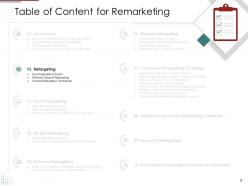
Slide 9: This slide displays Table of Content highlighting Retargeting.
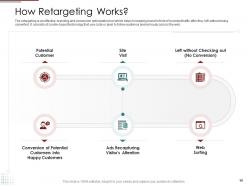
Slide 10: This slide explains How retargeting works.
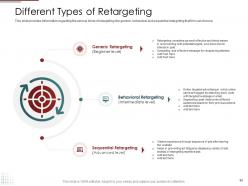
Slide 11: This slide provides information regarding the various kinds of retargeting like generic, behavioral and sequential retargeting that firm can choose.
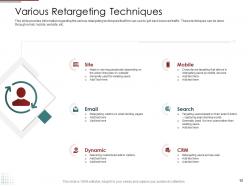
Slide 12: This slide provides information regarding the various retargeting techniques that firm can use to get back bounced traffic. These techniques can be done through email, mobile, website, etc.
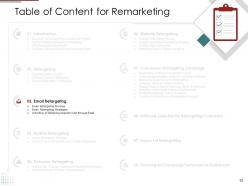
Slide 13: This slide displays Table of Content for the presentation highlighting Email Retargeting.
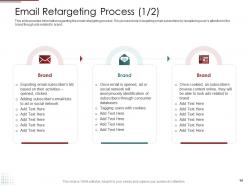
Slide 14: This slide provides information regarding the email retargeting process. This process help in targeting email subscribers by recapturing user’s attention to the brand though ads related to brand.
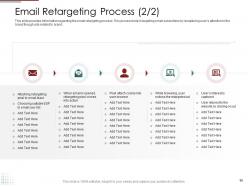
Slide 15: This is another slide providing information regarding the email retargeting process. This process help in targeting email subscribers by recapturing user’s attention to the brand though ads related to brand.
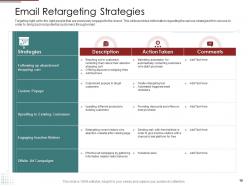
Slide 16: This slide shows Email Retargeting Strategies with related imagery.
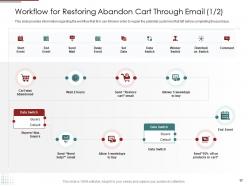
Slide 17: This slide provides information regarding the workflow that firm can follow in order to regain the potential customers that left before completing the purchase.
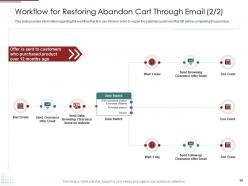
Slide 18: This is another slide providing information regarding the workflow that firm can follow in order to regain the potential customers that left before completing the purchase.
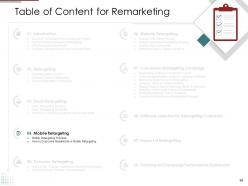
Slide 19: This slide displays Table of Content.highlighting Mobile Retargeting.
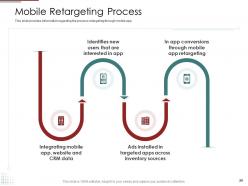
Slide 20: This slide provides information regarding the process retargeting through mobile app.
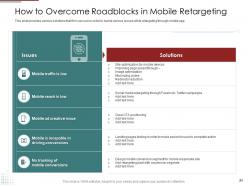
Slide 21: This slide provides various solutions that firm can use in order to tackle various issues while retargeting through mobile app.
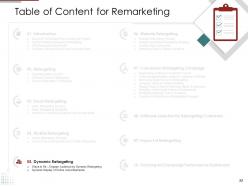
Slide 22: This slide shows Table of Content highlighting Dynamic Retargeting.
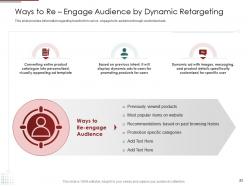
Slide 23: This slide provides information regarding how the firm can re- engage to its audience through customized ads.
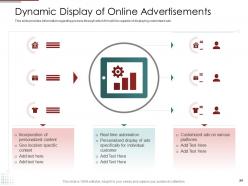
Slide 24: This slide provides information regarding process through which firm will be capable of displaying customized ads.
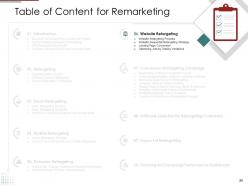
Slide 25: This slide shows Table of Content highlighting Website Retargeting.
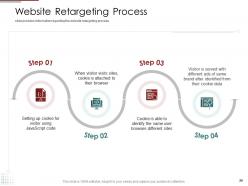
Slide 26: This slide provides information regarding the website retargeting process.
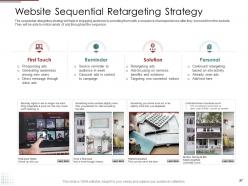
Slide 27: This slide presents Website Sequential Retargeting Strategy.
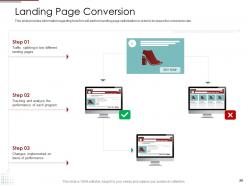
Slide 28: This slide provides information regarding how firm will perform landing page optimization in order to increase the conversion rate.
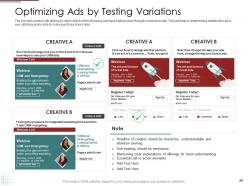
Slide 29: This slide provides information on Optimizing Ads By testing variations.
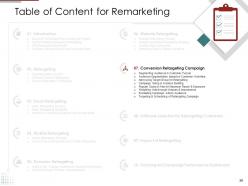
Slide 30: This slide displays Table of Content highlighting Conversion retargeting campaign.
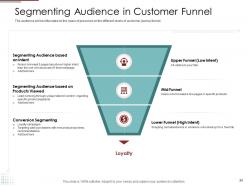
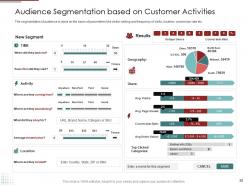
Slide 31: This slide presents Segmenting Audience in Customer funnel.
Slide 32: This slide shows Audience Segmentation Based On Customer Activities.
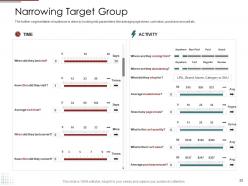
Slide 33: This slide displays Narrowing Target Group showing data in tabular form.
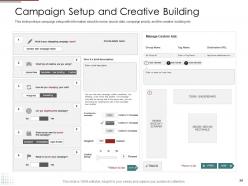
Slide 34: This slide portrays campaign setup with information about its name, launch date, campaign priority, and the creative building etc.
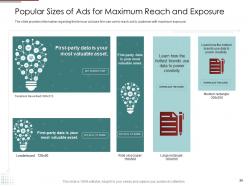
Slide 35: The slide provides information regarding the famous ad sizes firm can use to reach out to audience with maximum exposure.
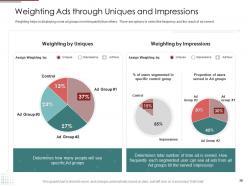
Slide 36: This slide displays Weighting Ads through Uniques and Impression.
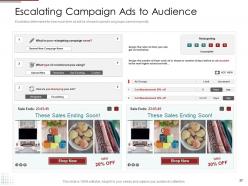
Slide 37: This slide presents Escalating Campaign Ads to Audience determining how much time ad will be shown to specific ad groups based on priority.
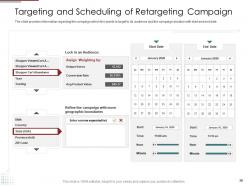
Slide 38: The slide provides information regarding the campaign which firm wants to target to its audience and the campaign duration with start and end date.
Slide 39: This slide displays Table of Content highlighting Software Selection for Retargeting Customers.
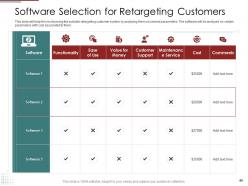
Slide 40: This slide will help firm in choosing the suitable retargeting customer system by analyzing them on several parameters. The software will be analyzed on certain parameters with cost associated to them.
Slide 41: This slide shows Table of Content highlighting Impact of Retargeting.
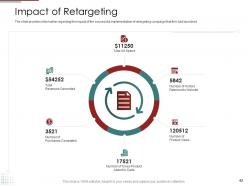
Slide 42: The slide provides information regarding the impact of the successful implementation of retargeting campaign that firm had launched.
Slide 43: This side shows Table of Content highlighting Tracking Ad Campaign Performance Dashboard.
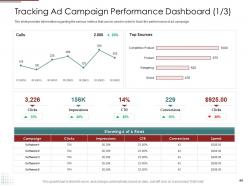
Slide 44: The slide provides information regarding the various metrics that can be used in order to track the performance of ad campaign.
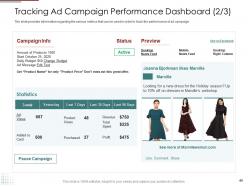
Slide 45: The slide provides information regarding the various metrics that can be used in order to track the performance of ad campaign.
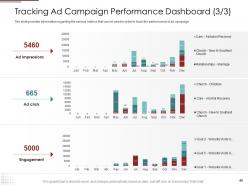
Slide 46: The is another slide providing information regarding the various metrics that can be used in order to track the performance of ad campaign.
Slide 47: This slide displays Icons for Remarketing.
Slide 48: This slide is titled as Additional Slides for moving forward
Slide 49: This is About Us slide to show company specifications etc.
Slide 50: This is Our Mission slide with related imagery and text.
Slide 51: This slide shows Post It Notes. Post your important notes here.
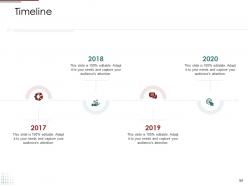
Slide 52: This is a Timeline slide. Show data related to time intervals here.
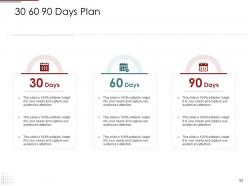
Slide 53: This slide shows 30 60 90 Days Plan with additional text boxes.
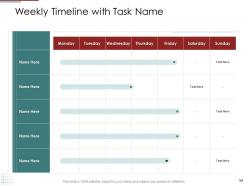
Slide 54: This slide displays Weekly Timeline with Task Name.
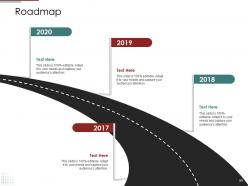
Slide 55: This slide presents Roadmap with related icons and text boxes.
Slide 56: This is a Thank you slide with address, contact number and email address.
Remarketing powerpoint presentation slides with all 56 slides:
Use our Remarketing Powerpoint Presentation Slides to effectively help you save your valuable time. They are readymade to fit into any presentation structure.
FAQs for Remarketing
So remarketing is basically stalking people who already visited your site - but in a good way lol. You show ads to folks who checked you out but didn't buy anything. Way smarter than throwing ads at random strangers who don't care. These people already know your brand, so they're way more likely to actually convert. Honestly, the results are usually way better than regular advertising. Just drop a tracking pixel on your site first - sounds techy but it's pretty straightforward. Then you can create campaigns targeting your best pages. It's like following up with leads but automated.
Look, segment people by what they actually did on your site - pricing page visitors are different from cart abandoners, right? Build ads that match where they dropped off. Dynamic product ads are solid for ecommerce, but honestly? Sometimes a basic "you left this behind" message crushes fancy creative. Short sentences hit different. Don't show ads to people who just converted though - super annoying to see ads for stuff you literally bought yesterday. Oh, and cap how often they see your ads or you'll just irritate everyone. Test when your ads kick in too.
Templates are a game-changer for remarketing, trust me. When someone sees your ad again, you want instant brand recognition - that "oh right, I was looking at their stuff" moment. Consistency is everything here. I learned this the hard way after spending way too much time making ads from scratch each time (never again). Your messaging stays cohesive across different platforms and audience segments too. Honestly, start with maybe 2-3 solid templates that match your brand's vibe. Then you can just switch out the product shots and copy based on what each person was actually browsing. It's so much cleaner.
Honestly, start simple with like 3-4 basic groups - website visitors, people who abandoned their carts, and past buyers. From there you can drill down into the really specific stuff. Think product category viewers, people who hung around your pricing page forever, or folks who grabbed your free guide. Geographic splits work pretty well too, especially if you're selling something regional. Oh and lookalike audiences based on your best customers are gold. I'd probably skip the fancy segmentation until you've got some data to work with - no point overcomplicating things right off the bat.
Track your CTR, conversion rates, and cost per acquisition first - those are your bread and butter. ROAS is huge too since remarketing should crush your cold traffic numbers. Watch your frequency caps though, nobody wants to be that creepy brand stalking people across every website they visit lol. View-through conversions are way more important here because people see your ad, then maybe convert later through direct search or whatever. Just benchmark everything against your regular display stuff first, then tweak from there.
Honestly, remarketing is pretty genius because it targets people who already know you exist. They see your ads repeatedly, so your brand just sticks in their heads better. Plus you can get super specific - like showing someone the exact shoes they abandoned in their cart. Makes them feel like you actually pay attention instead of just blasting random ads everywhere. The loyalty thing is real too since it feels personalized. I'd start basic though, just retarget your website visitors first. You can always get fancier with audience segments once you figure out how everything works.
Honestly, clean visuals are everything for remarketing. Your brand colors, fonts, and logo need to be super obvious - people should instantly know it's you. Skip the cheesy stock photos (seriously, those generic handshake pics are the worst). Real product shots perform way better anyway. Make your CTA button pop with contrasting colors, but don't go crazy with text - keeps things simple. I'd start with maybe 3-4 different designs and see what actually works. The data will tell you which ones are hitting. Testing different variations is kind of a pain but it's worth it in the long run.
Okay so first thing - get your conversion tracking set up properly or you'll be flying blind. Once that's done, you can actually see where people are bailing out of your funnel and create specific campaigns for each stage. Google Analytics and Facebook Pixel will show you lifetime value data, which is honestly a game changer for figuring out which customer segments are worth your ad spend. Then you can test different creative, timing, and frequency caps to see what actually works. The audience segmentation based on behavior patterns is where it gets really interesting - way more precise than the old spray-and-pray approach.
Honestly, just don't be that brand that stalks people around the web with the same ad forever – we've all been there and it's super annoying. Be upfront about collecting data and make it easy for people to opt out. Set frequency caps so your ads aren't everywhere they look. Also, be extra careful with sensitive stuff like health or finance ads. GDPR compliance isn't optional either. I'd start by checking if any of your current campaigns feel too pushy. The whole point is building trust with people, not just chasing conversions at any cost.
Split your audience and run different creative versions at the same time - but only test one thing at a time (headline, image, CTA color, whatever). Otherwise you won't know what actually worked. Start with your value prop messaging since that usually moves the needle most on clicks. Run each test for at least a week because people act weird on different days. Oh, and once you find a winner? That becomes your new baseline to beat with the next test. Honestly, it's kinda addictive seeing which random combo ends up winning.
Honestly, the two things that'll kill your campaigns are bad frequency caps and audience overlap. Nobody wants to be stalked by the same ad everywhere - cap it at 3-5 impressions weekly or people will hate you. Your brand awareness and conversion campaigns shouldn't be fighting over the same people either, so watch for overlap there. Oh, and don't chase people who visited like 6 months ago thinking they're still interested. Set up exclusions for recent buyers and actually segment audiences by how engaged they are. Trust me on the frequency thing - I've seen brands become internet villains over this.
So basically you'll want to start by dropping pixels on your website - Facebook's is probably your best bet first, then add LinkedIn and Twitter later. Track who visits, then build custom audiences to hit them with ads afterward. Dynamic product ads work great if you're selling stuff online. Also sync up your email lists to cast a wider net. Oh and lookalike audiences based on people who actually bought from you? Those convert really well in my experience. The trick is keeping your messaging consistent everywhere - like if someone ditched their cart, they should see the same vibe whether they're on Instagram or LinkedIn scrolling around. It's pretty simple once you get the first pixel working.
For remarketing, go with stuff that feels personal to where they are in your buying journey. Product demos and customer testimonials work really well - people already know your brand so they're more open to deeper content. I've honestly seen some pretty bland case studies still crush it just because the targeting was dialed in. Behind-the-scenes content builds trust too. If you're e-commerce, those dynamic product ads showing what they actually looked at are gold. User-generated content is less pushy than your typical branded stuff. Oh, and definitely start with whatever performed best in your original campaigns and just tweak it for remarketing.
Dude, cart abandonment campaigns are money. Set up retargeting for people who bailed before checkout - Facebook and Google's pixel tracking makes it super easy. Show them exactly what they left behind, maybe throw in free shipping or 10% off. I usually start soft like "Forgot something?" then ramp up the urgency over a few days. Honestly, these convert like crazy since they were already interested enough to fill their cart. Test different incentives though - what works for one audience totally flops for another. The conversion rates I've seen on these... way better than cold traffic campaigns.
Okay so frequency capping is basically setting limits on how many times the same person sees your remarketing ads - like max 3 times daily or 10 per week. Without it, you're just annoying people by stalking them with constant ads (and trust me, that backfires hard). You'll also burn through budget showing ads to someone who's already ignored you five times. I usually stick with 2-4 impressions per person daily - seems to work well without being pushy. Honestly, just pick something reasonable based on what you're trying to achieve, but definitely use caps or you'll regret it.
-
It saves your time and decrease your efforts in half.
-
 Page:
Page:
- Page 1
- You're currently reading page 2