

Reverse Proxy Server Powerpoint Presentation Slides





Try Before you Buy Download Free Sample Product
 Impress Your
Audience
 100%
Editable
 Save Hours
of Time


A reverse proxy is a kind of proxy server that resides under a closed networks firewall and routes customer queries to the correct backend server. Check out our professionally designed Reverse Proxy Server PowerPoint Presentation to get a brief idea about problems experienced by the company and how to overcome these problems by implementing reverse proxy. In this presentation, we have covered the companys current situation, the need for reverse proxy, and various types of the reverse proxy. In addition to it, this Reverse Proxy Load Balancer PPT incorporates a sequence of reverse proxy requests, its working and reverse proxy server-side technologies. Moreover, this Reverse Proxy PPT caters to a training program for network administrators, a budget, and a 30-60-90 days plan for implementing reverse proxy in the company. Lastly, this Reverse Proxy Load Balancer deck comprises a roadmap and talks about the impacts of reverse proxy implementation on business. It also includes a dashboard that can monitor reverse proxy server performance. Download our 100 percent editable and customizable template, which is also compatible with Google Slides.
People who downloaded this PowerPoint presentation also viewed the following :
Content of this Powerpoint Presentation
Slide 1: This slide introduces Reverse Proxy Server. State your company name and begin.
Slide 2: This slide states Agenda of the presentation.
Slide 3: This slide shows Table of Content for the presentation.
Slide 4: This is another slide continuing Table of Content for the presentation.
Slide 5: This slide highlights title for topics that are to be covered next in the template.
Slide 6: This slide depicts the problems faced by the company such as cyber loafing, malicious attack, etc.
Slide 7: This slide shows Highest Number of Malware Attacks on Departments.
Slide 8: This slide presents Cyber Attacks on the Main Server of Company.
Slide 9: This slide highlights title for topics that are to be covered next in the template.
Slide 10: This slide explains why reverse proxy is essential and how it imposes web application security.
Slide 11: This slide depicts why to use reverse proxy servers, including control over cyber loafing, bandwidth saving, etc.
Slide 12: This slide describes the benefits of using a reverse proxy server.
Slide 13: This slide displays Statistics of Reverse Proxies Used by Websites.
Slide 14: This slide highlights title for topics that are to be covered next in the template.
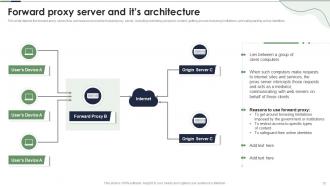
Slide 15: This slide represents Forward Proxy Server and it’s Architecture.
Slide 16: This slide showcases Reverse Proxy Server and It’s Architecture.
Slide 17: This slide shows Transparent Proxy Server and It’s Architecture.
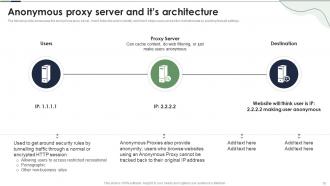
Slide 18: This slide presents Anonymous Proxy Server and It’s Architecture.
Slide 19: This slide displays Distorting Proxy Server and It’s Architecture.
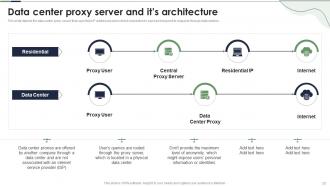
Slide 20: This slide represents Data Center Proxy Server and It’s Architecture.
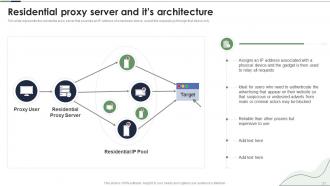
Slide 21: This slide represents the residential proxy server that provides an IP address of a hardware device.
Slide 22: This slide showcases Shared Proxy Server and It’s Architecture.
Slide 23: This slide shows Secure Sockets Layer (SSL) Proxy Server and it’s Architecture.
Slide 24: This slide highlights title for topics that are to be covered next in the template.
Slide 25: This slide presents Typical Sequence for a Reverse Proxy Request.
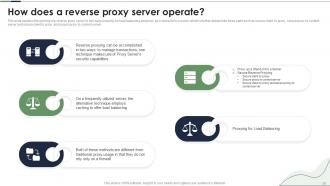
Slide 26: This slide explains the working of a reverse proxy server in two ways proxying for load balancing.
Slide 27: This slide depicts the proxy used for load balancing, and it includes DNS server, reverse proxy, cache, etc.
Slide 28: This slide represents proxy as a stand-in for a server type of implementation of reverse proxy.
Slide 29: This slide showcases Process of Secure Reverse Proxying.
Slide 30: This slide shows Secure Client Connection to Proxy Server.
Slide 31: This slide presents Secure Proxy Connection to Content Server.
Slide 32: This slide displays Secure Client Connection to Proxy and Secure Proxy Connection to Content Server.
Slide 33: This slide highlights title for topics that are to be covered next in the template.
Slide 34: This slide represents the reverse proxy server-side technology, which is load balancing.
Slide 35: This slide depicts another reverse proxy server-side technology called caching.
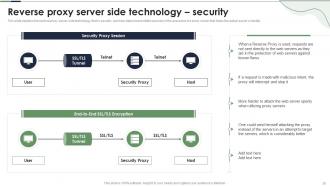
Slide 36: This slide explains the reverse proxy server-side technology, that is security.
Slide 37: This slide highlights title for topics that are to be covered next in the template.
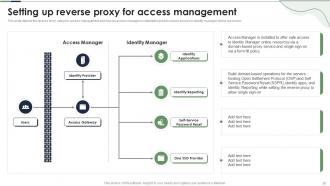
Slide 38: This slide shows Setting Up Reverse Proxy for Access Management.
Slide 39: This slide presents Reverse Proxy Architectures in Company.
Slide 40: This slide highlights title for topics that are to be covered next in the template.
Slide 41: This slide displays Training Program Intended for NGINX Administrator.
Slide 42: This slide represents Training Program Intended for System Administrator and Network Administrator.
Slide 43: This slide showcases Budget to Implement Reverse Proxy in Company.
Slide 44: This slide highlights title for topics that are to be covered next in the template.
Slide 45: This slide shows 30-60-90 Days Plan to Implement Reverse Proxy in Company.
Slide 46: This slide highlights title for topics that are to be covered next in the template.
Slide 47: This slide presents Roadmap to Implement Reverse Proxy Server in Company.
Slide 48: This slide highlights title for topics that are to be covered next in the template.
Slide 49: This slide displays Impact of Reverse Proxy Server Implementation on Business.
Slide 50: This is another slide continuing Impact of Reverse Proxy Server Implementation on Business.
Slide 51: This slide highlights title for topics that are to be covered next in the template.
Slide 52: This slide represents Dashboard for Monitoring Reverse Proxy Server Performance.
Slide 53: This slide showcases Dashboard for Reverse Proxy Performance Tracking.
Slide 54: This slide contains all the icons used in this presentation.
Slide 55: This slide is titled as Additional Slides for moving forward.
Slide 56: This slide depicts the meaning of proxy servers, where it is used, and how it manages traffic.
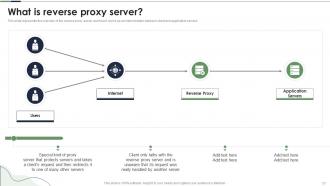
Slide 57: This slide represents the overview of the reverse proxy server and how it works.
Slide 58: This slide presents Comparison Between Forward Proxy and Reverse Proxy Server.
Slide 59: This slide displays Reverse Proxy Server and Load Balancer.
Slide 60: This slide provides Clustered Bar chart with two products comparison.
Slide 61: This is an Idea Generation slide to state a new idea or highlight information, specifications etc.
Slide 62: This slide displays Mind Map with related imagery.
Slide 63: This slide shows Post It Notes. Post your important notes here.
Slide 64: This is Our Goal slide. State your firm's goals here.
Slide 65: This slide provides 30 60 90 Days Plan with text boxes.
Slide 66: This slide depicts Venn diagram with text boxes.
Slide 67: This is a Timeline slide. Show data related to time intervals here.
Slide 68: This is a Thank You slide with address, contact numbers and email address.
Reverse Proxy Server Powerpoint Presentation Slides with all 73 slides:
Use our Reverse Proxy Server Powerpoint Presentation Slides to effectively help you save your valuable time. They are readymade to fit into any presentation structure.



















FAQs for Reverse Proxy Server
So a reverse proxy basically sits in front of your backend servers and handles all the incoming requests. It's like the opposite of a regular proxy - instead of hiding clients from servers, it hides your servers from clients. Most people use them for load balancing, SSL stuff, caching, security - you know, all that traffic management before requests actually hit your app servers. Nginx and HAProxy are pretty solid options, though Cloudflare's nice if you want something managed. Honestly, once you're running more than one server, you'll probably need one anyway. Makes life way easier.
So basically you want a reverse proxy for load balancing, SSL stuff, and caching. It sits between users and your backend servers - distributes traffic, handles certificates in one spot, caches popular content. Security's huge too since it hides your actual infrastructure. Compression and rate limiting are nice bonuses. I swear once you set one up you'll wonder how you lived without it (seriously made my life so much easier). Nginx is solid to start with, or Cloudflare if you want something more managed. Both work great honestly.
So basically a reverse proxy sits between users and your backend servers - kinda like a bouncer for web traffic. It hides your actual infrastructure which is pretty neat. You can set it up to block sketchy IPs and rate limit requests to stop DDoS attempts. SSL termination happens there too, so your backend doesn't deal with that processing overhead. Honestly, just setting up basic rate limiting will block most automated garbage right off the bat. Plus attackers can't easily figure out your internal network setup since everything's masked. Super useful for security without much hassle.
So reverse proxies are pretty clutch for high-traffic stuff. They spread requests across your backend servers so nothing gets overloaded. Caching is where you'll see huge wins though - static files like images and CSS get served without hitting your main servers every time. SSL termination helps too, takes that load off your backends. Oh and response compression, almost forgot that one. Honestly I'd focus on the caching and load balancing first since those give you the most bang for your buck right away.
So basically a reverse proxy is like having a smart traffic cop for your servers. It sits in front of all your backend servers and decides where to send each request. Pretty handy actually - it can use different methods like round-robin or sending requests to whichever server has the least connections going. Health checks are built in too, so it won't route traffic to servers that are dead. The whole point is spreading the load so no single server gets hammered. Way better performance and you can handle tons more users without everything crashing.
So SSL termination is basically when your reverse proxy does all the heavy lifting with encryption/decryption instead of your backend servers. Clients still get HTTPS, but internally everything's just plain HTTP. Your app servers will thank you - way less CPU overhead. Performance boost is honestly incredible. You also get way easier cert management since you're only updating one place instead of every single backend server (been there, not fun). Makes load balancing cleaner too. Just don't forget your internal network needs to be locked down since traffic between proxy and backends isn't encrypted anymore.
So you've got a few solid choices here. Nginx and Apache are probably your safest bets - they're everywhere and well-documented. If you need fancy load balancing stuff, HAProxy rocks. Traefik is amazing for Docker setups, honestly wish I'd discovered it sooner. There's also cloud options like Envoy and Cloudflare floating around. I'd personally just start with Nginx though - it's lightweight and the config files don't make you want to pull your hair out. Really depends what you're building and how complex your SSL needs are.
So basically a reverse proxy sits between users and your backend servers, caching stuff that gets requested a lot. Someone hits your site for cached content? The proxy just serves it up directly instead of bothering your backend. Response times drop like crazy since you're skipping that whole round trip. You can cache static files, API calls, whole pages - whatever makes sense for your setup. Honestly works best with content that doesn't change much, so don't forget to set those cache headers right. Otherwise you're just leaving performance on the table, which sucks when traffic picks up.
Yeah, reverse proxies can really help your SEO actually. They speed up page loads through caching and load balancing - Google eats that stuff up for rankings. Your site stays up more reliably too since traffic gets spread around multiple servers. Watch out for the SSL setup though, that's where most people mess up. If your certificates or redirects are wonky, search engines get confused fast. Users definitely notice when images and CSS load quicker. I learned this the hard way last year. Just keep an eye on your server logs so you don't accidentally block crawlers or create redirect loops.
Honestly, the biggest pain is just added complexity - now you've got another thing to babysit and monitor. If your reverse proxy craps out, everything behind it goes dark too. Latency gets worse since requests bounce through an extra hop. SSL stuff becomes way more annoying when you're handling certs at the proxy level. Debugging is such a headache with the extra layer. I learned that one the hard way last year. Just make sure you've got solid monitoring set up first, and maybe some kind of backup plan if things go sideways.
So reverse proxies deal with sessions in two main ways. Sticky sessions route users to the same backend server every time - works but kinda fragile if that server crashes. Way better option is shared session storage like Redis or a database. All your servers can grab session data from there, so users don't get logged out when requests hit different servers. Honestly sticky sessions are tempting cause they're simple, but you'll thank yourself later for going with shared storage. It's just more bulletproof when things get busy.
So reverse proxies are perfect for auth stuff - they become your single checkpoint before anything touches your backend. Way better than trying to manage authentication across like 10 different services, trust me on that one. The proxy checks who someone is, decides what they can access, then only lets the good requests through. Honestly saves so much time compared to scattered auth logic everywhere. You set up your rules once at the proxy level and you're done. Makes the whole system cleaner and way less of a pain to maintain.
So you'll want to set up different upstream blocks for each protocol - that's where the magic happens. Start with HTTP since it's the easiest, then add your SSL certs for HTTPS (terminate that at the proxy level btw). WebSocket is where it gets slightly annoying - you need those specific headers like `Upgrade` and `Connection` or it just won't work. Most people mess this part up initially. Each protocol maps to its own backend services, and your proxy forwards the right headers along. Honestly just tackle them one at a time instead of trying to configure everything at once.
So you wanna track response times, error rates, and how your upstream servers are doing - basically stuff that shows if everything's flowing right. Get centralized logging set up for access logs, errors, security events. Makes troubleshooting way easier. Oh and SSL cert monitoring! Trust me on that one, nobody wants those expiring randomly. Prometheus + Grafana work great for visualizing metrics. ELK stack's solid for logs too. Set alerts for high error rates and backend failures - you don't want to find out about problems from angry users. Start simple with dashboards, then build out from there.
Honestly, reverse proxies are clutch for A/B testing. You can set rules to split traffic however you want - 50/50, by location, user type, whatever. They sit in front of your servers making routing decisions, so your backend doesn't need any changes which is nice. I've used them for gradual rollouts too, super handy during deployments. You can even redirect people during maintenance windows. Geographic routing gets interesting if you're testing different markets. Start with basic percentage splits first though - once you get the hang of it, you can get way more creative with the rules.
-
I looked at their huge selection of themes and designs. They appeared to be ideal for my profession. I'm sure I'll grab a few of them.
-
Extensive range of templates! Highly impressed with the quality of the designs.