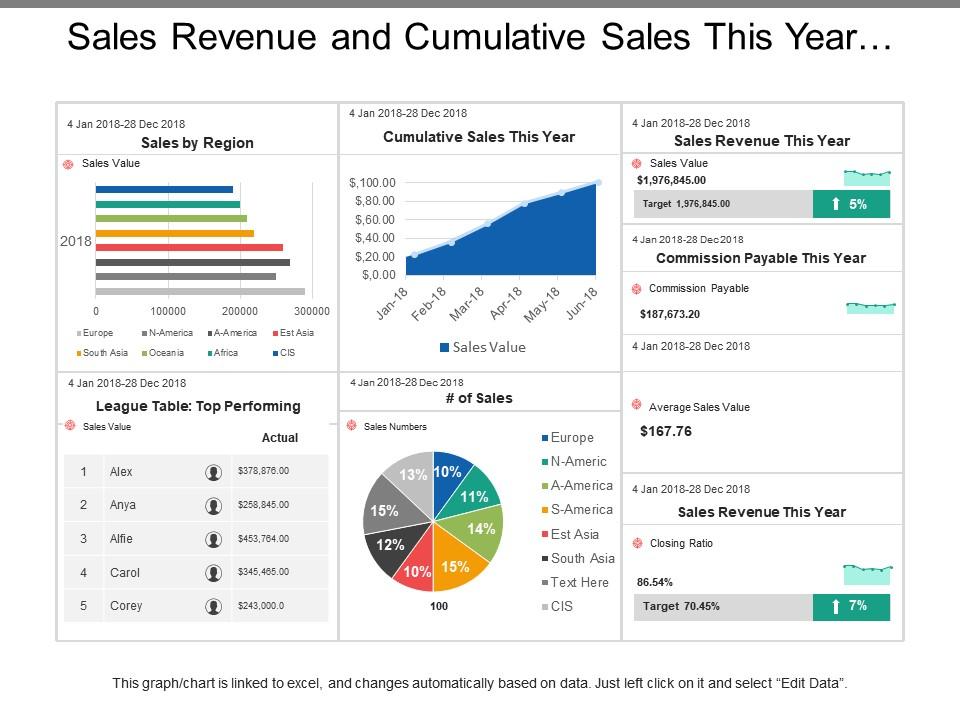
Sales revenue and cumulative sales this year dashboards

Sales revenue and cumulative sales this year dashboards
Slide 1 of 6
Favourites Favourites

Try Before you Buy Download Free Sample Product

Audience Impress Your
Audience
Editable 100%
Editable
Time Save Hours
of Time
The Biggest Sale is ending soon in
0
0
:
0
0
:
0
0
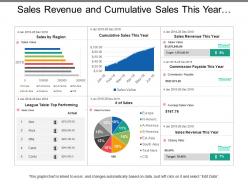
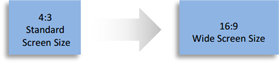
Presenting this set of slides with name - Sales Revenue And Cumulative Sales This Year Dashboards. Completely amendable presentation design as some elements are editable. Ease to personalize the slide with your company name, logo and even tag line. PowerPoint slide can be downloaded easily and transform into JPG and PDF format. More designs can be accessed with different nodes and stages. PPT diagram can be projected in standard and widescreen view. Great use of colors and innovatively designed. PPT template is compatible with Google slides.

FAQs for Sales revenue and cumulative sales

Revenue metrics are your bread and butter - current numbers vs targets, obviously. Pipeline health matters too, plus conversion rates at each stage. Individual rep performance tells you who's crushing it and who needs help. Lead sources and deal velocity? Super telling. You'll want real-time dashboards because nobody has time for outdated spreadsheets. Activity metrics like calls and emails are solid leading indicators - they show you what's coming down the pipe. Don't go overboard though. Start simple with these basics, then build based on what your team actually asks about.

Dude, you need a sales dashboard. Having everything in one spot means no more jumping between like 5 different tools just to figure out what's going on. You'll catch problems early - see which deals are dying or which reps need help. Start simple though, maybe track 3-4 key things first. Once you get hooked (and trust me, you will), you can spot patterns way faster. Makes forecasting actually accurate instead of just guessing. Oh and bottlenecks become super obvious, so you can fix stuff before it tanks your whole quarter.

Start with the big three: revenue vs target, conversion rates, and pipeline velocity. Those will tell you everything. I'm obsessed with sales cycle length too - probably check it way too often but whatever, it shows so many problems lurking underneath. Lead source performance matters, plus individual rep numbers, but don't jam too much onto one screen. Your dashboard should answer "are we crushing it or not?" in like 10 seconds max. Build from there based on whatever your team keeps asking about in meetings.

Honestly, good data viz will save your sanity with sales dashboards. No more squinting at endless spreadsheet rows trying to figure out what's going wrong. Line charts show trends instantly. Bar graphs make team comparisons obvious. Heat maps? They'll highlight your problem areas in seconds instead of you hunting through data for an hour. Your brain just handles visuals so much faster than numbers - it's wild how quick you can spot patterns. The trick is picking the right chart for each thing you're tracking. Oh, and stick to the same colors throughout or your team will get confused every single time.

Honestly, you've gotta show each team what actually matters to them. Sales reps care about their pipeline and deals closing - they don't need the same executive overview the VP is looking at, you know? Managers want performance data and forecasts instead. The whole point is making dashboards people will actually open and check, not ignore because there's too much irrelevant stuff. Here's what works: ask each team what three numbers they look at first thing Monday morning. Those go right at the top. Sounds obvious but most people skip this step and wonder why nobody uses their fancy dashboards.

Daily updates are your minimum, but honestly? Go hourly if you can handle it. Your team needs current data to make smart calls - I've watched sales reps waste time chasing dead leads because they were looking at week-old numbers. That's painful to see. Real-time info keeps everyone focused on what's actually happening right now instead of yesterday's performance. Just don't go crazy with constant refreshing or you'll drive people nuts. Start daily and ramp up based on how quickly your deals typically move. Oh, and make sure whatever frequency you pick actually matches your sales cycle speed.

Dude, real-time data is a game changer for sales dashboards. Instead of staring at yesterday's stale numbers, you're seeing what's actually happening right now with your deals and team. Hot leads? Jump on them instantly. Pipeline looking weird? You'll catch it before it tanks. I learned this the hard way when our old system had like a 6-hour delay - totally useless. The trick is making sure your CRM actually syncs properly with everything else, otherwise you're just getting fake "real-time" updates that don't mean anything.

Honestly, CRM integration is a total game-changer for your sales dashboard. Instead of bouncing between like five different systems (which is honestly exhausting), you'll have everything in one spot. Real-time customer data, pipeline visibility, activity tracking - it all flows in automatically. Your dashboard actually shows what's happening with prospects right now instead of yesterday's stale numbers. You can catch trends and bottlenecks way faster too. Oh, and definitely figure out which CRM fields actually matter to your sales process before you start connecting everything.

Honestly, the biggest mistake is cramming every metric you can think of onto one screen - total information overload. Skip the vanity metrics that just look pretty but don't help anyone make real decisions. Also, nobody wants to scroll sideways or zoom in to read tiny numbers (learned that one the hard way). Put your most important KPIs where people will actually see them first. Simple bar charts usually work way better than those fancy visualizations everyone thinks they need. Make sure your data refreshes often enough to matter, and focus on what your sales team needs to close deals. Build everything else around that.

Honestly, dashboards just put everyone on the same page with the numbers. No more digging through random spreadsheets or having those weird "so... how's your quota looking?" conversations in meetings. Everyone can see who's crushing it and who might need backup - which actually helps the team jump in earlier when someone's struggling. We started just pulling it up during our weekly check-ins and it's been solid. Way better than the old days of playing detective with everyone's numbers. Your reps will probably appreciate not having to constantly report where they stand too.

Honestly, everyone's obsessed with real-time data right now - sales teams want to see what's happening instantly. Predictive analytics are finally getting decent too, built right into dashboards with AI recommendations that don't suck. You can click around and drill into specific deals super easily now. The customization thing is pretty sweet though. Your dashboard won't look anything like your manager's since you're tracking different stuff. Oh, and definitely get something that works on mobile - I'm always checking numbers while grabbing coffee or whatever. Interactive visuals are everywhere now, which makes sense since nobody wants to stare at boring spreadsheets anymore.

Dude, mobile dashboards are clutch. Your sales team can pull up pipeline data wherever - coffee shops, airports, client lobbies. Real-time numbers right on their phones without waiting to get back to the office. The responsive design actually works too, so no more zooming in on charts that look like ant colonies. I learned this the hard way when our reps kept "forgetting" to check their metrics. Once we went mobile? Suddenly everyone's checking their numbers constantly. They'll actually use it instead of making excuses about being away from their computers all day.

Tableau and Power BI are your best bets - super flexible and handle complex stuff really well. Looker Studio is free and pretty user-friendly if you want something simpler. Already using HubSpot or Salesforce? They've got decent built-in dashboard tools. I mean, you *could* build something in Excel (I've seen it done), but honestly why put yourself through that pain? Oh, and figure out what data sources you're working with first - then just pick whatever plays nicest with your existing setup. Makes the whole process way less of a headache.

Honestly, the best approach is setting up automated alerts for when your metrics go off the rails - saves you from constantly checking stuff manually. Focus on leading indicators like lead quality scores and deal progression rates instead of just revenue numbers after the fact. Your dashboard should visualize historical data next to current performance so you can spot patterns easily. Conversion rates, pipeline velocity, seasonal trends - all that good stuff in one view. You can overlay different time periods to see what's normal vs what's actually changing. Pick your top 3-4 predictive metrics first and build everything around those. Way less overwhelming that way.

Dude, seriously - less is more with these things. Put your big money metrics like revenue right at the top where people look first. I've literally seen dashboards that are just metric vomit everywhere, it's painful. Stick to maybe 5-7 key numbers max or you'll lose people. Show trends over time instead of just current numbers - way more useful. Always throw in some context too, like targets or last quarter's data so they can actually make sense of what they're seeing. Bottom line: if someone stares at it confused for more than 30 seconds, you need to cut more stuff out.

Ratings and Reviews

0% of 100
Review Form
Write a review
Most Relevant Reviews

No Reviews